Wearable Technology Drives Warehouse Productivity
Smart and worker-friendly approach to improving team output and accuracy

Empower High Productivity With CSSI’s Wearable Technology Solutions

The modern warehouse must brave through a myriad of challenging demands. From shorter delivery timeframes to real-time order tracking, meet every demand with a modernization solution that adapts to the individual worker for maximized productivity and ergonomics. Wearable technology solutions provide an instant productivity boost for your team… faster scanning, improved ergonomics, less fatigue.

YouTube player

What Is Wearable Technology?

There are a number of wearable tech devices. These would include:

  • Hand- or finger-mounted barcode scanners and mobile computers (as an example, the Zebra WS50 Android Wearable Device)
  • Smart glasses (many people are familiar with wearables such as the Google Glass head mounted display)
  • VR Headsets – virtual reality and augmented reality may play a growing role in professional environments
  • Wearable electronics (examples might include the Fitbit smart watch, the Apple watch, or activity tracker devices)
  • Wearable sensors and smart clothing used for personal safety or individual metrics, for example, in hazardous environments where intrinsically safe technology is required.
  • Portable label printers

CSSI is focused primarily on wearable technologies which support activities in warehouse, distribution, and manufacturing environments.

Benefits of Wearable Computers

There are many advantages to well-implemented modern wearable technology solutions:

  • Faster order fulfillment / higher worker productivity
  • Improved order accuracy due to the scanner’s visual reinforcement
  • Workers benefit from the improved ergonomics of wearable devices
  • Team communication improves with push-to-talk capabilities
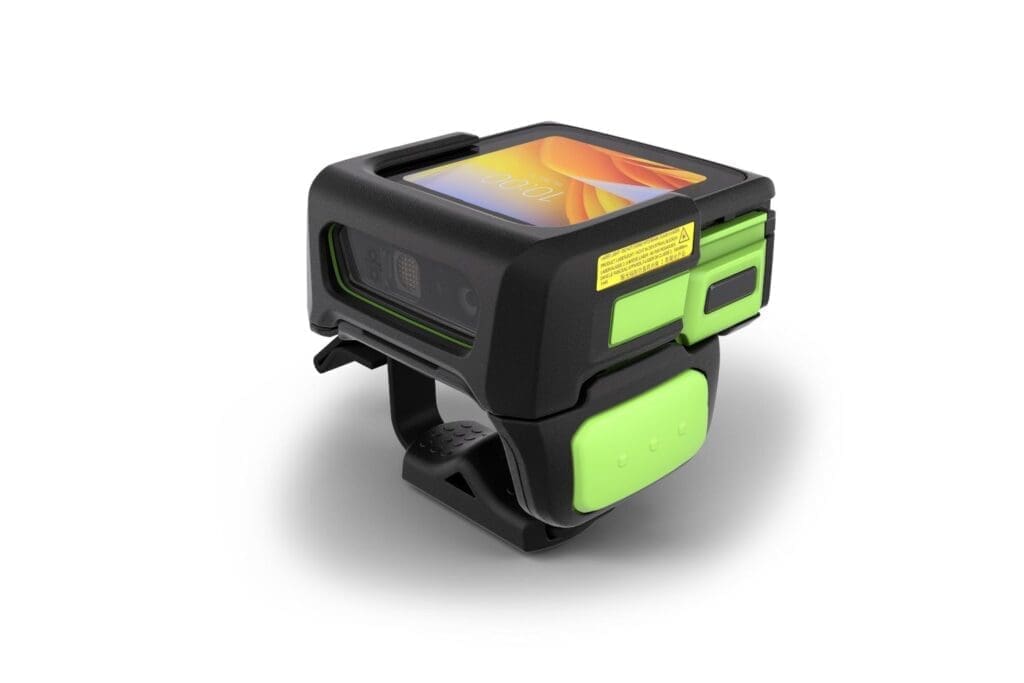
zebra ws50 wearable mobile computer

Zebra’s new WS50 wearable computer integrates a scanner and color screen.

CSSI can guide you in the selection, configuration, deployment, and support of wearable computers and ring scanners.

Learn More About Wearable Technology Options

Contact CSSI to learn more about the possibilities which wearable tech can unlock for your organization.

Q: What are wearable scanners, and how do they differ from traditional handheld devices?

A. Wearable scanners are data capture devices worn on the worker’s body rather than held in the hand. Zebra offers two main types: Android-based wearable mobile computers, such as the WT6400, which mount on the wrist or forearm, and compact ring scanners, such as the RS5100, which sit on the finger. With a wearable, workers don’t have to keep picking up and putting down a device between tasks, so both hands stay free to handle product, cartons, and parts.

Q: How can wearable scanners improve productivity in my warehouse or distribution center?

A. Wearables are built for frontline workers whose jobs involve repetitive, high-volume scanning. They work well for picking, order picking and packing, putaway and replenishment, receiving, and assembly part selection. Zebra designed them with built-in intelligence features and high-performance scan engines so that each scan is fast and reliable. Workers keep their hands free and their attention on the task, which cuts down on wasted motion during every shift.

Q: Can wearable scanners support voice-directed workflows?

A. Yes. Zebra’s wearable lineup supports voice-directed applications, voice communication, and task management. This lets you combine barcode scanning with voice picking, so workers can get instructions and confirm tasks without looking down at a screen. For operations that already use voice systems, or are considering them, this gives you more flexibility in how you design workflows.

Q: Will wearable scanners fit into our existing IT infrastructure?

A. Zebra’s wearable mobile computers run Android, which makes it easier to deploy enterprise applications and keep wearables in line with the rest of your mobile device fleet. Connectivity options include WLAN and WPAN (such as Bluetooth pairing between a ring scanner and a wrist-mounted computer), and some models can read RFID. IT teams can also use Zebra’s Managed Software Release Management services, which deliver OS updates and LifeGuard security patches to help keep devices secure and current over their lifespan.

Q: How do we protect our investment in wearable devices?

A. Zebra OneCare service plans cover normal wear and tear as well as accidental damage, which matters for devices worn through demanding shifts. Together with Zebra’s mobile software tools for employee, security, and network performance, these services help keep total cost of ownership predictable and keep downtime low.

Warehouse Operations Leaders Provide Insights on Trends & Future Plans

Zebra Technologies is back with a timely update to its 2019 Warehouse Vision Study ! The new 2027 Zebra Warehouse Vision Study is the result of survey of warehouse operators and decision makers worldwide, who were asked about their investment plans and expectations between 2022 and 2027. We are happy to present the Vision Study as a free download (see below).

2027 Zebra Warehouse Vision Study Key Takeaways

  1. Challenges in the marketplace have created a catalyst for positive change: Covid, supply chain shortages, difficult in attracting staff. These have all created major headaches for business. However, ‘necessity is the mother of invention’, and thus these crises have pushed warehouses to adapt and improve… adopting technology, creating more flexible work environments, and rethinking supply chains for more future robustness.
  2. Clarity on the most significant warehouse challenges: Shipping volumes are up (>20%), rising e-commerce activity creates unpredictable customer demand and faster delivery expectations, and returns management and fulfillment are challenging execs. At the same time, it’s harder to hire workers and retain warehouse associates.
  3. Presentation of the 5-year warehouse operations outlook: Eliminating unnecessary tasks is a priority, and there is an intention to improve labor optimization with mobile technology and warehouse automation solutions such as robotics and the autonomous mobile robot. There is a strong trend towards facility automation (over 30% intend to be fully or partially automated in 5 years).

Some of the Zebra Technologies Warehouse Vision Study Revelations

  • What are the top 3 challenges referenced by respondents due to increased e-commerce?
  • How are labor constraints impacting warehouses?
  • What are the common outbound fulfillment challenges?
  • Where are your warehouse peers planning to invest next?
  • What are the expectations around automation & robotics?
  • What is the outlook for the warehouse automation market? What are the adoption timelines for robotics automation and autonomous mobile robot solutions such as those from Fetch Robotics?

Complete the form below to immediately receive your free copy of Zebra’s Warehouse Vision Study, a survey of warehouse trends for 2022-2027

Complete the form below to immediately receive your free copy of Zebra’s Warehouse Vision Study, a survey of warehouse trends for 2022-2027

Get Your Free Download – The Rise of the Connected Factory

Name(Required)

Q: What operational problems are other warehouse leaders focusing on first?

A. Most are focused on outbound operations. In Zebra’s Warehousing Vision Study, more than 1,500 decision-makers and associates in manufacturing, retail, transportation and logistics, and wholesale distribution were surveyed. Returns management ranked as the top operational challenge. Close behind were packing, staging and loading (36%), order fulfillment time (35%), picking efficiency (35%), and order accuracy (32%), and all four rose since 2019. Inventory accuracy and visibility also made decision-makers’ top three challenges tied to e-commerce growth. Leaders are responding by finding their weakest operational areas so they can prioritize improvements better. Meanwhile, 87% agree they need new technology to stay competitive.

Q: We’re not sure where to start with automation. What are our peers doing?

A. Many are in the same position. In the study, 61% of decision-makers said they’re unsure exactly where to start automating. Most agree the best first step is to equip workers with mobile devices and software. That view is shared by 83% of decision-makers and 89% of associates. Planned adoption of these tools by 2027 rises sharply:

  • Handheld mobile computers with built-in scanners: from 43% to 92%
  • Mobile barcode label printers: from 32% to 94%
  • Wearable computers: from 40% to 94%
  • Rugged tablets: from 25% to 92%, the biggest increase of any device

The study also expects about nine in 10 decision-makers to bring in outside resources within five years to help them identify and carry out optimization and automation projects.

Q: How are other operations improving inventory and order accuracy?

A. Mainly through real-time visibility and sensor-based data capture. Within a year of the survey, 61% planned to add real-time inventory tracking, and 55% planned to invest in inventory and asset visibility inside the warehouse within one to three years. Sensor technologies are especially useful in outbound workflows:

Adoption of each of these is projected to reach about 90% or more by 2027. Those figures are up from 21% to 33% when the survey was taken.

Q: Are peers investing in robotics, and does it actually help picking productivity and accuracy?

A. Yes, and quickly. Use of person-to-goods autonomous mobile robots (AMRs), which guide workers to what and where to pick, is projected to grow from 34% to 93% by 2027. Associates who would work with AMRs say they boost productivity (83%), cut travel time and walking (83%), and improve accuracy (73%). Many operators are also looking at robot-as-a-service (RaaS), which avoids a large capital outlay and lets them scale as demand changes. At the time of the survey, 19% were implementing RaaS and another 69% planned to within one to five years. Many of today’s automation options don’t require reconfiguring the floor, so operations can start small and grow as use cases prove themselves.

Q: How are peers using technology to deal with labor shortages and training time?

A. Labor is a major driver of technology spending. Decision-makers say it takes about 4.7 weeks to train a new warehouse worker to full productivity. Among those automating now or planning to within three years, 66% say offsetting hiring difficulty is a top-three reason. Technology also helps with recruiting: 83% of associates say they’d be more likely to work for an employer that provides modern devices. The same share expect work devices and apps to be as easy to use as their smartphones. Decision-makers and associates agree on the top three labor initiatives:

  • Cut unnecessary tasks so front-line workers can focus on work that serves customers.
  • Make better use of temporary and seasonal labor.
  • Improve worker comfort and ergonomics.

As mobile computing devices proliferate throughout your operations, tremendous benefits accrue: improved productivity, inventory accuracy, and employee satisfaction. However, the introduction of technology also allows for the introduction of risks and threats due to:

  • misconfigurations
  • poor cybersecurity training
  • missed manual updates
  • inadequate data sharing

Cost of Average Cyberattack: $133,000

CSSI can help to keep you secure with the leading edge security of Zebra devices, protected by Zebra’s Lifeguard, mobility extensions, and regular patches.

YouTube player

Further, CSSI can take the burden of mobile device maintenance off your team with our Device Lifecycle Management service – we manage your device fleet, from configuration to deployment to patches and troubleshooting. To learn more, please complete contact us.

Q: How does mobile device management (MDM) software reduce the security risks of a rugged mobile device fleet?

A. Most mobile security gaps come from inconsistency: devices set up differently, updates missed, or settings changed in the field. MDM software gives your IT team one console to enforce the same security policies on every handheld computer, tablet, and wearable you deploy. You can require passcodes, turn off unused radios and ports, block unapproved apps, and lock devices into kiosk mode so workers can reach only the applications their jobs require. Because policies are pushed and enforced centrally, each new device is configured correctly from day one. Manual misconfiguration, one of the most common openings for attackers, largely goes away.

Q: Can MDM help us keep up with security patches and OS updates across hundreds of devices at multiple sites?

A. Yes, and this is one of the biggest advantages of MDM. Manually updating devices in a busy warehouse or distribution center is slow, and some units inevitably get missed. Those missed units then become weak points in your network. With MDM, you can schedule operating system updates and security patches to roll out remotely, often during off-shift hours so operations aren’t disrupted. Your team can also see which devices are out of compliance. When paired with manufacturer programs such as Zebra LifeGuard, which supplies regular Android security patches, MDM makes sure those patches actually reach every device in your fleet.

Q: What happens if a mobile device is lost, stolen, or compromised?

A. MDM gives your IT team immediate options to protect company data. You can locate a missing device, lock it remotely, or wipe it fully or selectively so sensitive inventory, customer, or shipment data doesn’t fall into the wrong hands. MDM also supports secure data sharing. You can enforce encrypted Wi-Fi and VPN connections, control which apps can access corporate data, and restrict file transfers to approved channels. Ongoing monitoring and compliance reporting help you spot unusual activity early and document your security posture for audits. To get the most from these tools, many organizations pair MDM with a managed service such as CSSI’s Device Lifecycle Management, which handles configuration, deployment, patching, and troubleshooting for the whole fleet.

View or download the 2027 Warehouse Vision Study below:

Zebra Fetch AMRs Now Available In PA Via CSSI

June 15, 2022, Lewisburg, PA – Pennsylvania-based CSSI Technologies introduces Zebra’s line of Fetch autonomous mobile robots (AMRs) to its product offering. Long known for expertise in mobile computing and automated data capture, now CSSI introduces autonomous mobile robots in PA.

As companies face labor shortages and rising expenses, even in the face of growing business demands, the maturation of autonomous mobile robots comes at the perfect time for manufacturers, warehouses, and distribution centers. “We are pleased to offer autonomous mobile robots to companies in Pennsylvania and throughout the mid-Atlantic US”, said Joe Tosolt, president of CSSI. “Robotics presents a solution for companies faced with rising volumes and struggling to attract and train staff during a labor shortage. Fetch AMRs eliminate wasted employee travel, boosting the speed and efficiency of your material movements.”

Warehouse robots reduce a company’s reliance on manned forklifts and pallet jacks, and allow the firm to direct those resources to higher value activities. Productivity can surge as valuable human resources spend less time escorting materials around the facility and more time adding value to those materials. AMRs augment and empower human staff, allowing a company’s people to get more done with less effort.

YouTube player

Zebra Technologies Purchase of Fetch Robotics

In August of 2021, Zebra Technologies completed its acquisition of Fetch Robotics , which was notable because Fetch has been a pioneer in mobile robotics technology and on-demand automation, and has developed a wide range of effective and easy-to-implement mobile robots powered by AI. As the industry leader in supply chain technology, Zebra’s purchase of Fetch Robotics enables it to add leading-edge material handling capabilities to its product line. CSSI is a Pennsylvania-based Zebra Premier Solutions Partner, and ready to work with you on implementing autonomous mobile robots in your warehouse and manufacturing facilities.

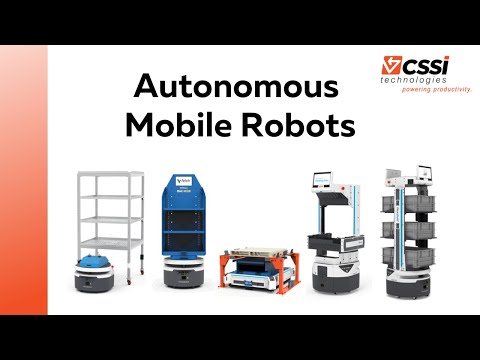
Fetch Autonomous Mobile Robot Product Family
The Fetch line of autonomous mobile robots from Zebra Technologies

Key Benefits of AMRs

Autonomous mobile robots can be transformative for the productivity of your warehouse, distribution center or manufacturing facility – improving performance for your customers. The benefits of mobile robot technology are far-reaching and include:

  • Reduce reliance on manned forklifts and pallet jacks
  • Significantly reduce the amount of time employees spend in transit
  • Support 2- and 3-shift operations
  • Reliable and dependable – autonomous mobile robots don’t get sick or take time off, offering 24/7 mobility
  • Improve safety – Zebra’s Fetch AMRs are designed with safe operation in mind with cameras and sensors, and reduce opportunities for accidents which results from human-driven forklifts
  • Zebra’s Fetch AMRs can be easily trained for a task, and can be retrained for a new task when your business needs change. (This is a major different of AMRs versus the less flexible AGV, automated guided vehicle).

Attractive Workflows to Handle With Autonomous Mobile Robots

As you think about implementing warehouse robots, think from the perspective of specific workflows. What is the definable, repeatable task which can be assigned to your AMR in order to improve overall productivity? You are likely to find the highest ROI by identifying the most well-defined and frequently executed tasks. Businesses differ, but some likely examples might include:

  • Support for picking operations with movement of eaches, totes, or cases
  • Transport of pallets within facility
  • Transport of rolling carts – supporting case picking, replenishment, and raw material delivery
  • Creation of a virtual conveyor system, moving items from one line to the next
  • Removal of waste material and recycling
  • Automated RFID scanning of facility for cycle counting and asset tracking
Zebra Fetch AMR - FlexShelf in the warehouse

How To Get Started With Autonomous Mobile Robots in PA

To get started with AMRs in Pennsylvania and the entire mid-Atlantic region, contact CSSI Technologies to discuss your needs. Our warehouse and mobile robot experts will work with you to determine the most attractive way to implement mobile robots in your facility.

Businesses which have been tempted to deploy consumer-grade tablets, and disappointed or frustrated by the results, will be thrilled by the new line of ET40 & ET45 tablets from Zebra Technologies Corporation. The ET40/45 family fills a gap between not-good-enough consumer tablets and more robust tablets such as Zebra’s ET80/ET85 line.

The Zebra ET40 tablet (wi-fi only) and ET45 tablet (wi-fi or cellular) are ready for demanding environments, with rugged features unavailable in consumer products, such as swappable batteries. Powerful Zebra barcode scanner technology and unified communications capabilities create dramatic productivity benefits for your team. Importantly, when you are adopting for a mobile computing rollout, you will appreciate Zebra’s 3-year hardware lifecycle and 6 years of service and support – a product runway dramatically longer than that attained with consumer-grade products.

Why Consumer Grade Tablets Fail In The Workplace

Businesses which don’t require completely rugged tablet solutions for mobile workers, may be tempted by initially less expensive consumer-grade products, but the complete cost of ownership should be considered, as the costs ultimately outweigh the upfront benefits:

  • Continual device failure after drops, bumps, and mishaps
  • Need for expensive rugged cases and scanning sleds undermines the perceived ‘cost-savings’
  • Short consumer lifecycles inevitably results in a workplace cluttered with many different device models, increasing the difficulty of management and training
  • Service and support is limited
  • Batteries are not replaceable – when battery dies, you must discard the device
  • Lack of enterprise features and connectivity options slows down and frustrates your workers

The ET4X Series of Zebra Tablets is Feature-Packed

Instead, choosing the enterprise grade ET4X series provides your team with a professional grade product with features which will save employees time and aggravation, and enterprise software tools which your IT staff will appreciate.

  • Tough design, yet thin and light styling. Corning Gorilla Glass protects your screen.
  • Large 8″ or 10″ screen superior to smaller mobile computer screen sizes
  • Fast wireless – 5G and Wi-Fi 6
  • Battery power for multiple shifts
  • Zebra’s industry-best barcode scanner performance and barcode software
  • Complete family of accessories is available
  • Multi-year lifecycle
  • Voice solutions such as Workforce Connect are available to improve team communication
  • Zebra’s mobility DNA packs in value-add features which contribute to device management and ease of use

Applications for the ET40/ET45 Rugged Tablet

There are many use cases for the Zebra ET40 / ET45 Tablet family:

  • Transportation and Logistics – use for routing or dispatch, proof of delivery, invoicing, inventory management, staff communication.
  • Field Service and Utilities – routing/dispatch, inventory management, personnel tracking, mobile work order management, safety inspection, meter reading.
  • Warehousing – inventory management, picking, put-away, receiving, staff communications.
  • Manufacturing – plant management, mobile HMI, maintenance repair, quality assurance, communications.
  • Retail and Hospitality – great for assisted selling, price checks, line busting, point of sale, inventory management.

Learn More About the Zebra ET40/ET45

To learn more about the ET40 & ET45 tablet, please contact CSSI Technologies. Our team of Zebra product experts can review your needs and help you select the optimal product for your business.

Q: What models are in the Zebra ET4 Series, and what sizes do they come in?

A. In 2026, the ET4 Series has three models: the ET401, the ET40, and the ET45. Each comes in an 8-inch or 10-inch size. Wi-Fi-only and cellular versions are available, so you can choose between tablets that stay inside the four walls and tablets that go out with drivers and field staff. All ET4 models use the same family of accessories, which makes buying and supporting a mixed fleet simpler.

Q: Will these tablets hold up in a warehouse, cold storage, or on the road?

A. Yes. Zebra designed the ET4 Series to keep working after drops, in subzero temperatures, and after being hosed down. Adding an optional rugged boot raises drop protection to 5.1 ft (1.5 m). The ET401 uses a different boot from the ET40 and ET45, so match the boot to the model when you order. For long shifts, an optional Expansion Back adds a hot-swappable battery for all-day power and a rotating hand strap for one-handed use.

Q: Can the ET4 replace a consumer tablet plus a separate scanner?

A. In many cases, yes. Depending on the model, the ET4 can include built-in barcode scanning and RFID, along with high-resolution front and rear cameras and an ultra-wide rear camera. That covers tasks like proof of delivery, curbside pickup, and reading RFID tags on pallets in the warehouse, all on one device. Zebra positions the ET4 as a lower-cost option than consumer tablets that need add-on cases and sleds to survive daily use.

Q: How hard is it for IT to deploy and manage a fleet of ET4 tablets?

A. Zebra includes tools to make this easier. StageNow lets IT set up tablets and enroll them in an EMM platform by scanning a barcode. Zebra DNA for Tablets adds staging tools, barcode-based data entry with no programming required, control over Google Mobile Services and apps, built-in diagnostics, and automatic EMM support. The ET4 is Android Enterprise Recommended. It also has a long product lifecycle, so you won’t have to manage several generations of tablets at the same time.

Q: Can one ET4 tablet do more than one job in our operation?

A. Yes. Workstation Connect turns the tablet into an Android-powered desktop workstation or point-of-sale station. The 10-inch models also fit a Presentation Stand for fixed or hybrid POS and kiosk setups. Workcloud Sync adds push-to-talk, voice and video calling, messaging, and task tracking, so the same device can handle both data capture and team communication. Every ET4 comes with a one-year hardware warranty from the shipment date, and you can add Zebra OneCare Essential or Select service plans for support over the tablet’s full life.

Your warehouse faces multiple pressures to meet customer expectations. Surpass them all with an all-in-one mobility solution – designed with Zebra Technologies.

YouTube player

Same-day shipping. Real-time order tracking. 100% order accuracy. Flexible return policies.

Your warehouse teams must navigate through a myriad of challenges while battling high turnover rates and shortages at the same time. Empower them to conquer challenges with streamlined efficiency delivered through…

muti-function rugged handheld computers

Learn More From CSSI

Contact CSSI to learn more about how you can consolidate the mobile devices in use in your facilities — adopting instead a multi-functional enterprise Android rugged handheld from Zebra Technologies.

Q: Why would we replace dedicated barcode scanners with handheld computers when our scanners still work?

A. A dedicated scanner does one job: it captures a barcode and passes the data to another system. A multifunction rugged handheld scans just as well, and it also runs warehouse management system (WMS) apps, shows pick and putaway instructions on screen, handles voice and push-to-talk, takes photos to document damage or proof of delivery, and can read RFID with the right accessory. That lets one device replace a scanner, a two-way radio, a mobile phone, and sometimes a cart-mounted terminal. Workers carry and charge less gear, and they get real-time task data in their hands, which helps them work faster and make fewer mistakes. Upgrading also makes sense when you’re under pressure for same-day shipping, real-time order visibility, and high order accuracy, because the handheld turns every scan into a live transaction.

Q: Won’t putting a computer in every worker’s hand make it harder for IT to manage and secure devices?

A. In most cases it gets easier. Today’s enterprise handhelds run Android and are built for central management. With a mobile device management (MDM) or enterprise mobility management (EMM) platform, IT can push app and security updates, lock devices into kiosk mode so workers can only open approved apps, set Wi-Fi and security policies, and find or remotely wipe a lost device, all from one console. Vendors such as Zebra, Honeywell, and Datalogic also offer extended Android security update programs and their own device management tools. Fewer device types means fewer platforms, fewer chargers, fewer spare parts, and fewer support contracts. The total cost of ownership is often lower than keeping several single-purpose devices running.

Q: How do multifunction handhelds help with high turnover and staff shortages?

A. A familiar, smartphone-style touchscreen with guided workflows cuts training time a lot, because new hires already know how to use the interface. On-screen prompts, pictures, and scan-to-confirm steps walk workers through each task, so temporary and seasonal staff can be productive sooner and make fewer errors. Because the same device handles picking, receiving, cycle counting, replenishment, and communication, supervisors can move people between tasks during peak periods without retraining them on different hardware. Supervisors also get real-time visibility into task progress, so they can spot bottlenecks and shift labor where it’s needed. That matters most when every shift is short-staffed.

Zebra Workforce Connect Unifies Your Teams

In a world of inevitable change, team communication in and out of the four walls is vital for business continuity. That’s why businesses are encouraged to unify teams with intelligent, push-to-talk systems like Zebra’s Workforce Connect. Your team’s rugged handhelds aren’t just for scanning and accessing key applications — they also function as extremely useful communication devices!

YouTube player

2-Way Radios Enable Real-Time Communication

  • Group calls
  • Automatic emergency alerts
  • Seamless task assignment
  • Secured text messaging

No need to burden your team with multiple devices — they can take advantage of the Zebra mobile computers and scanners they are already carrying! Zebra’s Workforce Connect is a 2-way radio function which lets you reach your team, and your team members to reach one another regardless of where they are.

Contact CSSI To Utilize 2-Way Radios For Your Team

To learn more about using Zebra Workforce Connect, please contact CSSI.

Q: As an IT director, why would I put push-to-talk on our handheld computers instead of keeping separate two-way radios?

A. When voice runs on the rugged handhelds your workers already carry, you have one fleet of devices to buy, charge, track and support instead of two. Voice, scanning and business apps all sit on a single platform that you manage with the same mobile device management tools and security policies. Your team doesn’t have to keep a separate radio inventory, swap batteries for a second device, or replace lost radios. Push-to-talk runs over your existing Wi-Fi, and where your devices support it, over cellular too. Conversations and secure text messages stay inside a system you control, not on open radio channels that anyone with a scanner can hear.

Q: As a logistics manager, how does push-to-talk help coordinate teams that work both inside and outside our facilities?

A. Push-to-talk on handheld computers connects dock workers, yard staff, drivers and supervisors in real time, whether they’re on the warehouse floor or on the road. Group calls send one message to an entire shift or department at once, so there’s no need to make several phone calls. Direct calls and secure messaging handle one-on-one questions. Supervisors can give out tasks and react quickly to changes like a late trailer, a rush order or a dock door conflict. That keeps freight moving and cuts down on idle time. Because the device that captures the scan or proof of delivery is also the communication tool, information flows faster between the facility and the field.

Q: As a warehouse director, what productivity and safety gains can we expect from handheld computers with push-to-talk?

A. Workers stop walking across the building to find a supervisor, and they don’t have to put down one device to pick up another. They press a button to ask a question, report an exception or call for help, then keep picking, putting away or loading. Over a full shift, those saved minutes add up to measurable throughput gains. On the safety side, emergency alerts can notify the right people right away when an incident happens. Group broadcasts let you quickly warn everyone about a spill, an equipment problem or an evacuation. Fewer devices on the belt also means fewer things to drop, juggle or lose in a busy operation.

Walmart Requires More Suppliers to Utilize RFID Tags

The retail world is buzzing, as once again, Walmart has imposed an RFID tagging mandate on a broad swath of suppliers. In order to better control and maintain visibility of inventory, Walmart is requiring many of its customers to ship products which are RFID-tagged. (https://www.arkansasonline.com/news/2022/feb/12/walmart-expands-rfid-tag-system/).

Why the mandate? Walmart is eyeing the 25% improvement in inventory accuracy and 10-15% reduction in labor hours required for counting items (per McKinsey). In this age of labor shortages and rising wages, those reductions will surely benefit Walmart’s operation.

Impact for Manufacturers Sold Through Retail Chains

Obviously, affected Walmart suppliers who have not already begun their RFID journey, will need to climb on board. And some who have a toe in the water may have to accelerate their pace. CSSI can help you with RFID consulting and guidance.

It’s also worth noting that Walmart may be early in requiring RFID, but it is unlikely to be the end of the story. We can expect that other retailers will use this as an opportunity to also introduce their own RFID requirements. (Has a retailer told you that you must add RFID tags to your goods before they’ll stock them?).

In short – it’s time to get real about RFID.

How RFID Tagging Can Be a Win-Win For Manufacturers

Here’s the best news: as an affected Walmart supplier or manufacturer, you should not look at this RFID mandate as a new expense or burden. Instead, you should see it as an opportunity to improve the efficiency of your own operations, and reduce your costs.

Some of the RFID benefits for the supplier or manufacturer include:

  • Improved visibility on the movement and location of inventory — near-real-time data can help you to reduce or eliminate costly stock outages.
  • Tagging product at the source provides you with valuable data for the product’s entire lifecycle, and when suitable, can provide track-and-trace data.
  • Eliminate or dramatically reduce expensive manual inventory counts, freeing resources for more productive pursuits.

CSSI Can Help with Your RFID Implementation

CSSI can support you with the complete solution you’ll need to meet these requirements:

  • RFID tags
  • Printers capable of encoding RFID data on printed tags
  • Software solutions to help track and maintain records
  • RFID scanners and antennas for your facility
  • RFID middleware to simplify your consumption of valuable RFID data

Contact us today to accelerate your adoption of RFID!

Q: Which major retailers are requiring suppliers to use RFID tags, and how long has this been going on?

A. Retailer RFID mandates aren’t new. Walmart was one of the first, starting in the early 2000s by requiring its top 100 suppliers to tag cases and pallets, and it has expanded its RFID program since then. Target started an RFID initiative around 2015, beginning with apparel and home goods and adding categories and suppliers over time. Macy’s set a goal of tagging every item in certain categories, mostly fashion, by 2016. Zara’s parent company, Inditex, tags merchandise during manufacturing so it can be tracked from the warehouse to the store floor. Decathlon has worked toward tagging its full product range worldwide. For suppliers, the takeaway is that RFID has moved past pilot programs and is now a normal requirement for doing business with large retailers.

Q: What type of RFID tags and equipment will our operation need to comply?

A. Most retail item-level and case-level tagging uses passive RFID tags. These tags have no battery and are powered by the signal from an RFID reader, which keeps them small and cheap enough to put on individual products. Active tags have their own battery and a much longer read range, so they’re usually saved for larger assets like shipping containers and equipment. You’ll also need RFID readers, either fixed or handheld, to read and verify tags, plus software that connects the RFID data to your existing ERP and inventory management systems. Each retailer may set its own rules for what data goes on the tag and where the tag is placed, so get each customer’s written specifications before you choose tags or encoding methods.

Q: How should we approach implementation without disrupting day-to-day warehouse and distribution operations?

A. A phased approach works best. First, assess your current inventory systems to see whether they can support RFID as-is or need upgrades. Next, choose technology partners for tags, readers, and software, and make sure the solution integrates cleanly with your ERP. Then confirm each retailer’s specific requirements and deadlines so nothing is missed. Before rolling out across the whole operation, run a pilot on one product line or category. This lets you test your tagging process, measure accuracy gains, and fix problems at a small scale. Finally, train your staff on tagging, reader use, and basic troubleshooting, and set up a support relationship with your vendor so problems get solved quickly once the program is live.

Q: What will RFID compliance cost, and how can we keep those costs under control?

A. Total cost goes well beyond the tags themselves. A realistic budget includes tags, readers, software, integration work, staff training, and any changes to operational workflows. To control spending, buy tags in bulk for better unit pricing, get quotes from several technology providers, and ask your retail partners whether they offer supplier incentives or support programs. A pilot project is also a cost-control tool, because it shows where processes can be streamlined before you commit to a full deployment. Also plan for keeping your readers and other RFID hardware maintained and performing well over time, since equipment downtime can quickly turn into compliance problems.

Q: Beyond meeting retailer requirements, what operational benefits can we expect from RFID?

A. RFID can pay for itself in your own operation, not just on your customers’ receiving docks. Tags can be read without a direct line of sight, even through packaging, and many tags can be read at once. Shipping, receiving, and cycle counts get much faster than scanning one barcode at a time. You get real-time inventory updates and better accuracy, less manual labor, and fewer picking and shipping errors. All of this improves supply chain visibility and product availability. Looking ahead, RFID data increasingly feeds AI-driven analytics, and newer, more durable tags handle products that used to be hard to tag, such as metal items and liquids. That makes the infrastructure you build for compliance a foundation for future gains in efficiency and transparency.

Warehouses Face Challenges… We Can Help

YouTube player

From the surge of ecommerce to the new wave of safety compliance codes, today’s warehouses and distribution centers are facing pressures from all sides to adopt flexible modernization solutions that maximize productivity.

Increasing Warehouse Challenges

And yet, over 60% of businesses see IT and technology implementation as the top operational challenge in the digital age. Without an adaptable strategy, operations may suffer under challenges such as:

  • the ever persisting labor shortage
  • an increasing occurrence of cyber attacks
  • and material shortages disrupting every industry in the globalized world.

Seamless Warehouse Modernization

But what if you could overcome these challenges with a seamless modernization strategy tailored to grow with your operations? From accurate data capture to consolidated MDM services, join CSSI and Zebra Technologies in uncovering what seamless modernization will look like in your operations.

Undisrupted communication, real time inventory visibility, dependable data security see it all come together in your operations when you contact CSSI to learn more.

Contact CSSI For Help

To get started on your warehouse modernization acceleration path, please contact CSSI by completing the form at right.