Print Oversize Cards & Badges with the Zebra ZC10L Large Format Card Printer
Efficient, high-quality large-format card printing with the Zebra ZC10L
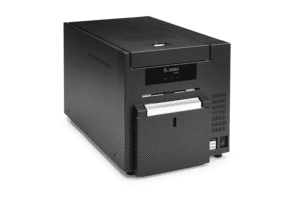
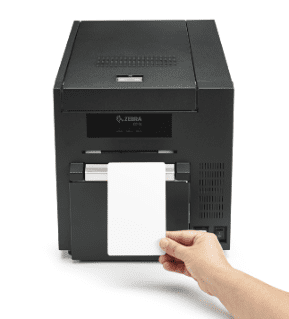
Need to print high quality oversized badges, id cards, passes, and placards? Zebra has launched the ZC10L card printer to enable you to generate these materials on-demand at 300 dpi! This Zebra card and badge printer offers capabilities not otherwise available for on-demand printing.
With Zebra’s CardStudio card design software, you can create visually captivating cards and badges on demand! Make changes right up to the event time, and print the exact quantity you need since you don’t commit to quantities and designs with pre printed cards. No more unusable leftover cards. Make card design changes right up to the last moment of with this Zebra id card printer. Take guest photos at point of entry to further personalize cards, or include sponsor logos and advertising.
To learn more and set up your own demo of the Zebra ZC10L large format card printer, please contact the print experts at CSSI. CSSI is an authorized dealer for Zebra Technologies Corp and can provide label printer, ID badge printer, barcode printer, and bardcode scanner technical support.
Capture Barcodes and RFID Data Without a Mobile Computer
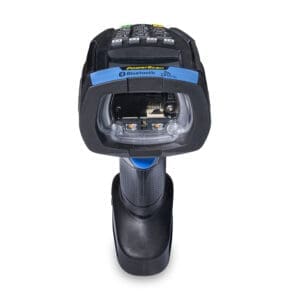
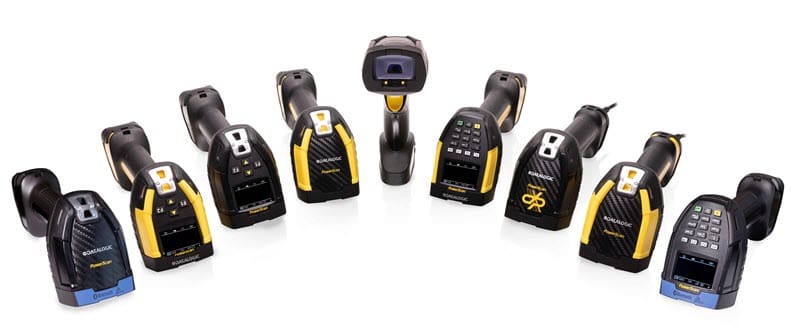
Datalogic has introduced the Powerscan 9600 RFID gun. This is a powerful hybrid worktool which enables you to capture both barcode and RFID data without the need for a handheld computer (making this a more cost-effective option).
The Powerscan 9600 scanner features a keypad and small screen, which enables you to both receive feedback on data scanned, but also to input data if you will be encoding data on RFID tags.
In the mobile RFID scanning realm, the typical alternatives have been a handheld computer equipped with RFID, or an attachable sled which combines with a touch screen computer. Datalogic’s approach provides you with visual feedback and a keypad, but allows you to avoid deploying a full mobile computer.
Great Applications for the Datalogic Powerscan 9600 RFID
Warehousing, Transportation & Logistics Cost-effective and powerful solution for reading both RFID tags and barcodes, along with a display and keypad model for manual input andcustomized operations, as well as the ability to capture color pictures for damaged packages recording and signature capture.
Manufacturing The PowerScan 9600 RFID allows traceability through RFID tags, which guarantee no damaged or unreadable labels, increased productivity and reduced slowdown compared to both barcode labels and DPM codes.
Retail The PowerScan 9600 RFID can be used in RFID-only or hybrid reading mode for check-outs and self check-outs to allow Loss Prevention (ticket switching and scan avoidance), improved inventory visibility, and increased speed of operations.
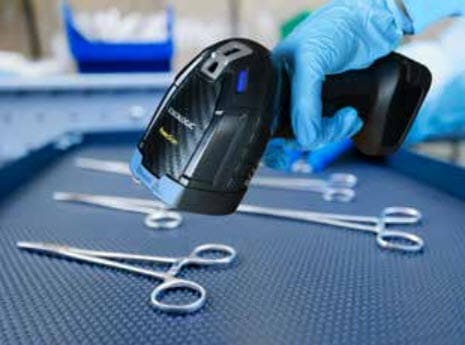
Healthcare The PowerScan 9600 RFID counts several surgical tools at once, reducing the time needed for scanning, avoiding double counts, and guaranteeing a good read even with bloodstained tools.
Datalogic Powerscan 9600 RFID Features
Cordless handheld with bluetooth connectivity
Display and keypad provide visual feedback and means for data entry
Reads RFID and barcode data – barcodes of all key formats as well as UHF RFID tags up to 3.2 ft
Tough – tested to withstands 50 drops at 8 ft, and sealed for IP67/IP65
Connectivity – USB and RS-232, multi-interface
Inductive contactless charging – wireless charging eliminates future fail points and extends usable life
Datalogic Powerscan Barcode Reader Family
Datalogic scanners are renowned for their advanced scanning technology, and for good reason. The Powerscan family represents Datalogic’s top of the line in terms of performance and reliability. These scanners have been designed to withstand the toughest environmental situations.
The PowerScan 9600 scanner is available in both corded or cordless models. Discuss your scanning needs with CSSI and we can help you select the optimal handheld scanners for your business.
Powerscan Models include
High performance – for high resolution codes and light DPM applications
Auto range scanner – supports close to far distance barcode capture
DPM (direct part mark) scanner
Document capture – scan barcodes and capture color images
Standard range – read standard barcodes
Contact CSSI to Learn More About Datalogic Powerscan
To learn more about Datalogic’s Powerscan 9600 RFID handhelds, please contact CSSI . We’d be glad to set up a hands-on demo of Datalogic scanners and handheld computers for you.
Tariffs are Driving Label Prices Up… CSSI Can Help
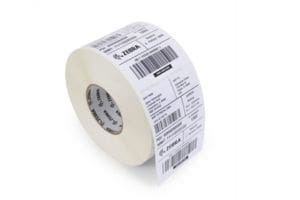
It’s no secret that tariffs and overall inflation have been impacting the prices of print supplies such as barcode labels, tags, and ribbons. Whether you use stock materials or customized labels, you have likely found prices creeping higher. Have you considered taking this as an opportunity to reconsider your choice in print supplies? We know that many companies are reluctant to ‘fix what ain’t broken’, but the print supplies team at CSSI often finds very real benefits when companies come to us for help.
Benefits of Re-evaluating Your Label Supplies:
Time flies! If it’s been a few years since you selected your labels, you may have been caught up in gradually creeping prices. Considering some alternatives may results in very real savings for your company.
Label quality matters – You want the best-value, and not necessarily the cheapest solution. Are your users frustrated with your current label solution’s reliability or availability? Torn labels, or out-of-stock supplies, can impact productivity. Is it time to consider some options which may perform better for you?
Innovation – Yes, there is innovation in labels. Materials, adhesive chemistry, and sometimes even form factor can bring positive benefits. Linerless labels reduce waste and clutter. There are even labels which provide thermal transfer quality from a direct thermal printer! We recommend taking a periodic look around to see if there are solutions which solve problems you may have become blind toward.
CSSI’s Print Media Experts Can Help
CSSI works with a range of leading print supplies providers. By working with our team of print experts, we can consider your needs & challenges and seek out new options for you. It’s easy to get started, just contact CSSI for help with labels and print supplies.
Why Adopt Barcode Inventory Management?
In today’s competitive landscape, manufacturers and warehouse operators are under constant pressure to increase warehouse efficiency, reduce errors, and gain better visibility into their operations. One proven way to achieve these goals is through the adoption of automated data capture technologies—especially barcode technology. For companies that have relied on manual processes, the transition to barcoding can deliver rapid and measurable benefits. Below, we explore the reasons some companies delay barcoding adoption, the drawbacks of manual data entry, the advantages of automated data capture, and what’s needed to implement a warehouse barcode system successfully.
Why Some Companies Have Delayed Barcode Adoption
Despite the clear advantages, some organizations have postponed adopting barcode technology due to several perceived or real barriers:
Cost Concerns: Smaller companies may assume the upfront investment in barcode scanners, label printers, and warehouse management system is too high.
Complexity Fears: There can be a belief that barcode implementation is too technical or disruptive to existing workflows.
Lack of Awareness: Some business leaders may not fully understand the capabilities of barcoding or may believe their operations are “too simple” to benefit.
Inertia: Long-standing manual processes can create resistance to change, especially if those processes appear to be “working fine.”
The Pitfalls of Manual Data Entry
Manual entry of business transactional data—such as recording inventory movements, shipping logs, or production tracking—might seem manageable at first glance, but it comes with hidden costs and risks:
Productivity Loss: Typing in product codes, part numbers, or transaction records takes time—time that skilled warehouse staff could spend on more valuable tasks.
Human Error: Typos and data entry mistakes are inevitable and can lead to shipping errors, incorrect inventory count, and costly rework.
Lack of Real-Time Inventory Item Visibility: Manually recorded data often experiences delays before being updated in systems, limiting visibility and agility.
Audit and Compliance Issues: Inaccurate records can result in difficulties during audits and regulatory inspections.
Key Benefits of Adopting the Barcode Scanner
Switching to barcoding can deliver wide-ranging improvements in operational performance:
Increased Accuracy: Scanning a barcode virtually eliminates data entry errors, ensuring accurate records for inventory, shipping, and production. A barcode scan is significantly more reliable than manual entry, improving inventory control.
Faster Transactions: Barcode scanning accelerates data capture, allowing workers to move products and process orders more quickly.
Real-Time Data Availability: A barcode inventory system can update inventory and process data immediately, enabling better decision-making and responsiveness.
Improved Inventory Management: With barcodes, companies can conduct faster, more accurate inventory counts and reduce stock discrepancies.
Scalability and Growth: A barcoding system is easily scalable, supporting growth and expansion without requiring a complete process overhaul.
Equipment and Infrastructure Needed for Barcode Implementation
To implement a barcode system, companies need a few key components to ensure smooth operation and integration into existing workflows:
a. Barcode Scanners or Handheld Computers with Scanners
Devices range from basic wired barcode scanners to rugged mobile computers capable of withstanding industrial environments. These devices read barcodes and transmit the data to software systems.
b. An Electronic Business System (ERP, WMS, MES)
A central system is needed to store and manage the captured data. Examples include Enterprise Resource Planning (ERP), Warehouse Management Systems (WMS), an inventory management system, or Manufacturing Execution Systems (MES).
c. Middleware or Integration Software
This software connects barcode scanners to the business system, enabling seamless data flow. It ensures that scanned data is correctly interpreted and recorded by backend applications.
Implementation Timeline: How Long Does It Take?
The time required to transition from manual processes to barcode-driven workflows varies depending on the complexity of the operation, but here’s a general guide:
Planning and Assessment: 2–4 weeks Evaluate existing workflows, identify data capture points, and select the appropriate hardware and software.
System Integration and Configuration: 4–8 weeks Set up scanners, configure middleware, and integrate with ERP or WMS systems.
Training and Testing: 2–3 weeks Train warehouse staff on new barcode reader equipment and inventory management workflows and run pilot tests to refine the system
Go-Live and Optimization: 1–2 weeks Roll out the system fully and fine-tune processes for optimal performance.
Total Estimated Time:Approximately 2 to 4 months from start to finish for a mid-sized operation.
A Barcoding Technology Partner is Your Secret for Success
For warehouse and manufacturing operations looking to improve productivity, accuracy, and operational visibility, barcoding is a smart investment. While initial concerns about cost or complexity may delay adoption, the long-term benefits far outweigh the short-term challenges. With the right equipment, software, and a well-planned implementation timeline, businesses can make a smooth transition to automated data capture—and position themselves for stronger growth and performance.
Contact CSSI for Barcoding Project Support
If you are an IT pro or a warehouse manager embarking upon the adoption of automated data capture technology such as barcodes or RFID, an experienced partner can help advise and support you through the process. We can help you realize the benefits of barcoding in a warehouse operation. CSSI Technologies offers years of experience in supporting companies as they adopt barcoding, both from a hardware (mobile computers , label printers , scanners) and software (warehouse management software) perspective. Have a conversation with CSSI to see how we can help with barcode inventory management and operational efficiency.
Start Your RFID Technology Adoption with a Pilot Project
For warehouse and manufacturing professionals considering the adoption of RFID (Radio Frequency Identification) technology , the move promises significant gains in visibility, accuracy, and efficiency. However, jumping into a full-scale RFID deployment without first testing the waters can lead to unforeseen costs and complications. That’s why a strategically scoped RFID pilot project is often the smartest first step. A well-executed pilot provides invaluable insights and reduces risk, while setting the stage for scalable, long-term success of your RFID application.
Why Start with an RFID Pilot Project?
In his book Good to Great, the best-selling business author Jim Collins discusses the concept of “BB’s, then bullets, then cannonballs.” He explains how great business decision makers don’t make significant business investments without first testing the waters, progressively enlarging the funding as the benefits are proven. This is a tremendous analogy to use when thinking about RFID, which can require significant investments for complete adoption, but can often be tested relatively inexpensively in pilot projects.
RFID is a powerful technology, but it is an engineered rather than a plug-and-play solution. Warehouses vary widely in layout, materials, workflows, and operating conditions—all of which affect how an RFID solution performs in a real-world environment.
Evaluate RFID performance in your actual environment (metal surfaces, high traffic, etc.).
Validate hardware and tag choices before bulk investment.
Identify integration needs with your warehouse management system (WMS) or ERP.
Measure ROI potential based on real operational metrics.
Gain internal buy-in for the RFID project from users and decision-makers based on data and experience.
Most importantly, your organization can discover all of the things which you hadn’t considered or hadn’t anticipated when establishing your RFID project goals!
With these insights, organizations can design a next-phase RFID rollout that’s technically sound, financially justified, and fully aligned with business goals.
RFID Challenges Solved During a Pilot
Even in well-planned deployments, implementing an RFID solution can present challenges. A pilot project offers the ideal proving ground to address the following issues:
Tag Selection and Placement RFID tag performance varies by material, size, and placement. During the pilot, you can test different tag types to see which work best for your inventory—especially items with challenging surfaces like metal or liquids. Will you purchase pre-printed tags, or use RFID printers to generate and encode tags on demand?
Read Range and Reader Placement RFID signals behave differently depending on interference, reader power, and physical layout. A pilot helps determine optimal RFID reader positions, antenna orientations, and read zones.
Data Filtering and Management RFID generates a lot of data. A pilot helps identify the right logic and filters to capture only meaningful, actionable information.
System Integration Connecting RFID data to your existing WMS or ERP requires configuration and sometimes customization. A pilot identifies integration needs early, so you avoid surprises during full deployment.
Staff Training and Process Alignment A pilot project offers a low-risk opportunity to educate staff, gather feedback, and fine-tune workflows before broader adoption. Ensure your whole team, and not just the information technology department, is ready for the RFID implementation.
Warehouse Workflows That Are Ideal for RFID Pilots
To get the most from a pilot, start with workflows that are high-impact, easy to measure, and frequently performed. Some of the best areas for RFID pilot projects include:
1. Inbound Receiving
Automate the verification of received goods against purchase orders.
Quickly identify shortages or mismatches.
Reduce manual scanning or counting at the dock.
2. Asset Tracking
Monitor high-value tools, pallets, or returnable containers with RFID tagging.
Ensure assets are available when needed and not lost or misplaced.
Great for maintenance-heavy environments where equipment moves often.
3. Inventory Management and Cycle Counting
Replace manual or barcode-based cycle counts with hands-free RFID sweeps.
Increase count frequency without increasing labor.
Reduce shrinkage and improve inventory accuracy.
4. Work-in-Process (WIP) RFID Tracking
Track parts or assemblies through multi-stage production.
Identify bottlenecks or delays in real time.
Ensure traceability and quality assurance for complex builds.
5. Shipping Verification
Validate that the correct items are loaded onto outbound shipments.
Prevent costly shipping errors or misdeliveries.
Improve customer satisfaction and reduce return handling.
An RFID Pilot is a Smart Way to Start
RFID has the potential to transform warehouse and manufacturing operations, but achieving a successful deployment requires more than just installing readers and slapping on tags. Success goes far beyond simply purchasing RFID equipment. A pilot project provides a structured way to test, learn, and refine—allowing your team to understand the technology, mitigate risks, and build a solid case for broader investment.
By starting small and scaling smart, warehouse and manufacturing organizations can set the foundation for RFID success that delivers measurable value across the operation.
Let’s Discuss Your RFID Pilot
The RFID team at CSSI Technologies is ready to discuss your business processes and benefits of RFID. Get ready to implement RFID with confidence and attain a successful RFID investment. We can help you identify the best workflow to target with an RFID Pilot. Please contact us to discuss your RFID questions today.
Ready to purchase barcode printers for your business? If you are new to printers, here is a brief explainer on the different types of label printers available for you. It’s important to consult with an expert like CSSI to ensure you are ultimately choosing the right model.
Print Process – Thermal Transfer or Direct Thermal?
When it comes to selecting an industrial label printer, the first thing is to understand the best type of print process for your application. Typically, you will choose between a direct thermal label printer or thermal transfer label printer. In specialty cases where color labels are necessary, you may do best with color inkjet . Once you know the print process you wish to use, you can select the best class of printer for you.
Thermal printing uses heat to apply the content to the print labels. A direct thermal printer applies the content directly to the label material. A thermal transfer label printer utilizes a print ribbon as an intermediary to transfer content to the label. To learn more about the pros and cons of each printing technology, see our prior article about Thermal transfer printers vs direct thermal printers.
Classes of Barcode Label Printers
There are several different label printer classes or categories. The correct category for your business will depend upon the usage environment, label requirements, and print speed, in addition to the level of ruggedness which is necessary.
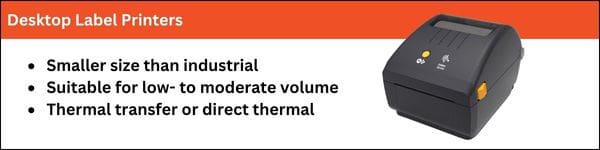
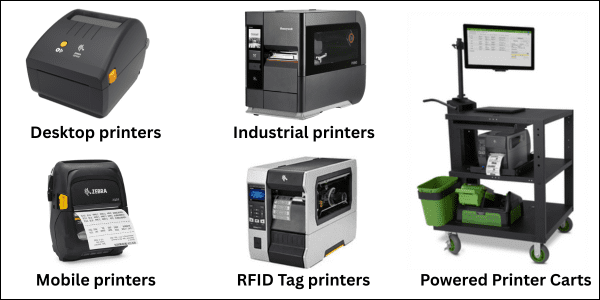
1. Desktop label printers
Desktop printers are a bread-and-butter choice. These are durable and business-ready printers, typically available in either 4 inch or 6-inch label widths. Direct thermal and thermal transfer printer models are available. Typical print speeds run around 6 ips (inches per second), making this a good choice for applications where volume is high, but not extremely high. Desktop printers are smaller than industrial printers, so it’s easier to find space for them.
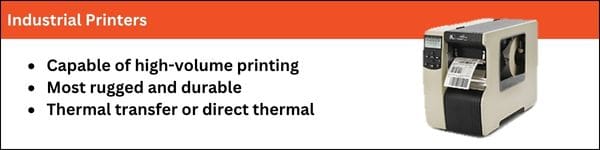
2. Industrial label printers
An industrial label printer serves in harsh and demanding use environments such as production floors, where the industrial printer must be able to withstand dust and particles, as well as high use. Industrial printers may run as fast as 12 or 14 ips (inches per second), making this a necessary choice for high-volume label generation. Options are available in thermal transfer and direct thermal, although thermal transfer is more common. Some industrial label printers offer a label verifier, which can confirm that each label generated has a readable barcode. This is necessary for applications where non-readable labels are not acceptable (for example, the company may be hit with chargebacks from larger retails for non-conforming labels). Industrial printers require more desk or counter space, so take that into consideration.
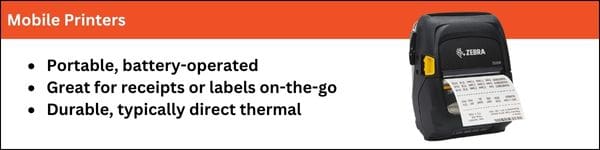
3. Mobile printers for labels and receipts
Do you need to generate labels or receipts while on the go? Then a mobile label printer is the best choice. These are smaller, battery-powered printers, typically employing a direct thermal process. The focus is on mobility and relatively light weight. Most mobile printers use a direct thermal printing process, but we have specialty printed label materials which allow you achieve thermal transfer results from a direct thermal printer.
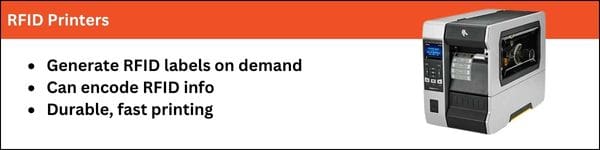
4. RFID printers
RFID printers have the ability to encode RFID tags as well as print labels. These printers are necessary if you are printing unique RFID labels at the point of use. We can work with you on your RFID process and pair you with the right printer.
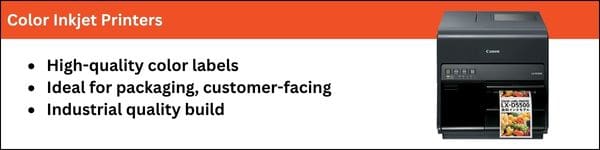
5. Color Inkjet
If you are printing labels which require high-resolution graphics (retail labels, packaging labels), then the right choice may be a color inkjet printer. CSSI offers several color label printer choices and can help you with your selection and testing.
Need Help with Barcode Labels & Print Supplies?
CSSI offers years of experience in the specification and procurement of reliable and cost-effective label media solutions and print supplies . Whether you are looking to introduce a new label, or seeking alternate sources for your existing labels, our print media team can propose options from our reliable suppliers.
CSSI Can Help You Select & Configure Label Printers
If you are preparing to purchase or upgrade label barcode printers, CSSI can help – we can assess your usage and recommend the ideal thermal label printer or inkjet printer for your application. We will guide you to selecting the best label printer and printing technology for your use case. Our professional services team can support your configuration and deployment. Need help with label design? We offer software such as BarTender to make bulk generation of labels and barcodes simple.
Solving Challenges with Mobile Computer Access & Management
It’s no secret that mobile computer usage is expanding in every enterprise. Whether in the warehouse, in transport/logistics, or field service, there are expanding fleets of rugged mobile devices in use. These enterprise mobile devices create 3 challenges for business’ IT and operations teams:
How to ensure that handhelds and tablets are secure, with company software accessible only to those authorized?
How to ensure that mobile devices are charged at the end of a work shift, so that they are ready to use when next needed?
How to avoid device loss & theft — mobile devices tend to go missing, so how to both prevent loss & ensure user accountability?
Zebra Guardian Tackles These Mobile Device Challenges
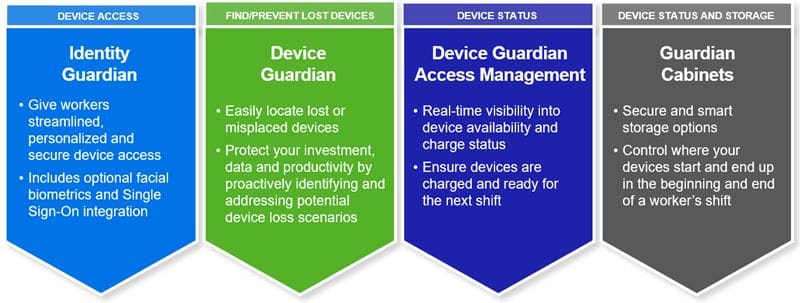
Zebra Technologies has brought together several hardware and software products which address these fleet device management challenges under the ‘Zebra Guardian’ umbrella. This is a set of solutions, one or all of which can be utilized to improve your security and utilization of Zebra mobile computers and tablets.
1. Zebra Guardian Cabinets
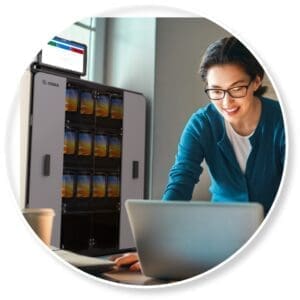
Formerly known as Intelligent Cabinets, this is a configurable cabinet and rack product which provides a ‘home base’ for your devices when not in use. Devices are placed on chargers, ensuring that they will be ready when next needed by a team member. Use in concert with Guardian Access Management software (see below).
2. Zebra Guardian Access Management
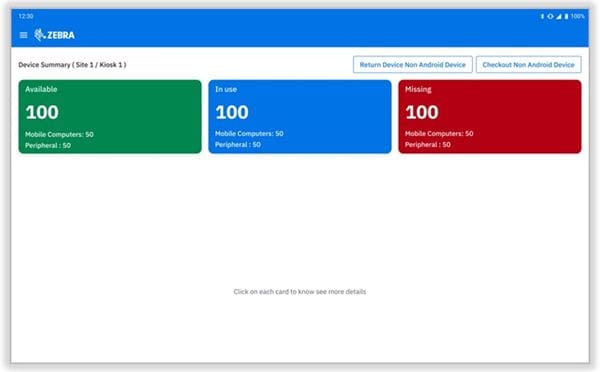
Guardian Access Management software provides visibility into device status and battery charge level for all of your mobile devices. At a glance, you can see how many devices are available, in use, or missing, helping you to preemptively avoid device loss. User accountability is built-in, since you can see which user has last checked out missing devices.
3. Zebra Identity Guardian
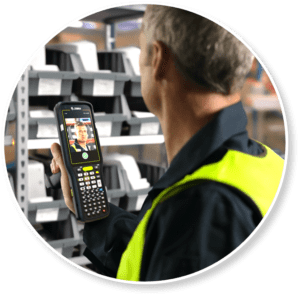
Identity Guardian is Zebra’s device authentication and single-sign on solution. Ensure that only authorized users have access to your mobile devices, and provide access only to the applications necessary for the user. You have the option of PIN and password access, or use the facial recognition capabilities of Zebra products such as the MC9400 and MC3400.
4. Zebra Device Guardian
One of the most common device management challenges is that of locating lost or misplaced handhelds. In large warehouses or manufacturing facilities, it is no small matter to locate a lost device. Device Guardian solves that problem with a Geiger-counter feature which enables you to quickly spot the missing device. You can also activate an alarm on the device to speed recovery.
Ready to Discuss Device Access & Charging with Zebra Guardian?
Thermal Transfer Quality from Direct Thermal Printers?
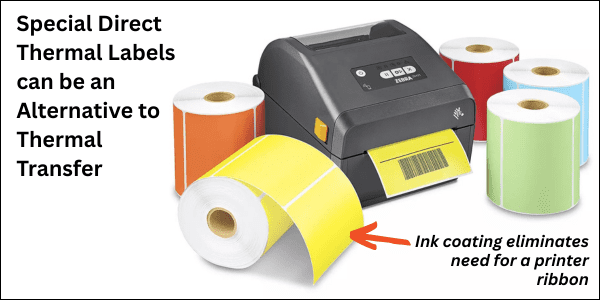
With recent tariffs causing havoc with supply chains, impacting costs and availability of the print ribbons needed for thermal transfer printers, you may be interested to know that there is a new alternative… there are special direct thermal labels now available with a special ink coating that eliminates the need for a ribbon. This special heat sensitive paper enables you to obtain thermal transfer label quality from a direct thermal printer.
Do you have a need for higher quality barcode labels from your direct thermal printers?
Are you having trouble with cost or availability of thermal ribbons and need an alternative?
CSSI can provide you with samples to evaluate this special direct thermal label material. Direct thermal printing can be less expensive if the end result label is a fit for your needs.
CSSI Can Help With Your Label Printing Needs
We carry a full line of business-ready print options, from direct thermal label printers, thermal transfer printers, mobile printers, RFID tag printers to print media, labels, and thermal ribbon supplies.
Contact CSSI For Label Printer Support and Help with Barcode labels
Contact us to speak with a print expert , whether you are interested in label and print media options or new durable printers. We’d be happy to quote barcode labels for you and suggest alternatives.
April, 2025
Software Developer to support B2B programming solutions
CSSI Technologies LLC is seeking an experienced SOFTWARE DEVELOPER to create and customize programming solutions for our diverse customer base of manufacturers, distributors, logistics companies, and more. We are open to both full-time and part-time candidates.
At CSSI Technologies, we are experts in the sale and integration of mobile computers and auto ID technologies (barcoding & RFID). We guide our customers in the selection and deployment of hardware and software to improve productivity and profitability. Our custom software development team enables us to create highly effective, custom-fit solutions.
We develop applications for multiple platforms (web, desktop, and mobile). Past solutions have included inventory / warehouse management (WMS), proof of delivery, quality control, and electronic forms.
Design, program and implement new applications and features.
Work with customers and internal team to develop project scopes
Deliver all projects and deliverables on-time and on-budget.
Maintain and debug code that is already deployed on production systems.
Resolve client inquiries and issues in a timely manner; communicate resolution effectively through email and phone communications.
Attention to detail. Document and record all aspects of client interactions in our service management system to promote transparency and understanding of technical issues and project status.
Delight customers in all phases of project execution.
Other duties which may be assigned.
Candidate Profile & Qualifications
A passion for solving puzzles, learning how things work, and helping people.
Ability to prioritize and complete multiple tasks and projects in a fast-paced, technical environment.
Ability to work independently as well as part of a small team.
Ability to interact effectively with both non-technical and highly technical users.
Willingness to research and figure out complex software and IT systems.
Excellent interpersonal and communication skills (written, verbal, and phone skills).
Can-do attitude with a service-oriented approach.
Work Details
Work is primarily performed from CSSI’s Lewisburg office. Very occasional travel to customer sites for meetings may be required.
Developer will be required to utilize CSSI’s ticket- and time-tracking systems and will adhere to CSSI’s efforts to document customer interactions and critical information.
Benefits
CSSI offers a competitive salary, comprehensive health insurance, and a 401k retirement plan with company matching.
Please email your resume and cover letter to resumes@cssi.com and list the position in the subject line.
IT Leaders Need Support for Enterprise Mobility Management
IT directors, particularly those at small-to-midsized businesses, have found themselves increasingly overburdened due to a combination of resource constraints, complex IT environments, and increasing cybersecurity demands. Consider just a few of the factors:
Small Teams, Big Responsibilities – Many small-to-midsized companies have lean IT departments, sometimes consisting of just one or two people. The IT director must juggle multiple roles—network administrator, help desk support, cybersecurity lead, and even software developer—all at once. Managed devices are increasing in number as the mobile workforce grows.
Fragmented Technology – Information Technology leaders wear many hats! Manufacturing and warehousing firms often rely on legacy systems, such as outdated ERP software, on-premises servers, and older industrial equipment. Multiple operating systems may be in play: Windows, Android, IOS, and perhaps Linux.
Cybersecurity Risks – Today’s always-online businesses are prime targets for hacks and cyberattacks like ransomware. IT directors may lose sleep at night trying to keep bad actors at bay with OS patches, security updates, and sufficient device security.
Mobile Devices are Multiplying… As are the Management Needs
Computing endpoints have multiplied dramatically in recent years, and this growth will continue into the future. Laptops, tablet computers, handheld computers, and vehicle mounted computers are all used in the modern enterprise. In managing these mobile computers, IT leaders must contend not only with larger quantities, but also with devices which are mobile and thus dispersed across the facility or even across many facilities.
This means that relying on getting hands-on to update and manage mobile technology is a bad plan, due to the time and hassle of simply tracking down all of the computers. Enter mobile device management (MDM) software as an enabling tool for efficiently handling these device fleets. When well-implemented and managed, MDM is a significant enabler for the IT team, creating an efficient way of managing and supporting large Android device fleets. (Read our past article: Is mobile device management a fit for you?)
The challenge for the IT team: enterprise mobility management software becomes yet another responsibility added to the IT plate, often without any increased resources to match. This is where CSSI’s mobile device support experts can step in to help.
CSSI Offers 3 Types of Mobile Device Support Options
The CSSI support team offers mobile device management services, particularly SOTI MobiControl . We offer flexible mobile support services with options for how we can help you manage your corporate devices and thereby reduce the burden on your IT team:
1. You Manage Your Devices
If your IT team is both knowledgeable about MDM and has sufficient bandwidth, you can use CSSI for sourcing your MDM software and providing services to support your initial MDM rollout. You take it from there and only contact us when needed.
2. You Manage Your Devices with Our Support
Your IT team may have a reasonable amount of MDM knowledge for day-to-day needs, but may lack the blocks of time needed for annual upgrades and major changes. In these cases, you may choose to use CSSI on an as-needed basis to provide you the necessary additional bandwidth, for example with device setup and device provisioning. There are no contracts or time commitments necessary, you would simply pay for the support time you need. Remote access tools are powerful aids in supporting your mobile workforce.
3. We Manage Your Devices
It’s possible that your IT team may either a) be unfamiliar with MDM software and Android mobile devices in particular, or b) may lack time to support mobile devices. To help our customers in these situations, CSSI created Device Lifecycle Management , a contracted support package. Under this program, CSSI can manage your mobile devices from initial new device enrollment and provisioning to annual patches and updates and can provide user technical support and trouble-shooting along the way. You can rest assured that your devices are patched and secured.
Contact Us To Discuss Mobile Device Support Services