Struggling with Management of Your Shared Enterprise Mobile Devices?
How do your users access their mobile computers and tablets? Is there a mobile device access and security solution in place which prevents unauthorized access? Is the security profile based upon the user’s role, or is it set by device? Do you utilize a multifactor login to enhance security? Many companies have found that typical device management practices leave the organization at risk for device loss, waste, and security challenges. In this environment, Zebra Technologies created Identity Guardian, an authentication solution which is specifically targeted for enterprise users using a mobile Zebra device such as the MC9400 or MC3400.
The Challenges with Shared Mobile Device Authentication
In most warehouse and industrial environments, devices are shared by users across different shifts. The same user will likely use a different mobile device each day. So how do your users sign into devices? The typical approaches each have shortcomings:
No device passcode – Complete lack of device control
Shared PINs – Loss of accountability for individual users
Complex PINs and passwords – Difficult for users to remember, encourages ‘workarounds’
Biometric authentication – Support single users, not shared users
Storing data in the cloud – Creates liability concerns around users’ personal information
How Identity Guardian Works and Adapts to Your Organization’s Device Strategy
Zebra Identity Guardian resides on your mobile devices. The authentication process is simple, and slightly different depending on whether you have shared or personally assigned devices. You have the option of utilizing a facial biometric to avoid shared PINs and passwords:
Shared Devices
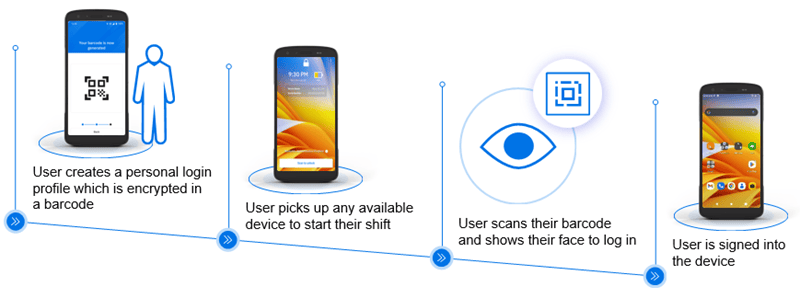
If your organization uses a pool of devices, with users randomly picking a device for each shift, you will benefit from a solution which can authenticate individual users rather than using a shared password. This graphic shows the Identity Guardian process for shared device biometric authentication:
Individually-Assigned Devices
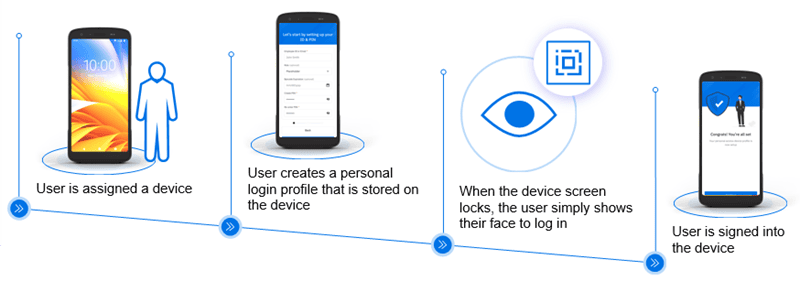
If your organization assigns specific devices to specific users, Identity Guardian can adapt to create a secure yet user-friendly authentication process, as shows below:
Identity Guardian Creates Visibility to Your Devices
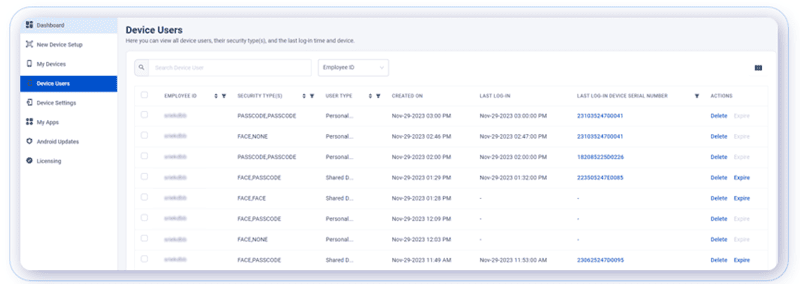
From an IT management perspective, Identity Guardian provides a huge benefit of easy visibility into which devices are being used by which users. This will save time and effort in locating and trouble-shooting device issues and also creates accountability for your users if devices are lost, not returned, or damaged on their watch.
Sample screen from Identity Guardian management interface:
Primary Benefits of Identity Guardian Solution
Accountability – Better understand user activity and track device sign-ins and sign-outs
Data protection – Multiple layers of protection keep your user and company data secure
Application support – Integrated with IdPs to simply authentication by leveraging single sign-on (SSO).
Familiar user experience – A common login makes it quick to train users
Increased visibility – Gain a clear view of all devices in or out of service and all user profiles
Convenient and secure – Zebra Technologies seamlessly merges biometric authentication with multifactor login protocols
FAQ – Frequently Asked Questions About Device Authentication and Zebra Identity Guardian
Q: What does “device authentication” actually mean for a warehouse or distribution environment, and why does it matter more than a standard PIN or password? A. Device authentication verifies who is holding a mobile computer or tablet before it grants access to business apps, data, or a network session — using something more reliable than a shared password everyone knows. In shared-device environments (think a rugged handheld passed between shift workers on a warehouse floor), standard passcodes are easy to forget, easy to share, and impossible to audit. A platform like Zebra Identity Guardian replaces that weak link with facial biometric recognition, PIN, or barcode-based login, so every session on every device is tied to an actual identified user — not just “whoever picked up the scanner.”
Q: Do we need fingerprint or facial recognition hardware, or can we mix authentication methods? A. Identity Guardian is built around facial biometric authentication as the primary method, layered with PIN/passcode, barcode scan-to-unlock, and single sign-on (SSO) through providers like Microsoft Entra ID, Okta, or PingID. Most organizations don’t run one method exclusively — a common approach is biometric-first login with a barcode or PIN fallback for edge cases (gloved workers, cold-storage environments, or damaged cameras), so the deployment stays practical on the floor rather than just in the spec sheet.
Q: How does this work on devices that get handed off between multiple employees across shifts? A. This is the scenario the platform is built for. Identity Guardian supports shared-device user switching with session isolation, meaning each worker’s login, app access, and data stay separate even though they’re using the same physical handheld. On assigned devices, credentials are protected within the Android security framework; on shared devices, a personal barcode managed by the individual user adds an additional layer so one worker’s session data isn’t visible to the next. That separation is what makes shift-based deployments auditable instead of a shared free-for-all.
Q: Will this integrate with the MDM and identity systems we already have in place? A. Yes — Identity Guardian is designed to sit inside your existing device and identity stack rather than replace it. It integrates with Zebra DNA Cloud for device and user administration, works alongside enterprise MDMs such as SOTI MobiControl, and connects to identity providers for SSO. For most CSSI clients, that means authentication policy gets layered onto the MDM environment you’re already running, not bolted on as a separate system to manage.
Q: Beyond security, what’s the business case — how does this show up in accountability, compliance, or day-to-day productivity? A. The immediate win is accountability: every device session is tied to a verified user, which gives IT and operations leadership a real audit trail of who accessed what device and when — useful for compliance requirements and for investigating shrinkage, errors, or misuse. On the productivity side, biometric and SSO login remove the friction (and help-desk tickets) that come with forgotten or shared passwords, while features like device alarms and remote sign-out reduce the operational risk of lost or misplaced hardware. The net effect is fewer credential-related slowdowns on the floor and a clearer security posture for leadership.