
Zebra WS50 Android Wearable Computer
The new WS50 is the world’s smallest Android wearable mobile computer with multiple mounting options

Zebra Launches New Android Wearable With Vivid Color Screen

Every task worker without mobile access to relevant information is forced to take more steps and more time to complete tasks, eroding operational efficiency. Now, connecting your disconnected workers is Every task worker without mobile access to relevant information is forced to take more steps and more time to complete tasks, eroding operational efficiency. Now, connecting your disconnected warehouse associates is easy with the Zebra WS50 – the world’s smallest all-in-one Android enterprise-class wearable mobile computer.

zebra ws50 android wearable scanner

The WS50 is an industrial barcode scanner and mobile computer with unparalleled functionality and flexibility, created by Zebra Technologies, a leader in supply chain solutions. The adaptable WS50 is lightweight and ergonomic, comfortable and hands-free. With no host device required, it’s the first of its kind, offering powerful data capture with all-in-one Android device simplicity. It’s rugged, weighing just a few ounces, but built to handle all-day everyday enterprise use – extreme heat and cold, bumps and drops. It’s a versatile computing core with a modular design that lets you choose the mount that’s right for the job: the WS50 can be worn ring-style on two fingers, on the back of the hand or on the wrist. The design is at home everywhere – from manufacturing and warehousing to retail and hospitality.

Zebra WS50 Android Wearable Computer Benefits

  • All-in-one design reduces your costs – no need to purchase separate mobile computer and ring scanner
  • Just-the-right screen size for task management, communications, and scan-intensive work
  • Reduced management burden – fewer devices, fewer batteries, fewer service contracts
  • Ideal for simplified task-based apps and communication
  • Perfect for the warehouse, improving pick productivity, and e commerce fulfillment
  • Can be used without a handheld computer – the WS50 is an all-in-one solution

The WS50 is small but mighty, packed with powerful business class voice and data features that drive productivity and accuracy into every task. Choose your data capture technology — Zebra’s enterprise-The Zebra WS50 is a small but mighty wearable computer, packed with powerful business class voice and data features that drive productivity and accuracy into every task. Choose your data capture technology – Zebra’s enterprise-class industrial barcode scanner SE4770 imager is integrated into the two-finger and back-of-hand mount for intense barcode scanning, and a high resolution 13 MP camera is integrated into the wrist mount to capture detailed photos to document proof of condition, as well as occasional barcodes. All models are push-to-talk ready, enabling workers to instantly collaborate with co-workers and managers for faster issue resolution. Support for task management applications enables better staff utilization and management. Voice features include an embedded speaker and microphone, plus the ability to connect a Bluetooth headset for cordless freedom and private communications.
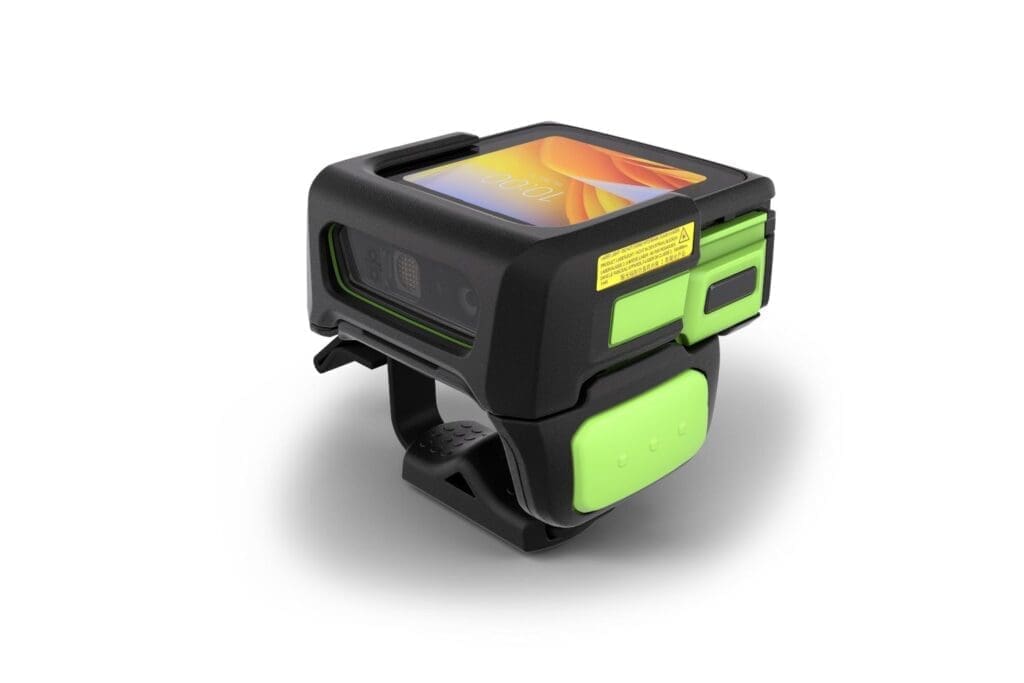
zebra ws50 wearable mobile computer

The Zebra WS50 offers exceptional useability and viewability and is always powered up and ready to work. The AMOLED color display is extraordinarily bright with a wider range of viewing angles, delivering superior readability. The removable hot-swappable battery ensures devices are powered every minute of every shift. And programmable buttons allow you to give workers one-press simplicity for a wide variety of functions – from push-to-talk and scanning to photo capture and more.

Learn More – Arrange a Demo of the Zebra WS50 Wearable Computer

Contact CSSI to arrange a demo and see how the WS50 can transform your warehouse picking operations! Allow us to employ our warehouse expertise and operational efficiency know-how to benefit your operations and warehouse workflows. CSSI is a premier solutions partner for Zebra Technologies Corporation.

Q: What is the Zebra WS50, and how is it different from a traditional wearable setup?

A. The WS50 is a small, rugged Android wearable computer that a worker wears instead of carrying. Zebra calls it the world’s smallest all-in-one, enterprise-class Android wearable. Older wearable setups pair a host computer on the forearm or belt with a separate ring scanner. The WS50 is one device, so the worker has a single unit for capturing and viewing data. It’s also push-to-talk (PTT) ready, which can remove the need for a separate voice device.

Q: How can it be worn, and which warehouse tasks does it suit?

A. The WS50 is a modular core with three ways to wear it: on the wrist, on the back of the hand or on two fingers. The back-of-hand and two-finger “converged” models are built for scanning-heavy work like picking, put-away, sorting and loading and unloading trucks. The wrist model is a separate version. It has a 13 MP camera for occasional scans and photo documentation, or it can be ordered with no data capture at all, which suits supervisors or workers who mostly need task management and communication. The trigger rotates for left- or right-handed use.

Q: How well does it scan, and will it hold up on a warehouse floor?

A. The converged models use Zebra’s SE4770 1D/2D omnidirectional imager. It reads 1D and 2D barcodes and OCR, and it can capture several barcodes on one label in a single scan. Workers can scan with the trigger or let a proximity sensor scan automatically, which keeps their hands free. For durability:

  • Drops: converged models survive 6 ft drops to tile over concrete and 2,000 tumbles. The wrist model is rated for 4 ft drops and 1,000 tumbles.
  • Sealing: IP65 against dust and water.
  • Temperature: operates from 14°F to 122°F.
  • Screen: a 2-inch AMOLED touchscreen with Corning Gorilla Glass that works with gloves.
  • Repair: the front shell can be replaced.

Q: Can the battery last through a full shift, and how is charging handled?

A. The batteries are removable and hot-swappable. Zebra says a worker has a 2-minute window to swap batteries, and no data is lost. The converged models use a 1,300 mAh battery and the wrist model an 800 mAh battery. Fast charging gets a battery ready in under three hours. For charging, you can choose 2- or 10-slot cradles that charge devices, 4- or 20-slot battery chargers, and an Ethernet cradle that holds five devices and five batteries. Accessories are color-coded so the converged and wrist models are easy to tell apart in a busy charging area.

Q: What should IT know about the platform, connectivity, security and management?

A. The WS50 runs Android 11 AOSP on a Qualcomm Snapdragon Wear 4100 quad-core processor (2 GHz), with 1 GB of RAM and 8 GB of flash storage. It connects over Wi-Fi 6E and Bluetooth, and it has NFC for tap-to-pair and tap-to-stage setup. Fast-roaming support (802.11r, OKC and PMKID caching) helps keep connections stable as workers move around a large building. Security includes WPA2/WPA3 Enterprise and several EAP methods, and LifeGuard for Android provides security updates through Zebra support. The device works with major EMM platforms, and OEMConfig gives your EMM access to Zebra’s device settings. Zebra’s Mobility DNA tools are included, such as DataWedge, StageNow, Enterprise Home Screen, PowerPrecision and Device Diagnostics. You can also add VisibilityIQ Foresight for cloud analytics on battery health and device use, and Zebra OneCare plans for support.

CSSI Promoted to Zebra Premier Solutions Partner

CSSI Technologies is pleased to announce that it has been promoted by Zebra Technologies to Premier Solutions Partner status!. This is an elite level of the partner program which recognizes the success and expertise which CSSI has built in the Zebra product line.

Zebra Technologies is a global leader in handheld computers, rugged tablet PC’s, thermal printers, and data capture technologies, as well as a broad ecosystem of software solutions and tools.

As a Zebra Premier Solutions Partner, CSSI is now even better positioned to apply our expertise in Zebra products to successful implementations in your business!

Let’s talk about your next warehouse, logistics, or operations technology upgrade!

Update your label printers and receive valuable cash rebates

Your business is moving faster every day. Don’t let aging printers slow your team down. CSSI is please to offer a 2022 program through which you can receive cash rebates when you update old thermal label printers. Best of all, you can trade up to industry-leading print solutions from Zebra. CSSI is an expert both in thermal printing, and in specifying and supplying thermal print media and label supplies.

Learn more about our 2022 program, and contact us today to get started.

Q: What is the GO Zebra rebate program, and how much can we save on thermal printers?

A. GO Zebra is Zebra’s trade-in program. You get cash back when you buy a new qualifying Zebra printer and send in an old one. The biggest rebates are on industrial printers. The ZT620 qualifies for up to $550, and the ZE500/ZE511/ZE521 print engines qualify for $500. The ZT610 earns up to $350, the ZT510 up to $250, and the ZT411 and ZT421 up to $200. The ZT220, ZT230, ZT111 and ZT231 earn up to $75. Desktop models earn smaller amounts: $40 on the ZD621, $35 on the ZD421 and $20 on the ZD411. Mobile printers used on the warehouse floor also qualify. The ZQ630 Plus, ZQ620 Plus and ZQ610 family earn up to $125, and the ZQ511 and ZQ320/ZQ310 Plus earn up to $100.

Q: How can we get the highest rebate on each printer?

A. On many models you can add a second rebate by buying a Zebra OneCare service contract with the printer. For example, the ZT620 gets $500 for the trade-in plus $50 for OneCare. The ZT411 gets $150 plus $50. Mobile printers like the ZQ620 Plus get $100 plus $25. Some models, including the ZE500 series and the ZD desktop printers, have no OneCare rebate. If you were already going to buy a service contract, buying it with the printer gets you the most money back.

Q: What old equipment can we trade in? Does it have to be a Zebra printer?

A. No. Zebra takes any Zebra or competitor thermal barcode printer, so old Honeywell, SATO, TSC or Datamax units qualify. The printer must power on and still have its printhead. You get one rebate for each printer you trade in, up to the number of new printers you buy. You can use the program more than once, which is helpful if you’re replacing printers in phases. Zebra also recycles the old units at no cost to you, so you don’t have to dispose of them yourself.

Q: What are the deadlines and eligibility rules?

A. Updated for 2026: The program covers purchases made between January 1 and December 31, 2026. It is open to end users in the continental U.S. and Canada. Alaska, Hawaii and U.S. territories are not included. You must buy from an authorized Zebra PartnerConnect reseller. Within 90 days of the reseller’s invoice date, you have to submit your application and Zebra has to receive your trade-in device. With year-end budgets closing, plan purchases and trade-ins so you don’t miss either deadline.

Q: How do we claim the rebate, and are there any restrictions?

A. The process has three steps:

  1. Buy a qualifying printer from an authorized Zebra reseller.
  2. Submit the rebate application online with a copy of the reseller invoice showing the serial numbers of the new printers.
  3. Ship your old printers back using the Trade-in Merchandise Authorization (TMA) Zebra sends you after it approves the claim.

The rebate can’t be combined with other Zebra promotions or with special pricing your reseller received on the same deal, so confirm the pricing with your reseller before you order. Zebra can change or end the program at any time. Check the current terms with your reseller before you plan around a specific rebate amount.

Rugged Android Touch Computer for Warehouse Vehicles

It’s time to replace your aging large screen Windows vehicle mount mobile computers. You want the same large screen, the latest mobility platform for future-proofing and features that will make the transition to a completely different OS as painless as possible. The VC8300 10-Inch delivers it all. This purpose-built, cost-effective device is right-priced — with all the right features.

Cutting Edge Android Performance

You get Zebra’s cutting edge Android platform for superior future-proofing. You get blazing application performance with the state-of-the-art powerful Qualcomm SD660 octa-core 2.2 GHz processor. Easily accommodate all your applications with the large 10 inch display. Workers can use the same gestures they are already familiar with on their personal devices with a capacitive touchscreen with multi-touch support, practically eliminating the learning curve. Multiple mounting options enable easy installation anywhere in virtually any material handling vehicle. And it’s easy to keep the VC8300 10-Inch secure throughout the enterprise-class extended lifecycle with Zebra Mobility DNA’s LifeGuard™ for Android™, included at no cost with every Zebra OneCare contract.

Zebra VC8300 10 inch tablet

Painless Migration of Terminal Emulation Apps to Android

The VC8300 10-Inch takes all the pain out of migrating Terminal Emulation apps to Android. Since Zebra Mobility DNA’s All-touch TE powered by Ivanti Velocity is pre-loaded and pre-licensed, existing TE apps run on the VC8300-10 Inch right out of the box — no application modification required. And when you’re ready, with the push of a button, this robust Zebra Mobility DNA tool transforms TE apps into interactive and intuitive modern Android screens that simplify and strip time out of everyday processes, boosting worker productivity.

Best-In-Class Network Connectivity

Mobile devices are only delivering value if they are connected to your network. And with best-in-class connectivity, you can count on a fast, constant connection. Wi-Fi coverage is in a class of its own, with Zebra-only features that deliver superior performance in moving vehicles to keep workers productive every minute of every shift. And Bluetooth 5.x Dual Mode support provides workers with a reliable, high-performance connection to the universe of Bluetooth peripherals — including headsets, handheld scanners and printers.

Rugged & Ready For Tough Environments – Including Freezer Warehouses

When it comes to rugged design, the VC8300 10-Inch is ready for your toughest environments. There’s no environment that’s too tough for this vehicle mount computer. With dust-and-water tight IP66 sealing, sealed connectors, a clean flat front that won’t catch dust or water, extreme temperature, shock and vibration testing and more, it thrives in virtually any challenging environment — from manufacturing plants and warehouses to outdoor yards and ports, even the freezer.

Need Support? CSSI Covers You With Device Lifecycle Management

Need help with deployment and future management of your fleet of warehouse computers? CSSI has you covered with Device Lifecycle Management, our unique program for managing and updating your mobile devices. Click to learn more.

Need help with Windows-to-Android migration? CSSI has you covered there too. Let us demonstrate how painless it can be.

Set Up Your Demo Today

The VC8300 10-Inch Vehicle Mount Mobile Device — the ultimate ultra-rugged all-touch Android device for the most demanding industrial applications. Contact CSSI to learn more about the VC8300, and see the detailed spec sheet below:

Q: Can the VC8300 run our existing terminal emulation (“green screen”) applications, or will we have to redevelop and retrain?

A. You can keep your current applications. The VC8300 ships with Ivanti Velocity terminal emulation already loaded and licensed, so existing green-screen apps run right out of the box. You don’t need to change your back end or retrain workers. When you’re ready to modernize, All-touch TE turns those terminal screens into touch-enabled Android screens without any coding. Workers keep the full alphanumeric keyboard they know: it’s backlit and field-replaceable, with 67 keys and 12 direct function keys in QWERTY or AZERTY layouts. That lets you move from keypad-based to touch-based workflows at your own pace.

Q: Will the VC8300 hold up in our freezer and cold storage operations?

A. Yes. The VC8300 is freezer-ready and operates from -22°F to 122°F (-30°C to 50°C). It has heaters for the display, internal electronics, UPS battery and connectors. Internal and external temperature sensors detect condensing conditions, such as when a forklift moves between the freezer and the dock, and the keyboard is built to keep working even when it ices up. IP66 sealing protects against dust and water. The unit is also tested for shock and vibration to MIL-STD 810F and IEC 60721-3-5M3, so it handles the punishment of forklifts and yard trucks.

Q: We already use Zebra VC70 or VC50 vehicle-mount computers. How expensive is the upgrade?

A. The VC8300 is backward compatible, which keeps upgrade costs down. Its accessories work with the VC70 and VC50, and you can reuse the mounts already on your vehicles, so there’s no need to re-engineer installations. For new installs, RAM mounting fits virtually any material handling vehicle. A 10-second quick-release mount makes it easy to remove the unit for vehicle maintenance or device service. Workers can pair any Zebra Bluetooth peripheral, such as a scanner, mobile printer or push-to-talk headset, by scanning the pairing barcode printed on the device.

Q: From an IT standpoint, is the VC8300 secure and manageable over the long term?

A. Yes. The VC8300 runs Android and can be upgraded to Android 14. Zebra’s LifeGuard program provides ongoing Android security updates. Wireless security supports WPA/WPA2 Personal and Enterprise and FIPS 140-2 Level 1 encryption, and the device supports Common Criteria. For deployment, Zebra’s StageNow tool is free and preloaded. Its Restricted Mode lets administrators turn Google Mobile Services off and back on. Zebra’s Mobility DNA tools include WorryFree WiFi for connectivity troubleshooting. LifeGuard Analytics is also available, free with a Zebra OneCare service contract.

Q: What happens to the device if a forklift loses power, and how reliable is the wireless connection?

A. The VC8300 has a built-in UPS that keeps it running for at least 30 minutes across its full operating temperature range. This prevents lost data and dropped sessions during battery swaps or when a vehicle is switched off. It accepts a wide 10 to 60V DC isolated power input, so it works with many vehicle types. For connectivity, it supports 802.11a/b/g/n/ac with 2×2 MU-MIMO and fast roaming (802.11k/r), with speeds up to 866.7 Mbps on the 5 GHz band. Internal and external antennas can be switched in software, which helps with coverage in dense racking or outdoor yards. Bluetooth 5.0 with Bluetooth Low Energy handles peripherals.

Highlights from Zebra’s Warehousing Vision Study

How does your warehouse performance and future planning stack up against your peers? Here are highlights from Zebra’s Warehousing Vision Study, which provides a data-driven path for investment and improvement.

Highlights:

  • 61% see IT/technology utilization as the top operational challenge
  • 80% believe tech implementation is key to competing in the fast on-demand economy (ask how CSSI can help with device deployment and management to speed your new tech adoption).
  • 55% are planning to utilize RTLS (real-time locationing systems)
  • 54% expect to be using a full-featured WMS (warehouse management system)
  • 86% plan to increase training for supply chain workers
  • 79% agree that tech transformation in the warehouse will increase the appeal of a warehouse career

Read on for more insights:

Q: Why are so many warehouses investing in new technology right now?

A. Growing e-commerce volume and speed are forcing warehouses to rethink how they fulfill orders. In Zebra’s Warehousing Vision Study, 87% of organizations planned to increase warehouse size and 86% expected to ship more items. Speed is behind much of this growth: 46% of facilities said they need to support faster delivery to the end customer, and 40% reported more demand from consumers. Technology is how operations keep up with that pace without letting accuracy or efficiency slip.

Q: Is IT and technology adoption really a top operational challenge?

A. Yes. 61% of respondents said IT and technology use is their top operational challenge. At the same time, 80% said implementing technology is the key to competing in an on-demand economy. For IT Directors, that means picking, deploying and supporting the right tools is now part of the operation’s competitive strategy, not just a back-office task.

Q: How are warehouses improving supply chain visibility?

A. Real-time locationing systems and modern warehouse management systems (WMS) lead the way. 55% of organizations planned to modernize with real-time locationing, and 54% expected to use a full-featured, best-of-breed WMS. Tools like RFID, barcode scanning and mobile computers feed accurate, up-to-the-minute data into these systems. That gives managers better visibility into inventory, assets and order status.

Q: Will automation replace our warehouse workers?

A. For most operations, no. The study points to a step-by-step approach in which technology helps people do their jobs rather than replacing them. 73% of respondents said the best operational balance in warehousing includes people, and 77% said augmenting labor with technology is the best way to introduce automation. Technology also helps keep workers: 86% planned more technical or supply chain training to retain staff, and 79% believed technology will make warehouse work more appealing as a career.

Q: Which technologies should we prioritize as we modernize?

A. Start with mobility and data. 62% of respondents planned to equip workers with rugged tablets and wearable computers. 68% planned to shift priorities toward asset visibility, real-time decision guidance and data-driven performance. Rugged mobile devices, barcode and RFID data capture, and a capable WMS make a practical base. Partnering with an experienced value-added reseller like CSSI Technologies helps you choose, deploy and support the right mix for your operation.

Trade In Old Handheld Computers, Scanners, and Printers for Valuable Rebates

Business is moving faster than ever! Don’t let your team be slowed down by out of date equipment.

CSSI is pleased to offer a trade-in program for your outdated handheld computers, scanners, tablets, and label printers. Now, when you purchase new Zebra equipment through CSSI you will receive lucrative rebates for your old equipment… regardless of manufacturer.

See details of the program below. Contact CSSI today to learn more. Interested in technology finance programs to further ease your purchase of new equipment?

Information updated for 2026 calendar year

Q: How much can GO Zebra rebates actually reduce the cost of a fleet upgrade?

A. It depends on what you buy, but the savings add up quickly across a fleet. Rebates are paid one-for-one for every new qualifying device you buy with a matching trade-in. Here are the T3 2026 amounts for the device types that matter most to warehouse and distribution operations:

  • Rugged mobile computers: the MC9400, MC9450, TC8300, VC80X and VC83 earn $250 per unit.
  • Industrial printers: the ZT620 earns $500, plus another $50 when you add Zebra OneCare, for $550 per printer. The ZT610 can earn up to $350.
  • Voice picking: the WT6300 and WT6400 wearables earn $200 per unit.

For example, refreshing 50 MC9400s at $250 each brings $12,500 back to your budget before any bonus.

Q: Our current fleet is a mix of brands, including non-Zebra devices. Does that hurt or help us?

A. It usually helps. For mobile computers, Zebra accepts any handheld from any manufacturer as long as its screen is at least 2 inches diagonally. Some models also pay a bonus for replacing a competitor’s device:

  • MC9400 and MC9450: a $150 bonus on top of the $250 rebate, for $400 per unit. In the 50-unit example above, the rebate grows to $20,000.
  • MC3400 and MC3450: a $50 bonus on top of the $100 rebate.

The other categories accept mixed brands too, within their own rules:

  • Printers: any Zebra or competitive thermal barcode or card printer qualifies, as long as it powers up and still has its printhead.
  • RFID: devices from any manufacturer qualify.
  • Scanners: the trade-in must be comparable to the scanner you’re buying.

Q: Can we combine GO Zebra rebates with special pricing or other promotions?

A. Generally, no. The rebate can’t be combined with any other Zebra offer, promotion or special pricing on the same transaction, unless Zebra says otherwise for a specific promotion. Before you buy, have your reseller confirm whether the equipment is being quoted at special pricing. Then compare a discounted quote against list pricing plus the rebate to see which gives you the lower total cost.

Q: What are the timing requirements, and how should we plan the rollout around them?

A. The current program covers purchases made between January 1 and December 31, 2026. Two deadlines matter for your rollout:

  • 90-day window: your online rebate claim and the return of your old devices must both be completed within 90 days of your reseller’s invoice date.
  • Old devices must be ready on time: plan deployment so the new devices are live and the old ones are decommissioned and ready to ship within that window.

For large or phased upgrades, it’s smart to split purchases into separate invoices that match each deployment wave. That way every wave gets its own 90-day window. You can use the program more than once, so a multi-phase refresh can earn rebates at each stage. Keep in mind that Zebra can change or end the program at any time without notice.

Q: What does the claim process involve, and who handles it?

A. It starts with an authorized Zebra PartnerConnect reseller, such as CSSI, which helps choose the right devices for your users, applications and work environments. The process has four steps:

  1. Buy the qualifying products through the reseller.
  2. Submit a trade-in application online, with a copy of the reseller’s invoice showing the serial numbers of the new devices.
  3. Once the claim is approved, you’ll receive a Trade-in Merchandise Authorization (TMA) with instructions for returning your old equipment.
  4. Ship the old devices according to the TMA instructions.

The program is available only to Zebra end users in the continental U.S. (excluding Alaska, Hawaii and U.S. territories) and in Canada.

Microsoft Teams Push-To-Talk (PTT) Available On Zebra Rugged Handhelds

Whether they are in the warehouse, on a production floor, at retail, or in a delivery truck, your workforce is not sitting at a desktop. And yet you still need to quickly reach people in order to maximize communication.

Zebra’s Workforce Connect software has long enabled companies to integrate with their PBX in order to create seamless connectivity for mobile workers through a unified mobile solution. Now, taking connectivity a step further, Zebra and Microsoft have announced a joint offering designed to support frontline workers in Teams through the Teams Walkie-Talkie app, now available on a range of Zebra mobile computers.

See the Microsoft announcement here: https://news.microsoft.com/2022/01/12/microsoft-announces-new-research-and-technology-to-empower-millions-of-frontline-workers/

Frontline workers have very different communications and device needs… With walkie-talkie in Teams on Zebra devices, we are providing a single solution for frontline workers to communicate and collaborate.

Nicole Herskowitz – Microsoft
zebra microsoft teams walkie-talkie

Teams is the dominant workforce communication tool in use today. However, frontline workers require a level of rugged durability, long battery life, and enterprise control which Zebra is uniquely positioned to provide. Now you can utilize Teams on handheld devices through the Walkie-Talkie app. As a Zebra partner, CSSI is able to work with you to specify the optimal mobile device for your staff, and to integrate that device with your systems and processes.

To learn more, check out the Zebra blog: It’s True! You can now use the Microsoft Teams Walkie Talkie App on dozens of Zebra Android Devices.

Contact CSSI to arrange a demo.

Q: How does Teams Walkie-Talkie compare to the two-way radios our staff already carry?

A. Traditional radios are limited by range, so a supervisor on the dock may not be able to reach a picker in an overflow building or a driver on the road. Teams Walkie-Talkie runs over Wi-Fi or cellular data, so workers can talk wherever the device has a connection. It also does away with the second device. Staff scan, pick and talk on one rugged Zebra handheld, so there are fewer radios to buy, charge, repair and track. Many Zebra TC, EC and MC series devices have a dedicated push-to-talk button, so the experience still feels like a radio: press and speak.

Q: Will we need new infrastructure or extra licensing to run it?

A. In most cases, no. Walkie-Talkie is an app inside Microsoft Teams, so if your organization already licenses Microsoft 365 or Teams for frontline workers, it’s typically included at no extra cost. It uses the wireless network your mobile computers already rely on, so there are no radio repeaters, frequency licenses or separate base stations to maintain. Before rollout, we recommend a wireless site survey to make sure coverage is strong in freezers, racking aisles, yards and other areas where Wi-Fi tends to be weak.

Q: How does IT manage and secure push-to-talk communications?

A. Walkie-Talkie uses the same Microsoft identity, security and compliance framework as the rest of Teams. IT turns the app on and assigns it through the Teams admin center. Conversations happen inside Teams channels, so access is tied to channel membership instead of whoever has a radio set to the same frequency. The Zebra devices can be enrolled in your existing mobile device management platform, such as Microsoft Intune, along with Zebra’s own management tools. That lets IT lock devices down, push updates and configure shared-device setups for multi-shift operations.

Q: Will it hold up in a loud, demanding warehouse or cold storage environment?

A. Zebra mobile computers are built for frontline conditions. They’re designed to survive drops, dust, moisture and temperature extremes, and many offer hot-swappable batteries that last through full or multiple shifts. The dedicated PTT button can be pressed with gloves on, and compatible wired or Bluetooth headsets help workers hear and be heard over conveyors, forklifts and freezer fans. Freezer-rated configurations are available for cold storage teams.

Q: What operational benefits can a warehouse manager expect?

A. Communication gets faster and better organized. Supervisors can reach a whole team, shift or department at once through Teams channels. Pickers can flag exceptions or stock problems right away without leaving the aisle to find someone. Managers can coordinate receiving, replenishment and shipping across the building. Because Walkie-Talkie sits inside Teams, frontline staff also connect with office-based colleagues who already use Teams. That closes the communication gap between the floor and the front office, and it doesn’t add another app or device.

Start off 2022 with a smart move which will save you time, improve your warehouse productivity, and reduce IT security risks — adopt CSSI’s device lifecycle management program.

Device Lifecycle Management is more than just mobile device management. It’s a robust program within which CSSI will deploy, manage, and maintain your fleet of rugged devices. Reduce IT headaches, put your handhelds into action faster, reduce training time, and improve security by ensuring critical patches are implemented quickly.

Read on for some of the major benefits:

Device Lifecycle Management

Learn more about CSSI Device Lifecycle Management here.

Q: Our Android devices seem to need updates far more often than our old Windows Mobile/CE devices did. How does CSSI Device Lifecycle Management help us keep up?

A. That’s normal. Android releases new versions much more often than Windows Mobile/CE did, so it takes a planned approach to keep a fleet current and secure. CSSI Device Lifecycle Management is a subscription program in which CSSI’s Android and mobile device management (MDM) experts handle operating system and firmware upgrades for you. You also get roadmap and security updates from the CSSI team, so your organization can plan ahead for each update instead of rushing to catch up.

Q: My IT team is already stretched thin. How much of the work does this program take off our plate?

A. Most of it. CSSI works with you to build a standard device configuration, then uses MDM tools to keep every device in your fleet on that standard. After your team approves the device management workflows, its main job is to use the SOTI MobiControl console to move devices into the right management profile, which finalizes their configuration. Your internal staff no longer has to carry the time and specialized expertise that configuration management and patching would otherwise demand.

Q: How does the program make it easier to roll out new devices or replace aging ones?

A. CSSI pre-configures each new device before it ships, so it’s ready to deploy as soon as it arrives at your facility. That makes procurement simpler and lets you swap out older mobile computers faster, with no lengthy in-house setup before devices reach workers on the warehouse floor.

Q: Devices returning from warehouse repair are a constant headache for us. Does this program help?

A. Yes. Under CSSI Device Lifecycle Management, hardware sent to the repair depot comes back with the correct firmware and device profile already loaded, ready to hand to the end user. You don’t have to reconfigure returned units, so devices spend less time out of service and your reverse logistics process gets simpler.

Q: How does the program improve the security of our mobile fleet?

A. It improves security in three ways: your devices stay on current firmware, security patches are adopted quickly, and each end user gets only the permissions they actually need. Because MDM keeps every device on the same standard configuration, you avoid unmanaged or out-of-date devices that could expose your network. If you only need new devices pre-configured, CSSI also offers a narrower Device Provisioning program.

An Innovative New Guest Check-In Software Offering

CSSI is excited to announce the addition of a front desk guest check-in product its offerings. Verkada Guest is a powerful yet easy-to-install visitor management software package which improves security, enables visitor reporting, and supports your company brand image from the moment a guest enters your facility.

If your business utilizes a paper form or an out-of-date, inflexible digital check-in process, you will benefit from Verkada Guest. Imagine greeting visitors with a brand-appropriate and seamless check-in experience at your front desk, while capturing necessary information (even signing NDA’s and capturing driver’s licenses).

visitor management software

Verkada Guest Strengthens Security While Simplifying Visitor Management

Verkada Guest is offered by Verkada, a world leader in innovative physical security solutions such as video surveillance and access control. This newest offering extends to the front desk, and integrates tightly with other Verkada products you may have in place. All are managed from an easy-to-use web interface, providing one pane of glass to control and capture reports on all activities which impact your security and access.

Verkada Guest may also be used as a stand-alone product. It is fast and easy to setup, yet can be customized to suit your unique check-in requirements and brand image needs.

Learn More About Verkada Guest

As a Verkada business partner, CSSI is pleased to offer a no-risk 30 day demo of Verkada Guest! Try it out yourself to experience this groundbreaking new security product. Learn more about Verkada Guest by clicking here, or contact CSSI to arrange a personal demo today.

Rugged Enterprise Tablets Can Replace Vehicle-Mounted Computers

It’s estimated that six out of ten businesses plan to integrate rugged tablets into their daily operations, yet many warehouses remain on the fence when it comes to upgrading fixed vehicle computers with rugged tablets. The former has been a trusted solution to guarantee effective data capture and processing directly at the forklift, minimizing wasteful steps throughout the warehouse. On the other hand, enterprise tablets like Zebra’s line of rugged tablets have also benefited a variety of workflows with dependable mobility and versatile functionality. The question remains: Can tablets ever replace vehicle-mounted computers and guarantee the same reliability and ease-of-use?

The answer is “yes”, and simplicity remains uncompromised.

3 Reasons For Enterprise Tablets

Complicated integration is one of the biggest factors working against modernization. If technologies are difficult to adopt, modernization may hinder productivity by stalling operations and creating bottlenecks. While a rugged tablet may look and function differently than a vehicle computer, it serves as a smart replacement if…

  1. Vehicle computers still rely on Windows OS – Migrating operating systems can be challenging due to high adoption rates; however, more leading tech manufacturers now choose Android for Enterprise as their OS of choice, integrating a familiar yet secure platform for the enterprise space. By swapping out legacy Windows devices for upgrades like Zebra’s L10 tablet, warehouses equip forklifts to capture, share, and update data without security risks on an easy-to-use touchscreen interface. Android’s open ecosystem also allows you to add new applications and WMS updates without extensive IT involvement.
  2. TE applications are still necessary – Younger warehouse workers have been shown to struggle more often in navigating crucial TE applications, yet terminal emulation has long been a cornerstone in securing efficient warehousing operations. Intelligent tablets should be able to bridge the generational gap by converting TE applications into a touchscreen platform for easier adoption for seasoned and new workers alike. Applications like Zebra’s All-Touch Terminal Emulation facilitate green-screen conversion in tablets for immediate TE use right out of the box.
  3. You have multiple docking options – Fortunately, Zebra’s newest tablet, the ET8x maximizes adaptability for easier implementation with a detachable keyboard and flexible docking to fit any mounting setup. Moreover, since it’s 20% lighter than competing models, the ET8x enhances worker mobility as it can be easily removed from the forklift to be used as a secondary data logging device in different parts of the warehouse. 
Zebra ET80/ET85 tablet with keyboard
Zebra’s new ET80/ET85 enterprise tablet

Simply put: Modernization doesn’t have to be complicated. To learn more about how you can optimize your warehouse operations with next-generation tablets, contact CSSI’s mobility specialists for an in-depth evaluation of your current mobility strategy.