Job Posting: Software Developer for Custom B2B/Industrial Programming Solutions
April, 2025
Software Developer to support B2B programming solutions
CSSI Technologies LLC is seeking an experienced SOFTWARE DEVELOPER to create and customize programming solutions for our diverse customer base of manufacturers, distributors, logistics companies, and more. We are open to both full-time and part-time candidates.
At CSSI Technologies, we are experts in the sale and integration of mobile computers and auto ID technologies (barcoding & RFID). We guide our customers in the selection and deployment of hardware and software to improve productivity and profitability. Our custom software development team enables us to create highly effective, custom-fit solutions.
We develop applications for multiple platforms (web, desktop, and mobile). Past solutions have included inventory / warehouse management (WMS), proof of delivery, quality control, and electronic forms.
Design, program and implement new applications and features.
Work with customers and internal team to develop project scopes
Deliver all projects and deliverables on-time and on-budget.
Maintain and debug code that is already deployed on production systems.
Resolve client inquiries and issues in a timely manner; communicate resolution effectively through email and phone communications.
Attention to detail. Document and record all aspects of client interactions in our service management system to promote transparency and understanding of technical issues and project status.
Delight customers in all phases of project execution.
Other duties which may be assigned.
Candidate Profile & Qualifications
A passion for solving puzzles, learning how things work, and helping people.
Ability to prioritize and complete multiple tasks and projects in a fast-paced, technical environment.
Ability to work independently as well as part of a small team.
Ability to interact effectively with both non-technical and highly technical users.
Willingness to research and figure out complex software and IT systems.
Excellent interpersonal and communication skills (written, verbal, and phone skills).
Can-do attitude with a service-oriented approach.
Work Details
Work is primarily performed from CSSI’s Lewisburg office. Very occasional travel to customer sites for meetings may be required.
Developer will be required to utilize CSSI’s ticket- and time-tracking systems and will adhere to CSSI’s efforts to document customer interactions and critical information.
Benefits
CSSI offers a competitive salary, comprehensive health insurance, and a 401k retirement plan with company matching.
Please email your resume and cover letter to resumes@cssi.com and list the position in the subject line.
IT Leaders Need Support for Enterprise Mobility Management
IT directors, particularly those at small-to-midsized businesses, have found themselves increasingly overburdened due to a combination of resource constraints, complex IT environments, and increasing cybersecurity demands. Consider just a few of the factors:
Small Teams, Big Responsibilities – Many small-to-midsized companies have lean IT departments, sometimes consisting of just one or two people. The IT director must juggle multiple roles—network administrator, help desk support, cybersecurity lead, and even software developer—all at once. Managed devices are increasing in number as the mobile workforce grows.
Fragmented Technology – Information Technology leaders wear many hats! Manufacturing and warehousing firms often rely on legacy systems, such as outdated ERP software, on-premises servers, and older industrial equipment. Multiple operating systems may be in play: Windows, Android, IOS, and perhaps Linux.
Cybersecurity Risks – Today’s always-online businesses are prime targets for hacks and cyberattacks like ransomware. IT directors may lose sleep at night trying to keep bad actors at bay with OS patches, security updates, and sufficient device security.
Mobile Devices are Multiplying… As are the Management Needs
Computing endpoints have multiplied dramatically in recent years, and this growth will continue into the future. Laptops, tablet computers, handheld computers, and vehicle mounted computers are all used in the modern enterprise. In managing these mobile computers, IT leaders must contend not only with larger quantities, but also with devices which are mobile and thus dispersed across the facility or even across many facilities.
This means that relying on getting hands-on to update and manage mobile technology is a bad plan, due to the time and hassle of simply tracking down all of the computers. Enter mobile device management (MDM) software as an enabling tool for efficiently handling these device fleets. When well-implemented and managed, MDM is a significant enabler for the IT team, creating an efficient way of managing and supporting large Android device fleets. (Read our past article: Is mobile device management a fit for you?)
The challenge for the IT team: enterprise mobility management software becomes yet another responsibility added to the IT plate, often without any increased resources to match. This is where CSSI’s mobile device support experts can step in to help.
CSSI Offers 3 Types of Mobile Device Support Options
The CSSI support team offers mobile device management services, particularly SOTI MobiControl . We offer flexible mobile support services with options for how we can help you manage your corporate devices and thereby reduce the burden on your IT team:
1. You Manage Your Devices
If your IT team is both knowledgeable about MDM and has sufficient bandwidth, you can use CSSI for sourcing your MDM software and providing services to support your initial MDM rollout. You take it from there and only contact us when needed.
2. You Manage Your Devices with Our Support
Your IT team may have a reasonable amount of MDM knowledge for day-to-day needs, but may lack the blocks of time needed for annual upgrades and major changes. In these cases, you may choose to use CSSI on an as-needed basis to provide you the necessary additional bandwidth, for example with device setup and device provisioning. There are no contracts or time commitments necessary, you would simply pay for the support time you need. Remote access tools are powerful aids in supporting your mobile workforce.
3. We Manage Your Devices
It’s possible that your IT team may either a) be unfamiliar with MDM software and Android mobile devices in particular, or b) may lack time to support mobile devices. To help our customers in these situations, CSSI created Device Lifecycle Management , a contracted support package. Under this program, CSSI can manage your mobile devices from initial new device enrollment and provisioning to annual patches and updates and can provide user technical support and trouble-shooting along the way. You can rest assured that your devices are patched and secured.
Contact Us To Discuss Mobile Device Support Services
FAQ – Frequently Asked Questions About Outsourcing Mobile Device Management
Q: What are the biggest advantages of outsourcing mobile device management for our device fleet? A. Outsourcing mobile device management shifts the day-to-day work of enrolling, configuring, patching, and provisioning Android devices to a dedicated team of specialists, rather than leaving it to internal IT staff who are already stretched thin. The result is less administrative burden on your team, faster deployment of new and repaired devices, more consistent configurations across the fleet, and stronger security — all without requiring you to build in-house Android and MDM expertise from scratch.
Q: How does outsourcing MDM reduce the workload on our internal IT team? A. A managed device lifecycle service takes over device enrollment, ongoing OS patching, configuration enforcement, and provisioning as a subscription-based service, rather than a one-time tool handoff. That means your IT staff no longer has to manually image every new handheld computer or tablet, chase down configuration drift in the field, or manage patch cycles on top of their other priorities — freeing them to focus on higher-value initiatives.
Q: Will outsourcing improve the security of our mobile device fleet? A. Yes. A managed service keeps firmware current, deploys security patches quickly across the entire fleet, and restricts user permissions to reduce exposure — closing the gap that unpatched, inconsistently configured devices create. This is especially valuable given that Android now ships significant updates on an annual cycle, and many organizations find themselves stalled on older versions because testing new releases against enterprise applications is time-consuming.
Q: How does this help with the growing complexity of Android updates and device fleets? A. As warehouses, distribution centers, and manufacturing facilities deploy more handheld computers and tablets, IT staffing rarely grows at the same pace, making annual Android updates and fleet-wide consistency harder to manage in-house. An outsourced program — built on a platform like SOTI MobiControl — handles the testing, security evaluation, and staged rollout of new OS versions, while enforcing standard configurations so devices don’t drift from your approved baseline, regardless of where they’re deployed in the field.
Q: Is our organization a good fit for a managed device lifecycle program? A. Companies operating 10 or more Android rugged devices are typically strong candidates, especially those that lack dedicated in-house Android or MDM expertise, manage a geographically distributed fleet, are in the middle of an OS or device upgrade and want to establish sound practices from the start, or are dealing with inconsistent firmware versions across devices. Engagement typically starts with an assessment of your current device environment and application requirements, followed by defining standard configurations and MDM profiles before the program goes live.
Handheld computers are valuable for more than inventory management and data capture
Many companies acquire rugged mobile computers to use in inventory management and warehouse/logistics applications. That makes sense, because integrated data capture / barcode scanning capabilities allow your team to use mobile computers to pick orders and receive shipments. With better inventory management, the company can track inventory levels in real time, reduce stock discrepancies and prevent overstock or shortages.
However, if that’s all your company uses handhelds for, you are missing out on high-value opportunities gained by exploring other mobile app options…
Additional Tasks for Your Handheld Computer Fleet
1. Communication and Collaboration
Mobile communication is a constant challenge in almost all organizations. In large facilities, workers can waste substantial amounts of time seeking one another out, or trying to find task-critical information which may be held by a teammate. For remote workers required to carry more than one mobile computing device (for example, a handheld scanner and a cell phone), the company must acquire and support more devices than necessary.
Did you know that the same mobile computing device used for data capture and inventory management is also capable of communications? Mobile computers can function as two-way radios or messaging devices, enabling instant communication between warehouse workers, drivers, and supervisors. This helps streamline coordination, reduce errors, and improve response times to issues.
Options are available for handhelds and rugged tablets which offer cellular, as well as messaging and video capabilities. Mobile application options such as Zebra Workforce Connect and Honeywell Smart Talk make it easy to add secure communications ability to both your in-house and remote devices.
2. Quality Control and Inspections
What happens when quality issues are discovered? Instead of relying on paper-based checklists, your team can report damaged goods and document findings with cameras. They can capture photos, log data, and integrate with quality management systems. This allows your team to get the right information to the right people to avoid customer impact.
3. Electronic Forms
Most organizations are riddle with paper forms and clipboards, to the extent that management may not even have a complete list of all in use. Paper forms are prone to error and incorrect use, and any data to be gleaned only comes after form data is manually transcribed into a spreadsheet. As opposed to paper forms, electronic forms allow you to capture data immediately, at the source, and immediately direct it to the correct place. The mobile computers which you already have in use for other tasks can easily become data capture stations. CSSI can help you by designing electronic forms and integrating with your systems.
4. GPS and Route Optimization
In logistics and fleet management, mobile computers with GPS capabilities help optimize delivery routes, track shipments in transit, and provide drivers with real-time navigation. This reduces fuel costs and improves on-time deliveries. There’s no need to pay for additional mobile devices or take the security risk of using your employees’ personal phones. The same device you are using to track deliveries and receipts can also be used for routing and directions.
5. For Management: Employee Visibility and Productivity
With device management tools, such as mobile device management (MDM) , or authentication software ( Zebra Identity Guardian), managers can gain visibility into the whereabouts and activities of both devices and team members. Reduce your device losses, ensure devices are charged and ready for service, and provide remote support to employees who require it.
Learn More About Mobile Applications for High Value Workflows Using Your Rugged Mobile Computers
FAQ – Frequently Asked Questions About Finding More Uses for Rugged Mobile Computers
Q: We only use our rugged handhelds for barcode scanning. What else can they actually do? A. More than most companies realize. A modern rugged Android or Windows handheld is a full computer, not a dedicated scanner — it has a camera, GPS, sensors, and the ability to run multiple apps side by side with your scanning software. That same device can capture proof-of-delivery signatures, photograph damaged goods for claims documentation, run digital forms and checklists in place of paper, support voice-directed picking, and provide two-way push-to-talk communication between floor staff and supervisors. The hardware is already capable — most of it is sitting unused.
Q: Do we need to buy new devices to add these capabilities? A. Usually not. If your fleet is running a reasonably current OS version and isn’t near end of life, it can typically take on additional apps alongside the scanning app you already rely on. The exception is fleets that have stalled on older firmware — some organizations are still running Android 10 or 11 because of application compatibility concerns — where an upgrade may be needed before new use cases can run reliably. A quick fleet audit is the fastest way to find out which category you’re in.
Q: Won’t adding more apps and use cases make our devices harder for IT to manage? A. It can, if it’s done device by device. Every new app is another configuration to test, deploy, secure, and keep consistent across every facility and role. This is precisely the problem device lifecycle management is built to solve — using MDM platforms like SOTI MobiControl to define configuration profiles by job role, push new apps remotely without touching each handheld, and enforce settings fleet-wide so devices don’t drift out of sync. Expanding use cases and keeping IT’s workload flat aren’t mutually exclusive if the management layer is in place first.
Q: How do we figure out which new use case to add first? A. Look at the manual, paper-based, or spreadsheet-driven steps that already happen near your scanning workflow — proof-of-delivery paperwork, quality or damage inspections, cycle count sheets, safety checklists. These are usually the easiest wins because the data collection habit already exists; you’re just moving it onto a device your team is already carrying. Pilot the new workflow with one facility or one role before rolling it out fleet-wide, so you can work out configuration and training issues at a small scale.
Q: Where should we start if we want to expand what our devices do? A. Start with two things in parallel: an inventory of your current fleet (device age, OS version, app compatibility) and a short list of manual processes happening near your existing scanning workflow that could move onto the device instead. Together, those tell you what’s technically feasible right now and where the highest-value opportunity is. If you’d like help with either step, CSSI can assess your current fleet and configuration setup as part of a Device Lifecycle Management consultation and point you toward the use cases that make sense for your operation.
New Aegex 100M Intrinsically Safe Tablet PC
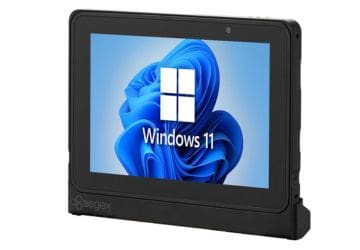
If you are searching for an intrinsically safe tablet solution rated for stringent hazardous environments , we have an attractive new option for you. The 100M rugged Windows tablet from Aegex Technologies is certified for C1D1 and ATEX Zone 1 and Zone 0. It’s loaded with useful features for users in a hazardous area / ATEX zone, including a capacitive touch screen, tough aluminum case, and Win11 OS.
Key Features of the Aegex 100M Tablet PC
The 100M Aegex tablet will accommodate your software and your working requirements:
Certified ATEX/IECEx Zone 1, Zone 0, and Class I, Div 1
Windows 11 operating system
8GB RAM
Rated for operating temperatures -20C to 55C!
Capacitive touch screen for gloves or pen
Ergonomic design improves grip
Suitable for Your Hazardous Area
Aegex Technologies understands the needs of hazardous environments. Deploy the 100M ATEX tablet in:
FAQ – Frequently Asked Questions About the Aegex 100M and Deploying Tablets in Hazardous Locations
Q: What does “intrinsically safe” mean, and which hazardous locations is the Aegex100M actually rated for? A. Intrinsically safe means the device is engineered so it cannot generate enough electrical or thermal energy to ignite a surrounding explosive atmosphere, even under fault conditions. The Aegex100M is ATEX/IECEx Zone 1 certified, Class I Division 1 rated, and reaches Zone 0 when paired with the Aegex Zone 0 Case. In practical terms, this covers most oil & gas, chemical, pharmaceutical, and utility environments where flammable gases or vapors may be present continuously or during normal operation, not just occasionally.
Q: Can we save money by putting a rugged case on a regular consumer or enterprise tablet instead of buying a certified device? A. No — a protective case addresses drops, dust, and moisture, but it does nothing to change the device’s internal electrical characteristics, which is what hazardous location certification actually governs. A standard tablet’s battery, circuitry, and components can still generate a spark or enough heat to ignite gas or vapor, regardless of what’s wrapped around the outside. Only a device engineered and certified as intrinsically safe, like the Aegex100M, is legally and practically suitable for Zone 0/1 or Division 1 areas.
Q: Will the Aegex100M run the business software and apps our team already uses? A. Yes. The Aegex100M is built to support hundreds of standard business applications, so most existing workflow, maintenance, and inspection software should run without requiring a specialized or stripped-down alternative. This matters for deployment planning, since it typically means field teams can keep their current app stack rather than retraining on hazardous-location-specific software.
Q: How does the Aegex100M hold up to the physical conditions in our facility? A. It’s built with a hard-anodized aluminum casing and a capacitive touchscreen operable with gloves or a pen, and it’s rated for a -20°C to +55°C operating range. That combination is designed for the temperature swings, grime, and glove use common in oil & gas, chemical processing, and utility field environments, without sacrificing touchscreen responsiveness.
Q: What’s different about deploying and supporting certified tablets compared to our regular device fleet? A. The main difference is upfront: certified devices, accessories, and any add-on cases (like the Zone 0 Case) need to match the hazard zone/division of each deployment area, so IT and safety teams should map out zone ratings by location before rollout. Aegex provides datasheets, user guides, and certification documentation to support that planning, along with driver downloads and direct specialist consultation, so the day-to-day management side (app deployment, updates, support) doesn’t need a fundamentally different process from a standard mobility fleet.
Struggling with Management of Your Shared Enterprise Mobile Devices?
How do your users access their mobile computers and tablets? Is there a mobile device access and security solution in place which prevents unauthorized access? Is the security profile based upon the user’s role, or is it set by device? Do you utilize a multifactor login to enhance security? Many companies have found that typical device management practices leave the organization at risk for device loss, waste, and security challenges. In this environment, Zebra Technologies created Identity Guardian, an authentication solution which is specifically targeted for enterprise users using a mobile Zebra device such as the MC9400 or MC3400.
The Challenges with Shared Mobile Device Authentication
In most warehouse and industrial environments, devices are shared by users across different shifts. The same user will likely use a different mobile device each day. So how do your users sign into devices? The typical approaches each have shortcomings:
No device passcode – Complete lack of device control
Shared PINs – Loss of accountability for individual users
Complex PINs and passwords – Difficult for users to remember, encourages ‘workarounds’
Biometric authentication – Support single users, not shared users
Storing data in the cloud – Creates liability concerns around users’ personal information
How Identity Guardian Works and Adapts to Your Organization’s Device Strategy
Zebra Identity Guardian resides on your mobile devices. The authentication process is simple, and slightly different depending on whether you have shared or personally assigned devices. You have the option of utilizing a facial biometric to avoid shared PINs and passwords:
Shared Devices
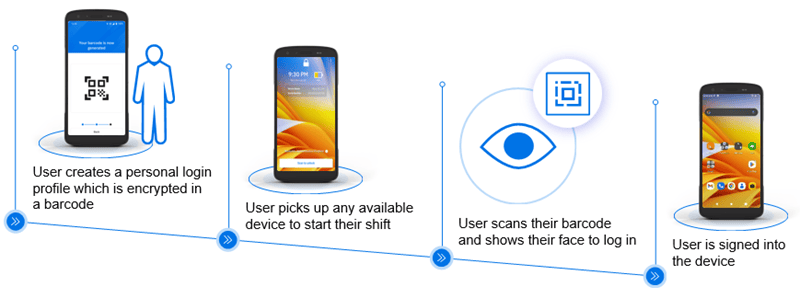
If your organization uses a pool of devices, with users randomly picking a device for each shift, you will benefit from a solution which can authenticate individual users rather than using a shared password. This graphic shows the Identity Guardian process for shared device biometric authentication:
Individually-Assigned Devices
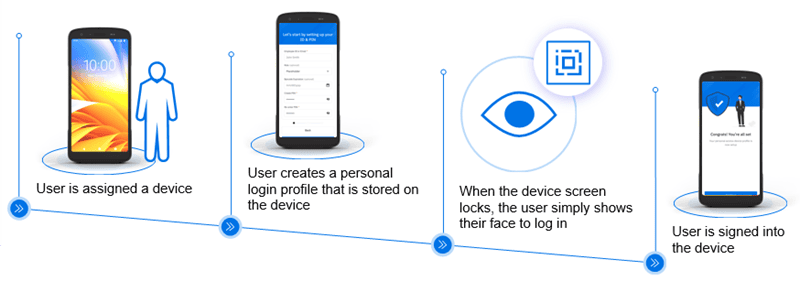
If your organization assigns specific devices to specific users, Identity Guardian can adapt to create a secure yet user-friendly authentication process, as shows below:
Identity Guardian Creates Visibility to Your Devices
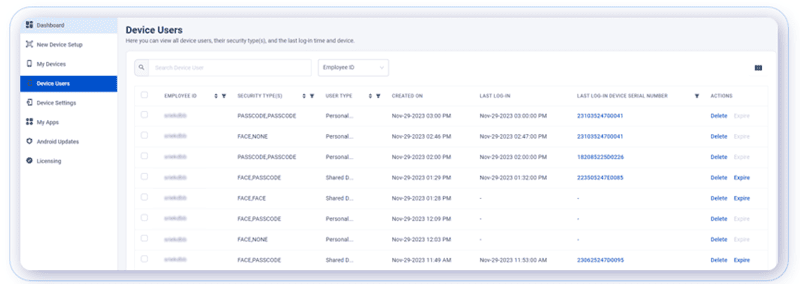
From an IT management perspective, Identity Guardian provides a huge benefit of easy visibility into which devices are being used by which users. This will save time and effort in locating and trouble-shooting device issues and also creates accountability for your users if devices are lost, not returned, or damaged on their watch.
Sample screen from Identity Guardian management interface:
Primary Benefits of Identity Guardian Solution
Accountability – Better understand user activity and track device sign-ins and sign-outs
Data protection – Multiple layers of protection keep your user and company data secure
Application support – Integrated with IdPs to simply authentication by leveraging single sign-on (SSO).
Familiar user experience – A common login makes it quick to train users
Increased visibility – Gain a clear view of all devices in or out of service and all user profiles
Convenient and secure – Zebra Technologies seamlessly merges biometric authentication with multifactor login protocols
FAQ – Frequently Asked Questions About Device Authentication and Zebra Identity Guardian
Q: What does “device authentication” actually mean for a warehouse or distribution environment, and why does it matter more than a standard PIN or password? A. Device authentication verifies who is holding a mobile computer or tablet before it grants access to business apps, data, or a network session — using something more reliable than a shared password everyone knows. In shared-device environments (think a rugged handheld passed between shift workers on a warehouse floor), standard passcodes are easy to forget, easy to share, and impossible to audit. A platform like Zebra Identity Guardian replaces that weak link with facial biometric recognition, PIN, or barcode-based login, so every session on every device is tied to an actual identified user — not just “whoever picked up the scanner.”
Q: Do we need fingerprint or facial recognition hardware, or can we mix authentication methods? A. Identity Guardian is built around facial biometric authentication as the primary method, layered with PIN/passcode, barcode scan-to-unlock, and single sign-on (SSO) through providers like Microsoft Entra ID, Okta, or PingID. Most organizations don’t run one method exclusively — a common approach is biometric-first login with a barcode or PIN fallback for edge cases (gloved workers, cold-storage environments, or damaged cameras), so the deployment stays practical on the floor rather than just in the spec sheet.
Q: How does this work on devices that get handed off between multiple employees across shifts? A. This is the scenario the platform is built for. Identity Guardian supports shared-device user switching with session isolation, meaning each worker’s login, app access, and data stay separate even though they’re using the same physical handheld. On assigned devices, credentials are protected within the Android security framework; on shared devices, a personal barcode managed by the individual user adds an additional layer so one worker’s session data isn’t visible to the next. That separation is what makes shift-based deployments auditable instead of a shared free-for-all.
Q: Will this integrate with the MDM and identity systems we already have in place? A. Yes — Identity Guardian is designed to sit inside your existing device and identity stack rather than replace it. It integrates with Zebra DNA Cloud for device and user administration, works alongside enterprise MDMs such as SOTI MobiControl, and connects to identity providers for SSO. For most CSSI clients, that means authentication policy gets layered onto the MDM environment you’re already running, not bolted on as a separate system to manage.
Q: Beyond security, what’s the business case — how does this show up in accountability, compliance, or day-to-day productivity? A. The immediate win is accountability: every device session is tied to a verified user, which gives IT and operations leadership a real audit trail of who accessed what device and when — useful for compliance requirements and for investigating shrinkage, errors, or misuse. On the productivity side, biometric and SSO login remove the friction (and help-desk tickets) that come with forgotten or shared passwords, while features like device alarms and remote sign-out reduce the operational risk of lost or misplaced hardware. The net effect is fewer credential-related slowdowns on the floor and a clearer security posture for leadership.
Earn Cash Back When Upgrading to New Honeywell Mobile Computers & Printers
As you plan your 2025 purchases of handheld computers and printers, it’s good to know that, if you are upgrading from older equipment, you have the ability to reduce your overall purchase cost with trade-in rebates. We’re pleased to announce that Honeywell has implemented a trade-in program for 2025. You can receive cash back when purchasing new Honeywell equipment by trading in qualifying old devices. Your old equipment can be Honeywell or competitive brands.
Examples of 2025 Honeywell Trade-In Rebates
Rebates vary depending on the new device you are purchasing. Savings can be substantial. Here are a few examples:
$200/unit when purchasing a Honeywell CW45 wearable mobile computer
$350/unit when purchasing a Honeywell Industrial label printer
Please refer to the trade-in program data sheet below. If you’d like to discuss your options with Honeywell’s line of mobile computers and label printers, please contact the Honeywell experts at CSSI to get started!
FAQ – Frequently Asked Questions About Using a Trade-In Program
Q: What is the Honeywell Trade-In Program, and how does it actually reduce our upgrade costs? A. The program lets you trade in old Honeywell or competitive-brand devices for cash back when you purchase new Honeywell mobile computers, wearable computers, or industrial label printers. Instead of treating your legacy fleet as a sunk cost, the trade-in credit is applied directly against the purchase of new equipment, lowering your net spend on the upgrade.
Q: Which of our devices are eligible to trade in, and do they have to be Honeywell brand? A. No — both old Honeywell equipment and competitive-brand devices can be traded in. The rebate is tied to what you’re buying, not what you’re trading in, so a fleet that mixes brands or has been patched together over the years can still qualify.
Q: How much credit can we expect per device? A. Rebate amounts vary by the new device purchased. As examples, trading in toward a new CK67 mobile computer earns $250 per unit, a CW45 wearable mobile computer earns $200 per unit, and a Honeywell industrial label printer earns $350 per unit. Because credits scale with the new equipment tier, a full fleet refresh across computers and printers can add up to meaningful budget relief.
Q: Is there a deadline to take advantage of the program? A. Honeywell hasn’t published a fixed end date for this trade-in initiative, but rebate programs like this are typically time-limited and subject to change. Businesses planning an annual hardware refresh should treat the current terms as a reason to move sooner rather than later, and confirm active rates before finalizing a purchase.
Q: How do we find out which of our devices qualify and what we’d receive? A. Because eligible trade-in models and rebate amounts vary by the new equipment selected, the most reliable next step is to contact CSSI Technologies directly. We can review your current mobile computer and printer fleet, match it against qualifying new models, and put together a specific trade-in quote as part of your upgrade planning.
Better Management of Mobile Device Fleets with Zebra’s Storage Solution
As businesses acquire growing fleets of mobile computers and tablet PCs, effective management of these devices presents challenges. Enterprises often struggle with ensuring devices are adequately charged, tracking who has last signed out devices, and maintaining security to keep the company assets safe.
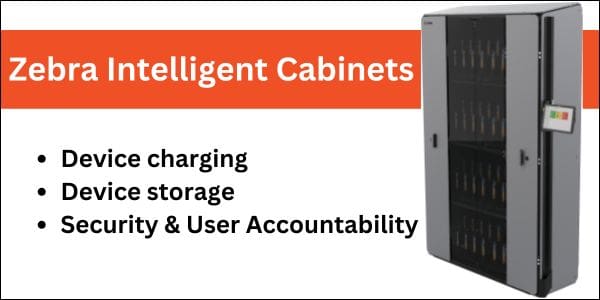
These challenges can lead to increased operational costs: workers have downtime due to devices which aren’t adequately charged, and economic costs due to device loss or theft. Zebra Technologies addresses these issues with its Intelligent Cabinets product line, offering a comprehensive solution for storage, charging, and management of your Zebra mobile computers and tablets.
Note: Since this article was published, Zebra has renamed Intelligent Cabinets to Guardian Cabinets.
Challenges in Managing Mobile Computers
Companies deploying numerous mobile computers face several hurdles:
Device Tracking: Without a centralized system, keeping tabs on each device’s location becomes cumbersome, increasing the risk of loss or misplacement.
Charging Management: Ensuring all devices are charged and ready for use is critical. Inconsistent charging can lead to downtime, affecting productivity.
Security Concerns: Unauthorized access or theft of devices can compromise sensitive data and lead to financial losses.
These challenges not only disrupt workflows but also escalate costs related to device replacement, repairs, and operational inefficiencies. That’s where the Intelligent Cabinets storage solution steps in:
Zebra’s Intelligent Cabinet Solution
Zebra Intelligent Cabinets provide an integrated approach to these challenges by offering:
Secure Storage: Customized cabinets and Zebra intelligent racks ensure devices are stored safely, reducing the risk of loss or damage.
Efficient Charging: Built-in charging capabilities guarantee that devices are powered and ready for deployment at the start of every shift.
Automated Management: The system automates device tracking and access management, streamlining operations and enhancing security.
Zebra Intelligent Cabinets are ideal for use in logistics, manufacturing, the warehouse, and retail environments. By consolidating devices into a centralized system, Zebra’s solution enhances device readiness and operational efficiency.
Key Features of the Intelligent Cabinet Product Line
Configurability: The modular design of Zebra’s cabinets allows businesses to customize storage solutions to fit various device types and quantities, ensuring optimal space utilization.
Device Monitoring: Integrated software provides real-time insights into device status, including battery levels and usage patterns, facilitating proactive management.
Charging Options: The cabinets are equipped with power distribution units, ensuring that all stored devices are charged simultaneously, eliminating downtime due to uncharged equipment. You can utilize the correct charging cradles for your Zebra device models.
Security and user accountability: Enhanced security features, such as key barrel locks and the Zebra Access Management System (ZAMS), control and monitor device access, reducing unauthorized usage and potential theft.
Ensuring User Accountability with ZAMS
The Zebra Access Management System (ZAMS) is a pivotal component in promoting user accountability. This software solution automates device access management by:
User Authentication: Requiring workers to authenticate before accessing devices, ensuring that only authorized users can retrieve equipment.
Usage Tracking: Recording which user has taken which device and when, fostering a sense of responsibility and enabling quick issue resolution.
Battery Status Monitoring: Providing visibility into device battery levels, allowing users to ensure devices are adequately charged before use.
By implementing ZAMS, organizations can significantly reduce device loss and damage, leading to a lower total cost of ownership.
Hardware Requirements for ZAMS
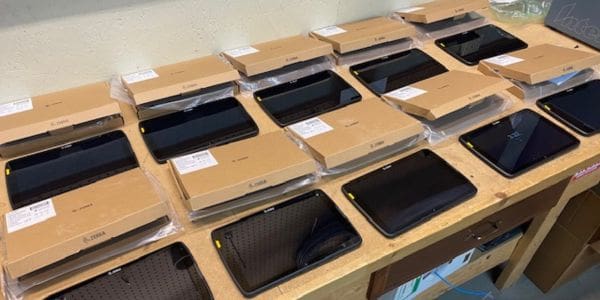
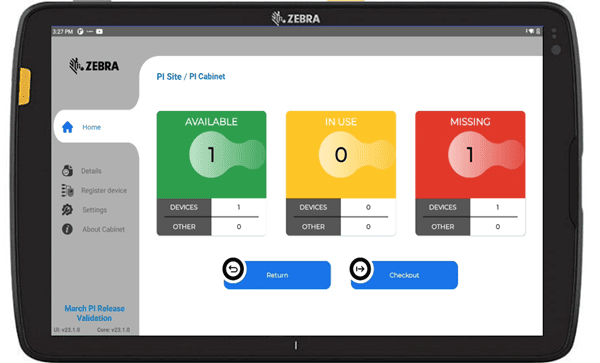
ZAMS can run on Zebra Tablet PCs such as the ET60 , or the Zebra CC6000 Kiosk computer. The device is mounted on the outside of the cabinet, and as seen in the screen graphic above, it provides at-a-glance visibility into quantities of devices which are available, in use, or missing, allowing managers to quickly remedy problems. Behind the scenes, ZAMS keeps track of device usage, enabling audits and accountability if devices go missing.
Learn More About the Intelligent Cabinet Mobile Device Storage Solution
FAQ – Frequently Asked Questions About Intelligent Cabinets, now called Zebra Guardian Cabinets
Q: What is a Guardian Cabinet, and how does it help manage our mobile device fleet? A. Guardian Cabinets are Zebra’s enterprise device storage and management solution, built to keep mobile computers, tablets, and mobile printers (including Zebra’s TC2x, TC5x, and TC7x device families) charged, secured, and accounted for between shifts. Rather than devices being left scattered across a warehouse floor or checked out informally, Guardian Cabinets centralize storage in a single, purpose-built rack system — giving IT and operations leadership a consistent process for device deployment and return.
Q: How many devices can a Guardian Cabinet hold, and does it scale to our operation’s size? A. Guardian Cabinets are available in six sizes, from Compact to Extreme, supporting anywhere from 5 to 100 units depending on device type and cradle configuration. Single- and double-sided modular racks can each hold 30 to 60 devices in a mix of configurations, so a distribution center running a large fleet and a smaller cold storage or manufacturing site can both be outfitted with a right-sized solution rather than an off-the-shelf cabinet that doesn’t match the operation.
Q: Will devices be fully charged and ready at the start of every shift? A. Yes. Guardian Cabinets include integrated battery charging, so devices dock, charge, and stay ready for the next shift without staff needing to manage charging separately. For operations running multiple shifts, this removes one of the more common causes of delayed shift starts — workers waiting on a charged device or hunting for one that wasn’t returned to a charger.
Q: How do Guardian Cabinets improve device security and accountability? A. Each cabinet provides multiple layers of security, including mechanical cradle locks compatible with intelligent racks, so devices can’t simply walk off the floor. Just as important, the system supports personal ownership and accountability by tracking which user is assigned to which device. That visibility is often what reduces loss, damage, and replacement costs more than the physical lock itself — when a device is tied to a specific user, it tends to get treated with more care.
Q: Can we manage and monitor devices remotely, and does this integrate with our existing device management approach? A. Guardian Cabinets connect to the cloud, enabling remote management and reporting from anywhere. The system runs on Device Guardian Access Management software, which automates device administration, manages access control, and tracks individual assignments and usage through a cloud-based interface. For IT teams already running an MDM platform, this adds a layer of physical device accountability that complements software-based fleet management — giving both IT and warehouse operations leadership a clearer picture of where devices are and who’s responsible for them.
New Ultra-Rugged Barcode Scanner from Honeywell
Honeywell has just announced the latest update to its Granit line of super-rugged industrial barcode scanners. The Granit Ultra 2100i is the new best-in-class for demanding environments. It boasts exceptional scan performance, ultra durability, and high-capacity battery performance to keep your team productive all day long.
Key Features of the Granit Ultra 2100i
The Granit Ultra 2100i is packed with valuable features:
Reads a broad range of barcode types and sizes – both standard and low definition, 1D/2D
Range of scanning distances – SR model for ‘standard range’ / close range, XLR for extra long range scanning – scan the top rack from the floor
Option to read multiple barcodes simultaneously – helpful based on your task and workflows
Intuitive use – Green LED aimer dot makes it easy to see where you are pointing the scanner
Rugged – 10′ drop spec, and IP65/68 sealing
High-capacity battery – Use scanner for multiple scan-intensive shifts on a single charge!
FAQ – Frequently Asked Questions About the Honeywell Granit Ultra 2100i Barcode Scanner
Q: What makes the Granit Ultra 2100i different from other corded barcode scanners on the market? A. The Granit Ultra 2100i uses AI-driven scanning that delivers up to 45% faster scan speeds than comparable models, and it can read 1D, 2D, Digimarc, and OCR codes — including Direct Part Mark (DPM) codes etched directly onto components. It also won the 2025 Red Dot Award for design, and Honeywell markets it around three pillars: scan performance, durability, and ease of use. For businesses scanning damaged, dirty, curved, or hard-to-read labels on a high-volume line, that combination of speed and code-type flexibility is the main draw over a standard imager.
Q: Which scan range option should our business choose? A: The 2100i comes in four range variants, so the right choice depends on your workflow: HD (High-Density) reads codes as small as 10mil Code128 at 0–147mm, ideal for close-up work like small parts or labels; SR (Standard Range) covers 0–1.0m for general-purpose scanning at a counter or workstation; XR (Expanded Range) extends to 2.8m for picking off shelves or pallets; and XLR (Ultra Long Range) reaches up to 7.5m, suited to scanning pallets in racking or items on the far side of a dock or conveyor. Matching the variant to your actual scan distances avoids paying for range you don’t need — or under-spec’ing for a task like cold storage racking or high-bay warehousing.
Q: Is this scanner rugged enough for a warehouse, cold storage, or manufacturing floor? A: Yes. The Granit Ultra 2100i is built for industrial environments: it survives 3m (10ft) drops per MIL-STD-810G, withstands 7,500 tumbles at 1 meter, and carries an IP65/IP68 rating for dust and water resistance. It also operates from -30°C to 50°C (with storage down to -40°C), and tolerates up to 95% relative humidity non-condensing — so it’s rated for cold storage and freezer applications as well as standard warehouse, distribution, and manufacturing settings.
Q: What’s involved in connecting and configuring the scanner during implementation? A: The 2100i is a corded (tethered) scanner — it connects via USB, Serial, or KBW interfaces and draws power directly from the host connection (2.15W over USB 2.0), so there’s no battery to manage or charge and no wireless pairing to troubleshoot. Configuration is done by scanning setup barcodes, and the Data Format Editor lets you define custom multi-code reading sequences for applications that need to capture several codes in a specific order (for example, a shipping label plus a serial number). Because it’s a known, wired connection rather than a wireless device joining your network, IT deployment is typically simpler than provisioning a batch of mobile computers.
Q: What kind of support and protection comes with the purchase? A: The Granit Ultra 2100i ships with a 3-year manufacturer warranty from Honeywell. As an authorized Honeywell PSS dealer, CSSI Technologies can help with sourcing, configuration for your specific workflow (range variant, interface, data formatting), and post-purchase support — which matters for a device meant to run daily in assembly, picking, packing, vehicle loading, and sortation environments.
New Wi-Fi & Cellular Mobile Computer from Datalogic: Memor 12 & 17
Are you seeking mobile yet rugged computing power at an attractive price? Good news: Datalogic just announced the Memor 12-17, an excellent device choice for your mobile work staff who need handhelds which can stand up to the bumps and drops of day-to-day use.
This newest member of the Memor family includes Datalogic’s famous scanning technology, along with computing power which will carry you all the way through Android 18. Datalogic has been making big strides with its recent product launches, so it’s well worth a look for your next mobile computing project. The team at CSSI are mobile computing experts and can guide you in your device selection.
Key Features of the Memor 12-17
In addition to excellent scanning capability and Datalogic’s patented ‘Green Spot’ aimer, the Memor has attractive features for its price point. A few highlights are:
Display: 6″ Gorilla Glass 7 screen
Connectivity: Wi-Fi 6e (Memor 12) and 5G or Wi-Fi 6e (Memor 17)
Rugged ‘enough’: 6-foot drop spec
Future-proof: Supports up to Android 18
Download the data sheet below for the full device specs.
Great Applications for the Memor 12-17
The Memor 12-17 shines in field/remote use applications where you need mobility and scanning capability along with reasonable durability, but don’t require the more extreme rugged construction of pricier models such as the Memor 30-35. Test it out for:
Transportation & Logistics: Proof of delivery, last-mile delivery, field service
Healthcare: Admittance, bed care, electronic medical records
Contact CSSI to Set Up An Evaluation
The best way to evaluate the new Datalogic Memor 12-17 handheld is with an evaluation unit. Contact CSSI to discuss your application and schedule a test of this powerful new mobile computer!
FAQ – Frequently Asked Questions About the Datalogic Memor 12-17 Handheld Computer Series
Q: How rugged is the Memor 12-17, and can it hold up in demanding daily use? A. Yes. The Memor 12-17 is built to MIL-STD 810H standards for drop and tumble resistance, carries IP65/IP67 ratings for dust and water protection, and uses Corning Gorilla Glass 7 on the display to guard against scratches and impact damage. For businesses running devices through long shifts, frequent handoffs, or outdoor conditions, this means fewer cracked screens, less unplanned downtime, and a lower total cost of ownership compared to consumer-grade devices.
Q: Will the Memor 12-17 speed up scanning and data capture for frontline workers? A. It’s designed to. The device uses Datalogic’s latest Halogen 2121DL scan engine with DeepSight decoding technology, which is built to read barcodes accurately even in variable or poor lighting. Combined with Green Spot good-read feedback and GS1 Digital Link readiness, workers spend less time re-scanning and more time moving through tasks — a direct productivity gain for high-volume retail, transportation, and healthcare workflows.
Q: What connectivity does the Memor 12-17 offer, and is it ready for modern enterprise networks? A. Yes. It supports WiFi6E and 5G connectivity, giving IT teams a device that’s ready for both current network infrastructure and where enterprise wireless is heading. It also includes multi-side NFC reading and a fast-locking GPS system, which matters for use cases like asset tracking, mobile payments, or location-based workflows across a distributed workforce.
Q: How long can a business expect to use the Memor 12-17 before it needs to be replaced? A. Datalogic backs the Memor 12-17 with 4+4 years of hardware and software support, with a software runway up through Android 19. For IT and operations leaders, that’s a meaningfully longer deployment window than typical consumer devices offer, which helps stretch capital investment further and simplifies long-term device lifecycle planning.
Q: Is the Memor 12-17 a good fit across different industries, or is it built for one specific use case? A. It’s built as a flexible platform. The Memor 12-17 line is designed for front-facing applications across retail, transportation and logistics, and healthcare — including white, healthcare-specific (HC) variants for regulated clinical environments. With a 6″ FHD display, dual cameras, and a full-touch Android experience, it’s suited to customer-facing associates, delivery and logistics staff, and clinical or facility workers alike, which can simplify standardizing on a single device family across a mixed workforce.
Using Staylinked to Create Color Touch Screens from TE Interfaces
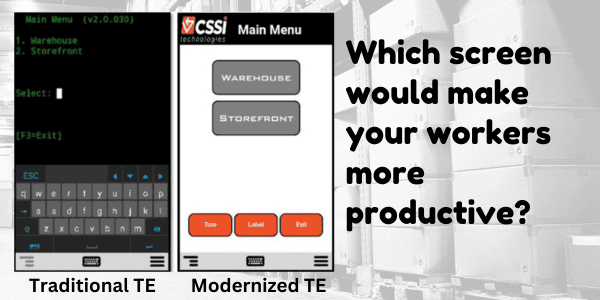
Do your warehouse mobile computers connect via telnet (TE)? We’re excited to tell you about an option to create a modern touch interface for your ‘green screens’ without breaking your budget or consuming your IT resources! See how it works and looks in the side-by-side video below:
Why Modernize Mobile Device Screens?
Operations everywhere use mobile device interfaces which were designed in a pre-touch screen world. With modern color touch screens, there is massive potential to improve the GUI with immediate benefit:
Reduce user errors and new user training time
Eliminate keystrokes and improve workflows
Improve user ergonomics
Telnet Screen Modernization… without software rewrites!
Updating legacy software can be expensive and complicated. The good news is that CSSI offers software which resides either on-device or on server, and acts as an intermediary between your mobile devices and back-end systems. You don’t need to touch your legacy software. This can get you up and running quickly and painlessly.
CSSI Can Help!
Would you like to explore your options for improving your telnet mobile device screens? Consult with the Android mobile experts at CSSI, we’d be glad to discuss your situation and propose options. Just contact CSSI to get started with telnet modernization.
FAQ – Frequently Asked Questions About Using StayLinked SmartTE to Modernize Terminal Emulation (TE) Screens
Q: What is SmartTE, and how does it modernize our terminal emulation (TE) screens? A. SmartTE is StayLinked’s terminal emulation solution that transforms legacy “green screen” applications into graphical, touchscreen-friendly interfaces. Using dynamic screen generation, it automatically converts existing TE screens into modern formats your workforce can navigate intuitively, without altering the underlying data or logic those screens present.
Q: Do we need to replace our host systems or backend infrastructure to deploy SmartTE? A. No. SmartTE modernizes the presentation layer only, so your existing host systems, WMS, and enterprise applications continue running exactly as they do today. This makes it a low-risk way to update the user experience without the cost or disruption of a full infrastructure overhaul.
Q: Will switching to SmartTE disrupt daily operations or require extensive retraining? A. Modernized screens are designed to be more intuitive than the green-screen interfaces they replace, which typically shortens onboarding rather than lengthening it. SmartTE also includes a drag-and-drop Custom Screen Designer, so IT teams can tailor layouts to match existing workflows rather than forcing operators to learn a new process from scratch.
Q: How does SmartTE maintain reliability if our facility has spotty wireless coverage? A. SmartTE is built on what StayLinked describes as the industry’s most advanced terminal emulation architecture, engineered around session persistence that virtually eliminates dropped sessions between mobile devices and the host. That means workers moving through warehouses, cold storage, or dock areas with inconsistent signal stay connected without losing their place in a transaction.
Q: What devices are compatible with SmartTE, and how is it licensed? A. SmartTE supports rugged and mobile devices from manufacturers including Zebra, Honeywell, and Datalogic. Licensing is based on active device connections through a centralized architecture, so you’re only paying for devices actually in use at a given time. StayLinked also offers a free trial with no credit card required, so teams can evaluate the modernized experience before committing. Contact CSSI to discuss a StayLinked trial.