How Ready-To-Use Indicators Provide End-Customer Reassurance

What are ready-to-use indicators?

Ready-to-use indicators are small cards which contain temperature-sensitive areas which provide a visual signal triggered by environmental conditions. For example, a mark may change color if the temperature exceeds a certain threshold, or a different mark may appear if freezing conditions have been encountered. Indicator cards are available in various configurations, each intended to provide useful information in certain shipment workflows.

Ready to use indicators are one of several varieties of environmental sensors available from CSSI which prevent the consumption of unsafe foods or medicine. End-users benefit from improved confidence in the quality of the items received, and thereby improve their opinion of your brand.
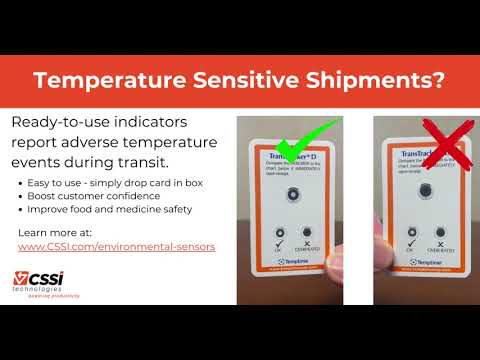
YouTube player

What types of ready-to-use indicators are available?

Indicators are available in a variety of configurations, each intended to report on specific environmental situations:

  1. Heat indicators
  2. Freeze indicators
  3. Shipment temperature indicators
  4. Food temperature indicators
  5. Blood temperature indicators

This indicator cards require no batteries or power. They work through the application of certain chemicals or inks which are affected by temperature. CSSI is able to help you find or specify the right type of indicator for your application.

What are great applications for ready-to-use indicators?

Ready-to-use indicators are ideal for situations where you need to provide assurance that acceptable temperature ranges are maintained for items during shipping or handling, particularly if there is a high volume of such items which make the cost per unit important. These indicator cards are disposable and inexpensive, so they are suited for one-way trips and customer shipments. Indicators are great for all situations where you need to ensure that food or medicine is properly handled after it leaves your direct control.

Some typical applications might include:

  • Shipment of frozen food
  • Shipment of temperature-sensitive food or medicine
  • Handling of blood samples for which proper temperatures must be maintained

Contact CSSI to discuss ready-to-use indicators

Complete the form to connect with CSSI for a conversation on ready-to-use indicators. We are able to provide you with samples for testing, and ensure that you specify the right type of card for your application.

Q: What are Zebra Ready-To-Use Environmental Indicators, and what problem do they solve?

A. They are simple card or self-adhesive temperature indicators that give you visibility into the temperature exposure of products such as medications and vaccines. They reveal when products have been exposed to excessive heat or freeze events, so your team can spot a temperature excursion at a glance instead of assuming a shipment stayed in range. The indicators are manufactured by Zebra/Temptime and support a variety of stability profiles.

Q: How do the indicators show that a product was exposed to excessive heat?

A. Time-temperature indicators (TTIs) and threshold heat indicators give an irreversible visual indication when temperature-sensitive products are exposed to excessive heat. Because the change cannot be reversed, an excursion that happened earlier in transit or storage is still visible when the product reaches your dock, even if the temperature has since returned to normal. That visual feedback supports decisions about product integrity throughout the product’s lifecycle.

Q: Can the indicators detect freeze events as well as heat?

A. Yes. FREEZEmarker freeze indicators provide an easy-to-read visual indication when temperature-sensitive products are exposed to freeze events. This matters for products that are damaged by freezing, where a cold excursion can be as costly as a warm one and is otherwise hard to detect after the product thaws.

Q: Which indicator fits my product type or application?

A. Zebra groups the indicators by use:

  • Heat exposure: TTIs and threshold heat indicators for products sensitive to excessive heat.
  • Freeze exposure: FREEZEmarker indicators for freeze-sensitive products.
  • Food: Fresh-Check indicators are temperature-sensitive labels that give a visual indication when food is subjected to temperatures that can affect freshness.
  • Blood products: Safe-T-Vue indicators show when blood products, plasma, and RBCs have reached or exceeded 6°C or 10°C.
  • Shipments: TransTracker and Electronic Temperature Sensors monitor temperature-sensitive products across the cold chain, from manufacturer to distributor and on to the hospital, clinic, pharmacy, or end user.

Q: What operational and financial benefits can we expect?

A. Zebra positions the indicators as a way to improve process efficiency and protect margins from re-shipments of product inadvertently exposed to damaging conditions. In practice, receiving and quality staff get a clear visual basis for accept, hold, or reject decisions without specialized equipment. Zebra also describes the food indicators as a cost-effective monitoring option, which makes item-level or case-level monitoring practical where electronic sensors on every unit would not be.

Q: How Can I Obtain Samples of Zebra Ready-To-Use Indicators?

A. CSSI is an authorized Zebra reseller. Contact CSSI to discuss your need, and we will work with you to arrange samples for testing and evaluation.

CSSI is a Reliable Source for Quality Labels & Print Supplies

Honeywell recently announced that it was closing its print supplies business effective in Q2, 2024. Honeywell has been a long-time significantly supplier of labels, tags, and print supplies, so this announcement means that many companies will have to find new suppliers for these items. In particular, companies which have custom or specialized labels and tags will need to act quickly to ensure that samples from new supplies can be qualified.

The last day to place an order for products is November 17, 2023. Full Honeywell media closure will occur by Q2 2024. We recommend planning ahead to avoid supply shortages.

For any current CSSI customers affected by this change, CSSI is already working on alternate supplies for any Honeywell products you source through us, and we have likely already been in touch with you. Our team will be contacting you to discuss alternative suppliers and arrange any necessary testing with you. We will then work with you through the transition to the new supplier.

CSSI Is a Print Supplies Expert

CSSI has years of experience providing thermal printers as well as labels and print supplies. We have always worked with a range of the industry’s top consumables suppliers. If you are in need of a reliable source for supplies due to the Honeywell media closure, please contact us to review options for labels, tags, receipt media, wristbands, ribbons, and more.

In an age where the global pharmaceutical industry is expanding and becoming increasingly complex, ensuring the safety and integrity of the drug supply chain has become a paramount concern. To address these concerns, the Drug Supply Chain Security Act (DCSCA) was enacted, aiming to enhance the security and traceability of prescription drugs across the United States. This article delves into the key aspects of the DCSCA, its implementation, benefits, and the preparedness required from drug manufacturers and pharmacists.

The November 2023 compliance deadline is rapidly approaching, so now is the time to take action to ensure your compliance.

1. What is the Drug Supply Chain Security Act, or DCSCA?

The Drug Supply Chain Security Act (DCSCA) is a piece of legislation signed into law by the United States Congress in 2013 as part of the Drug Quality and Security Act. The primary objective of the DCSCA is to establish a comprehensive system for tracing and verifying the authenticity of prescription drugs as they move through the supply chain, from manufacturers to patients.

2. Why is the DCSCA being implemented?

The implementation of the DCSCA is a response to the growing threat of counterfeit, adulterated, and stolen pharmaceutical products infiltrating the legitimate drug supply chain. These illicit activities not only jeopardize patient safety but also undermine the integrity of the pharmaceutical industry. By implementing the DCSCA, the government aims to ensure that patients receive safe and effective medications while maintaining the credibility of the pharmaceutical supply chain.

3. When is the DCSCA being implemented, and who is affected by it?

The DCSCA implementation occurred in phases, with full compliance expected by 2023. The act impacts all entities involved in the distribution of prescription drugs, including manufacturers, wholesalers, repackagers, and dispensers. This encompasses a wide range of stakeholders, from large pharmaceutical corporations to local pharmacies, all of whom must adhere to the new regulations to maintain compliance.

4. What are the five top benefits of the Drug Supply Chain Security Act (DCSCA)?

Enhanced Patient Safety

The DCSCA’s robust traceability system allows for rapid identification and mitigation of potentially unsafe or counterfeit drugs, minimizing the risks to patient health.

Improved Supply Chain Traceability

The act mandates the use of unique identifiers and barcodes, enabling stakeholders to track products at every step of the supply chain, reducing the likelihood of diversion or counterfeit products entering the market.

Efficient Recalls

In the event of a product recall, the DCSCA facilitates swift and accurate identification of affected lots, helping manufacturers and distributors remove potentially harmful products from circulation more effectively.

Reduced Counterfeit Drugs

The DCSCA’s stringent requirements make it harder for counterfeiters to infiltrate the supply chain, thereby protecting both patients and the industry from the detrimental effects of counterfeit drugs.

Preservation of Industry Integrity

By establishing a transparent and secure supply chain, the DCSCA maintains consumer trust in pharmaceutical products and the businesses that produce and distribute them.

5. What do Drug Manufacturers and Pharmacists need to do to comply with the DCSCA?

Both drug manufacturers and pharmacists play pivotal roles in ensuring compliance with the DCSCA. Manufacturers are required to affix product identifiers, such as serial numbers and barcodes, on individual drug packages. They must also provide transaction information, history, and statements to wholesale distributors, ensuring the traceability of products.

Pharmacists, on the other hand, need to verify the legitimacy of drug products before dispensing them to patients. They should be well-versed in handling serialized drug packages and understanding the transaction history associated with the products they dispense. Training and education are crucial for pharmacists to seamlessly integrate DCSCA requirements into their daily operations.

6. How can CSSI help with DCSCA compliance?

DCSCA compliance will require both manufacturers and pharmacies to have reliable, quality barcode scanners or RFID readers on hand. CSSI is the leading source for scanner guns and RFID systems from top manufacturers such as Zebra Technologies. Not just a source for equipment, CSSI can assist you in configuring, deploying, and maintaining these devices throughout their lifecycle.

CSSI can also provide quality barcode label printers and label stock to enable on-demand printing of product labels.

Conclusion

In conclusion, the Drug Supply Chain Security Act represents a significant stride towards safeguarding the pharmaceutical supply chain and patient well-being. By mandating stricter traceability and accountability measures, the DCSCA brings numerous benefits, from heightened patient safety to industry-wide integrity. Manufacturers and pharmacists must proactively familiarize themselves with the requirements of the act to ensure a seamless transition to a more secure and trustworthy drug supply chain. As the DCSCA continues to roll out, its positive impacts on patient health and the pharmaceutical industry’s reputation are poised to be realized.

Contact CSSI for DCSCA compliance help

To discuss your needs for Drug Supply Chain Security Act compliance, please contact CSSI

Q: Where do DSCSA compliance deadlines stand today, and does my organization still need to act?

A. Most trading partners are already past their deadlines. Manufacturers, repackagers and wholesale distributors saw their FDA exemptions expire in 2025. Large dispensers, meaning pharmacies with 26 or more full-time employees across the same corporate entity, should have met the interoperability requirement as of November 2025. The main remaining group is small pharmacies. On August 6, 2026, the FDA extended its exemption for small dispensers (those whose owning company has 25 or fewer full-time pharmacists and pharmacy technicians) from November 27, 2026 to November 27, 2027. That extension is not a pause. The FDA has stressed that pharmacies should keep working toward full compliance during the extension period. The agency has also already issued warning letters and criminal indictments for DSCSA violations, so enforcement is real for everyone else.

Q: Why are barcodes so central to DSCSA compliance?

A. The barcode is how a drug package’s identity travels through the supply chain. DSCSA requires manufacturers, wholesale distributors and dispensers to exchange transaction data electronically at the package level, using serialized product identifiers (GTIN, serial number, lot number and expiration date) encoded in 2D DataMatrix barcodes. Every receiving, verification or dispensing step depends on reading that barcode quickly and accurately. Keying the data in by hand is slow and invites errors. A 2D imaging scanner captures all four data elements in one scan and passes them straight to your compliance, ERP or warehouse management software. For this reason, older 1D-only laser scanners are not enough. Your scanning fleet needs 2D imagers that can reliably read small DataMatrix codes, often on curved vials or glossy cartons.

Q: How do rugged mobile computers and scanners help with day-to-day requirements like verification and suspect product handling?

A. Several of the most time-sensitive DSCSA duties happen on the receiving dock or the pharmacy floor. Under the law, organizations must be able to electronically verify product on receipt using the Verification Router Service (VRS), investigate and report suspect or illegitimate product within 24 hours, and keep all transaction records for at least six years. Mobile computers with built-in 2D scanners let workers scan a package and check it against the manufacturer’s data in real time, right where the product is handled. A mismatch can be flagged and the product quarantined immediately, which helps you meet the 24-hour investigation window. Each scan also creates a timestamped digital record of who handled which serialized package and when. That record is very useful in an FDA inquiry, a recall or an internal audit.

Q: Does DSCSA require RFID, or should we stick with barcodes?

A. DSCSA does not require RFID. The product identifier on each saleable package must be in a 2D DataMatrix barcode, so barcode scanning stays the foundation of any compliance program. RFID can still add value alongside barcodes, especially for distributors and larger operations moving high volumes. RFID tags on cases, totes or pallets can be read in bulk without line of sight. This speeds up receiving, shipping verification and cycle counts, and it gives better visibility into where high-value or controlled products sit in the facility. It can also help with aggregation, which links individual serialized packages to the case or pallet that holds them. Many organizations use a hybrid model: barcode scanning for package-level serialization and RFID for faster, wider inventory visibility.

Q: What should an IT director consider when selecting and deploying data capture technology for DSCSA?

A. First, confirm that scanners and mobile computers can read 2D DataMatrix codes reliably, including on small or damaged labels. Second, make sure the devices integrate cleanly with your DSCSA compliance platform, ERP or WMS, so scanned data flows into your EPCIS-based transaction records without manual re-entry. Third, plan for label printing. Barcode label printers and quality label stock are needed for case and pallet labels, aggregation labels and relabeling during repackaging. Fourth, think about long-term management. Mobile device management (MDM), security patching and spare-pool planning keep devices compliant and in service, because a down scanner on a busy receiving dock becomes a compliance risk. Finally, choose a partner who can configure, deploy and support these devices over their full lifecycle, not just ship them.

Special Alert: Customer Challenges When Implementing Android 11 Devices

CSSI Technologies has recently encountered numerous customers who have run into major challenges when attempting to deploy mobile computers running Android 11. These customers discover that applications which have worked with prior versions of Android suddenly will not function.

This problem can occur either when attempting to deploy newly purchased Android 11 devices, or even when older devices return from a manufacturer repair depot upgraded to Android 11, as commonly occurs.

Even if you have not yet upgraded to Android 11 devices, this issue is still relevant to you… because you will face it when you eventually upgrade.

The Android 11 Problem

The root issue results from Google’s implementation of ‘scoped storage’. This is a security measure which changes the way apps can store and access files on a device, with the goal of protecting the privacy of app and user data. Scoped storage was originally introduced with Android 10, but new enhancements delivered with Android 11 enforce greater data protection and have played havoc with some companies’ operations.

Typical issues and questions associated with an Android 11 / scoped storage issue:

  1. Why won’t my provisioning barcodes work on my Android 11 devices?
  2. Why are my device’s configurations no longer working on my Android 11 devices?
  3. Why are my MDM deployment packages not working on my Android devices?
  4. Why won’t my WMS application work on my Android 11 devices.
  5. What new firmware works with my current applications?

Scoped storage is a new Android reality and will be present in future OS versions. So, companies which might skip Android 11 will still encounter it in 13 and beyond.

Working the Scoped Storage Problem With CSSI

The CSSI team has recently worked with numerous companies to solve the scoped storage challenge. We have developed a number of configuration and upgrade methodologies which have enabled customers to get back up and running. We are well-prepared to help you resolve your own Android 11 issues.

Consider the following recent case study…

Case Study – Android 11 Fixed

A major industrial manufacturer with a broadly distributed fleet of mobile devices managed with SOTI MobiControl (MDM) asked CSSI for help. Device configurations had been stable for some time, but when attempting to deploy new handhelds, critical applications would suddenly not work. CSSI researched the issue and determined that it was caused by configurations which would not work under Android 11, the OS installed on the recently purchased devices.

CSSI’s technical team examined the customer’s deployment environment and designed Zebra StageNow and SOTI MobiControl profiles which successfully worked around the issue. This customer is now able to run Android 11 devices side by side with devices on older versions of Android and is prepared for future Android updates as well.

Contact CSSI To Prepare for Android 11

Whether you are already experiencing issues, or are planning to upgrade to new devices, you are welcome to contact CSSI to discuss your configuration. We can help you to determine what issues you will experience with Android 11 and develop a plan to proactively resolve the problem. To learn more, please contact CSSI Technologies.

Q: How can we tell whether our current applications and configurations will break when we move to Android 11?

A. Start with an inventory of everything that reads or writes files on your devices: line-of-business apps, WMS clients, terminal emulators, industrial browsers, MDM agents, and staging profiles. Ask each software vendor directly whether their current release is certified for Android 11 and scoped storage. Then pay close attention to anything that relies on shared folders such as the root of internal storage or the SD card, which is the most common point of failure. Apps that store settings files, log files, or import/export data in common locations are the most likely to stop working. Finally, check which Android API level each app targets, since apps updated to target Android 11 (API level 30) lose the “legacy storage” exception that let many older apps keep working under Android 10.

Q: Should we test before rolling out, and what should a pilot look like?

A. Yes. Never let your first Android 11 device be one headed to the warehouse floor. Set aside a small number of devices in a test environment that mirrors production, including the same Wi-Fi network, MDM policies, staging barcodes, and back-end systems. Run each critical workflow end to end: enrollment, provisioning, app installation, login, scanning, printing, and data sync. Document every failure and its fix before you expand to a pilot group of real users at one site. Only after the pilot runs cleanly through a full shift cycle should you schedule a broader rollout.

Q: Our staging barcodes and MDM packages have worked for years. What has to change?

A. Provisioning tools such as Zebra StageNow and MDM platforms like SOTI MobiControl often push configuration files, certificates, and app settings to specific folders on the device. Under Android 11’s stricter scoped storage rules, many of those destinations are no longer accessible to the apps that need them. In most cases the profiles must be rebuilt to deliver files to approved locations, grant the right permissions, or use the vendor’s managed configuration options instead of loose files. Plan to maintain separate staging profiles for Android 11 devices and for older devices until your fleet is fully transitioned.

Q: Can we run Android 11 devices alongside our existing Android 8, 9, and 10 devices?

A. Yes, and most organizations will have to, since fleets are rarely replaced all at once. Running a mixed fleet successfully requires OS-specific configuration profiles, app versions confirmed to work on every OS in use, and MDM grouping that delivers the correct package to each device. Also keep in mind that devices sent out for repair often come back from the manufacturer’s depot upgraded to a newer OS, so a device that left as Android 10 may return as Android 11. Your process for returning repaired devices to service should include a check of the OS version and re-staging with the correct profile.

Q: Can we avoid this by skipping Android 11 and waiting for a later version?

A. No. Scoped storage is a permanent part of Android, and its restrictions continue in Android 12, 13, and beyond. Skipping Android 11 only delays the work, and in some cases makes it bigger because more changes accumulate between versions. Delay also carries risk: older OS versions eventually stop receiving security patches, and new devices from Zebra, Honeywell, and Datalogic ship with current Android releases. The better approach is to make your applications and configurations scoped-storage compliant now, so future OS upgrades become routine rather than disruptive. CSSI can review your current deployment and help you build a migration plan.

As of May 2023, Zebra has discontinued support for its long-time workhorse Xi4 industrial printer. This means that support and replacement parts are no longer available. If you are one of the many companies utilizing the Xi4, it’s time to update to a newer model so that you don’t risk unplanned downtime.

Best Upgrade Option for Zebra Xi4

Our recommended upgrade option for the Xi4 is the ZT600 family of industrial printers. The ZT600 is packed with Zebra’s latest innovations and brings the performance and durability you require to support your label printing operations. With the help of Zebra’s trade-in program, you can also save up to $350 per printer when you upgrade!

Contact CSSI to Demo the ZT600 Series

Please complete the form at right to setup your demo of the powerful ZT600 series printers. CSSI is able to assist your upgrade process with our Zebra product line expertise and money-saving Zebra trade-in rebates which are available if you act soon.

Q: How does the ZT6 Series relate to the Zebra Xi Series printers we already run?

A. The ZT6 Series is Zebra’s successor to the Xi Series. It keeps the rugged, high-volume design the Xi line was known for and adds a more intuitive interface and a platform built to adapt as your operation changes. If your Xi printers are nearing end of life, the ZT6 Series is the natural replacement.

Q: Will these printers hold up in a demanding warehouse, cold storage, or manufacturing environment?

A. Yes. The ZT6 Series uses steel structural components designed for years of heavy use in industrial conditions, including temperature extremes, dust, and debris. The printers are built for nonstop, high-volume printing on production lines, in distribution centers, and in other harsh settings.

Q: How hard is it for my team to set up and operate the printers?

A. Zebra designed the ZT6 Series with ease of use in mind. A 4.3-inch full-color touch display makes setup, settings changes, and troubleshooting easier, and toggles for adjusting printhead pressure simplify switching between media types. Zebra’s Printer Setup Utilities also help with initial configuration and point out ways to tighten printer security.

Q: Can the printers grow with us if we add RFID or change our labeling processes?

A. Yes. The ZT610 and ZT620 can be upgraded to RFID encoding in the field, and Zebra says the upgrade takes about five minutes. Factory-configured ZT610 RFID and ZT620 RFID models are also available. The series includes two communication slots, field-installable media-handling options, and two USB host ports for plug-and-play peripherals. An optional wireless card adds dual-band Wi-Fi 6 (802.11ax) and Bluetooth.

Q: How can we manage and secure a fleet of ZT6 printers across one or more facilities?

A. ZT6 printers run Zebra DNA, Zebra’s printer software suite for remote management, security, and ongoing updates throughout the printer’s life. Printer Profile Manager Enterprise lets IT find every networked printer and push configurations from a web browser. PrintSecure helps secure connections and block unauthorized access to protect your data and network. Zebra OneCare maintenance plans can be added for extra uptime protection beyond the standard one-year warranty.

Opportunities & Challenges of Wearables in the Warehouse

Warehouse leaders searching for productivity gains and operational efficiency are increasingly turning to the wearable computer and products such as Zebra WS50 wearable computer due to significant increases in worker output. To learn more about the specific benefits of this technology, check out our related article on the top 6 ways wearables can improve warehouse productivity .

However, wearable computers also require some advance thought and planning. How will workflows need to change, and are there software updates necessary to effectively use the wearable devices?

Zebra WS50 – How To Make the Most of a Smaller Screen

The Zebra WS50 wearable computer is revolutionary in that it is not just a wrist mount or hand mount barcode scanner… the WS50 is a fully functional Android mobile computer. The benefit is that the user does not need to carry 2 devices – you gain single device simplicity – even allowing for communication capabilities. However, in order to take full advantage of the WS50, the company must adapt its software to fit on the smaller screen.

Good news, particularly if your company utilizes telnet/TE and ‘green screens’ on your mobile computer devices… you have a significant opportunity to make multiple workflow and interface improvements. Here’s a demo of the Zebra WS50 running TE workflows, but presenting a full-color touch interface specifically designed for the small screen:

YouTube player

Customizing Telnet Screens for the Zebra Technologies WS50

Which of the screens below are more user friendly, and more adapted to the requirements of a wearable computer user? Many companies are reluctant to upgrade these screens because of the time and expense required to upgrade back-end systems such as the AS/400.

However, CSSI can change device interfaces with no impact whatsoever to the back-end system! Our solution resides entirely on the mobile device itself.

The true power is unlocked when steps and keystrokes can be removed from a workflow with intelligent mobile screens. The result is reduction of wasted motion, improved user ergonomics, fewer errors, and faster training!

Contact CSSI to Discuss the Zebra WS50 Wearable Computer

The WS50 is much more than a ring scanner. It can improve task worker output and boost your operational efficiency. Set up your personal demo of the WS50 and discuss CSSI’s ability to customize mobile screens for your business. We would be happy to arrange a demo unit for you to try in your operation. Please contact us to get started today.

Q: What makes the WS5 Series different from other wearable setups we’ve looked at?
A. Most wearable solutions are two-piece systems: a ring or back-of-hand scanner tethered to a wrist- or arm-mounted host computer. The WS5 Series is a true “no-host” design that puts the computer, data capture and voice communication into a single unit. Zebra bills it as the world’s smallest Android enterprise-class wearable mobile computer. For your team, that means fewer pieces to issue, charge, pair and keep track of each shift.

Q: How is the device worn, and will it suit different jobs across our operation?
A. The WS5 Series is modular, with three wearing styles: on the wrist, across two fingers, or on the back of the hand. That flexibility lets you match the mount to the task. A picker handling cartons all day may prefer a different style than a receiving clerk or a replenishment associate. Every style is lightweight and keeps workers’ hands free.

Q: Can a device this small really do the work of a handheld mobile computer?
A. Zebra designed the WS50 to deliver the core capabilities of a full-size mobile computer. Workers can capture barcodes with an integrated scanner, or take high-resolution photos with the camera option. Programmable buttons can automate repetitive workflow steps. The AMOLED color display is easy to read and uses little power, which helps extend battery run time. The device is also built rugged for warehouse and manufacturing floors.

Q: Can our workers talk to each other with it, or do we still need radios?
A. Every model in the series supports push-to-talk, so the same device that scans can also serve as a voice communication tool. Supervisors and associates can coordinate across the building without carrying separate radios. Fewer devices per worker simplifies issuing equipment and reduces your total hardware investment.

Q: What models are available, and how do we manage and protect them once deployed?
A. The series currently includes the WS50, WS50 RFID, WS501 and WS501-R, so RFID-capable options are available for operations that track tagged inventory or assets. For fleet management, the devices are supported by Zebra DNA, Zebra’s suite of tools for setting up, securing, managing and optimizing devices across their lifecycle. Zebra DNA Cloud manages devices from a single interface, and Device Guardian helps locate lost or missing units. The standard warranty covers defects for one year from shipment. Zebra OneCare maintenance plans extend coverage to normal wear and tear and accidental damage.

Reduce Training Time and Improve Productivity in Multi-Lingual Warehouses

Warehouses which utilize mobile devices running telnet/TE (the ‘green screen’) have for some time been able to take advantage of CSSI’s screen modernization capabilities, which enable users to take convert old-style green screens to modern touch-sensitive screens without touching complex back-end systems.

YouTube player

Now, we can take it even further… warehouses are diverse work environments. In many businesses, non-english or non-native-english speakers comprise a majority of employees. This complicates training, slows down workers, and has quality control implications.

CSSI can create alternate sets of screens which enable your workers to interact in their preferred language… and this can be done without impacting your back-end systems!

Imagine how much easier it would be to onboard non-native english speaking employees if they were able to interact with handheld computers in their native language!

Here are some side-by-side examples of english/spanish screens. We can customize your screens to suit your preferences and needs:

Contact CSSI to discuss the possibilities unlocked by screen modernization and multi-lingual screen tools.

Modernized handheld screens

Q: Why should we offer device screens in languages other than English?

A. In many warehouses, non-native English speakers make up a large share of the front-line workforce. When those workers have to read screen prompts, field labels, and error messages in a second language, they slow down, hesitate, and ask supervisors for help more often. Presenting screens in each worker’s preferred language removes that barrier. Employees can focus on picking, putting away, receiving, and shipping instead of translating each prompt in their heads. The result is faster task completion, more confident workers, and less supervisor time spent explaining what a screen is asking for.

Q: Will adding multilingual screens require changes to our WMS, ERP, or host system?

A. No. This is often the first concern for IT directors, and it is one of the strongest advantages of the approach. CSSI builds alternate sets of screens that sit on top of your existing telnet/terminal emulation (TE) application. Your back-end system keeps sending and receiving the same data it always has. The translation happens at the presentation layer on the mobile device. There’s no need to re-code host applications, open a project with your WMS vendor, or put your core systems at risk.

Q: How do multilingual screens affect training time and onboarding?

A. Training is where many operations see the fastest payoff. New hires who can work in their native language learn workflows faster because they are learning the job, not a second language at the same time. Trainers spend less time repeating instructions, and new employees reach full productivity sooner. In operations with high turnover or seasonal hiring peaks, shorter onboarding cycles add up quickly in labor savings and throughput.

Q: Can multilingual screens help reduce errors and improve quality control?

A. Yes. Misread prompts are a common source of costly mistakes, such as wrong quantities, wrong locations, skipped confirmations, or ignored exception messages. When workers fully understand what each screen is asking, they are more likely to enter the correct information and respond properly to warnings. Fewer mis-picks and data entry errors mean better inventory accuracy, fewer customer complaints, and less rework for your team.

Q: How do multilingual screens fit with telnet screen modernization, and how do we get started?

A. They work hand in hand. CSSI’s screen modernization converts traditional “green screen” telnet applications into modern, touch-friendly screens, again without touching your back-end systems. Multilingual screen sets build on that foundation, so you can modernize the look and usability of your applications and support multiple languages in a single project. Screens can be customized to your workflows and preferences. To discuss which languages and applications make sense for your operation, contact CSSI at 570.524.4424 or through the contact form.

In today’s fast-paced warehouse environments, efficiency and productivity are key to meeting customer demands and optimizing operations. One technology that continues to emerge as a warehouse game-changer is that of ‘wearables’. Wearable devices include mobile computers and barcode scanners worn by the user, typically on the arm, hand, or fingers, or smart glasses worn by the worker. Wearables provide workers with hands-free access to crucial information, enabling them to perform critical warehouse tasks faster and more accurately.

zebra wt6000 warehouse wearable computer

Wondering about the specific benefits of wearable technology for the warehouse and how you can justify the investment for your business? 

Top 6 Ways Wearable Technology Improves Warehouse Worker Productivity

1. Improved Order Picking Efficiency:

The need for improved output from warehouse workers is the most common reason for adapting wearable scanners and computers. Order picking is a critical and time-consuming task in warehouse operations, and wearable technology significantly enhances this process. By displaying order details and optimal picking paths directly on the wearable device, workers can efficiently navigate the warehouse, reducing travel time and optimizing the sequence of picking tasks. This augmented visibility helps minimize errors, boost accuracy, and ultimately improve order fulfillment speed.

2. Real-Time Access to Information:

Traditionally, warehouse workers had to refer to paperwork or walk to fixed computer terminals to access essential data. Wearable technology eliminates this limitation by providing real-time access to information right at the worker’s fingertips. Workers can instantly retrieve inventory data, order details, and picking instructions, enhancing their decision-making capabilities and minimizing errors caused by miscommunication.

3. Ergonomic Advantages:

In high-volume environments, wearable tech will make an impact. Warehouse wearables offer ergonomic benefits by eliminating the need for workers to carry heavy handheld devices or frequently reach for fixed computer terminals. By integrating technology directly into wearable devices, workers can perform tasks more comfortably and efficiently. A wearable barcode scanner or computer provides an ergonomic advantage which minimizes fatigue, reduces the risk of repetitive strain injuries, and enhances overall worker well-being. Time studies show that saving just 2-3 seconds per transaction will have an outsize impact when tasks are performed hundreds of times per day (or more!).

4. Streamlined Inventory Management:

Wearable technology, when equipped with barcode scanning capabilities, revolutionizes inventory management. With these devices, workers can scan items effortlessly by simply pointing their fingers at barcodes, eliminating the need for handheld scanners. This streamlines the inventory counting process, reduces errors, and saves valuable time. Also, it can increase compliance with processes by making it easier for the worker.

zebra ws50 wearable computer

5. Faster Training and Onboarding Assistance:

Wearable technology can be instrumental in training new warehouse employees or facilitating onboarding processes. By providing step-by-step visual instructions on the wearable device, workers can quickly learn complex tasks, reducing training time and minimizing errors. This technology serves as a virtual mentor, ensuring consistency and accuracy in the execution of various warehouse processes.

Products such as Zebra’s WS50 Android Wearable Computer enable voice-communication in addition to scanning and computer access.

6. Adaptability and Scalability:

Another advantage of wearable technology is its adaptability and scalability to different users and warehouse environments. These devices can be easily integrated with existing warehouse management systems, making them compatible with various workflows and processes. Additionally, as businesses grow and evolve, wearable technology can scale to accommodate changing needs, ensuring long-term productivity gains.

Ready To Look at Wearables?

Wearable technology has emerged as a transformative tool in the warehouse industry, empowering workers with instant access to critical information, optimizing workflows, and boosting overall productivity. From streamlining inventory management and order picking to improving communication and training processes, these devices have the potential to revolutionize the way warehouses operate. As technology continues to advance, embracing wearable devices in warehouse environments will undoubtedly become a key factor in achieving operational excellence and maintaining a competitive

Contact CSSI To Demo Wearable Computers

Ready to pursue warehouse automation and find a wearable computer which can help your team gain increased productivity? Contact the scanning and mobile computing experts at CSSI to arrange a demo of wearable scanners or computers which can make a fast impact on your team’s warehouse efficiency. We will assess your needs, and set up a hands-on demonstration for your team.

Q: How do we justify the cost of wearable scanners and computers?

A. Start with the math on your highest-volume task. If pickers scan hundreds of items per shift, saving even a few seconds per scan adds up to hours of recovered labor per worker each week. Add the cost of picking errors you would avoid, such as returns, re-shipments, and chargebacks, and the payback is usually easier to show than leaders expect. Many operations also extend the life of the handhelds they already own by pairing them with a ring or wrist scanner rather than replacing them. CSSI can help you run a proof of concept (POC) that measures throughput and accuracy in your own workflows, so the business case is based on your numbers rather than industry averages.

Q: What’s the difference between a wearable scanner and a wearable computer, and which do we need?

A. A wearable scanner, such as a ring or glove scanner, captures barcodes and sends the data over Bluetooth to a host device like a handheld, wrist-mounted computer, or vehicle-mounted computer. A wearable computer, such as Zebra’s WS50 or WS501, combines the scanner, screen, and Android computer in one device worn on the wrist or hand. Scanners suit workers who already carry a mobile computer and mainly need their hands free while scanning. Wearable computers suit high-volume picking, putaway, and sortation, where workers benefit from seeing tasks and confirmations on the device itself. Many warehouses use both, matched to the job.

Q: Will wearables work with our existing WMS and warehouse applications?

A. In most cases, yes. Android-based wearable computers can run the same native apps, web apps, and terminal emulation sessions your handhelds use today, and ring scanners act as keyboard-wedge input to whatever host app is already running. The main consideration is screen size. Applications built for a full handheld display may need screens simplified for a smaller wrist display. Industrial browsers and Telnet screen modernization tools can reformat existing WMS screens without changing the back-end system, and CSSI’s custom programming services can handle tailored workflows.

Q: How does IT manage, secure, and support wearable devices at scale?

A. Wearable computers are managed like any other enterprise Android device. A mobile device management (MDM) platform lets IT push apps and updates, lock devices into approved applications, enforce security policies, and locate or remotely wipe devices. Bluetooth pairing between scanners and hosts can be configured to speed shift startup, and your Wi-Fi network should be checked for coverage and roaming performance in aisles and docks before rollout. For ongoing support, a device lifecycle program with a spare pool keeps replacement units on hand so a failed device doesn’t stall a shift.

Q: Will wearables hold up to multi-shift operations and harsh environments, and will workers actually use them?

A. Enterprise wearables are built for drops, dust, moisture, and many are rated for cold storage and freezer use. For multi-shift sites, look for hot-swappable batteries and shared charging cradles so devices can move between workers without downtime, along with mounts and straps that are easy to clean between users. Adoption tends to be strong because wearables are lighter than a handheld and free both hands for lifting and handling. Involving a few experienced workers in a pilot to choose fit, finger or wrist position, and trigger style goes a long way toward buy-in across the team.

CSSI Technologies is pleased to announce the addition of Bob Carter as account manager, covering the Southeast US (VA, NC, SC, GA, and FL). Bob is an experienced AIDC and enterprise mobility veteran, and brings a wealth of experience and insight to CSSI customers.

“We are thrilled to be able to extend CSSI’s quality customer support and capabilities to a broader geography with the addition of Bob Carter”, according to CSSI president Joe Tosolt. “We look forward to powering the productivity of warehouses, distribution centers, manufacturing floors, and transportation/logistics businesses throughout the southeast US.”

Contact CSSI to discuss your requirements and opportunities with Bob!

Modern Business Moves Beyond the Clipboard

As we continue to witness a digital revolution, businesses are increasingly moving away from traditional paper-based processes to digital alternatives. One significant area where this shift is taking place is in the conversion of paper forms to digital forms. Paper forms are easy to create, but create a time-consuming burden, and in the end are riddled with errors, omissions, and the need to be manually re-keyed into a computer to be of any value.

Here are the Top Five Benefits of Converting Paper Forms to Digital

1. Digital Forms Offer Increased Efficiency

Converting paper forms to digital forms significantly enhances the efficiency of business processes. Unlike paper forms, digital forms eliminate the need for manual data entry, which can be time-consuming and error-prone. With digital forms, data is captured and stored electronically, making it easy to search, retrieve, and analyze. Moreover, digital forms can be easily accessed by authorized personnel from anywhere, at any time, improving overall workflow and reducing the time required to complete tasks.

2. Digital Forms Can Reduce Costs

Converting paper forms to digital forms can save businesses a considerable amount of money. Paper forms require printing, storage, and shipping, which can be expensive. Additionally, manual data entry can result in errors that require time and resources to correct. Digital forms eliminate the need for printing, storage, and shipping, and the risk of human error is significantly reduced. This results in cost savings for businesses, especially in the long term.

3. Digital Forms Enhance Security

Digital forms offer better security than paper forms. Digital forms can be encrypted, password-protected, and accessed only by authorized personnel, significantly reducing the risk of unauthorized access, theft, or loss. Additionally, digital forms can be backed up regularly, ensuring that data is not lost due to hardware or software failure.

paper form conversion

4. Digital Forms Improve Customer Experience

Digital forms offer a better customer experience than paper forms. With digital forms, customers can complete and submit forms online, eliminating the need to visit physical locations. Digital forms can also be designed to be user-friendly, with prompts and guidance to assist customers in completing them correctly. Moreover, digital forms can be integrated with other business systems, such as customer relationship management (CRM) software, providing a seamless and personalized experience for customers.

5. Digital Forms Enable Better Data Analysis

Digital forms provide better data analysis capabilities than paper forms. With digital forms, data is captured and stored electronically, making it easy to search, retrieve, and analyze. This enables businesses to identify patterns, trends, and insights that can inform decision-making and improve business operations. Additionally, digital forms can be integrated with analytics tools, such as business intelligence software, to provide real-time data analysis and reporting.

Technology To Deliver Digital Forms

CSSI can create a complete digital form solution for you. Our development team can digitize your paper forms, and our hardware experts can specify rugged tablet PCs or handheld computers for your team. We start with a review of your current processes and requirements, and then put together a complete solution to meet your needs.

See how CSSI used digital forms to improve a manufacturer’s delivery operation:

YouTube player

Say No To Paper, Yes To Digital

In conclusion, converting paper forms to digital forms offers significant benefits to businesses. It improves efficiency, reduces costs, enhances security, improves the customer experience, and provides better data analysis capabilities. By embracing digital forms, businesses can streamline their operations, improve their decision-making capabilities, and gain a competitive advantage in today’s fast-paced business environment.

Contact CSSI To Create Digital Forms

If you are ready to create digital forms to improve your operation, contact the team at CSSI. Our experts can review your paper forms and propose a fast and effective digital migration. Contact us today.

Q: Will electronic forms integrate with our existing WMS, ERP, or other business systems?

A. In most cases, yes. Electronic forms can pass captured data straight into your warehouse management system, ERP (including Microsoft Dynamics GP), or a shared database, so information doesn’t have to be re-keyed. The integration approach depends on your systems. Options include direct database connections, APIs, or file-based imports. A good first step is a process review that maps each paper form to the system that consumes its data. That way the digital version feeds the right place from day one, rather than creating another information silo.

Q: What happens if a worker loses Wi-Fi coverage in a freezer, trailer, or far corner of the warehouse?

A. Well-designed digital forms can work offline. Data is stored on the device and synchronized automatically once the worker returns to coverage, so a dead zone doesn’t mean lost inspections or incomplete receiving records. It’s still worth having a wireless site survey done, especially in cold storage and high-racking environments where coverage gaps are common. Offline capability then acts as a safety net instead of a workaround.

Q: What hardware do our workers need to fill out digital forms?

A. That depends on the job. Handheld mobile computers suit workers who need to scan barcodes while completing a form, such as receiving, cycle counts, or proof of delivery. Rugged tablets offer more screen space for longer checklists like safety audits, equipment inspections, or quality reports. Vehicle-mounted computers work well for forklift pre-shift checks. In demanding environments, choose enterprise-grade rugged devices rather than consumer tablets. They hold up to drops, dust, moisture, and freezer temperatures, and they offer longer support lifecycles and built-in features such as barcode scanning and signature capture.

Q: How do we keep form data and devices secure and manageable as we scale?

A. Pair digital forms with a mobile device management (MDM) platform. MDM lets IT lock devices down to approved applications, push form updates remotely, enforce passwords and encryption, and wipe a lost or stolen device. On the forms side, role-based access controls who can view, edit, or approve each form, and every submission is time-stamped and tied to a user. This creates an audit trail that paper can’t match, which is valuable during customer audits, safety reviews, or regulatory inspections.

Q: How hard is it to get frontline workers to adopt digital forms, and how quickly will we see a return?

A. Adoption is usually easier than expected, because digital forms are designed to make the job simpler. Required fields, drop-down lists, barcode scanning, and photo capture reduce typing and guesswork, and the form won’t let a worker submit incomplete information. Start with one or two high-volume, high-pain forms, such as receiving logs or equipment inspections, and run a short pilot with a few experienced workers who can help coach others. The return often shows up quickly in reduced data entry labor, fewer errors and rework, and faster access to information supervisors need to make decisions. The pilot also gives you real numbers to support a broader rollout.