Rugged Android business tablet for a variety of applications
ET60/ET65 Enterprise Tablet PC from Zebra Technologies
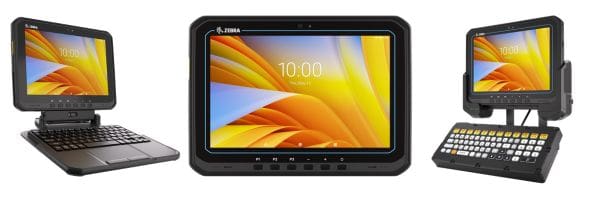
Zebra’s new ET60 (Wi-Fi only) and ET65 (Wi-Fi/cellular) tablet family is a rugged and versatile workhorse which can find a use in most every business. This rugged tablet PC is packed with features, including a tough touch screen display, Zebra’s advanced SE55 industrial barcode scanner, camera, and a 20-hour battery. Check out the spec sheet at bottom for the impressive feature list.
The ET60/ET65 can be utilized in a number of different configurations:
It’s worth noting that the ET60 is truly ready for forklift mounting… Zebra has developed mounts and connectors which will stand up to the rigors of forklift motion. This means that the ET60 can be a replacement for more expensive and complex VMU’s (vehicle-mounted computers). And, the ET60 has the advantage of being able to double as a mobile tablet which can be undocked and carried with the worker when not on the forklift.
Great Industry Solutions for the Zebra ET60 Tablet PC
There are an endless variety of applications which can be serviced by the versatile Zebra ET60 / Zebra ET65 tablet:
Warehouse
Inventory management
Picking
Cold storage
Fork truck computing
Manufacturing Plant
Manufacturing floor management
QA operations
Staff communications
Ports and Truck Yards
Cross docking
Yard management
Crane and yard mule operations
Field Service
Routing and dispatch
Mobile work orders
Meter reading
EMS & Public Safety
Routing and dispatch
Incident and patient care reporting
Staff communications
Schedule a demo of the ET60/ET65 Android Tablet
CSSI Technologies is an authorized Zebra dealer, and ready to discuss your Zebra tablet computer applications. We’d be happy to speak about the Zebra ET60 Tablet PC and arrange a hands-on demo for you. Please contact us to get started with Zebra tablets.
FAQ – Frequently Asked Questions About Zebra ET6x Tablets
Q: What is the Zebra ET6x Series, and which models does it include?
A. The ET6x Series is Zebra’s line of 10.1-inch rugged enterprise tablets, available in Android (ET60/ET65) or Windows 11 (ET60W/ET65W). The ET60 models are Wi-Fi only. The ET65 models add 5G, including support for private 5G and CBRS networks. Both versions use most of the same accessories, so a site can run Android and Windows devices side by side without buying two sets of docks, keyboards and handles.
Q: Will the ET6x hold up on a busy warehouse floor or in cold storage?
A. Yes. Every model survives 5-foot drops to concrete, which exceeds the MIL-STD-810H standard, and has an IP66 rating against dust and water. The Android models run from -4°F with the standard battery and down to -22°F with the extended battery, so they’re a good fit for freezers and cold docks. The 1,000-nit Gorilla Glass display stays readable in bright light and works with gloves and wet hands.
Q: Can one battery last a full shift, including double shifts?
A. On the Android models, the standard battery gives about 10 hours and the extended battery about 20. The batteries are hot-swappable: a built-in super capacitor keeps the tablet running while you change batteries, so workers don’t have to reboot or lose data mid-task. Batteries charge over USB-C in about 2.5 hours (standard) or 5.5 hours (extended).
Q: How does the ET6x fit into forklift, receiving and data-entry workflows?
A. The tablet works in several setups with the right accessories:
Forklifts and material handling: a vehicle dock with a heated touch panel and keyboard option for cold environments.
Stationary data entry: a warehouse keyboard and tray.
Office and laptop-style work: a keyboard with a friction hinge that turns it into a 2-in-1 laptop.
Walking work: an extendable handle for easier carrying.
For scanning, you can add the optional SE55 Advanced Range scan engine, which reads 1D/2D barcodes from up to 40 feet away (useful for high rack locations). The 16 MP camera can also scan barcodes and read license plates, VINs and documents.
Q: What makes the ET6x a sound long-term investment for IT and operations?
A. The ET6x is designed to lower total cost of ownership by making devices easier to manage over their lifespan. Zebra’s Mobility DNA and DNA tools help IT set up, manage and secure devices at scale. On Android, LifeGuard provides regular security patches. Connectivity is built to last, with Wi-Fi 6E on Android and Wi-Fi 7 on Windows. The Windows models use Intel Core Ultra processors with AI features, such as noise-suppressing audio and a touchscreen that adjusts itself to how it’s being used. Zebra includes a 3-year standard warranty and offers extended service options.
Enhance Operational Efficiency and Reduce Errors with Barcode Scanners
The barcode scanner has become an indispensable tool in warehouse and manufacturing environments, revolutionizing the way businesses manage and track their inventory. The use of the barcode reader offers numerous benefits, including increased accuracy, efficiency, and reduced human errors. Any manual data collection system will never rival the speed and reliability of automated data collection through a barcode scan.
While many companies make use of barcode labels, they may not take full advantage of the technology for all the workflows where it can be helpful. Also, some companies still rely on manual data collection (pen and paper) for key business processes. We’d like to explore the top six applications for barcodes in manufacturing and warehouse applications, and also discuss some of the hardware necessary to create an effective barcode scanning solution. CSSI Technologies is an expert in barcode scanning and mobile computing technologies as well as barcode software. We can help you further explore and implement any of these workflows.
1. Inventory Management
Barcodes play a pivotal role in streamlining inventory management processes. Inventory items are assigned a barcode, allowing for quick and accurate tracking of stock levels. Barcode scanners can effortlessly scan items during receiving, picking, and shipping, providing real-time updates on the accurate inventory level. This not only minimizes errors but also ensures that the right products are in the right place at the right time. Improved inventory control has multiple benefits: more efficient labor operations, less lost inventory, and more inventory tracking accuracy which results in higher sales and the ability to turn inventory faster.
Order picking is a critical aspect of warehouse operations. Barcodes enable a more efficient and error-free picking process. Warehouse staff equipped with a mobile device can scan barcodes on items and bins to verify product information and confirm that the correct items are being picked for an order. This reduces the likelihood of mistakes and speeds up the fulfillment process. The company benefits by accelerating the speed of picking and reducing errors (mis-picks) which can lead to expensive returns and lower customer satisfaction.
Barcodes simplify the shipping and receiving process by providing accurate data capture. When products arrive at a warehouse, their barcodes are scanned to update the inventory system automatically. Similarly, during the shipping process, barcodes are scanned to confirm that the correct items are being sent to the right destination. This minimizes shipping errors and improves overall order accuracy. Barcodes allow the company to ensure that the correct products are received and routed to the correct destinations, and can accelerate the invoicing process.
Maintaining product quality is crucial in manufacturing. Barcodes are used to track and trace raw materials and finished goods throughout the production process. Quality control checkpoints can be established where barcode labels are scanned to ensure that products meet specified standards. A scanned barcode allows you to electronically link QC actions to an electronic record, providing proof of what checks were made. See CSSI’s case study of custom quality control software created for an industrial customer to track lab samples.
In a manufacturing environment, barcodes facilitate real-time tracking of work-in-progress (WIP). Each stage of the production process can be assigned a unique barcode, allowing for accurate monitoring of the production flow. This visibility aids in identifying bottlenecks, improving efficiency, and meeting production deadlines. Barcode technology can reduce missed manufacturing steps and provide company management with visibility and metrics on the state of production at any point in time.
Barcodes extend beyond product tracking and are invaluable for monitoring equipment and assets within a warehouse or manufacturing facility. Each asset can be assigned a barcode, enabling easy identification and tracking of its location and maintenance history. This helps in optimizing asset utilization and reducing downtime. The company can reduce losses from stolen or misplaced assets and can create accountability for check-in/check-out procedures.
How to Get Started Implementing Barcode Technology
Of course, there are many more possibilities beyond the top 6 applications for barcodes in manufacturing and warehousing. The adoption of barcodes in industrial, distribution center, and transportation/logistics environments has transformed traditional inventory and operational processes. The efficiency, accuracy, and real-time visibility provided by barcodes contribute significantly to overall productivity. To implement a successful barcode scanning solution, businesses must invest in the appropriate hardware, including barcode scanners, mobile computers, printers, and software tailored to their specific needs.
However, it’s also necessary to understand best-in-class workflows and how these technologies have been successfully implemented at industry peers. This is where CSSI Technologies can be of great help to you. We offer years of experience in implementing and supporting barcode technology and mobile computer implementations, as well as inventory software and barcode scanning software. By bringing our experience to the table, we can help a company get started faster, with a better outcome. Avoid unnecessary pitfalls and contact CSSI to discuss your barcode project.
FAQ – Frequently Asked Questions About Implementing Barcode Scanners in Your Warehouse or Manufacturing Operation
Q: What type of barcode scanning device is right for our operation?
A. It depends on the task, the environment, and how much information the worker needs at the point of scan. Rugged mobile computers suit picking, receiving, and inventory work where the operator must see and respond to instructions on screen. Wearable scanners keep both hands free in high-volume picking and packing. Corded or cordless handheld scanners work well at fixed stations such as packing benches, QC stations, and shipping desks. Also consider scan range (a pallet label on high racking requires a different scan engine than a carton label at arm’s length), temperature and moisture exposure, and drop ratings. Most operations end up with a mix of device types matched to each workflow.
Q: Will barcode scanners integrate with our existing ERP, WMS, or MES?
A. In most cases, yes. Enterprise-grade scanners and mobile computers are designed to feed data into business systems, either through the vendor’s own mobile client, a browser-based or terminal-emulation interface, or a third-party data collection application that sits between the device and the system. The key questions to ask early are which transactions you want to capture at the point of work (receipts, picks, moves, production reporting, QC checks) and whether your system exposes those transactions for real-time updates. Answering those first avoids buying hardware that your software cannot fully use.
Q: What infrastructure do we need in place beyond the scanners themselves?
A. Plan for four things: wireless coverage, labels, device management, and power. Real-time scanning depends on reliable Wi-Fi across the entire floor, including dock doors, racking aisles, and freezers, so a wireless site survey is worth doing before deployment. You will need thermal label printers and label stock suited to your surfaces and conditions, plus location labels for racks and bins. A mobile device management (MDM) tool lets IT push updates, lock down devices, and troubleshoot remotely. Finally, budget for charging cradles and spare batteries so devices last through every shift.
Q: How do we justify the investment, and where does the return come from?
A. The return typically comes from the same areas where barcodes are applied: fewer picking and shipping errors (and the returns, reships, and credits that follow), less time spent on manual data entry and paperwork, more accurate inventory that reduces stockouts and write-offs, and faster invoicing because shipments are confirmed as they leave. To build the case, measure your current error rates, the labor hours spent on counts and data entry, and the cost of a mis-shipment. Those baselines make it possible to estimate savings and to verify results after go-live.
Q: How disruptive is implementation, and how long does it take workers to adapt?
A. Disruption is manageable when the rollout is phased. Many operations start with one process, often receiving or picking, prove it out, and then extend to other areas such as work-in-process tracking, quality control, and asset tracking. Scanning workflows are generally easy to learn because the device guides the operator through each step, and modern touchscreen mobile computers feel familiar to anyone who uses a smartphone. The work that takes the most planning usually happens before go-live: labeling locations and inventory, cleaning up item data, and defining the workflows the devices will enforce.
Zebra MC9400 / MC9450 Raises the Bar for Ultra-Rugged Handhelds
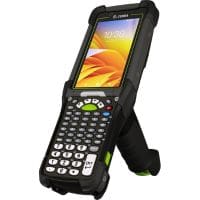
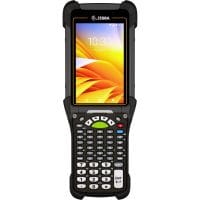
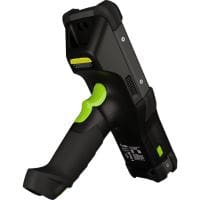
Zebra Technologies has announced the latest update to its leading rugged MC9300 handheld… the MC9400 (wifi only) / MC9450 (wireless/WAN) is now available for your most rugged use environments. This is Zebra’s top-of-the-line mobile computer, and as you would expect, it is able to withstand harsh use environments while offering tremendous computing and communications horsepower, as well as Zebra’s latest data capture and imaging innovations.
Consider the MC9400 for warehouse and production environments, and consider the MC9450 for outdoor, tranportation, and field-use.
First Look at the MC9400 / MC9450
The new model will look familiar to users of the prior Zebra MC9300, with minor changes in outer appearance. In use, differences will quickly become more apparent, particularly with Zebra’s adoption of a new green laser which has been tested to be several times more visible than traditional red aiming lasers.
MC9400/MC9450 Highlights
The MC9400 raises the bar over its impressive predecessor, the Zebra MC9300. With support through Android 17, an impressive 8-foot drop spec, and more processing power, the MC9400 is ready to offer you benefits for years to come. The MC9450 adds WAN and GPS capability. Do you require an intrinsically safe computer? The MC9400 is available in a Class 1 Div 2 non-incendive model.
Advanced scanning technology
Scan barcodes from up close, or to over 100 ft m away! Plus, Zebra’s innovative green laser aimer is up to 7X more visible than typical red aimers.
Wi-Fi 6E
4X the bandwidth and capacity, 3X the speed, and up to 3X the available spectrum! Faster application response times for your busy workers to increase productivity.
Private and public 5G
The MC9400 is first gun-style handheld with private and public 5G wireless data connectivity — giving you affordable wireless networking options in both outdoor and indoor environments.
Biometric facial recognition
Improve security, and provide users with easier access to their device.
Push to talk & secure text messaging
Zebra’s PTT and voice options improve your team communication… and enable you to consolidate to 1 device.
Cold Storage or Freezer Environment? The MC9400 is Ready
The MC9400 is available for use in cold storage environments…
The freezer-grade version of the product can accommodate temperatures between -22F and 122F! CSSI can help you choose from several different keyboard options, in order to enable better access for users wearing gloves.
Contact CSSI to Schedule Your MC9400 Demo
The best way to learn more about Zebra’s MC9400/9450 is to contact CSSI by completing the form at top right or click here… CSSI is an official Zebra Premier Solutions Partner. We’d be happy to discuss the MC9400 family with you and schedule your hands-on demonstration.
FAQ – Frequently Asked Questions About the Zebra MC9400/MC9450 Ultra-Rugged Mobile Computer
Q: What are the main benefits of the MC9400/MC9450 for my operation?
A. The MC9400/MC9450 is the next generation of Zebra’s MC9000 Series, offering more power and faster performance than its predecessors. It combines extended-range scanning, Wi-Fi 6E and 5G wireless options, and Zebra’s software toolset in one ultra-rugged device.
Q: How far away can the MC9400/MC9450 scan barcodes?
A. With the SE58 Extended Range Scan Engine with IntelliFocus™ technology, workers can capture barcodes in hand or more than 100 ft./30.5 m away. The same device can scan an item being picked and a rack label on the top shelf, with no need to leave the forklift.
Q: What makes the scanner easier for my workers to use?
A. The SE58 uses a green laser aimer that is up to seven times more visible than the typical red aimer dot. This makes it easier for workers to see what they are targeting at long distances.
Q: What wireless connectivity options does the device offer?
A. The device supports Wi-Fi 6E, which provides triple the available spectrum, quadruple the bandwidth and capacity, and triple the speed. It also supports private and public 5G (data only). With both a Nano SIM and an eSIM, it can hold private and public 5G connections at the same time, which suits large facilities and yards.
Q: We already use MC9300 devices. Will we have to replace our accessories and how hard is deployment?
A. No, the MC9400/MC9450 is fully backward compatible with MC9300 accessories, so you can keep your existing ones. Zebra DNA for Mobile Computers, a software suite, helps your IT team set up, secure, manage, and optimize the devices throughout their lifecycle.
Let’s discuss top reasons that we have seen CSSI customers benefit from outsourcing the management and support of their mobile devices…
What is Mobile Device Management? (MDM)
Mobile device management software (MDM) (also referred to as enterprise mobility management) helps IT administrators to efficiently deploy, control, and secure the growing fleets of remote computing devices used by modern business operations. MDM software can be used to rapidly push software updates to devices which are geographically dispersed, and thus not convenient for hands-on updates. MDM software can establish rules of access, such as determining which applications or screens a device holder can use – users can be assigned to different access groups, each with its own configuration and setup, and can even be moved between groups when necessary, all without requiring the admin to touch the device. MDM also enables remote management and accelerates technical support by allowing the IT admin to see and even remotely control the user’s screen.
What are some examples of MDM software? CSSI Technologies supports mobile device management solutions such as SOTI MobiControl, 42Gears, and Microsoft Intune.
The challenge with MDM as it relates to AIDC and rugged mobile devices , is that a company’s internal IT staff may not have the expertise (or time) to manage fleets of specialized Android devices. This is where outsourcing management to CSSI can make sense.
5 Reasons You Benefit from Outsourcing Mobile Device Management Work to CSSI
Here are 5 of the top ways that you can benefit from speaking with CSSI about mobile device management and our Device Lifecycle Management service :
1. Take Advantage of CSSI’s MDM Expertise
The CSSI Technologies team is extremely knowledgeable about Android OS and the rugged mobile devices which we sell and support. We have experience in deploying and updating these devices, which can be of great benefit to you. No need to climb the learning curve and take on new technical domains. As your mobile device partner, we can handle it for you. For example, having trouble with devices running Android 11 or higher? We can help.
2. Enhance security with reliable OS updates & patches
The Android operating system features one annual update, and smaller updates and patches which may be released more frequently. Without an MDM system in place, it will be almost impossible to keep pace with these updates for a distributed group of mobile devices. Also, it will be time consuming for your internal IT team to test and then deploy each change. This is work which CSSI can perform efficiently for you, on a schedule which we pre-determine.
3. Standardize device configurations
MDM software makes it simple to create and enforce standard mobile device configurations and security policies. Not only does this improve organizational mobile security, it also reduces technical support demands by simplifying the potential issues which users may encounter. Further, it’s easier to test and approve applications prior to installation, in order to ensure adverse effects are not encountered.
4. Save time: Deploy devices directly to production
When devices are enrolled in MDM profiles, they can either arrive at the facility ready to deploy, or be deployable by scanning a CSSI-created configuration barcode. Your team no longer needs to spend hours manually updating devices before they can be used.
5. Free up your internal IT team for other tasks
Best of all, your IT gains back time. Instead of slogging through mobile device management work such as trouble-shooting and configuration, the team can spend time on higher-value tasks, knowing that CSSI has taken care of device configuration, and stands ready to provide technical support when needed.
How To Further Explore a Mobile Device Manager for Your Business
To discuss the benefits of a mobile device management solution, and in particular, how CSSI can handle the creation of configuration profiles, mobile device deployment, and support of your rugged devices, please contact us to begin a conversation. We’d love to trial an MDM tool with you so that you can see the value prior to committing to spend. Contact us about mobile device management solutions today!
FAQ – Frequently Asked Questions About the Benefits of Mobile Device Management
A. Most operations see gains in three areas: uptime, security, and labor. Devices stay current on OS versions and security patches, configurations stay consistent from one handheld to the next, and problems can often be diagnosed and fixed remotely instead of pulling a device off the floor. For the warehouse, that means fewer interrupted shifts and fewer workers waiting on a working scanner. For IT, it means fewer support tickets and far less time spent on repetitive setup and update work.
Q: Why is MDM preferable to managing devices manually?
A. Manual management means someone physically touches every device for each update, app install, or settings change. That approach is slow and prone to inconsistency, and it becomes harder to sustain as a fleet grows or spreads across shifts and sites. An MDM platform pushes the same change to every enrolled device from a central console, on a schedule you choose, with a record of which devices received it. You also gain visibility that manual methods cannot provide, such as which devices are out of date, offline, or missing.
Q: How does MDM improve the security of our rugged mobile devices?
A. Android receives a major update each year and security patches far more often. Without MDM, devices tend to drift out of date, and each unpatched device is a potential entry point to your network. MDM lets you test updates and then roll them out on a planned schedule, enforce password and Wi-Fi policies, restrict devices to approved applications, and lock or wipe a device that is lost or stolen.
Q: Will rolling out MDM disrupt our warehouse operations?
A. It should not if the rollout is planned. Enrollment is typically staged by device group, shift, or site, and updates can be scheduled for off-hours or shift changes so that devices are not tied up during picking and shipping windows. New devices can arrive already enrolled, or be configured in minutes by scanning a setup barcode, so they go straight into production rather than waiting on an IT bench.
Q: Should we manage MDM in-house or outsource it?
A. That depends on your team’s capacity and its familiarity with Android and rugged devices. Platforms such as SOTI MobiControl, 42Gears, and Microsoft Intune are powerful, but each takes time to learn and requires ongoing attention to testing, patching, and policy maintenance. If your IT staff is already stretched, you can outsource MDM work to CSSI – we provide established expertise from the start and free your team for higher-value projects. CSSI offers both as-needed support and a Device Lifecycle Management program through which we take care of your device upgrade and configuration needs.
The Growing Adoption Rate of RFID Technology
It’s hard to avoid the increasing chatter around RFID… it seems like every company is implementing or testing the use of RFID for inventory management, asset tracking, or locationing. News events such as Wal-Mart’s vendor RFID initiative have served to push the adoption rate. As seen in the chart below, expected global compound annual growth for RFID is 11.1% running through 2032!
All of this growth is for good reason — RFID technology is exceptionally impactful when applied to the right type of workflow, and when properly implemented. Also, RFID hardware has been improving, and tag costs have been falling.
5 Things that RFID is NOT
While there is a lot of industry excitement around the growing number of applications and use cases for RFID, there are also many misunderstandings and misconceptions (as with any new technology). Let’s address some of those:
1. RFID is Not a Magic Wand
RFID is unlikely to immediately solve all of your inventory management and control issues, certainly not without a lot of work and investment. For example, it seems common for newcomers to envision a system where they can ‘press a button’ and immediately get current inventory counts for an entire facility. For many reasons, several of which are further addressed below, there are likely technical and environmental challenges which will prevent RFID from instantly solving all of your problems.
2. RFID Does Not Solve Problems Caused by Lack of Process or Control
RFID at the core is a means of data capture. This can be extremely valuable for tracking or counting items. However, if your business lacks processes and control, RFID’s impact will be limited. For example, you might install RFID portals in certain doors of your facility, but if users don’t adhere to only transporting items through those ‘choke points’, the system will not be able to capture data. Many RFID projects need to start at a white board to map out the process, and require post-deployment enforcement of processes so as not to undermine the project.
3. RFID is Not Foolproof
What is your acceptable read success rate? It’s important to understand that the successful tag read rate is unlikely to be 100% for a number of reasons (items oriented in the wrong way relative to the reader, or occasional defective tags). Just to be clear, barcode scans will also have a <100% success rate, as missed scans, damaged barcodes, and erroneous scans do happen. A well-run pilot project (see item 4 below) and well thought-out project goals should be able to design around this, but ensuring that the success rate is maximized, and that it meets business needs is important. Pre-deployment testing should enable you to set a reliable expectation for post-deployment read-rate performance.
4. RFID is Not Instantly Deployable
For many applications, RFID can not be deployed without planning, testing, and piloting. By comparison, barcode scanning is faster to deploy because there are fewer potential challenges to successful data capture. RFID requires an investment of time to plan the project and test and fine-tune the system, which involves multiple components which must work in sync: tags, antennas, RFID readers, software, and integrations with your back-end systems.
5. RFID is Not Cost-Effective for Every Application
Sometimes RFID is not the optimal technology to solve your business problem. Whether due to the cost of tags or the amount of equipment which would have to be installed, RFID may be too expensive to create ROI. In some cases, the items to be tracked or the environment are inherently unsuitable for RFID, and result in read success rates which are too low. See: 10 great RFID applications.
Why you need a knowledgeable RFID Solution Partner
With all of the foregoing negatives on the table, it’s important to reinforce that… when RFID is the right fit, it can be massively impactful for your business. That’s why you benefit from working with an experienced solutions partner who can help you to define your business problem, match you with the optimal technology solution, and work with you to test and pilot prior to making larger investments.
Contact CSSI for RFID Help
CSSI Technologies is an experienced data capture, mobile computing, and RFID expert. Our team is available to discuss your workflows and needs, and help you to create successful deployments. To speak with one of our consultants about your potential RFID project, please contact CSSI.
FAQ – Frequently Asked Questions — What First Time RFID Adapters Should Watch Out For?
Q: Will RFID work reliably with our products and in our facility?
A. Not automatically, and this is the first thing to verify. Radio waves behave differently around metal and liquids, which can reflect or absorb the signal and reduce read rates. Dense pallet loads, tag placement and orientation, nearby equipment, and even dock door layout all affect performance. Be cautious of any proposal that promises results before someone has tested your actual items in your actual environment. A site survey and tag testing on your real products should come before any hardware purchase.
Q: Does RFID replace our barcode system?
A. In most operations, no. RFID and barcodes usually work side by side. Barcodes remain inexpensive, dependable, and well suited to single-item scans and exception handling, while RFID earns its keep where you need to capture many items quickly without line of sight. Be cautious about planning a wholesale replacement. A more realistic approach is to identify the specific process points where RFID removes labor or errors and leave barcoding in place everywhere else, including as the fallback when a tag fails to read.
Q: What does an RFID project really cost beyond tags and readers?
A. Tags and readers are the visible costs, but rarely the whole budget. Plan for antennas, cabling and mounting, RFID printers/encoders, software or middleware to filter and interpret reads, integration with your WMS or ERP, installation and tuning, and staff training. Tags are also a recurring expense, not a one-time purchase, and specialty tags for metal or harsh environments cost more than basic labels. Be cautious of ROI calculations built on tag price alone. Build the business case on total cost against a measurable gain, such as labor hours saved, shipping accuracy, or reduced inventory shrink.
Q: What does IT need to prepare for?
A. More data and more integration work than a barcode project. Fixed readers can report the same tag many times per second, so the raw output must be filtered into meaningful business events before it reaches your system of record. (This is the role of RFID Middleware). IT should be cautious about four areas: how read data will map to transactions in your WMS or ERP, how stray reads from adjacent zones or dock doors will be prevented or filtered out, network capacity and power at reader locations, and how tag data will be encoded and standardized so it stays consistent across suppliers, customers, and sites. Involve IT at the start of the project, not after the hardware is on the wall.
Q: How should we start, and how do we know if it’s working?
A. Start small with a defined pilot around one process, such as outbound shipment verification or work-in-process tracking, rather than tagging everything at once. Before the pilot begins, agree on what success looks like: a target read rate, a time savings, or an accuracy improvement you can measure against today’s baseline. Be cautious about skipping the baseline, because without it you cannot prove the return. Also decide in advance how exceptions will be handled when a tag is missed, since no system reads 100% of the time. A pilot that meets its goals gives you tested hardware choices, proven procedures, and real numbers to justify expanding.
The Benefits of Wireless Connectivity Via Private Networks and CBRS LTE
In the dynamic landscape of wireless communication, CBRS (Citizens Broadband Radio Service) and Private LTE/5G networks have emerged as significant breakthroughs for many businesses. If you are considering installing a private wireless network or updating your existing wireless network in 2024, it’s worth considering these new technologies.
In this article, we delve into both CBRS and 5G / Private LTE, explore their benefits for private companies, and discuss the optimal use cases for adopting CBRS instead of traditional Wi-Fi or public cellular networks.
Understanding CBRS and Private LTE/Private 5G
Citizens Broadband Radio Service was created to extend wireless service in large spaces. It operates in the 3.5 GHz band and is a shared spectrum, providing a unique blend of licensed and unlicensed spectrum access. This model differentiates CBRS from traditional Wi-Fi networks and public cellular services. Unlike Wi-Fi, CBRS offers a more predictable and controlled environment, while it distinguishes itself from public cellular networks by allowing organizations to manage their dedicated spectrum. This approach enhances reliability, security, and overall performance. CBRS advantages include:
More secure than public LTE – With a private CBRS network, companies have greater control over security protocols and can implement customized measures to safeguard sensitive data.
Improved performance and reliability – A CBRS private network allows companies to operate in a dedicated spectrum, minimizing interference and enhancing overall network performance.
Predictable Connectivity – CBRS provides consistent connectivity, making it suitable for applications that demand low latency and high reliability.
Better indoor and outdoor coverage – A private LTE network is a ‘best of both worlds’ between a traditional Wi Fi network and a public LTE network.
CBRS offers flexibility to dedicate and segment bandwidth – You have the ability to provite priority access for certain traffic (critical for robotics or guided vehicles).
Designed for extended coverage – In large areas which might otherwise require significant Wi-Fi infrastructure, a CBRS deployment can offer lower adoption cost due to fewer access points and less necessary supporting infrastructure.
Cost-Efficiency – Private companies can optimize their wireless network costs by avoiding the need for public cellular subscriptions while enjoying the benefits of a dedicated and controlled spectrum.
Differences Between 5G and 4G Networks
Differences Between Private 5G and 4G LTE Networks
CBRS can be configured as a private LTE/private 5G network, so it makes sense to review the newer 5G standard versus its 4G predecessor.
4G
5G
Speed
4G networks typically offer download speeds in the range of 10 to 100 Mbps (Megabits per second) and upload speeds of 5 to 50 Mbps.
5G is designed to provide significantly faster speeds. Speeds can vary, but 5G is expected to deliver download speeds in the range of 100 Mbps to multiple gigabits per second (Gbps).
Latency
4G networks generally have a latency (the time it takes for data to travel from the source to the destination) of around 30 to 50 milliseconds.
5G aims to achieve ultra-low latency, with targets as low as 1 millisecond or less. This low latency is crucial for applications that require real-time responsiveness.
Capacity & Connectivity
While 4G networks can handle a significant number of connected devices, they may face congestion in densely populated areas, leading to reduced speeds and reliability.
5G is designed to support a massive increase in connected devices per square kilometer, providing enhanced capacity and improved connectivity in crowded environments.
Frequency Bands
Primarily operates in lower-frequency bands (sub-6 GHz).
Utilizes a broader range of frequencies, including lower-frequency bands (sub-6 GHz) and higher-frequency millimeter-wave (mmWave) bands.
Technological Advancements
Based on LTE (Long-Term Evolution) technology.
Introduces new technologies like massive MIMO (Multiple Input, Multiple Output), beamforming, and network slicing, enabling improved performance and flexibility.
Attractive ‘Use Cases’ for CBRS Technology
Applications which require either prioritization of certain traffic, or coverage of large indoor/outdoor areas can benefit from CBRS. Some typical examples might be:
Industrial IoT (Internet of Things) : CBRS is well-suited for industrial applications where low-latency and reliable connectivity are crucial. This includes applications like predictive maintenance, asset tracking, and real-time monitoring in manufacturing plants.
Large Manufacturing/Warehouse Facilities and Campuses : Large spaces which might require for indoor and outdoor coverage can benefit from CBRS networks for seamless connectivity across expansive areas with high user density.
Healthcare : In healthcare settings, CBRS can support critical applications like telemedicine, remote patient monitoring, and data-intensive imaging processes, ensuring a secure and reliable network infrastructure.
When is the Right Time to Consider CBRS Adoption?
The decision to adopt CBRS depends on various factors, including your organization’s size, connectivity needs, and budget constraints. However, key indicators for considering CBRS adoption include:
Upcoming Network Expansion or Upgrade : If a company is planning to expand its operations or upgrade its existing network infrastructure, it might be an opportune time to explore CBRS.
Increasing IoT Integration : As IOT device counts expand within businesses operations, the need for a reliable, low-latency wireless network becomes paramount, making CBRS an attractive option.
Enhanced Security Requirements : If a company deals with sensitive data and requires a higher level of security, CBRS provides the necessary control and customization to meet those requirements.
CSSI Offers CBRS-Compatible Handhelds and Tablets
CSSI can help you select from and test a variety of CBRS devices and 5G-compatible handheld computers and tablets. It’s a big jump forward from 4G LTE. We are also able to help you with site surveys and installations for your wireless network technology upgrades.
Contact CSSI To Learn More About CBRS and Private LTE/5G
Citizens Broadband Radio Service and Private 5G networks offer a compelling alternative to traditional Wi-Fi and public networks, providing businesses with increased control, reliability, and security. As the digital landscape continues to evolve, companies looking to optimize their connectivity infrastructure should consider the benefits of CBRS, especially in scenarios where low latency, reliability, and customization are critical. To discuss your environment and potential CBRS band applications, please contact CSSI.
FAQ – Frequently Asked Questions About the CBRS and Private LTE/5G
Q: Will private LTE/5G replace our Wi-Fi, or run alongside it?
A. In most facilities, the two run side by side. Wi-Fi remains the practical choice for laptops, guest access, office areas, and devices that have no cellular radio. Private cellular takes over where Wi-Fi tends to struggle: large or outdoor footprints such as yards and docks, RF-hostile environments such as freezers and dense metal racking, and mobile workflows where a dropped session during a roam costs productivity. A common approach is to move mission-critical mobile devices, vehicle-mounted computers, and automation to the private network and leave general-purpose traffic on Wi-Fi.
Q: Do we need to buy an FCC spectrum license to run a private CBRS network?
A. No. CBRS uses 150 MHz of shared spectrum in the 3.5 GHz band (3550–3700 MHz), managed under three tiers: federal incumbents, Priority Access Licenses (PAL), and General Authorized Access (GAA). Most private enterprise networks run on the GAA tier, which requires no license purchase. Your radios must register with an FCC-approved Spectrum Access System (SAS), a cloud service that assigns channels and protects higher-priority users from interference. SAS access is typically a modest subscription fee, and radios generally must be registered by a Certified Professional Installer. Note that CBRS is a U.S. spectrum framework, so facilities in other countries fall under different private-spectrum rules.
Q: How does the cost compare with expanding or upgrading our Wi-Fi?
A. It depends heavily on the site. A CBRS radio is more expensive than a Wi-Fi access point, and you also need a network core (on-premises or cloud-hosted), SIM management, and a SAS subscription. However, each radio covers considerably more area than a Wi-Fi access point, particularly outdoors, so you need fewer radios and less cabling, switching, and installation labor. The economics therefore tend to favor private cellular in large, open, or outdoor spaces and to favor Wi-Fi in smaller or office-style spaces. A site survey that models both options is the most reliable way to compare total cost of ownership.
Q: Will our existing handhelds, tablets, and scanners work on a private network?
A. Only if they have a cellular radio that supports the CBRS band, which is Band 48 for LTE and n48 for 5G. Wi-Fi-only devices cannot connect directly, although they can be bridged through a CBRS gateway or router. Many current-generation rugged mobile computers and tablets from the major AIDC manufacturers are available in CBRS-capable configurations, so compatibility is often a matter of selecting the right model at your next refresh. Each device also needs a SIM or eSIM provisioned for your network, which is part of what makes access more tightly controlled than a shared Wi-Fi passphrase.
Q: What does it take to deploy and manage a private network, and does our IT team need cellular expertise?
A. Less than most teams expect. Deployment generally follows a familiar path: RF site survey and design, radio installation and SAS registration, core network setup, SIM provisioning, and integration with your existing LAN and security policies. Many current solutions are managed through a cloud dashboard that will feel familiar to anyone who administers enterprise Wi-Fi, and they can also be purchased as a managed service. Most organizations start with a pilot in one problem area, such as a yard, a freezer, or a single production line, and expand once performance is validated.
Upgrade Windows Mobile to Android
It has now been several years since Microsoft decided to exit the mobile operating system business, and several years since end-of-support for Windows Mobile/CE occurred. While there has been a massive amount of development of rugged mobile devices utilizing the Google Android OS, and while market adoption has been significant, it is true that more than half of mobile devices still in use are running the obsolete Windows phone OS options.
Is your company seeded with outdated handhelds running Windows Mobile/CE? We’ve outlined below a number of the risks to your business, and also outline why migration to Android may be much easier than you think.
The Risks of Using Windows Mobile or Windows CE Devices in 2024
Using older mobile computers with the Windows Mobile or Windows CE operating system in 2024 poses several risks and challenges for companies. These legacy systems may have served well in the past, but they are increasingly outdated and can hinder a business’s ability to operate efficiently and securely in the modern digital landscape. Here are some of the key risks companies face when using older Windows Mobile/CE devices in 2024:
1. Security Vulnerabilities
Perhaps the most critical risk is the heightened vulnerability to security threats. Microsoft has officially ended support for both Windows Mobile and Windows CE, meaning that there are no longer any security updates or patches for these operating systems. This leaves devices running on these platforms susceptible to malware, viruses, and other cyberattacks. With the ever-evolving threat landscape, using unsupported software can be a major liability. Now out of support for several years, devices using Win Mobile/CE are increasingly threats to your IT security. By comparison, the Android version updates annually, with additional security patches.
2. Limited Support and Repairs
Your rugged devices endure some rough handling, and accidents happen. Windows device downtime can mean lost productivity and fewer units available for workers. At this point, most Windows Mobile devices are no longer produced or supported by manufacturers, meaning that support plans have ended and replacement parts are near impossible to find. As these devices become increasingly rare and obsolete, companies may face longer downtime in case of hardware failures, leading to disruptions in business operations.
3. Limited Features and Functionality
Older mobile computers running Windows Mobile/CE lack many of the features and functionalities available on modern devices. This can limit the ability to take advantage of new technologies, such as advanced sensors, improved cameras, and augmented reality, which can be valuable in various industries. By comparison, Android is loaded with cutting-edge features and there is an Android app for almost everything.
4. Reduced Productivity
Outdated mobile devices typically lack the performance and features of their modern counterparts. Slow processing speeds, limited memory, and outdated hardware can result in reduced productivity for employees who rely on these devices for daily tasks. This can lead to delays in operations and decreased overall efficiency. An Android smartphone or rugged mobile device will be more recent, more powerful, and easier for your users.
5. Employee Frustration
Newer employees who are used to modern smartphones and tablets may find it frustrating to work with outdated and clunky Windows Mobile/CE devices. This dissatisfaction can impact morale and employee retention, particularly among younger workers who are accustomed to intuitive, user-friendly interfaces.
6. Decreased Competitiveness
In a rapidly evolving business landscape, companies that rely on outdated technology risk falling behind their competitors who have embraced modern mobile platforms. Being unable to adapt to changing market conditions and customer expectations can put a company at a significant disadvantage.
Android OS: What’s Holding You Back?
Warehousing and Manufacturing IT professionals may understandably have limited experience with the Android OS, and often have questions. The CSSI team has extensive experience in working through and addressing these concerns. Here are some of the frequent questions and concerns:
1. Is Android Secure?
In recent years, Android has made significant strides in bolstering its security features. The platform now offers robust security options such as file encryption, device management, and remote wipe capabilities. Android Enterprise, a set of tools designed for business use, provides comprehensive security solutions, including zero-touch provisioning and containerization of work-related data. This ensures that sensitive information remains protected even on employee-owned devices. It should also stay top of mind that Windows Mobile/CE is no longer supported or patched and thus is not a secure alternative.
2. Does Android have security updates?
The Android OS development cycle involves frequent updates and enhancements, ensuring that your devices stay current with the latest features and security patches. Manufacturers and software developers are committed to providing long-term support for Android devices, reducing the risk of obsolescence. In contrast, Windows Mobile and Windows CE have been largely phased out, leaving companies vulnerable to security risks and compatibility issues.
3. Are there Android device product options?
Android’s popularity has led to a wide variety of affordable hardware options. Whether you need ruggedized devices for fieldwork or sleek, modern tablets for point-of-sale systems, there is an Android device to suit your budget and requirements. This affordability extends to maintenance and repairs as well, reducing the total cost of ownership compared to Windows Mobile/CE devices.
4. Can Android handle telnet / terminal emulation?
Yes, absolutely. CSSI can demonstrate for you how you not only can rapidly migrate your TE screens to Android , but we can help you go even further by implementing time-saving shortcuts and the ability to take advantage of your touch screen.
5. What if software needs to be rewritten?
CSSI offers custom development services , and is available to discuss the migration of your custom software to an Android environment.
Contact CSSI to discuss Migrating from Windows Mobile/CE to Android Devices
Contact the Android and mobile device experts at CSSI to set up a demonstration of the power that modern mobile devices can bring to your operations and warehouse teams, while creating a secure environment that can help IT sleep better at night!
FAQ – Frequently Asked Questions About Updating Old Mobile Devices Running Windows Mobile / Windows CE with Android
Q: How long does a Windows Mobile/CE to Android migration take, and can we phase it in?
A. Most migrations are phased, not done as a single cutover. A typical project runs through an application and workflow assessment, a proof of concept on one or two candidate devices, a pilot in a single shift or zone, and then a site-by-site rollout. The hardware swap is rarely the long pole; application readiness is. Legacy and Android devices can run side by side during the transition as long as both can reach the same host systems, which lets you replace your oldest or most failure-prone units first and spread the spend across budget cycles. See CSSI’s Windows to Android Migration service for how we structure this.
Q: Will our existing wireless network, chargers, and peripherals work with new Android devices?
A. Your wireless network generally will, and often works better, because current devices support newer Wi-Fi standards and stronger security protocols than legacy units. A migration is a good time to validate coverage and roaming, since newer radios can expose gaps that older devices masked. Cradles, batteries, and chargers are usually specific to a device family, so plan to replace them unless you stay within a product line that offers backward-compatible accessories. Bluetooth printers and scanners typically carry over, but confirm driver and pairing support for each model. CSSI can review your Wi-Fi and wireless environment as part of the planning.
Q: How do we provision, lock down, and manage a fleet of Android devices?
A. Through a mobile device management (MDM) platform combined with Android Enterprise. Together they let IT enroll devices in bulk, push applications and OS updates on your schedule, restrict users to approved apps, and remotely locate, lock, or wipe a unit. For shared warehouse devices, a kiosk or lockdown mode keeps workers inside the scanning and WMS applications they need and out of settings and consumer apps. Teams without the staff to run this in-house can outsource it through CSSI’s Mobile Device Management service.
Q: How long will a new Android device be supported, and how do we avoid ending up in the same situation again?
A. Enterprise rugged devices are built for a much longer service life than consumer phones. The major manufacturers publish lifecycle commitments covering years of availability, multiple Android version upgrades, and security patching that extends beyond Google’s standard support window. Before you buy, ask three questions about any model: how many OS upgrades are guaranteed, how long security patches will be delivered, and how long the device and its accessories will remain orderable. Pairing the purchase with a manufacturer service contract and a device lifecycle management plan gives you a scheduled refresh instead of a forced one.
Q: How do we build the business case for replacing devices that still work?
A. Start with what the legacy fleet costs you today, since “still working” hides most of it. Quantify downtime and lost labor hours from failures, the cost and scarcity of repair parts and batteries, the size of the spare pool you maintain to compensate, and the security and compliance exposure of running an unpatched operating system on your network. Then weigh those against the gains from current hardware: faster scanning, longer battery life, shorter training time for new hires, and access to applications your old devices cannot run. A proof of concept in your own facility produces the measured numbers finance will want to see. Contact CSSI to set one up.
Organize, Store, Secure, Track, and Manage Your Mobile Device Fleet
Companies face real challenges in keeping track of their growing fleets of handheld and mobile devices. Many firms use ad hoc solutions such as tables or shelves for charging stations. Unfortunately, these methods lack an ability to ensure that devices are properly returned to charge at shift-end, and there is limited security and accountability for users.
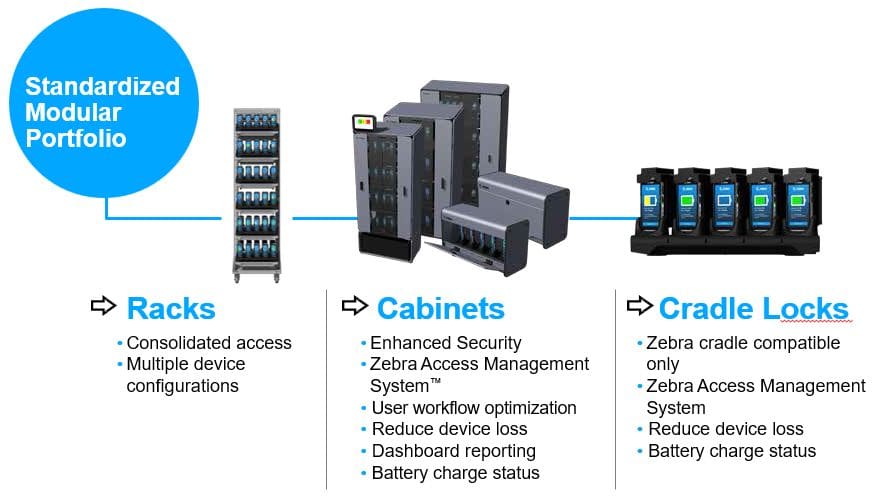
We were excited to discover Zebra’s Intelligent Cabinets product line, which directly tackles these challenges… and does so in a way which is seamless and integrated with the popular Zebra mobile computers used by so many firms.
A Configurable Device Management Solution
The Intelligent Cabinets solution is highly configurable and adaptable to your preferred method of use. At core, the solution provides an organized method of storing and charging mobile devices when not in use. It also provides a check-in / check-out capability which enables you to track which employees have which devices. As further value add, you have the option of adding device security and keeping an eye on device battery health so that you can proactively replace failing items.
Your CSSI rep will work with you to spec out the features and configurations you need and will plan your deployment. We can create solutions for varying device quantities and types, as well as adding features like locking cradles or cabinets.
The Benefits of Zebra Intelligent Cabinets
What is the cost of device loss and/or lost device usage in your facility? These are significant for most companies. Not only do expensive handhelds occasionally go missing, but workers are unable to perform their job due to not being able to find the right device, or losing battery strength during the course of the workday. Intelligent Cabinets addresses those problems with immediate benefits:
Ensure devices are charged daily
Monitor battery life and battery health
Limit device access, and provide accountability for device return
Manage device software updates
Device Accountability and Oversight
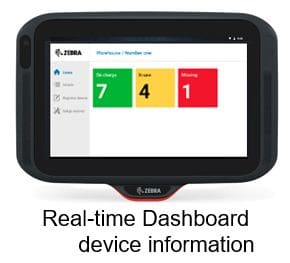
The cornerstone of all intelligent cabinet installations is the device dashboard. This kiosk informs you at a glance how many devices are in use. Dive deeper, and you can gain visibility into which users have devices, and which devices are missing or not available for use. Reduce productivity lost due to the inability to find devices, or to devices with dead batteries mid-shift!
Learn More About Zebra Intelligent Cabinets
Contact CSSI to discuss this device storage solution. Our consultants will review your needs and specify a solution perfect for your business.
FAQ – Frequently Asked Questions About the Zebra Guardian Cabinets (Formerly Known as Intelligent Cabinets)
Q: What are Zebra Guardian Cabinets, and what problem do they solve?
A. Guardian Cabinets are a portfolio of device storage solutions that combine storage hardware with software automation, security applications, and ongoing support. They consolidate your Zebra mobile devices in one place and connect them for reporting, battery charging, and access management. The goal is to have every device ready for use at the start of every shift without interrupting operations.
Q: How many devices can a cabinet hold, and what are my options if a cabinet doesn’t fit my space?
A. The standardized modular cabinets come in six sizes, from Compact to Extreme, holding from 5 to 100 devices depending on the device type and cradles used. If an enclosed cabinet isn’t the right fit, single-sided or double-sided open racks store 30 to 60 devices, with several mounting and built-in options to suit your floor space and workflows. Cradle locks are also available for Zebra’s TC2x, TC5x, and TC7x cradles, and they can be mounted on walls or desks, inside cabinets, or on carts.
Q: How do the cabinets keep devices secure and reduce loss?
A. Security comes from Device Guardian Access Management, which controls how devices are issued to workers. The software tracks which worker is using which device. Zebra describes multiple security layers that support personal ownership and accountability, which can reduce device loss, damage, repairs, and replacements and lower Total Cost of Ownership.
Q: How do I know devices will be charged and ready when a shift starts?
A. The access management software is designed to ensure devices are stored securely and fully charged before they are placed into service on a shift. On cradle lock configurations, the Access Management System automates workflows and battery charge status. In practice, this means workers are issued devices that are ready to go, not ones that will die mid-shift.
Q: How do supervisors monitor device usage, and does this add administrative work?
A. Authorized personnel can access the cloud-based software from the display attached to the cabinet or through a browser. Rather than adding work, individual user tracking and reporting removes the need for additional supervisory resources, speeds up device readiness at shift start, and reduces delays at shift end.
LEWISBURG, PA October 20, 2023 — CSSI Technologies, an 11-employee industrial technology firm based in Lewisburg, PA which serves the rapidly expanding warehouse and distribution sector, announced that it has transitioned to new ownership. Company president Joe Tosolt purchased the business from long-time owner Dave Cornelius upon his retirement.
“I am thrilled to be able to carry on the tradition of technology leadership and excellent customer support established by Dave Cornelius in his years of ownership,” said Joe Tosolt, CSSI president and owner. “We will continue to support customers as they empower their edge workers, and improve productivity, inventory accuracy, security, and data availability throughout their organizations.”
Originally founded in 1973 by Ronald Lewis as Computer Support Services Group, Inc., the company was acquired in 1978 by Dave Cornelius and Del Ritter. The firm achieved success selling rapidly evolving computer hardware, software, and business forms, earning a spot in the Inc 5000 in 2007. With additional partner Tom Erickson, the company later developed Core Integrator, a successful accounts payable automation software package. Core Integrator was split off as an independent company in 2018.
Today CSSI Technologies LLC provides 3 business lines: 1) Rugged mobile computing and data capture technologies such as barcoding and RFID, which empower edge workers and improve business efficiency; 2) Support and service for Microsoft Dynamics GP accounting software, and 3) Custom programming services. While the company originally focused on the Pennsylvania market and continues to serve many leading regional companies, today the customer base is increasingly national in scope.
Tosolt is a Pennsylvania native and Lehigh University MBA, and formerly the CEO of Innovative Office Products LLC in Easton, PA. He will continue to operate with the same experienced staff from the company headquarters in Lewisburg, PA.
About CSSI Technologies LLC CSSI Technologies LLC (https://cssi.com/) boosts business productivity with the smart integration of auto ID, mobile computing, and business software. Founded in 1973 as a datacenter for accounting software, CSSI has evolved to offer a complementary range of services which include: Barcoding and Mobility Solutions, Custom Software Development, sales & support for Microsoft Dynamics GP, and Microsoft analytics software. From headquarters in Lewisburg, PA, CSSI supports customers across the United States.
What are ready-to-use indicators?
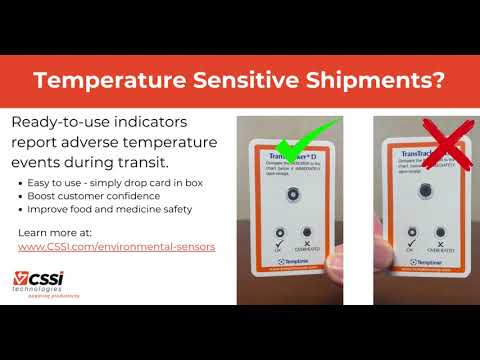
Ready-to-use indicators are small cards which contain temperature-sensitive areas which provide a visual signal triggered by environmental conditions. For example, a mark may change color if the temperature exceeds a certain threshold, or a different mark may appear if freezing conditions have been encountered. Indicator cards are available in various configurations, each intended to provide useful information in certain shipment workflows.
Ready to use indicators are one of several varieties of environmental sensors available from CSSI which prevent the consumption of unsafe foods or medicine. End-users benefit from improved confidence in the quality of the items received, and thereby improve their opinion of your brand.
What types of ready-to-use indicators are available?
Indicators are available in a variety of configurations, each intended to report on specific environmental situations:
Heat indicators
Freeze indicators
Shipment temperature indicators
Food temperature indicators
Blood temperature indicators
This indicator cards require no batteries or power. They work through the application of certain chemicals or inks which are affected by temperature. CSSI is able to help you find or specify the right type of indicator for your application.
What are great applications for ready-to-use indicators?
Ready-to-use indicators are ideal for situations where you need to provide assurance that acceptable temperature ranges are maintained for items during shipping or handling, particularly if there is a high volume of such items which make the cost per unit important. These indicator cards are disposable and inexpensive, so they are suited for one-way trips and customer shipments. Indicators are great for all situations where you need to ensure that food or medicine is properly handled after it leaves your direct control.
Some typical applications might include:
Shipment of frozen food
Shipment of temperature-sensitive food or medicine
Handling of blood samples for which proper temperatures must be maintained
Contact CSSI to discuss ready-to-use indicators
Complete the form to connect with CSSI for a conversation on ready-to-use indicators. We are able to provide you with samples for testing, and ensure that you specify the right type of card for your application.
FAQ – Frequently Asked Questions About the Zebra Ready-To-Use Indicators
Q: What are Zebra Ready-To-Use Environmental Indicators, and what problem do they solve?
A. They are simple card or self-adhesive temperature indicators that give you visibility into the temperature exposure of products such as medications and vaccines. They reveal when products have been exposed to excessive heat or freeze events, so your team can spot a temperature excursion at a glance instead of assuming a shipment stayed in range. The indicators are manufactured by Zebra/Temptime and support a variety of stability profiles.
Q: How do the indicators show that a product was exposed to excessive heat?
A. Time-temperature indicators (TTIs) and threshold heat indicators give an irreversible visual indication when temperature-sensitive products are exposed to excessive heat. Because the change cannot be reversed, an excursion that happened earlier in transit or storage is still visible when the product reaches your dock, even if the temperature has since returned to normal. That visual feedback supports decisions about product integrity throughout the product’s lifecycle.
Q: Can the indicators detect freeze events as well as heat?
A. Yes. FREEZEmarker freeze indicators provide an easy-to-read visual indication when temperature-sensitive products are exposed to freeze events. This matters for products that are damaged by freezing, where a cold excursion can be as costly as a warm one and is otherwise hard to detect after the product thaws.
Q: Which indicator fits my product type or application?
A. Zebra groups the indicators by use:
Heat exposure: TTIs and threshold heat indicators for products sensitive to excessive heat.
Freeze exposure: FREEZEmarker indicators for freeze-sensitive products.
Food: Fresh-Check indicators are temperature-sensitive labels that give a visual indication when food is subjected to temperatures that can affect freshness.
Blood products: Safe-T-Vue indicators show when blood products, plasma, and RBCs have reached or exceeded 6°C or 10°C.
Shipments: TransTracker and Electronic Temperature Sensors monitor temperature-sensitive products across the cold chain, from manufacturer to distributor and on to the hospital, clinic, pharmacy, or end user.
Q: What operational and financial benefits can we expect?
A. Zebra positions the indicators as a way to improve process efficiency and protect margins from re-shipments of product inadvertently exposed to damaging conditions. In practice, receiving and quality staff get a clear visual basis for accept, hold, or reject decisions without specialized equipment. Zebra also describes the food indicators as a cost-effective monitoring option, which makes item-level or case-level monitoring practical where electronic sensors on every unit would not be.
Q: How Can I Obtain Samples of Zebra Ready-To-Use Indicators?
A. CSSI is an authorized Zebra reseller. Contact CSSI to discuss your need, and we will work with you to arrange samples for testing and evaluation.