Unleashing Hands-Free Power: Introducing the Zebra WS501 Wearable Computer

The Zebra WS501 Wearable Computer Brings Hands-Free Data Capture To Mobile Workflows

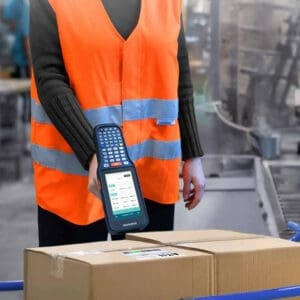
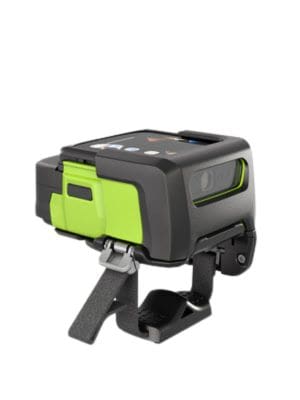
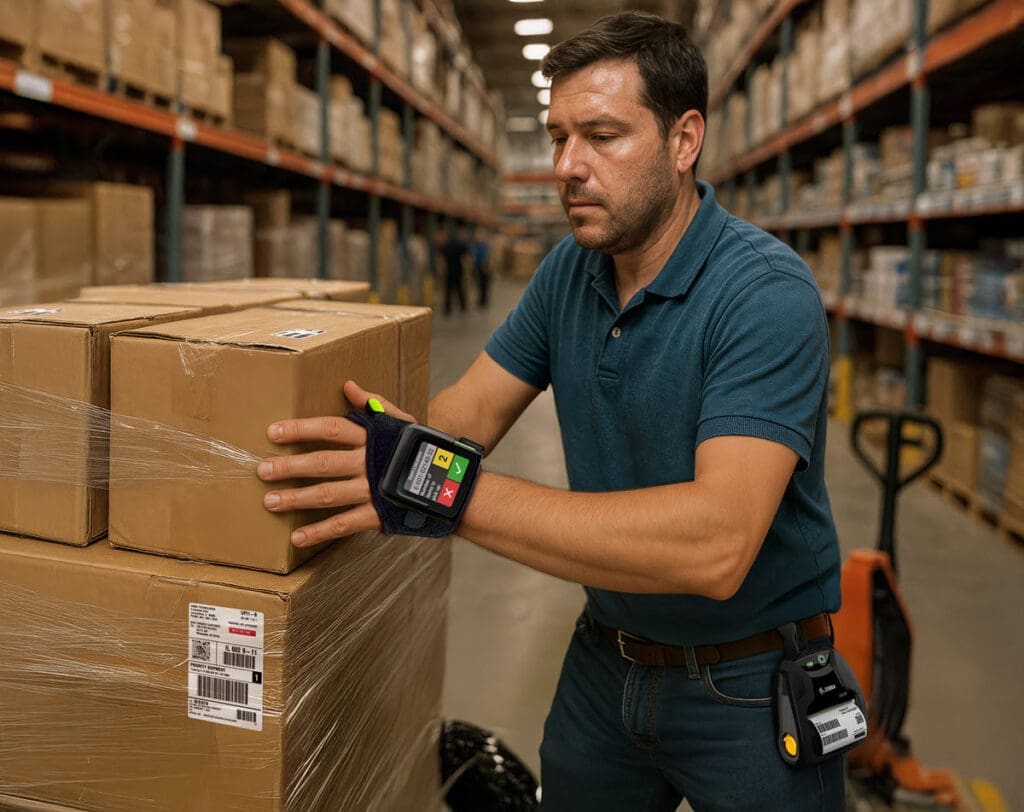
In today’s fast-paced operational environments, keeping up with fulfillment and production demands requires technology that moves as fast as your workers. Enter the Zebra WS501 Wearable Computer with integrated barcode scanner —the world’s smallest and most powerful all-in-one Android operating system enterprise-class wearable device. Designed for the most scan-intensive jobs, the WS501 brings hands-free, high-performance computing directly to your frontline workers who face scan intensive tasks.

The All-in-One Advantage: Why Upgrade from Handhelds and Ring Scanners?

Traditionally, hands-free data capture required a two-piece solution: a host mobile computer strapped to the wrist or hip, paired with a separate Bluetooth ring barcode scanner. The WS501 is a redesign and major update to the Zebra WS50 wearable computer, and completely revolutionizes this approach with a true “no-host” converged design. This is part of a broad line of wearables offered in the Zebra mobile computers lineup.

Why is it a better option?

  • Simplified Worker Experience: Workers only need to wear one lightweight, ergonomic device to capture and access data, removing the bulk and connectivity hassles of a two-piece setup. It can be worn on the back of the hand (hand mount) or as a two-finger mount. The barcode scanner is operated with an ergonomic trigger.
  • Reduced IT Burden & Cost: With an all-in-one solution, IT teams only have one device to procure, one battery to charge, one operating system to update, and one Zebra OneCare™ service contract to manage.
  • Uncompromised Power: Despite its size, it features 3GB RAM and 32GB Flash (five times the memory capacity of its predecessor, the WS50), enabling seamless multitasking across multiple applications without keeping workers waiting.

Transforming Workflows in Warehousing and Manufacturing

The WS501 is built to handle all-day, everyday enterprise use. It survives extreme temperatures, bumps, drops, and is dust-tight and hose-down waterproof. Here is how it fits perfectly into core operations:

Warehousing & Distribution

  • Item Sorting: The bright 2-inch AMOLED display provides instant, line-of-sight instructions to workers on the proper bin locations for scanned items.
  • Receiving & Put-Away: Workers can easily maneuver and move goods from the receiving zone to warehouse shelves with completely free hands.
  • Voice-Directed Picking: The integrated speaker and microphone support industry-leading voice-directed picking solutions. Workers can interact with voice apps while using the integrated scanner to verify picked items, locations, and quantities.

Manufacturing

  • Parts Tracking & Line-side Replenishment: Workers can scan parts as they move through the assembly process without constantly setting down a handheld device.
  • Finished Goods Verification: High-volume, heavy-duty data capture is made easy with the integrated SE4770 imager, which quickly reads dirty, damaged, or poorly printed barcodes, even if the worker or the item is in motion.

Key Technical Specifications

Below is a snapshot of the enterprise-grade power packed into the WS501:

FeatureSpecification
Memory3GB RAM / 32GB Flash (Supports multiple apps simultaneously)
Display2-inch AMOLED color touch screen with Qualcomm® TruPalette™ (No backlight required)
ScanningIntegrated Zebra SE4770 Imager (Captures large/multiple barcodes with superior motion tolerance)
Wireless ConnectivityWi-Fi 6 (802.11ax) and Bluetooth 5.3 for blazing-fast, reliable connections
Operating SystemAndroid 14 AOSP (Future-proof with 2 additional planned OS releases up to Android 17)
PowerHot-swappable batteries; fast charging in under 3 hours
AudioIntegrated microphone and speaker with Push-to-Talk (PTT) capabilities

Leveling Up with the WS501-R: Integrated UHF RFID

For workflows that require advanced tracking, Zebra also introduces the WS501-R Android RFID Wearable Computer . This model takes the all-in-one concept a step further by integrating a UHF RFID reader directly into the wearable device, completely eliminating the need for a separate RFID sled or reader.

Key Benefits of the WS501-R:

  • Simultaneous Capture: Workers can handle items and packages while reading UHF tags and scanning barcodes completely hands-free.
  • Configurable Read Range: The WS501-R offers a maximum UHF read range of up to 5 feet (1.5 meters). The read range can be dynamically controlled via applications to support short-range reading (a few inches) by automatically reducing RFID output power.

Applicable WS501-R Workflows:

  • Manufacturing: Pallet/container management, automated parts tracking, and finished goods verification.
  • Warehousing & T&L: Inventory management, sorting, picking, and loading/unloading tasks where RFID tags are heavily utilized to automate data entry.

Learn More About the Zebra WS501 Wearable Computer

To learn more about the WS501 and WS501-R Wearable Mobile Computer from Zebra, please contact CSSI. We are a Zebra Technologies corp authorized partner and can arrange a demo so that you can assess this powerful new update to the Zebra WS50 for your critical hands-free workflows.

1. What exactly is the Zebra WS501, and how is it different from a standard handheld scanner? The WS501 is an all-in-one, enterprise-class wearable computer that combines a barcode scanner, touchscreen computer, and voice communication device into a single unit worn on the back of the hand or as a two-finger mount. Traditional setups require a separate wearable computer paired with a ring scanner; the WS501 replaces that two-piece arrangement with one device, which means one battery to manage, one operating system to update, and one service contract to track — simplifying both the worker’s experience and the IT department’s workload.

2. What are the key hardware specs, and is it durable enough for warehouse or manufacturing floors? The WS501 runs on 3GB of RAM and 32GB of flash storage (five times the memory of its predecessor, the WS50), powered by Android 14 with updates planned through Android 17. It features a 2-inch AMOLED color touchscreen that stays readable without a backlight, an integrated Zebra SE4770 imager for scanning, Wi-Fi 6 and Bluetooth 5.3 connectivity, and a built-in microphone and speaker for push-to-talk communication. On durability, it’s built to withstand extreme temperatures and is both dust-tight and hose-down waterproof, making it suitable for demanding warehouse, distribution, and manufacturing environments.

3. How long does the battery last, and what happens if it runs out mid-shift? The article highlights hot-swappable batteries with fast charging in under 3 hours, so workers can swap in a charged battery without powering down the device or losing their session, minimizing downtime during a shift.

4. What tasks or workflows is the WS501 best suited for? It’s designed for scan-intensive environments across two main areas. In warehousing and distribution, it supports item sorting (using the bright display for bin location guidance), receiving and put-away (keeping hands free to maneuver goods), and voice-directed picking. In manufacturing, it supports parts tracking, line-side replenishment during assembly, finished goods verification with motion-tolerant imaging, and container/pallet management.

5. Is there a version that supports RFID, and how does it differ from the standard model? Yes — the WS501-R is an enhanced variant that adds an integrated UHF RFID reader, allowing simultaneous barcode and RFID tag reading. It offers a read range of up to 5 feet with configurable power output, making it adaptable for shorter-range applications where more precise read zones are needed.

Zebra ET60 and ET65 Certified for C1D2 Hazardous Environments

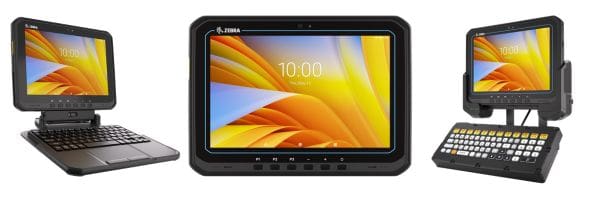
Operating in hazardous locations like chemical plants, oil refineries, and specialized manufacturing facilities requires uncompromising safety standards. Consumer-grade devices simply aren’t safe and put your workers at risk. That is why we are thrilled to announce that the highly versatile Zebra ET60 (wi-fi only) and ET65 (wi-fi and cellular) Enterprise Tablets are now Class 1/Division 2 (C1D2) certified for safe use in hazardous environments.

What Does C1D2 Certification Mean for Your Operations?

C1D2 is a widely accepted North American ANSI/ISA certification for devices tested by a Nationally Recognized Testing Laboratory (NRTL) for safe operation in hazardous locations (HazLoc). The ET6x C1D2 configurations are specifically engineered to avoid generating a spark or enough heat to cause an explosion. To ensure safety, they include special physical enhancements such as screws to securely lock the battery and USB port covers before entering a hazardous area.

HazLoc ClassificationDescription
Class 1Environments containing flammable gases, vapors, and liquids.
Division 2The environment contains a hazard, but it is contained. It is only present under abnormal conditions, such as a system malfunction or a rupture.

The Zebra ET60 and ET65 Advantage: Rugged Redefined

Beyond its safety certifications, the ET60 and ET65 offer a versatile, single-platform solution that adapts to your evolving workflow needs. It can function as a rugged tablet, a desktop computer (with the snap-on friction hinge keyboard), or a fixed vehicle-mount computer in forklifts.

  • Unmatched Ruggedness: Features IP66 sealing (can be hosed down for easy cleaning), a 5 ft. (1.5m) drop specification to concrete right out of the box, and thrives in blazing heat, dust, and freezing temperatures.
  • Next-Generation Connectivity: Supports Wi-Fi 6E, 5G, Private 5G, and CBRS (US only) for blazing-fast, reliable connections inside facilities or out in the field.
  • Superior Viewing: A super bright 1000-nit display protected by shatter- and scratch-resistant Gorilla Glass ensures readability in virtually any lighting condition, including bright outdoor sunlight.
  • Advanced Data Capture: Utilize the 16 MP rear camera with OCR Wedge to automatically capture license plates, VINs, TINs, and meter readings. For intense scanning needs, the optional SE55 Advanced Range barcode scanner captures barcodes from near contact up to 40 ft. (12m) away.
  • Powerful Performance: Powered by a Qualcomm® 6490 octa-core 2.7 GHz platform (for Android operating system) or the new Intel® Core™ Ultra platform (for Windows), enabling the AI and machine learning apps of today and tomorrow.
YouTube player

Hazardous Workflows Powered by the Zebra ET6x

Equipping workers with C1D2-certified ET6x tablets ensures they remain productive and safe when in hazardous locations:

  • Petrochemical & Chemical Manufacturing: Perform specialized manufacturing maintenance, mobile HMI, PLC programming, and safety and compliance inspections where flammable vapors or liquids may be present.
  • Oil & Gas / Utilities: Streamline critical infrastructure inspections, remote assistance, meter reading, and proof of service in potentially explosive environments.
  • Mining: Automate asset management and track personnel safely in extreme, high-risk environments.
  • Warehousing & Logistics: Utilize ultra-rugged forklift mounts to manage fleets, track inventory, and handle lineside replenishment seamlessly in facilities storing hazardous materials.

Learn More About the Zebra ET6x Tablet Certified for C1D2 Hazardous Environments

When worker safety is mandatory, you need a ruggedized mobile device that boasts the highest level of HazLoc safety without compromising on enterprise-class features. Contact the Zebra Technologies Corp mobile computer experts at CSSI to arrange a demo of the ET60 or ET65 rugged tablet PC.

1. What does C1D2 certification mean, and why does it matter for the Zebra ET60/ET65? C1D2 stands for Class 1, Division 2 — a designation under the ANSI/ISA hazardous-locations standard for areas where flammable gases or vapors may be present under abnormal conditions. The Zebra ET60 (Wi-Fi) and ET65 (Wi-Fi/cellular) have been certified to this standard by a Nationally Recognized Testing Laboratory, meaning independent testing confirmed the devices are engineered to avoid spark generation or explosive heat. In practice, this lets workers bring a full-featured tablet directly into petrochemical plants, oil and gas sites, and other combustible-atmosphere locations without needing a separate, stripped-down “hazloc” device.

2. What’s the difference between the ET60 and the ET65? Both models share the same rugged design and C1D2 certification, but they differ in connectivity: the ET60 is Wi-Fi only, while the ET65 adds cellular connectivity (including 5G) on top of Wi-Fi. The ET65 is the better fit for field teams who need connectivity outside Wi-Fi range — such as pipeline or utility inspectors working across a large site — while the ET60 suits facilities where reliable Wi-Fi 6E coverage is already in place.

3. How rugged are these tablets, and can they handle extreme conditions? The ET6x series is built for demanding industrial use: it carries an IP66 seal rating against dust and water, is rated for 5-foot drops, and is designed to tolerate extreme temperatures. The display is a 1,000-nit, Gorilla Glass-protected screen, so it stays readable in direct sunlight and holds up to the bumps and scrapes typical of plant floors, mining sites, and warehouse operations.

4. What safety precautions are needed before taking the tablet into a hazardous area? The ET60/ET65 include screws that lock down the battery compartment and USB port covers, and these need to be securely fastened before the device enters a classified hazardous location. This step is part of what allows the tablet to maintain its C1D2 rating in the field — it’s a simple but essential procedure for site safety compliance, and workers should confirm covers are locked as part of their pre-entry checklist.

5. What tasks can workers actually perform with these tablets, and which industries use them? Beyond basic data access, the ET6x can handle HMI and PLC programming, compliance inspections, infrastructure and asset inspections, remote expert assistance, meter reading, and inventory or fleet tracking. It also flexes into different form factors — used as a handheld tablet, docked as a desktop workstation with a friction-hinge keyboard, or mounted in a vehicle or forklift. Optional accessories like the SE55 barcode scanner (40-foot scan range) extend its use for warehousing and logistics. Typical industries include petrochemical and chemical manufacturing, oil and gas, utilities, mining, and warehousing/logistics operations that handle hazardous materials.

Datalogic Falcon X60 and X65 – New Ultra-Rugged Android Mobile Computer

If your operation runs hard — multiple shifts, cold storage, outdoor loading docks, forklift aisles — your mobile computers need to keep up. Datalogic’s Falcon X60/X65 is a handheld computer engineered from the ground up for exactly that environment, and brings several genuinely notable advancements to the rugged handheld market.

What’s New & Notable

A significant step forward in mobile computer scanning range and speed

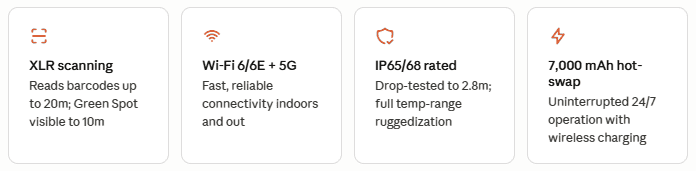
The headline feature is Datalogic’s new XLR (Extra-Long Range) barcode scanner, which reads barcodes at distances up to 20 meters. Combined with the patented Green Spot™ technology — a visible confirmation dot projected directly onto the label — operators get instant, eyes-on confirmation without looking down at their device. The Green Spot is visible up to 10 meters on the XLR imager, which is a meaningful improvement for high-bay warehouse environments.

The TrueAim™ two-stage trigger adds precision targeting to reduce misreads before they happen — a small ergonomic detail that adds up to real efficiency gains across a full shift.

Key feature highlights:

Datalogic Falcon X60/X65 tech highlights
  • XLR imager/barcode scanner reads barcodes up to 20 meters; Green Spot™ visible confirmation up to 10 meters
  • TrueAim™ two-stage trigger for precision targeting and fewer misreads
  • Wi-Fi 6/6E with WPA3 Enterprise security on both models
  • 5G cellular, GPS/GNSS, and eSIM on the X65 for outdoor and multi-site operations
  • Qualcomm QCx4490 Octa-Core 2.4 GHz processor with 8 GB RAM and 128 GB storage
  • Operating system: Android 15 GMS with a committed upgrade path to Android 19

Connectivity is another major upgrade. Both models support Wi-Fi 6/6E with WPA3 Enterprise security. The X65 adds 5G cellular (including private network and CBRS support), GPS/GNSS, and an eSIM slot — making it the stronger choice for operations that span indoor and outdoor environments or require cellular backup.

Model Comparison – Two models, one platform

The Datalogic Falcon X60 and X65 models share the same processor, display, OS, keyboard options, battery, and ruggedization. The X65 adds 5G cellular, GPS/GNSS, a barometric pressure sensor, and an eSIM slot for operations that need cellular connectivity or location awareness.

Falcon X60Falcon X65
Wi-Fi 6/6E / XLR Imager / Wi-Fi only (No cellular)Wi-Fi 6/6E / 5G Cellular / XLR Imager / GPS / eSIM

Where It Fits – Strong applications across several verticals

The Falcon X60/X65 is a natural fit across several demanding industries:

Warehousing & Distribution

Inventory management, receiving, putaway, picking, shipping, and work order management. The XLR imager handles high-bay racking without requiring operators to physically approach every scan point.

Transportation & Logistics

Truck loading and unloading, forklift operations, baggage management, and returns. The 5G-capable X65 is well-suited for yard management and outdoor dock use.

Manufacturing

Intralogistics, kitting, quality control, and traceability. The field-detachable handle supports both handheld and pistol-grip configurations for different task types on the floor.

Healthcare Warehousing

Receiving, inventory management, order fulfillment, and batch tracking in clinical supply chains where chemical resistance and reliability are non-negotiable.

Datalogic Falcon X60/X65 Specs at a Glance

SpecificationDetails
ProcessorQualcomm QCx4490 Octa-Core 2.4 GHz
Memory / Storage8 GB RAM · 128 GB UFS Flash
Operating SystemAndroid 15 GMS; upgradeable to Android 19
Display4.3″ WVGA IPS, 600-nit, Gorilla Glass 7
Scan EnginesStandard 2D, Extended Range, or XLR (Extra-Long Range) — all with Green Spot™
WirelessWi-Fi 6/6E (802.11ax), Bluetooth 5.3, NFC; 5G FR1 (X65 only)
Battery7,000 mAh LiIon, hot-swap; wireless (Qi EPP, 10W) + contact charging
Drop Resistance2.8m to concrete at ambient; 2.4m across full operating temp range
SealingIP65 and IP68
Keyboard Options31-key Numeric · 41-key Functional Numeric · 53-key Alphanumeric
Cameras13 MP rear (autofocus) · 8 MP front (fixed focus)
Warranty1-year factory warranty; EASEOFCARE plans available

Ready to evaluate the Datalogic Falcon X60 or X65 for your operation?

We are an authorized Datalogic partner. Contact CSSI Technologies for mobile computer pricing, demos, and compatibility guidance, or to speak with an enterprise mobility specialist.

1: What’s the difference between the Falcon X60 and the X65 — which one do I need? The X60 is the Wi-Fi-only model, best suited for indoor environments like warehouses and distribution centers with solid wireless coverage. The X65 adds 5G cellular, GPS, and an eSIM, making it the better choice for operations that extend outdoors — loading docks, yard management, or multi-site environments where Wi-Fi isn’t always available. Both models are otherwise identical in hardware, OS, battery, and ruggedization.

2: We’re already running Skorpio X5 docks. Do we need to replace our charging infrastructure? No. The Falcon X60/X65 is fully backward compatible with existing Skorpio X5 docks and accessories, including both contact and wireless charging variants. You can deploy new devices without replacing your cradles or dock stations.

3: How does the 20-meter scanning range work in practice — do operators need to do anything differently? Not really. The XLR imager works like a standard scanner but with a much longer reach. Datalogic’s Green Spot™ technology projects a visible confirmation dot directly onto the label when a scan registers successfully, so operators get immediate feedback without changing their workflow. The TrueAim™ two-stage trigger helps with precision at longer distances to minimize misreads.

4: What does Android 15 — upgradeable to Android 19 — mean for our IT team? It means a longer, more predictable device lifecycle. Rather than forcing a hardware refresh every time Android moves forward, Datalogic has committed to OS upgrade support through Android 19. For IT, that translates to fewer emergency replacement cycles, more consistent MDM/EMM compatibility over time, and better ROI on the hardware investment.

5: What’s the warranty and support situation for the Datalogic Falcon series? The Falcon X60/X65 includes a standard 1-year factory warranty. Datalogic also offers EASEOFCARE service plans, which add Datalogic Shield for ongoing Android security patches and OS upgrades. CSSI can walk you through the right coverage level for your fleet size and operational requirements — that’s a good topic to cover in a demo conversation.

Honeywell CT70 Handheld Computer – Top of Line Rugged Mobile Device

In warehousing, distribution, and logistics, mobile computers don’t get the luxury of a controlled environment. They ride on forklifts, get dropped on concrete, move in and out of freezers, and are exposed to rain, dust, and constant physical stress—shift after shift. Choosing the right device isn’t just a technology decision; it’s a business continuity decision.

The Honeywell CT70 Mobile Computer was engineered for exactly these conditions. Positioned as Honeywell’s ultra-rugged, next-generation enterprise handheld, the CT70 device delivers a rare combination of forward-looking technology—5G, Wi-Fi 7, Edge AI—packaged in a device built to outlast harsh operational realities. This post breaks down what the CT70 is, where it fits best, and how it compares to a less-rugged alternative like the Honeywell CT47.

YouTube player

Technical Overview: What Are the Key Features of the Honeywell CT70?

The CT70 is built on Honeywell’s Mobility Edge™ platform —a proven hardware and software foundation that delivers long device lifecycles, enterprise security, and a predictable Android OS upgrade path. With planned support through Android 19 , the CT70 is designed to remain viable for a long service life, a critical consideration for organizations that can’t afford to refresh their mobile fleet every two or three years.

Processor and Memory

At the core is a Qualcomm Snapdragon QCS/QCM6690 octa-core processor running up to 2.9GHz, with a built-in neural processing unit (NPU) that enables on-device Edge AI workloads. The CT70 ships with 8GB LPDDR5 RAM and 128GB UFS 3.1 Flash storage—a meaningful step up from the previous generation in both raw throughput and power efficiency.

Reliable Connectivity

The CT70 offers three connectivity configurations to match the deployment environment:

  • 5G (sub-6GHz FR1 with broad global band support, including AT&T FirstNet compliance) for high-bandwidth, low-latency performance in outdoor and transportation scenarios
  • Wi-Fi 7 (IEEE 802.11be) with triband support (2.4GHz, 5GHz, 6GHz) and multi-link operation (MLO)—purpose-built for high-density warehouse and distribution environments
  • CBRS (Citizens Broadband Radio Service) for secure private LTE coverage in environments where Wi-Fi coverage is inconsistent, such as large outdoor staging areas, yard management, or sprawling DC floors

The device also includes Bluetooth 6.0, integrated NFC in the display, and a comprehensive GPS stack (GPS, GLONASS, Galileo, Beidou, NAVIC, QZSS with dual-band GNSS) for fleet and asset tracking applications.

Scanning

The CT70 supports Honeywell’s FlexRange™ S0803 barcode scanner as standard, with mid-range capability (0–5m) and compatibility with 1D and 2D barcode symbologies via the S0703 engine. DPM (Direct Part Mark) scanning is available via license, supporting applications in manufacturing and parts traceability.

Display and Usability

The CT70 features a 6.0-inch Full HD display (2280 x 1080 resolution) designed for readability in variable lighting conditions—indoors, outdoors, and in direct sunlight. The touchscreen is optimized for use with gloves, styluses, screen protectors, and even in rain, reducing the need for workers to remove PPE to interact with the device.

Durability Ratings

The CT70 is built to survive real-world punishment with an ultra rugged design:

  • Multiple drops to concrete from 1.8m (6 ft) without boot, and 2.4m (8 ft) with protective boot, per MIL-STD-810H
  • Exceeds 3,000 tumbles at 0.5m and 1,500 tumbles at 1.0m per IEC 60068-2-32
  • IP68 and IP65 ingress protection ratings—fully dust-tight and protected against immersion
  • Operating temperature range of -20°C to 50°C (-4°F to 122°F), with storage to -30°C (-22°F)

Battery

The CT70 is available with a 4,775 mAh standard battery type (also available as a wireless-enabled variant) or a 7,692 mAh extended battery for heavy-use and multi-shift environments. Batteries are hot-swappable and field-replaceable, minimizing downtime during shift changes.

What Are Ideal Applications for the CT70? How This Mobile Computer Earns Its Keep With Frontline Workers

Warehousing and Distribution

Warehouse operations run on throughput and accuracy. The CT70 is designed to support both without compromise:

  • Receiving and put-away: Fast, accurate barcode scanning with the FlexRange barcode scanner handles labels on pallets, cartons, and shelving across varying distances without requiring workers to reposition.
  • Pick, pack, and ship: The bright 6-inch display supports clear visibility of WMS instructions and order data, while the glove-friendly touchscreen keeps workers moving without interruption.
  • Cycle counting and inventory audits: Integrated NFC support enables quick pairing with peripheral devices, and Wi-Fi 7 with MLO ensures consistent connectivity even in high-density RF environments with dozens or hundreds of active devices.
  • Cold storage operations: With an operating temperature range down to -20°C, the CT70 performs reliably in freezer environments where lesser devices fail or require warm-up periods before becoming responsive.

Transportation and Logistics

For carriers, couriers, freight handlers, and last-mile delivery operations, the CT70’s 5G capability is the differentiating feature:

  • Proof of delivery: The 13-megapixel rear camera with phase detection autofocus supports high-quality photo capture for delivery confirmation, damage documentation, and exception handling.
  • Yard management and dock operations: CBRS reliable connectivity provides reliable network coverage in large outdoor staging areas where Wi-Fi signal is inconsistent and cellular is preferred.
  • Driver workflows: Real-time route updates, electronic manifests, and dispatch communications are supported over low-latency 5G, reducing driver downtime and improving exception response times.
  • Asset tracking: The dual-band GNSS stack provides accurate geolocation for fleet management, load tracking, and chain-of-custody documentation throughout the transportation lifecycle.

Inventory and Asset Visibility

For organizations managing high-value assets, serialized inventory, or multi-site operations, the CT70 provides the platform for accurate, real-time visibility:

  • RFID and NFC workflows: The integrated NFC reader in the display supports contactless asset identification, access control, and device pairing. UHF RFID capability is available via accessories for bulk inventory scanning applications.
  • Audit and compliance: The CT70 supports Honeywell Operational Intelligence, providing IT and operations teams with device health dashboards, battery analytics, and usage data that support compliance reporting and proactive maintenance planning.
  • Multi-site mobility: Built on the Mobility Edge platform with planned Android 19 support, the CT70 provides a consistent software environment across distributed facilities, reducing configuration management complexity for IT teams managing enterprise-scale deployments.
honeywell CT70 mobile computer

CT70 vs. CT47: When Ultra-Rugged Changes the Equation

The Honeywell CT47 is itself a capable enterprise mobile computer—ultra-rugged by most industry definitions, with 5G connectivity, Wi-Fi 6E, IP65/IP68 ratings, MIL-STD-810H drop performance to 2.45m, and Android OS support through Android 15. For many deployments, the CT47 is the right tool.

But the CT70 is in a different class for organizations with more demanding requirements. Here’s how the two compare across the dimensions that matter most:

CT47CT70
Lifecycle and OS SupportAndroid support guaranteed through Android 15.Android support planned through Android 19—roughly two full OS generations beyond the CT47. For organizations with three-to-five-year device refresh cycles, that gap is significant. Deploying devices that will remain on a supported OS for longer reduces the frequency and cost of fleet refreshes and the associated retraining, MDM reconfiguration, and application re-certification cycles.
Processor and AI CapabilityQualcomm QCS6490/QCM6490 octa-core at 2.7GHz.Qualcomm QCS/QCM6690 octa-core at up to 2.9GHz with a dedicated Neural Processing Unit (NPU) for Edge AI inference. As AI-driven applications—computer vision for damage detection, predictive pick path optimization, real-time quality inspection—move from pilot to production, the CT70 is positioned to support them without a hardware refresh.
Wireless Connectivity5G and Wi-Fi 6E.5G, Wi-Fi 7 (with multi-link operation), and CBRS. Wi-Fi 7’s MLO capability allows the device to simultaneously utilize multiple frequency bands, delivering more stable connectivity in congested RF environments—particularly relevant in large distribution centers with high device density. CBRS adds a private LTE option for environments where public cellular is insufficient and Wi-Fi coverage is incomplete.
Display5.5-inch display.6.0-inch display with Full HD resolution (2280 x 1080). The additional screen real estate reduces scrolling and improves readability for WMS applications, digital manifests, and work instructions displayed in dense environments.
Drop and Tumble PerformanceMultiple drops to 2.45m (8 ft.) without boot; 2.75m (9 ft.) with boot.Multiple drops to 1.8m (6 ft.) without boot; 2.4m (8 ft.) with boot—comparable, with both tested per MIL-STD-810H. Tumble performance exceeds 3,000 tumbles at 0.5m and 1,500 tumbles at 1.0m, consistent with the CT47’s overall ruggedness envelope.

Why Source the Honeywell CT70 Mobile Computer Through CSSI?

CSSI Technologies is a Honeywell Platinum Partner—Honeywell’s highest partner tier—for the Honeywell Productivity Solutions and Sensing (PSS) AIDC product line. That designation reflects not just transaction volume, but demonstrated technical competency across Honeywell’s mobile computing, scanning, and printing portfolio.

What that means in practice for organizations evaluating or deploying the CT70:

  • Pre-sales consultation: CSSI’s team helps customers match the right Honeywell product—and the right configuration—to their operational environment. Not every deployment needs a CT70; not every CT47 deployment is appropriately spec’d. We help you make the right call before you commit.
  • Configuration and staging: CSSI can stage CT70 devices before shipment, including MDM enrollment, application installation, and asset labeling, so devices are ready to deploy on arrival.
  • Accessory and ecosystem expertise: The CT70 supports a comprehensive accessory ecosystem—universal docks, scan handles, vehicle mounts, wearable kits, and protective boots. CSSI sources and configures the complete solution, not just the device.
  • Ongoing technical support: As a Platinum Partner, CSSI has direct access to Honeywell’s technical resources and can provide first-line support for hardware issues, warranty claims, and software integration questions.
  • Lifecycle management: From procurement through end-of-life, CSSI supports the full device lifecycle—including repair, replacement, and responsible disposal programs.

CSSI’s focus is on AIDC technology across warehousing & distribution, cold storage, manufacturing, and transportation. The CT70 fits squarely in our wheelhouse, and we have the experience to deploy it effectively.

How To Get a Demo of the Honeywell CT70 Mobile Computer?

If you’re evaluating mobile computers for a warehouse, distribution center, or logistics operation—or if you’re looking at an upcoming device refresh—the CT70 device deserves a close look. The best way to evaluate it is hands-on. Contact CSSI to arrange a product demonstration. We’ll bring the CT70 to your facility, walk through the specifications relevant to your workflows, and help you assess whether it’s the right fit—or whether another Honeywell or partner solution better matches your needs.

Q: How does the CT70 perform in freezer or cold storage environments? A: The CT70 is rated for operation in temperatures as low as -20°C (-4°F), making it suitable for freezer warehouses and cold chain environments where many standard mobile computers become unreliable or unresponsive. Its rugged design ensures consistent performance through repeated transitions between cold storage and ambient temperature areas.

Q: What’s the difference between the CT70’s Wi-Fi 7 and the Wi-Fi 6E found on the CT47? A: Wi-Fi 7 introduces multi-link operation (MLO), which allows the device to transmit and receive data across multiple frequency bands simultaneously. In high-density warehouse environments with dozens or hundreds of active devices, this translates to more stable throughput and lower latency compared to Wi-Fi 6E—which, while fast, operates on a single link at a time.

Q: Why does Android OS support matter when choosing a mobile computer? A: Enterprise mobile computers are typically deployed for three to five years or longer. A device that reaches end-of-OS support mid-deployment creates security vulnerabilities, application compatibility issues, and pressure to refresh hardware ahead of schedule. The CT70’s planned support through Android 19 gives IT teams a longer, more predictable lifecycle compared to the CT47’s Android 15 commitment.

Q: What is CBRS, and when would a warehouse or logistics operation need it? A: CBRS (Citizens Broadband Radio Service) is a shared spectrum band that allows organizations to deploy private LTE networks without a traditional carrier relationship. It’s particularly useful in environments where Wi-Fi coverage is inconsistent—such as large outdoor yard management areas, loading docks, or the far corners of sprawling distribution centers—and where public cellular signal is insufficient or undesirable for security reasons.

Q: Can the CT70 support AI-powered applications, and what kinds of use cases does that enable? A: Yes. The CT70’s Qualcomm processor includes a dedicated Neural Processing Unit (NPU) that enables on-device Edge AI inference without relying on cloud connectivity. Practical applications in warehouse and logistics environments include computer vision for damage detection at receiving, real-time quality inspection on production lines, and predictive analytics for pick path optimization—workloads that are beginning to move from pilot programs into production deployments.

Zebra OneCare Support Secures Your Manufacturing and Logistics Mobility Investment

Downtime for your company’s enterprise mobile devices is expensive. Research indicates that a single device failure can lead to a loss in productivity of up to 65 minutes, and each percentage point increase in mobile device failure leads to a 5% increase in Total Cost of Ownership (TCO). For this reason, companies which opt to ‘save’ by not purchasing device maintenance for new equipment often ultimately regret the decision. Service contracts bring savings when it comes to getting Zebra devices repaired, but the most important value is in reducing device downtime.

YouTube player

What Are the Top Reasons to Include Zebra OneCare Service in Your Device Purchase?

For fast-paced manufacturing and transportation environments, Zebra device downtime directly impacts the bottom line. Here are the top reasons to attach Zebra OneCare support service to your hardware investments:

  • Predictable Total Cost of Ownership (TCO): A single device repair without a service plan can sometimes cost more than the device itself! OneCare provides comprehensive coverage—including accidental damage, cracked screens, and normal wear and tear—at a predictable, fixed cost, eliminating unexpected repair expenses.
  • Unparalleled Manufacturer Expertise: Get support directly from the experts who built the devices. This unburdens your IT staff and provides priority access to highly trained professionals fluent in 17 languages.
  • Robust Data Security & Software Updates: Mobile technology operating continuity means business continuity. You gain continuous access to OS software updates, security patches, and LifeGuard™ for Android™ updates, which extend your mobile computers’ security lifespan significantly beyond standard 36-month consumer support.
  • Maximum Device Availability: Eliminate the cost of downtime with rapid turnaround times. Depending on your tier, you can receive advanced replacement devices that arrive pre-commissioned with your software and settings, ready to use right out of the box.
  • Superior Device Visibility: Many plans include VisibilityIQ™ OneCare™, a cloud-based dashboard providing critical insight into device health, repair status, technical support cases, and LifeGuard analytics.

What Are the Zebra OneCare Coverage Tiers?

Zebra Technologies Corp offers flexible tiers and enhancements to meet the specific operational needs and budgets of any facility.

Zebra OneCare TierBest Suited ForKey Features & Turnaround Time
EssentialCore assurance and foundational operational coverage.• 3-day depot repair turnaround
• Comprehensive coverage (accidental damage + wear & tear)
• 8×5 live-agent technical support
• OS updates and LifeGuard for Android
• VisibilityIQ OneCare included
SelectMaximum protection for mission-critical operations.• Next-business-day advanced replacement (like-new device sent before broken one is received)
• Device Commissioning (arrives ready to use)
• 24/7 live-agent technical support
• Includes all Essential features
PremierAdvanced Managed Services and unique enterprise needs.• Fully customizable service package
• Dedicated 24/7 support team with a single point of contact
• Advanced diagnostics, 3rd party software support, custom dashboards, and proactive alerts
SV (Special Value)Right-priced protection for value-tier devices (e.g., TC2X).• 5-day depot repair turnaround
• 8×5 technical support
• Software/LifeGuard updates and VisibilityIQ OneCare
On-SiteDevices that are too vital, large, or cumbersome to ship.• Certified Zebra technician dispatched to your facility
• All parts, labor, travel, and preventative maintenance included
• 1-day or 2-day response options available
TSS (Technical & Software Support)Standalone Technical and Software Support.• 8×5 tech support and OS/LifeGuard updates
• Note: Hardware repair is not included in this tier.

How To Get a Quote for Zebra OneCare for Your Zebra Devices?

Whether your warehouse requires standard comprehensive depot coverage, immediate next-day Zebra device replacements, or an on-site technician, a Zebra OneCare maintenance plan delivers operational excellence and protects your critical technology investments. Combine that with professional services and Zebra support services… contact the Zebra experts at CSSI to discuss OneCare for your Zebra devices.

1. What is Zebra OneCare, and how is it different from a standard manufacturer warranty? Zebra OneCare is Zebra’s comprehensive device protection and support portfolio, built to go beyond a standard break-fix warranty. Rather than only covering manufacturer defects, it’s designed to keep mission-critical hardware — mobile computers, barcode scanners, RFID devices, and thermal printers — running with minimal downtime. Coverage typically includes accidental damage, cracked screens, and normal wear and tear, plus direct access to Zebra’s own support engineers rather than a third-party warranty provider.

2. What coverage tiers does Zebra OneCare offer, and how do I know which one fits my operation? Zebra OneCare comes in several tiers to match different operational needs and budgets: Essential (core coverage with 3-day depot repair and 8×5 support), Select (next-business-day advanced replacement with 24/7 support for mission-critical operations), Premier (a dedicated 24/7 team with advanced diagnostics for enterprise customization), SV (5-day depot repair and 8×5 support for value-tier devices), On-Site (certified technician dispatch with 1-2 day response for large or vital equipment), and TSS (standalone technical/software support only, including firmware updates). The right tier depends on how critical the device is to daily operations and how much downtime your business can tolerate.

3. Which devices can be covered under a Zebra OneCare plan? Zebra OneCare covers the core hardware manufacturing and logistics teams rely on day to day: Zebra mobile computers, barcode scanners, RFID devices, and both thermal transfer and direct thermal printers.

4. How does Zebra OneCare actually reduce costs, if it’s an added expense on top of the device? While OneCare is an additional cost, it’s positioned to lower total cost of ownership rather than add to it. A single device failure can cost up to 65 minutes of lost productivity, and every percentage-point increase in device failure rates raises Total Cost of Ownership (TCO) by roughly 5%. Without a service contract, repair costs can sometimes exceed the value of the device itself. OneCare converts those unpredictable repair costs into a fixed, predictable expense while keeping devices in workers’ hands and minimizing the downtime that drives TCO up in the first place.

5. What support and software benefits come with Zebra OneCare beyond hardware repair? Beyond physical repairs, Zebra OneCare includes continuous OS software updates and security patches, with LifeGuard for Android extending security support well past the standard 36-month consumer window. Customers also get priority access to Zebra’s own trained support staff (available in 17 languages) rather than generic third-party support, plus access to the VisibilityIQ OneCare cloud dashboard, which gives visibility into device health, repair status, open support cases, and fleet analytics. At minimum, CSSI recommends the TSS tier even for budget-conscious operations, since it’s the entry point for continued Android firmware and security updates.

Why Zebra Printhead Protection Program Is Attractive for Zebra Printer Users

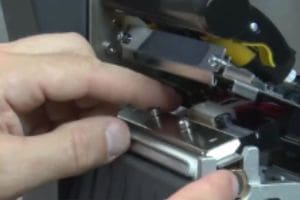
In fast-paced manufacturing and transportation logistics environments, printer downtime is more than just a nuisance—it is a costly disruption to your operations. Everyone knows that thermal printheads wear down over time. As print quality suffers, you are typically forced to pay for expensive replacements. What if you could cross printhead replacement off your expense list entirely?

Zebra Technologies Corp has created a solution that turns an unavoidable hardware expense into a thing of the past…

How Does Zebra Printhead Protection Benefit Your Company?

Participating in this program delivers immediate and long-term advantages for your operational budget and efficiency:

  • Massive Cost Savings: Free Printhead replacements can cost your business thousands, tens of thousands, or even hundreds of thousands of dollars. Eliminating this cost instantly lowers your overall supplies cost and Total Cost of Ownership (TCO).
  • Increased Zebra Printer Uptime & Productivity: By using certified supplies and having rapid access to free replacement printheads, your critical manufacturing and logistics lines stay up and running.
  • One-Source Printing Solution: Ensure consistency and simplify your procurement by getting your printing solutions from a single, reliable ecosystem.
  • No Maintenance Shipping Hassles: Optimize your Zebra printer fleet without the need to ship your printers back to a depot… free printhead replacement saves you valuable time and freight costs.
  • Simple Enrollment: There are no additional costs to receive your printheads, provided you are committing to your label print volume and using genuine Zebra media appropriately.
Printhead replacement

Why Should You Use Genuine Zebra Supplies for Print & Labels?

To qualify for Zebras printhead protection program, you must use Zebra Certified Supplies . But beyond free replacement printhead service, utilizing Zebra media offers distinct operational benefits for demanding applications:

  • Outstanding Print Quality & Rigorous Testing: Zebra’s experienced R&D team pre-tests all materials to ensure minimal printhead wear and longer life. They test for image abrasion, durability, adhesion strength, and extreme temperatures (from -112°F / -80°C up to 1,000°F / 538°C), as well as resistance to harsh chemicals.
  • Exceptional Service & Availability: With four U.S. manufacturing and distribution locations, hundreds of products are available to ship at a moment’s notice to ensure you never run out of critical labels.
  • Unmatched Expertise: With over 50 years of experience in thermal printing and narrow-web flexographic printing, Zebra provides performance-matched supplies you can trust. They are also ISO 9001:2015 registered, ensuring consistent, high-quality products every time.

How Do You Participate in Zebras Printhead Protection Program?

Stop paying for printheads today. Enrollment is easy, lasts for one year, and can be automatically renewed with your continued purchase of Zebra Certified Supplies.

To participate, you simply need to commit to a barcode label print volume using genuine Zebra Certified Supplies for your covered Zebra printers. To get started, contact CSSI Technologies! Our team will provide you with all the necessary information, help you qualify your current print volume, and provide the simple sign-up forms to get you enrolled and on your way to rapid free printhead replacement.

1. What is the Zebra Printhead Protection Program? It’s a program that provides complimentary replacement printheads for the lifetime of enrolled Zebra printers. In exchange for committing to a defined barcode label printing volume using genuine Zebra Certified Supplies, enrolled users receive brand-new printheads at no charge whenever their existing ones wear out from normal use.

2. Who is eligible to enroll? Any business that owns or operates Zebra printers can qualify, provided they commit to a defined print volume and use genuine Zebra Certified Supplies (media and ribbons) appropriate for their covered equipment.

3. How much does the program cost? There are no enrollment fees. The only requirement is purchasing Zebra Certified Supplies as part of normal operations. Enrollment runs for one year and automatically renews as long as qualified supply purchases continue.

4. What does the program actually cover — and what doesn’t it cover? The program covers printhead replacement resulting from normal wear and tear during standard operation. It does not cover damage caused by misuse or the use of non-certified, non-Zebra supplies.

5. How do I enroll my business in the program? Enrollment starts by contacting CSSI Technologies. Their team will verify your current print volumes, confirm your qualification, and provide the enrollment documentation to get you started.

How Does CSSI’s Device Lifecycle Management Help IT Teams?

If your warehouse, distribution center, or manufacturing facility relies on a fleet of rugged Android devices — handheld computers, tablets PCs , vehicle-mounted terminals — you already know that keeping those devices configured, secure, and operational is no small task. For many IT teams, managing mobile device deployments has become one of the most time-consuming and frustrating parts of the job.

That’s exactly the problem CSSI’s Device Lifecycle Management program was designed to solve. As a subscription-based managed service, this mobile device management solution lets CSSI’s team of Android and mobile device management experts handle the heavy lifting — so your people can focus on running the business.

Android Is Moving Fast – How This Creates Challenges for Company IT Leaders

When companies operated fleets of Windows Mobile and Windows CE devices, firmware updates were infrequent and manageable. Android has changed all of that. The Android operating system now releases significant updates on an annual cycle, and each update must be tested against enterprise applications before deployment, evaluated for security implications, and then rolled out across potentially hundreds of devices — often spread across multiple facilities.

CSSI works with companies every day that are struggling to keep pace. Many have stalled on Android 10 or Android 11 because of application compatibility issues they haven’t had the internal bandwidth or expertise to resolve. The consequences are real: outdated firmware means unpatched security vulnerabilities, potential compliance issues, and devices that are increasingly out of sync with vendor support.

At the same time, mobile device fleets are growing due to the increasingly mobile workforce. Employee devices such as handhelds and tablets have proliferated across warehouse and manufacturing operations, but IT headcount often has not kept pace. When you layer annual firmware cycles on top of day-to-day user support demands, device provisioning for new hires, and warranty repair returns — the workload becomes overwhelming.

The program is built around SOTI MobiControl, the best of mobile device management solutions, and includes end-to-end management of your device fleet: from defining your standard configuration and enforcing it across your fleet, to planning and executing firmware upgrades, to provisioning new devices before they ever reach your facility.

Here’s how the Device Lifecycle Management program works in practice:

  • CSSI works with you to define a standard device configuration — potentially multiple profiles if you have different device types or user roles.
  • CSSI uses MDM software tools to enforce that standard configuration across your entire fleet, automatically.
  • New devices arrive at your facility pre-provisioned and ready to deploy out of the box — no reconfiguration required.
  • CSSI plans and executes firmware and OS upgrades, including testing and coordination with your application environment.

What Are the Benefits of CSSI Device Lifecycle Management for Your Business?

1. Dramatically Reduced IT Workload

Device Lifecycle Management sharply reduces the time and expertise your internal IT team must invest in maintaining and updating your mobile computers and tablets. Once configurations are approved, your team is largely hands-off — CSSI handles device enrollment, ongoing OS patching, configuration enforcement, and provisioning. For lean IT teams juggling many responsibilities, this is a meaningful relief.

2. Faster Device Deployment

When new devices are ordered, they arrive at your facility pre-configured and ready to use — a “white-glove” provisioning experience with pre-approved device settings. This eliminates the time your team would otherwise spend imaging and configuring devices manually. It also means replacement devices from warranty repairs are returned to service quickly, minimizing costly downtime.

3. Consistent Configuration Across Your Fleet

Configuration drift is a common and underappreciated problem. When devices are configured manually — or reconfigured after repairs without a rigorous process — inconsistencies creep in. Device Lifecycle Management uses MDM enforcement to ensure every device in your fleet stays within the approved standard, regardless of what happens to it in the field. Mobile application management allows you to push updates without having to physically recall devices.

4. Stronger Security Posture

Security is one of the most compelling reasons to adopt a managed lifecycle approach. Device Lifecycle Management keeps your corporate devices synced to current firmware, ensures security patches are adopted quickly, and restricts end-user permissions to only what is necessary for each role. When companies fall behind on Android updates, their exposure to unpatched vulnerabilities grows with every passing month. CSSI’s program eliminates that risk. Further an MDM tool enhances asset management – you can see when devices have last been accessed, and utilize geofences.

5. Access to CSSI’s Android and MDM Expertise

Android expertise is not easy to develop in-house, especially when it isn’t a core part of your business. CSSI’s team works with Android mobile devices and mobile device management software every day across dozens of customer environments. That accumulated expertise translates directly into faster problem resolution, better-informed upgrade planning, and proactive roadmap guidance. Subscribers also receive regular roadmap and security updates from the CSSI team.

6. Simplified Procurement and Reverse Logistics

Replacing devices becomes simpler when procurement is integrated with the provisioning process. And when devices return from warranty repair, the headache of reconfiguration is eliminated — devices are returned to the standard configuration automatically, reducing downtime and the administrative burden of managing the reverse logistics process.

Is Device Lifecycle Management Right for Your Organization?

Our mobile device management solution is a particularly strong fit for organizations that:

  • Operate a fleet of 10 or more rugged Android mobile computers, handheld scanners, or tablets
  • Have an IT team that lacks deep Android or MDM expertise — or time to manage mobile devices
  • Are upgrading to new Android handhelds and want to establish sound management practices from day one
  • Have experienced challenges keeping firmware and OS versions current
  • Operate across multiple facilities or have geographically distributed device fleets
  • Want to improve managed device security, protect corporate data, and reduce the risk of unpatched vulnerabilities

CSSI works with companies across warehousing and distribution, manufacturing, cold storage, transportation and logistics, and field service — and the program is designed to scale with your fleet as it grows.

How To Outsource Mobile Device Management with CSSI?

Starting with Device Lifecycle Management begins with a conversation. CSSI will work with you to understand your current device environment, your application stack, and your management pain points. From there, CSSI’s team helps define your standard device configuration, establishes the MDM management profiles, and puts the program into operation.

A downloadable one-sheet overview of the CSSI’s managed mobility services and the Device Lifecycle Management program is available on the CSSI website. You can also reach out directly to CSSI to schedule a conversation with a mobile device specialist.

1. How is Device Lifecycle Management different from just buying MDM software ourselves? MDM software is a tool — Device Lifecycle Management is a fully managed service built on top of it. When you purchase MDM software on your own, your team still owns the responsibility for configuring it, defining device profiles, planning and executing firmware upgrades, troubleshooting issues, and staying current with Android changes. CSSI’s Device Lifecycle Management program takes all of that off your plate. CSSI’s experts handle the ongoing operation of the MDM platform (SOTI MobiControl), so your IT team approves the workflows once and then largely steps back.


2. How many devices do we need to have for the program to make sense? There’s no hard minimum, but the program tends to deliver the most value for organizations running 20 or more rugged Android devices — particularly when those devices are spread across multiple facilities, serve different user roles, or require multiple configuration profiles. The more devices you manage, the more time and risk your IT team is carrying, and the more meaningful the relief becomes. However, we are able to accommodate companies with smaller number of devices. Particularly if you run devices at multiple sites, this service can have great value for you.


3. What happens when a device comes back from warranty repair? This is one of the most practical benefits of the program. Rather than your IT team spending time to manually reconfigure repaired devices before returning to service, CSSI will reconfigure your repaired devices before they even reach your facility – ensuring that your devices are ready to use out of the box.


4. We’re still running older Android versions. Can CSSI help us catch up? Yes — and this is a situation CSSI encounters frequently. Many organizations have stalled on Android 10 or Android 11 because of application compatibility concerns they haven’t had the internal bandwidth or expertise to resolve. CSSI’s team has hands-on experience navigating Android 11, 13, and 14 upgrade challenges across many customer environments. Part of the Device Lifecycle Management engagement includes upgrade planning and execution, with testing coordinated against your enterprise software stack.


5. Do we need to replace our current devices to enroll in the program? Not necessarily. The program is designed to work with your existing fleet of Android rugged devices. CSSI will work with you to assess your current device environment, define a standard configuration, and establish the MDM management profiles — whether you’re onboarding existing hardware, taking delivery of new devices, or a mix of both. The pre-provisioned “white-glove” experience applies to new device orders going forward, but enrollment in the program doesn’t require a fleet refresh.

Why Is Ultra-Long-Range Barcode Scanner Capability Now Essential for Most Warehouses?

Today’s warehouses and distribution centers are fundamentally different from what they were even five years ago. Taller racking, longer aisles, cold storage zones, forklift traffic, and aggressive throughput targets have pushed traditional mobile barcode scanner technology past its limits – greater scan range for barcode labels is often needed. For IT and operations leaders evaluating mobile computing upgrades, ultra-long-range (ULR) scanning is increasingly the capability that determines whether a device investment actually delivers ROI—or falls short on the floor.

What Is the Operational Case for Long Range Barcode Scanners?

The challenges driving ULR adoption are not edge cases—they are everyday realities in high-volume facilities:

  • Distance and high-bay racking: Workers can’t always get close to the label. Multilevel pick faces and wide aisles make close-range scanning impractical, slowing throughput and increasing scan failures.
  • Forklift operations: Drivers who must dismount repeatedly to scan pallet or shelf barcode labels lose significant time per shift. ULR scanning lets operators scan from their seated position—a direct productivity gain.
  • Harsh environmental conditions: Moisture from refrigeration units, dust from corrugated materials, and worn or damaged labels degrade the scanner and impeded reliable performance. Rugged scanner models and rugged mobile computers with long range scanner engines are purpose-built to maintain first-pass accuracy in these conditions.
  • Cold storage: Frigid environments restrict fine motor skills and force workers into bulky protective gear. A scanner that demands precise aim or close proximity becomes a liability in cold storage and refrigerated warehouses. ULR scanning compensates by extending effective scan range and reducing alignment requirements.

How Long Range Scanners Improve Productivity?

The ROI for a long range scanner isn’t theoretical. Fewer scan failures means less time repositioning, re-scanning, and troubleshooting. For forklift operators alone, eliminating repeated mount/dismount cycles can recover meaningful time per shift across an entire fleet. Multiply that across a workforce, and the labor savings are material.

Beyond efficiency, there’s a workforce retention dimension. Workers equipped with rugged scanner tools that actually work in their environment experience less fatigue and frustration—which directly affects turnover. In a labor market where warehouse staffing remains a persistent challenge, that matters.

What Scan Ranges Are Covered By Different Types of Barcode Scanners?

Scanner CategoryTypical Working RangeBest Applications
Near RangeInches to several feetItem picking, manufacturing lines
Mid-Range3 or 4 feetWarehouse picking, low-mid rack heights
Long Range100 feet and moreForklift operators, outdoor yard management, high-rack warehouses
Flexible RangeInches up to 100 feetHighly varied scanning needs

What to Look for in a ULR Mobile Computing Solution?

Not all long-range scanning range claims are equal. When evaluating devices, look for:

  • First-pass read rate accuracy under real-world conditions (not just lab specs)
  • Rugged certifications appropriate for your environment (IP ratings, MIL-STD drop testing)
  • Reliable performance and ability to scan both 1d barcodes and 2d symbologies.
  • Cold storage validation—if it works there, it will work everywhere
  • Ergonomic design that reduces physical strain during high-volume scanning tasks
  • Integration with your existing WMS and device management platform

The Bottom Line on the Long Range Barcode Scanner

Ultra-long-range and extended range scanning has moved from a premium feature to a practical requirement for any facility operating at scale. As warehouses grow taller, faster, and more complex, the ability to scan reliably at distance—from a forklift seat, in a freezer aisle, or from 30 feet away—directly determines whether your mobile computing investment performs on the floor. Plus, modern scanners can accommodate both 1d barcodes and 2d codes. The facilities getting ahead of this curve are treating ULR capability as a baseline, not an upgrade.

CSSI Technologies can help: Our team of barcode and mobile computer experts can help you select, test, and deploy high performance long range barcode scanners for your working environment. Please contact us to discuss your handheld device and barcode scanner need.

1: What makes ultra-long-range (ULR) scanning different from standard barcode scanning on a mobile computer? Standard barcode scanners are designed for close-range, controlled conditions — typically a few inches to a few feet. Ultra-long-range scanning engines extend that effective read distance significantly, allowing workers to decode barcodes from across an aisle, at height on a racking system, or from a forklift seat without dismounting. The key difference isn’t just distance: ULR scanning is also engineered to maintain first-pass accuracy despite real-world interference factors like poor lighting, worn labels, dust, moisture, and environmental haze that degrade standard scanner performance at range.


2: Which warehouse operations benefit most from long-range barcode scanning capability? Forklift operations see some of the most immediate gains — drivers can scan shelf and pallet labels from their seated position, eliminating repeated mount/dismount cycles that consume significant time per shift. High-bay and multilevel pick face environments benefit because workers can confirm identifications without repositioning to align with the label. Cold storage facilities are another critical use case: frigid conditions and bulky protective gear restrict fine motor skills, making precise close-range scanning impractical. Any operation where distance, safety clearance, or environmental conditions prevent close label contact is a strong candidate for ULR-equipped mobile computers.


3: How does long-range scanning capability affect worker safety? Safety is one of the most underappreciated benefits. In a working warehouse — with forklift traffic, moving pallets, and active pick zones — repeatedly maneuvering close to a label creates exposure to preventable hazards. ULR scanning allows workers to confirm identifications from a safe distance, reducing unsafe body positions and minimizing the need to enter active traffic zones to scan. For forklift operators specifically, keeping drivers in their seats during scanning tasks eliminates a class of incidents associated with frequent vehicle entry and exit.


4: Is the long-range barcode scanner market growing, and what’s driving that growth? Yes, significantly. The long-range barcode scanner market is projected to grow from approximately $2.37 billion in 2024 to $5.51 billion by 2033, representing a compound annual growth rate (CAGR) of 9.8%. The primary drivers are the continued expansion of e-commerce fulfillment — which puts pressure on picking speed and accuracy — and broader investment in warehouse automation and intelligent inventory management. Warehouse operators are also increasing capital budgets, with average project spend rising from $1.8 million to over $2.1 million in the past year, reflecting a strong appetite for technology that improves operational efficiency.


5: What should operations or IT leaders look for when selecting a mobile computer with ULR scanning for their facility? Start with first-pass read rate accuracy under real-world conditions, not just advertised range specs in a controlled lab environment. Beyond that, evaluate rugged certifications — IP ratings for dust and moisture resistance, and MIL-STD drop testing relevant to your environment. Cold storage validation is a reliable stress test: a device that performs reliably in a freezer aisle will hold up in virtually any other warehouse environment. Consider ergonomic design, since devices that minimize physical strain during repetitive scanning tasks directly affect worker productivity and retention. Finally, confirm integration compatibility with your WMS and device management platform. Working with a specialized AIDC reseller — rather than a generalist channel — is often the most effective way to match device capabilities to the specific demands of your facility.

A barcode symbology guide for warehouse, distribution, and logistics operations

Walk the floor of virtually any modern distribution center, and you’ll find barcode labels on everything—cartons, pallets, bin locations, and assets of every kind. But look closely, and you’ll notice something: not all barcodes look the same. Some are simple black-and-white stripes. Others look like tiny crossword puzzles or geometric mosaics. That distinction matters—a lot.

This post breaks down the difference between 1D and 2D barcode symbologies, explains why 2D has become the preferred choice for high-volume operations, and highlights the three 2D code formats you’re most likely to encounter in warehousing, transportation, and distribution. The typical modern barcode scanner can handle both formats, so you should understand each to choose the best barcode type for your business application.

1D vs 2D barcodes

What Are the Key Differences Between 1D and 2D Barcodes?

1D Barcodes: Simple, Linear, and Limited

The classic barcode—officially called a 1D or linear barcode—encodes data in a single horizontal dimension using a series of parallel bars and spaces of varying widths. When a 1D barcode scanner reads it, it captures information in a single sweep from left to right.

EAN barcode symbology

Common 1D symbologies include Code 39, Code 128, UPC-A, and ITF-14. Most people are familiar with the universal product code (UPC code). These formats have been workhorses of commerce and industry for decades, and for good reason: they’re simple to print, easy to scan, and universally supported. But they carry a significant limitation—capacity. A typical 1D barcode can hold anywhere from 8 to 25 characters of data, just enough for a part number, serial number, or SKU. The 1D scanner tends to be the simplest (and cheapest) barcode scanner available.

That constraint forces a tradeoff: the barcode itself becomes just a pointer, a key that unlocks a record in a back-end database. If the scanner can’t reach that database (poor connectivity, system downtime, edge locations), the data is effectively inaccessible.

2D Barcodes: Data in Two Dimensions

2D barcodes encode data in both the horizontal and vertical dimensions, using patterns of dots, squares, or other shapes arranged in a matrix or stacked rows. The result is dramatically higher data capacity.

Aztec barcode symbology

Where a 1D barcode might store a 12-digit product number, a 2D barcode label can carry hundreds—or even thousands—of alphanumeric characters in the same physical footprint. That means the barcode itself can contain rich data: lot numbers, expiration dates, serial numbers, URLs, shipping instructions, and more—all without a database lookup. Typicallys, a 2D scanner can also be used to read a 1D code.

What Are the Advantages of 2D Barcode Labels?

The move from 1D code to 2D code isn’t just about more data. It unlocks a range of operational advantages that matter greatly in demanding supply chain environments.

Higher Data Capacity

This is the headline benefit. 2D barcodes can encode structured data strings—GS1 Application Identifiers, product details, date codes, batch numbers—within a single label. For industries like food & beverage, pharmaceuticals, or electronics, where traceability requirements are strict, this is transformative.

Smaller Footprint

Because barcode data is encoded in two dimensions, 2D symbols can be printed much smaller than their 1D equivalents while still holding more information. This is critical in applications where label real estate is limited, such as small components, medical devices, or individual item labels on consumer packaged goods.

Error Correction

Most 2D symbologies incorporate built-in error correction algorithms (Reed-Solomon is common). This means that even if a portion of the 2D barcode is damaged, dirty, or obscured, the scanner can still reconstruct and decode the data accurately—a significant advantage in harsh warehouse and manufacturing environments where labels take a beating.

Omnidirectional Scanning

2D barcodes can be read from any orientation—upside down, sideways, at an angle. This improves scan rates and reduces operator frustration, particularly on high-speed conveyor lines or in pick-and-pack operations where workers are moving quickly.

Offline Data Availability

Because the barcode carries the data itself (rather than just a pointer to a database), 2D barcodes support offline workflows. Scanners in areas with limited Wi-Fi coverage—cold storage, loading docks, remote yard locations—can still capture complete, actionable information without a network connection.

Image-Based Scanning Compatibility

2D barcodes require image-based (area imager) scanners rather than laser scanners. This is actually a feature, not a limitation: modern area imagers can read 1D and 2D codes, capture photos, and even read damaged or poor-quality labels with sophisticated decode algorithms. The technology has matured to the point where area imagers are now the standard choice for new deployments.

What Are the Top 2D Barcode Symbologies in Warehouse, Transport & Distribution?

There are dozens of 2D barcode standards in existence, but three dominate in supply chain and logistics environments. Here’s what you need to know about each.

1. GS1 DataMatrix

Data Matrix is a compact, square 2D symbol built around the GS1 system of standards—the same framework that governs UPC and EAN barcodes in retail. In supply chain applications, GS1 DataMatrix is the go-to format for item-level identification, particularly in regulated industries.

Data matrix barcode symbology

Key characteristics of Data Matrix barcodes:

  • Encodes GS1 Application Identifiers (AIs) for structured data: GTINs, lot numbers, expiration dates, serial numbers
  • Highly compact—can be printed very small, down to direct-part marking on metal components
  • Excellent error correction (up to 30% of the symbol can be damaged and still read successfully)
  • Widely used in healthcare (FDA UDI compliance), food & beverage traceability, and electronics manufacturing

If your operation handles items where regulatory traceability is required—or where individual item serialization is part of your workflow—GS1 DataMatrix is likely already in your supply chain.

2. GS1-128 / PDF417 (Stacked Linear)

PDF417 is a stacked barcode symbology—technically a bridge between 1D and 2D—that arranges multiple rows of linear code into a tall, rectangular symbol. It’s been a staple in transportation and logistics for decades.

PDF417 barcode symbology

Key characteristics:

  • High data capacity: up to 1,800 numeric or 1,100 alphanumeric characters
  • Supports the ANSI MH10.8.2 and GS1 standards used in shipping labels
  • Widely used on bill of lading labels, pallet labels, and government ID documents (driver’s licenses in North America use PDF417)
  • Readable with standard linear barcode scanners at moderate print quality

PDF417 remains common on UPS, FedEx, and LTL carrier shipping labels, and on GS1-128 pallet labels compliant with retailer compliance programs (Walmart, Target, Amazon, etc.). If you’re managing outbound compliance labels today, there’s a good chance PDF417 is already part of your label set.

3. QR Code

Originally developed by Denso Wave for automotive parts tracking in Japan, the QR code has become the most widely recognized 2D symbology in the world—and it’s increasingly finding serious application in supply chain operations beyond its consumer-facing uses.

QR Code barcode symbology

Key characteristics:

  • High capacity: up to 4,296 alphanumeric characters or 7,089 numeric characters
  • Four levels of error correction, making it resilient in dirty or physically demanding environments
  • Open, royalty-free standard with enormous ecosystem support
  • The GS1 Digital Link standard now enables QR codes to carry structured supply chain data (GTINs, lot numbers, expiration dates) in a URL-compatible format

GS1’s recent push toward the “Sunrise 2027” initiative—an industry milestone where retail point-of-sale systems are expected to be capable of scanning GS1 Digital Link QR codes—is dramatically accelerating QR adoption in consumer goods and retail supply chains. For warehouse operations that handle CPG products, QR is increasingly becoming a format you need to be ready to read.

The Bottom Line on 1D vs 2D Barcode Symbologies

The shift from 1D to 2D barcode labels isn’t a trend—it’s already well underway across the supply chain. Driven by traceability mandates, compliance requirements, and the demand for richer data at every node of the supply chain, 2D symbologies offer capabilities that linear barcodes simply can’t match.

For operations managers and IT leaders evaluating barcode scanner hardware, barcode label printing systems, or WMS integrations, understanding which 2D barcode formats your trading partners, carriers, and regulatory bodies require—and ensuring your equipment is capable of reading and printing them—is no longer optional. It’s table stakes.

The good news: modern rugged mobile computers and barcode scanners from manufacturers like Zebra Technologies, Honeywell, and Datalogic support all major 2D symbologies out of the box. The technology is ready. The question is whether your operation is configured to take full advantage of it.

Questions about the different types of barcodes, your barcode scanner infrastructure or barcode label printing capabilities? CSSI Technologies helps warehousing, distribution, and logistics operations select, deploy, and support the right AIDC solutions. Contact us for barcode technology and support at cssi.com.

1. What equipment do I need to read 2D barcodes in my warehouse? You’ll need area imager scanners (also called 2D imagers) rather than traditional laser scanners. Modern rugged mobile computers and handheld barcode scanners from manufacturers like Zebra Technologies, Honeywell, and Datalogic come 2D-capable out of the box and can read both 1D and 2D symbologies. If your current devices are laser-only, a hardware refresh is worth evaluating — the scanning performance and data capture advantages of 2D imagers typically deliver a strong ROI.

2. Will 2D barcodes work in areas of my facility with poor Wi-Fi coverage — like cold storage or loading docks? Yes — and this is one of the key advantages of 2D barcodes. Because the barcode itself contains the data (lot numbers, serial numbers, expiration dates, and more), your workers don’t need a live database connection to capture complete, actionable information. This makes 2D particularly well-suited to edge locations like freezers, outdoor yards, and dock doors where wireless connectivity can be unreliable.

3. Which 2D barcode format should I use — DataMatrix, PDF417, or QR? It depends on your use case. GS1 DataMatrix is the preferred choice for item-level traceability, especially in regulated industries like food & beverage or healthcare. PDF417 is the standard for pallet and shipping labels used by major carriers (UPS, FedEx) and retail compliance programs. QR Code is gaining ground in consumer goods supply chains, driven by the GS1 Sunrise 2027 initiative. In many operations, you’ll encounter all three — so ensuring your scanners can read each format is the practical priority. Consult with CSSI for advice on choosing a symbology.

4. Can I print 2D barcodes on my existing label printers? Most modern thermal transfer and direct thermal label printers support 2D barcode symbologies natively through their firmware and printer command languages (ZPL for Zebra, IPL/DPL for Datalogic/Intermec, and others). If your printers are relatively current, you likely already have 2D printing capability. Older hardware may require a firmware update or replacement. Your labels also need to be printed at sufficient resolution (typically 203 dpi minimum, 300 dpi preferred) to ensure reliable scanning, particularly for compact DataMatrix symbols.

5. Do I need to change my WMS or ERP system to support 2D barcodes? Not necessarily — but some configuration will likely be required. The scanning hardware and label formats can often be updated independently of your back-end systems. However, to take full advantage of 2D’s data capacity (capturing lot numbers, expiration dates, and serial numbers in a single scan), your WMS or ERP needs to be configured to receive and process that structured data. An experienced AIDC integrator like CSSI can help assess your current system’s readiness and identify what changes — if any — are needed to unlock the full value of 2D.

How To Implement Electronic Forms for Warehouse Tasks?

Ask any warehouse supervisor or plant manager what slows their operation down, and you’ll hear a familiar list: lost paperwork, illegible handwriting, form field data entered twice, and reports that are always a day behind. The culprit is often the same — manual paper forms that have been part of the operation for so long, no one stops to question them.

The good news is that converting paper forms to electronic forms is one of the fastest and most cost-effective improvements a facility can make. Unlike large-scale ERP implementations or automation projects, digital forms can be scoped, built, and deployed in a matter of days — delivering immediate ROI in the form of faster data collection, fewer data entry errors, and real-time insights and visibility across your operation. You can even build integrations with other company systems.

Here’s a look at five common warehouse and manufacturing tasks that are ideal candidates for the paper-to-digital transition.

What Are 5 Ideal Tasks for Digital Workflow Automation?

1. Receiving and Inbound Inspection

When a shipment arrives, workers typically fill out paper form receiving logs to record quantities, lot numbers, condition notes, and carrier information — then someone re-enters that form data into the WMS or ERP later. An electronic form deployed on a mobile device such as a rugged handheld or tablet lets the receiver scan barcodes or RFID tags to auto-populate item data, flag discrepancies in real time, capture a photo of damaged goods, and push the completed record directly into your system — all in a single step. No clipboard, no re-keying, no delay.

2. Cycle Count and Inventory Audits

Paper-based cycle count sheets are slow, error-prone, and invisible to the rest of the organization until someone walks the completed forms back to the office. Electronic cycle count forms on handheld computers allow workers to scan locations and item barcodes, automatically compare counts to expected quantities, and flag variances for immediate review — giving inventory managers real-time visibility into accuracy issues before they become fulfillment problems.

3. Equipment Inspection and Preventive Maintenance Checklists

Daily forklift inspections, dock door checks, and conveyor maintenance logs are standard in most warehouse environments — and they’re almost universally done on paper. When those forms are converted to electronic format, each inspection is time-stamped, tied to a specific asset and operator, and immediately accessible to maintenance supervisors. Issues can trigger automatic notifications, and historical data becomes searchable for trend analysis and compliance reporting — a major advantage during audits or OSHA reviews.

4. Quality Control and Non-Conformance Reporting

In manufacturing, QC inspectors often document defects, measurements, and pass/fail results on paper forms that then need to be compiled, transcribed, and analyzed — a process that can take days. Electronic QC forms enforce consistent data entry through required fields, dropdown selections, and validation rules. Results are immediately available upon form submission for quality managers. Non-conformance reports can be routed automatically for review and corrective action without anyone hunting down a physical form.

5. Proof of Delivery and Outbound Documentation

Paper-based delivery documentation — driver logs, BOLs, and customer sign-offs — creates delays and data gaps that affect billing cycles, dispute resolution, and customer service. Electronic forms on mobile devices allow drivers to capture customer signatures digitally, photograph delivered goods, and transmit completed delivery records back to the office instantly. The result is faster invoicing, a clear audit trail, and the ability to resolve delivery disputes with documented proof rather than a handwritten note.

What Makes Electronic Forms Work in a Warehouse Environment?

The key to a successful electronic form deployment in a warehouse or plant is choosing the right hardware. Standard consumer tablets and smartphones aren’t built for these environments. Rugged handheld computers and tablets — from manufacturers like Zebra Technologies, Datalogic, and Honeywell — are designed to withstand drops, dust, moisture, and temperature extremes while offering barcode scanning and RFID capabilities that make form data entry faster and more accurate.

When an electronic form is paired with the right device, workers can scan a barcode to populate form data automatically — eliminating the single biggest source of manual entry errors. Form logic can enforce required fields, validate data formats, and even route completed forms to the right person for review or approval, all without anyone touching a paper form.

The Bottom Line

The shift from paper to electronic forms isn’t just about going paperless for its own sake. It’s about getting better data, faster — and making that data available to the people who need it, when they need it. Organizations that make this transition typically see measurable improvements in accuracy, processing speed, and operational visibility, along with real cost savings from reduced re-keying, storage, and paper-related waste.

For most operations, electronic forms are low-hanging fruit for workflow automation: quick to implement, fast to show results, and easy for workers to adopt.

How To Learn More About Eliminating Paper Forms in Your Operation?

CSSI Technologies specializes in electronic form development for warehouse, distribution, manufacturing, and logistics environments. Our team will assess your current paper-based processes, recommend the right form platform, and deliver a solution optimized for your hardware and workflow — often in just a few days.

Contact CSSI today to discuss your paperless form project.

What types of electronic forms work best in warehouse and manufacturing environments? The most effective electronic forms in these settings are those designed for rugged handheld computers and tablets, since those devices are built to withstand drops, dust, moisture, and temperature extremes. Forms that incorporate barcode scanning or RFID input — so workers can scan rather than type — deliver the greatest gains in speed and accuracy. Beyond hardware compatibility, the best forms enforce data quality through required fields, dropdown selections, and validation rules, and they route completed records automatically to the right system or approver.

Do we need to replace our WMS or ERP to use electronic forms? No. Electronic forms are typically designed to integrate with your existing WMS, ERP, or other back-end systems, not replace them. The form captures and validates data on the device, then pushes the completed record into your existing system via API or direct integration. Most operations are able to deploy electronic forms without any changes to their core software infrastructure.

How long does it take to convert paper forms to electronic forms? The timeline depends on the complexity and number of forms involved, but many individual forms can be scoped, built, and deployed in just a few days. Unlike large-scale ERP implementations or automation projects, electronic form conversions are typically fast, low-disruption projects. Starting with one high-impact process — such as receiving or cycle counts — allows you to demonstrate ROI quickly before expanding to other areas. CSSI can advise you and help with this process.

Will workers resist switching from paper to electronic forms? Adoption resistance is a common concern, but workers generally adapt quickly once they see that electronic forms reduce friction rather than add it. Scanning a barcode to populate a form is faster and easier than handwriting the same information, and workers no longer have to worry about illegible forms being rejected or lost paperwork creating problems downstream. Starting with a well-designed pilot on a single process helps build confidence and creates internal advocates before a broader rollout.

What hardware is needed to run electronic forms in a warehouse or plant? Consumer smartphones and tablets are not recommended for most warehouse and manufacturing environments — they aren’t designed for the physical demands of those settings. CSSI offers rugged handheld computers and tablets from manufacturers such as Zebra Technologies, Datalogic, and Honeywell which are purpose-built for industrial use, with drop resistance, sealed housings for dust and moisture, and integrated barcode scanning. The right device depends on your specific environment and workflow. CSSI is an experienced AIDC solutions provider and can guide you through device selection.