Having Trouble Managing Your Android Mobile Devices?
How CSSI Can Help Manage Your Android Computers
We encounter many companies which struggle to support their growing fleets of Android mobile devices. Consider some of the headaches we have helped our clients navigate related to Android 11, Android 13, and Android 14. We encounter many companies which have yet to upgrade from Android 10 or 11 because of software issues… CSSI can help you navigate these problems.
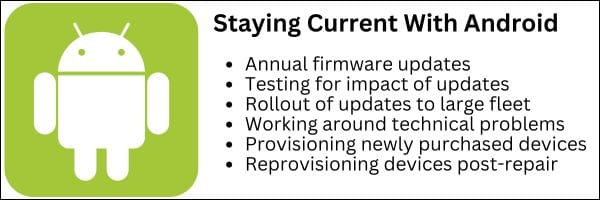
Handhelds and tablets have proliferated, but IT resources often have not kept pace. When you combine this with the challenge of annual Android firmware updates, the need to test those updates against your enterprise software, and day-to-day user support demands, it becomes overwhelming.
For these reasons, CSSI created a program where our Android experts can manage your device profiles, plan and execute your firmware upgrades, and manage device provisioning, to ensure a turnkey experience for you. If you have either a quantity of mobile computers, or devices which are spread across multiple locations, this solution will be particularly valuable for your IT team.
Do Any of These Android OS Challenges Apply to You?
You have not upgraded your Android OS on mobile devices for several years (running Android 10/11/13 in 2026).
You struggle to support your company’s mobile devices and user technical issues
You are not an expert in using mobile device management software
You would like to get new handhelds deployed to users more rapidly
You need guidance for strategies in simplifying your ongoing support of mobile devices
What Is CSSI Device Lifecycle Management?
Device Lifecycle Management is CSSI’s program for managing your devices as your configurations change and the Android OS evolves. Our goal is to take away your mobile device management burden.
We believe that there is great value in standardizing, so we work with you first to define your standard configuration (perhaps several if you have different device types or user types). We utilize mobile device management software to enable hands-off software updates and technical support. We ensure that new devices arrive at your facility pre-provisioned and ready to deploy, saving you time and frustration. On an annual basis, we review the impact of the latest Android firmware, help you test, and if acceptable, create a plan and push updates to your users.
You benefit from: better control and support for your mobile computer fleet; time savings for your IT team; improved security by staying current with firmware; improved user support; access to our Android and mobile device management experts.
How To Get a Quote or Demo for CSSI Device Lifecycle Management
Interested in learning more? Contact CSSI and set up a demo and discussion of how we can help you manage your handhelds and tablets.
FAQ – Frequently Asked Questions About Managing Android Mobile Devices
Q: Why is managing a growing fleet of Android devices so difficult for IT teams? A. As companies add more Android handhelds and tablets to support scanning, warehouse, or field operations, the workload for IT doesn’t scale in a straight line — it grows faster than the fleet does. Staffing rarely increases at the same pace, so the same IT team ends up responsible for provisioning, updating, troubleshooting, and securing far more devices than before. CSSI’s Device Lifecycle Management program is built to absorb that extra load, giving IT teams expert support and standardized processes instead of asking them to stretch further on their own.
Q: Why do so many companies get stuck on older versions of Android? A. Upgrading from one Android version to the next (for example, from Android 10 or 11 to 13 or 14) isn’t as simple as clicking “update.” Every new OS version has to be tested against the enterprise software and workflows already running on those devices, and a failed or rushed upgrade can break mission-critical apps. Many organizations understandably delay upgrades to avoid that risk — but staying on an outdated OS for years also means missing security patches and new features. CSSI’s team plans, tests, and deploys firmware and OS updates on a defined schedule so devices stay current without the guesswork.
Q: What is Device Lifecycle Management, and what does it include? A. Device Lifecycle Management is CSSI’s managed program for handling Android devices from deployment through retirement. It covers device provisioning (devices arrive pre-configured and ready to deploy, rather than IT setting up each one by hand), firmware management (CSSI’s specialists test, plan, and deploy annual OS updates), mobile device management or MDM (software updates are pushed out hands-off through MDM tools), configuration standardization (optimal settings are defined for each device type and user role, so every device behaves consistently), and expert support (direct access to Android and MDM specialists when issues come up).
Q: How does MDM software reduce the day-to-day burden on IT? A. Mobile device management software lets IT push configurations, updates, and policies to many devices at once instead of touching each one individually. Within CSSI’s program, this means routine software updates happen automatically in the background, and device settings stay standardized across the fleet — cutting down on one-off support tickets and freeing IT staff to focus on higher-value work instead of repetitive device maintenance.
Q: How can CSSI help a company that’s currently struggling with its Android fleet? A. CSSI works directly with organizations to take the ongoing burden of Android fleet management off their internal IT teams. Through Device Lifecycle Management, CSSI handles provisioning, firmware and OS update testing and deployment, MDM-based software updates, and configuration standardization — backed by specialists who know Android and MDM platforms in depth. The result is better control over the device fleet, stronger security through up-to-date firmware, and less day-to-day strain on internal IT resources. Companies that want this kind of hands-on support can reach out to CSSI to discuss their current device environment and get started.