Joe Tosolt Archive | page 6
Honeywell Trade-In Program for 2025
Get cash back when upgrading to new Honeywell mobile computers and label printers

Earn Cash Back When Upgrading to New Honeywell Mobile Computers & Printers

As you plan your 2025 purchases of handheld computers and printers, it’s good to know that, if you are upgrading from older equipment, you have the ability to reduce your overall purchase cost with trade-in rebates. We’re pleased to announce that Honeywell has implemented a trade-in program for 2025. You can receive cash back when purchasing new Honeywell equipment by trading in qualifying old devices. Your old equipment can be Honeywell or competitive brands.

Examples of 2025 Honeywell Trade-In Rebates

Rebates vary depending on the new device you are purchasing. Savings can be substantial. Here are a few examples:

  • $250/unit when upgrading to the new CK67 mobile computer
  • $200/unit when purchasing a Honeywell CW45 wearable mobile computer
  • $350/unit when purchasing a Honeywell Industrial label printer

Please refer to the trade-in program data sheet below. If you’d like to discuss your options with Honeywell’s line of mobile computers and label printers, please contact the Honeywell experts at CSSI to get started!

Better Management of Mobile Device Fleets with Zebra’s Storage Solution

As businesses acquire growing fleets of mobile computers and tablet PCs, effective management of these devices presents challenges. Enterprises often struggle with ensuring devices are adequately charged, tracking who has last signed out devices, and maintaining security to keep the company assets safe.

These challenges can lead to increased operational costs: workers have downtime due to devices which aren’t adequately charged, and economic costs due to device loss or theft. Zebra Technologies addresses these issues with its Intelligent Cabinets product line, offering a comprehensive solution for storage, charging, and management of your Zebra mobile computers and tablets.

YouTube player

Challenges in Managing Mobile Computers

Companies deploying numerous mobile computers face several hurdles:

  • Device Tracking: Without a centralized system, keeping tabs on each device’s location becomes cumbersome, increasing the risk of loss or misplacement.
  • Charging Management: Ensuring all devices are charged and ready for use is critical. Inconsistent charging can lead to downtime, affecting productivity.
  • Security Concerns: Unauthorized access or theft of devices can compromise sensitive data and lead to financial losses.

These challenges not only disrupt workflows but also escalate costs related to device replacement, repairs, and operational inefficiencies. That’s where the Intelligent Cabinets storage solution steps in:

Zebra Intelligent Cabinets

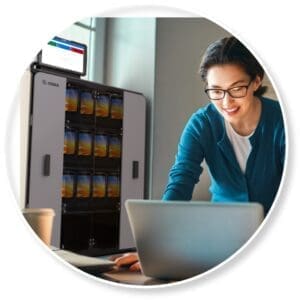
Zebra’s Intelligent Cabinet Solution

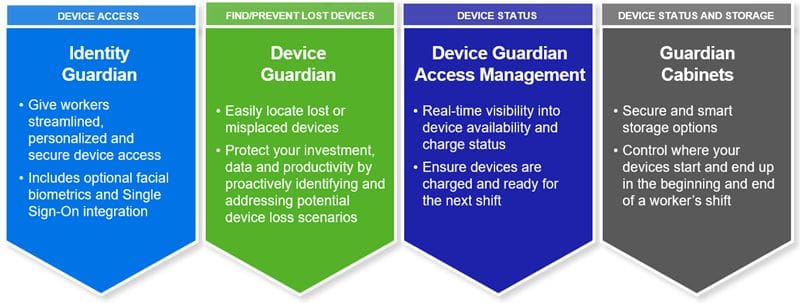
Zebra Intelligent Cabinets provide an integrated approach to these challenges by offering:

  • Secure Storage: Customized cabinets and Zebra intelligent racks ensure devices are stored safely, reducing the risk of loss or damage.
  • Efficient Charging: Built-in charging capabilities guarantee that devices are powered and ready for deployment at the start of every shift.
  • Automated Management: The system automates device tracking and access management, streamlining operations and enhancing security.

Zebra Intelligent Cabinets are ideal for use in logistics, manufacturing, the warehouse, and retail environments. By consolidating devices into a centralized system, Zebra’s solution enhances device readiness and operational efficiency.

Key Features of the Intelligent Cabinet Product Line

  1. Configurability: The modular design of Zebra’s cabinets allows businesses to customize storage solutions to fit various device types and quantities, ensuring optimal space utilization.
  2. Device Monitoring: Integrated software provides real-time insights into device status, including battery levels and usage patterns, facilitating proactive management.
  3. Charging Options: The cabinets are equipped with power distribution units, ensuring that all stored devices are charged simultaneously, eliminating downtime due to uncharged equipment. You can utilize the correct charging cradles for your Zebra device models.
  4. Security and user accountability: Enhanced security features, such as key barrel locks and the Zebra Access Management System (ZAMS), control and monitor device access, reducing unauthorized usage and potential theft.
YouTube player

Ensuring User Accountability with ZAMS

The Zebra Access Management System (ZAMS) is a pivotal component in promoting user accountability. This software solution automates device access management by:

  • User Authentication: Requiring workers to authenticate before accessing devices, ensuring that only authorized users can retrieve equipment.
  • Usage Tracking: Recording which user has taken which device and when, fostering a sense of responsibility and enabling quick issue resolution.
  • Battery Status Monitoring: Providing visibility into device battery levels, allowing users to ensure devices are adequately charged before use.

By implementing ZAMS, organizations can significantly reduce device loss and damage, leading to a lower total cost of ownership.

ZAMS - Zebra Access Management System

Hardware Requirements for ZAMS

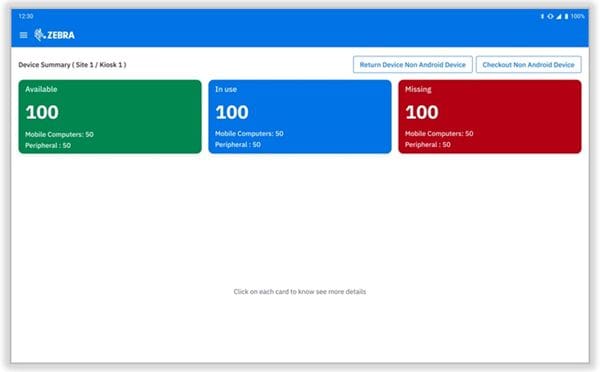
ZAMS can run on Zebra Tablet PCs such as the ET60 , or the Zebra CC6000 Kiosk computer. The device is mounted on the outside of the cabinet, and as seen in the screen graphic above, it provides at-a-glance visibility into quantities of devices which are available, in use, or missing, allowing managers to quickly remedy problems. Behind the scenes, ZAMS keeps track of device usage, enabling audits and accountability if devices go missing.

Learn More About the Intelligent Cabinet Mobile Device Storage Solution

Zebra Intelligent Cabinets, combined with the Access Management System, offer a robust solution to the challenges of managing large fleets of Zebra mobile computers. To learn more about Zebra Intelligent Cabinets and how this device storage solution can help your business, please contact CSSI.

New Ultra-Rugged Barcode Scanner from Honeywell

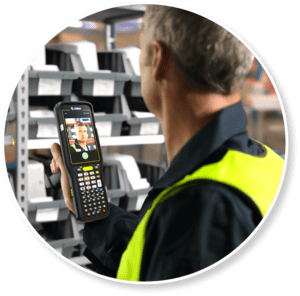
Honeywell has just announced the latest update to its Granit line of super-rugged industrial barcode scanners. The Granit Ultra 2100i is the new best-in-class for demanding environments. It boasts exceptional scan performance, ultra durability, and high-capacity battery performance to keep your team productive all day long.

Honeywell Granit Ultra Scanner 2100i in use

Key Features of the Granit Ultra 2100i

The Granit Ultra 2100i is packed with valuable features:

  • Reads a broad range of barcode types and sizes – both standard and low definition, 1D/2D
  • Range of scanning distances – SR model for ‘standard range’ / close range, XLR for extra long range scanning – scan the top rack from the floor
  • Option to read multiple barcodes simultaneously – helpful based on your task and workflows
  • Intuitive use – Green LED aimer dot makes it easy to see where you are pointing the scanner
  • Rugged – 10′ drop spec, and IP65/68 sealing
  • High-capacity battery – Use scanner for multiple scan-intensive shifts on a single charge!

Download the data sheet below.

Contact CSSI to Test the Granit Ultra

Want to test this scanner? We’re ready with a demo unit for you to evaluate. Contact CSSI to discuss your barcode scanning application and schedule a test of this powerful new scanner!

New Wi-Fi & Cellular Mobile Computer from Datalogic: Memor 12 & 17

Are you seeking mobile yet rugged computing power at an attractive price? Good news: Datalogic just announced the Memor 12-17, an excellent device choice for your mobile work staff who need handhelds which can stand up to the bumps and drops of day-to-day use.

This newest member of the Memor family includes Datalogic’s famous scanning technology, along with computing power which will carry you all the way through Android 18. Datalogic has been making big strides with its recent product launches, so it’s well worth a look for your next mobile computing project. The team at CSSI are mobile computing experts and can guide you in your device selection.

Datalogic Memor 12-17 proof of delivery

Key Features of the Memor 12-17

In addition to excellent scanning capability and Datalogic’s patented ‘Green Spot’ aimer, the Memor has attractive features for its price point. A few highlights are:

  • Display: 6″ Gorilla Glass 7 screen
  • Connectivity: Wi-Fi 6e (Memor 12) and 5G or Wi-Fi 6e (Memor 17)
  • Rugged ‘enough’: 6-foot drop spec
  • Future-proof: Supports up to Android 18

Download the data sheet below for the full device specs.

Great Applications for the Memor 12-17

The Memor 12-17 shines in field/remote use applications where you need mobility and scanning capability along with reasonable durability, but don’t require the more extreme rugged construction of pricier models such as the Memor 30-35. Test it out for:

  • Transportation & Logistics: Proof of delivery, last-mile delivery, field service
  • Retail: Shelf replenishment, price checks, queue busting
  • Healthcare: Admittance, bed care, electronic medical records
Datalogic Memor 12-17 scanning

Contact CSSI to Set Up An Evaluation

The best way to evaluate the new Datalogic Memor 12-17 handheld is with an evaluation unit. Contact CSSI to discuss your application and schedule a test of this powerful new mobile computer!

Using Staylinked to Create Color Touch Screens from TE Interfaces

Do your warehouse mobile computers connect via telnet (TE)? We’re excited to tell you about an option to create a modern touch interface for your ‘green screens’ without breaking your budget or consuming your IT resources!  See how it works and looks in the side-by-side video below:

YouTube player

Why Modernize Mobile Device Screens?

Operations everywhere use mobile device interfaces which were designed in a pre-touch screen world. With modern color touch screens, there is massive potential to improve the GUI with immediate benefit:

  • Reduce user errors and new user training time
  • Eliminate keystrokes and improve workflows
  • Improve user ergonomics
Telnet modernization side-by-side comparison graphic

Telnet Screen Modernization… without software rewrites!

Updating legacy software can be expensive and complicated. The good news is that CSSI offers software which resides either on-device or on server, and acts as an intermediary between your mobile devices and back-end systems. You don’t need to touch your legacy software. This can get you up and running quickly and painlessly.

CSSI Can Help!

Would you like to explore your options for improving your telnet mobile device screens? Consult with the Android mobile experts at CSSI, we’d be glad to discuss your situation and propose options. Just contact CSSI to get started with telnet modernization.

Earn Cash Back with the Go Zebra 2025 Trade-In Program

As a certified Zebra Technologies partner, CSSI is excited to announce that Zebra has launched a cash-back rebate program for 2025! The Go Zebra trade in program enables you to trade in your old technology when upgrading to new and improved Zebra units.

The rebates vary by product and are covered in the brochure below, but the program is simple – you can send back your old device when buying a new Zebra device and receive cash. The device you are trading up from does not need to be a Zebra device, just an equivalent product.

YouTube player

A Few Examples of the Impressive Go Zebra Trade In Rebates

Your cash back reward for a Zebra trade in can be substantial:

  • $250/unit when purchasing a Zebra MC9400 or MC9450
  • $100/unit when purchasing a Zebra MC3400 or MC3450
  • $100/unit when purchasing a Zebra tablet such as ET60 or ET80
  • Trade in the old printer, Zebra tablet, Zebra device, Zebra printer, and even products from other manufacturers!

The supply chain solutions team at CSSI can help you determine the rebate for which you will qualify and can make sure you are equipped to take advantage of this offer. See the Zebra trade in data sheet below.

To learn more about the Go Zebra 2025 trade-in program, simply contact CSSI to discuss!

Zebra MC3400 Mobile Computer

Zebra Technologies Corp has announced the next generation mobile computer to build on its prior success with the MC300. The Zebra MC3400 series mobile computer is packed with new features such as front- and rear- facing cameras, several powerful scanner choices, and the ability to support both Wi-Fi and cellular (5G) connectivity. Plus, it will support at least through Android 18, which means you can count on years of productive use.

YouTube player

Connectivity: Use it on Wi-Fi or private/public cellular

A big addition to Zebra’s MC34 series is the addition of cellular connectivity. The MC3400 handheld computer offers wi-fi only (Wi-Fi 6e), while the MC3450 mobile computer offers both Wi-Fi as well as 5G (supporting both public and private 5G).

Other Notable New Features for the MC3400 / MC3450

Some of the new features which we’d like to highlight are:

  • Flexible – Available in both ‘gun’ and ‘straight shooter’ form factors, and choose from multiple keyboard options (47 key alphanumeric, 38 key function numeric, and 29 key numeric). Features both front and rear camera.
  • Wi-Fi 6E – 4X the bandwidth and capacity, 3X the speed, and up to 3X the available spectrum!
  • Private and public 5G – Use your MC3450 outside the building or in the field!
  • Advanced barcode scanner – The new SE58 scan engine has a 20% longer read range, and Zebra’s new green laser aimer is up to 7X more visible than typical red aimers. You can also connect to a bluetooth ring scanner.
  • Support through Android 18 – Your investment will lock in years of usage as Android advances

Support from CSSI’s Zebra Experts

We are more than just Zebra mobile computer experts… our team of consultants and engineers will work with you to conduct testing and can support your deployment and post-sale technical needs. We are an authorized partner of Zebra Technologies Corp, and also offer services such as mobile device management.

CSSI support services for Zebra MC3400 and MC3450

Let’s Discuss the Zebra MC3400 Mobile Computer

Contact CSSI to discuss the Zebra MC3400 / MC3450 and let’s see if it is the right fit for your mobile computing and data capture needs. We are ready to setup hands-on demos and trials of this powerful new handheld. CSSI offers technical support for your evaluation and deployment of Zebra handhelds.

As 2024 winds to a close, we wanted to take a look back at the many topics we wrote on this year:

  • Mobile computing technology
  • AIDC technologies such as barcoding and RFID
  • Connectivity such as Wi-Fi, 5G and CBRS
  • Inventory management and supply chain workflow improvement opportunities

We tallied up the results and can introduce you to our 10 most popular posts from 2024!

1) Challenges in upgrading to Android 11, 13, and beyond

Expect Android 11-13 Upgrade Challenges

Android 11 and higher versions include significant security changes which many businesses have found can play havoc with mobile device configurations and critical software. In this article, we outlined the key issues and discussed how companies can get ahead of the headaches with preparation.

Read the blog post here.


2) 5 ways MDM software can help you manage your devices

Is MDM (mobile device management) a good fit for your business? Here are 5 benefits.

Mobile Device Management (MDM) software is a critical but often underutilized tool for managing large mobile device fleets. We discuss several benefits of MDM, and how CSSI can help by bringing our MDM expertise to your business.

Read the blog post here.


3) All the reasons you need to upgrade Windows Mobile/CE to Android

Android migration 2023

Although Android has been the standard OS for enterprise mobile devices for several years, there are still many companies using handhelds with Win Mobile or CE. We discuss the risks of this approach, and dispel some of the myths which may still persist around Android.

Read the blog post here.


4) What is session persistence? How to eliminate session drops

StayLinked and session persistence

Mobile devices which lose connectivity can cause applications to crash and data to be lost… an expensive cost borne by warehouse operations. Session persistence software eliminates this problem. We explore the costs of dropped sessions and how they can be eliminated by CSSI.

Read the blog post here.


5) Top 6 applications for barcodes in warehouses and manufacturing

ws50 zebra wearable computer

Barcodes are the most common data-capture method used in the supply chain. Yet many companies may overlook barcode opportunities to speed things up and eliminate manual entry. Here is a list of the top 6 applications for barcodes… how many is your business using, and are there opportunities for you?

Read the blog post here.


6) Choosing the right enterprise tablet: Android versus Windows

If you are planning to use tablets in your business operation, you’ll have to decide between Windows and Android. This leads to questions such as which OS is right for you, and what are the pros and cons? We explored Android versus Windows tablets for enterprise users in this popular blog post.

Read the blog post here.


7) Time for CBRS and Private 5G Networks?

CBRS application container yard

CBRS and Private 5G seem to be the fastest growing wireless communication technology today. This is reflected in the wave of CBRS mobile devices (Zebra MC9450) which are CBRS-compatible. It’s an ideal middle ground between Wi-Fi and public cellular, with some special and unique benefits. Learn more about this private network technology in our post.

Read the blog post here.


8) Should you use vehicle-mounted computers (VMUs) or rugged tablets on your forklifts?

Vehicle-Mounted Computers versus rugged tablet PCs

For many years, vehicle-mounted computers (VMUs) have been the standard for forklift use. However a new range of rugged tablets (such as the Zebra ET60) are now rated for the special demands of vehicle usage. So how should you decide between a VMU and tablet for your next project? We walk through the pros and cons of each solution.

Read the blog post here.


9) Exploring RFID? Start with an RFID pilot project

RFID is the fastest growing data capture technology today. As companies explore RFID and contemplate investment, they grapple with the best way to get started. We believe that a manageable pilot project is the best way to test the RFID waters. CSSI can help you get started faster and build on pilot project success in later scope expansions.

Read the blog post here.


10) Why use wearable scanners in the warehouse?

wearable scanner in warehouse

Companies searching for productivity gains in their order picking operations are finding great benefits with wearable scanners. In this post, we discuss wearables and how they can be helpful to your team members. Wearables have made huge advancements in recent years and are worth your evaluation.

Read the blog post here.

How Can CSSI Technologies Help You with AIDC Technology?

Our team at CSSI are experts in handheld computers, rugged tablets, thermal printers, RFID, and the many workflows within which these technologies are utilized. If you’d like to discuss your challenges or projects, please contact us and let us know how we can help.

Convert a handheld computer into a mobile RFID reader

RFID (Radio Frequency Identification) technology is transforming how businesses track inventory, manage critical assets, and monitor workflows. Among RFID devices, handheld RFID solutions are gaining popularity due to their flexibility and cost-effectiveness. A standout option in this category is the UHF RFID sled—a versatile accessory that works in conjunction with mobile devices. In this article, we explore RFID sleds, their advantages, and their ideal applications.

What Is an RFID Sled?

An RFID sled reader is an accessory that provides a handheld mobile device with RFID tag reading capability. Unlike a standalone fixed RFID reader, this mobile solution provides flexibility for the user, which can be essential for certain RFID workflows… and can be instantly implemented without having to mount physical antennas. While there are dedicated mobile RFID readers, the sled solution provides additional flexibility to the company, which can create RFID reading functionality without having to invest in dedicated devices.

Typically, RFID sleds are compact and lightweight, featuring ergonomic grips for easy handling. They are available with varying ranges, frequencies, and capabilities, making them suitable for different industries and use cases.

Examples of Reliable RFID Sleds

Here are several examples of reliable RFID sleds. Your CSSI rep can help you select the right choice for your needs:

Zebra RFD90 RFID Sled: Zebra’s premier RFID sled is ultra-rugged and ready for harsh environments and intensive usage. It is able to withstand 6 foot drops, and boasts IP65 / IP67 rating. Compatible with rugged Zebra mobile computers and several third-party smart phones.

Datalogic 2128P RFID Sled: Datalogic’s RFID sled is an ideal add-on for the Memor handheld computer. It quickly reads UHF RFID tags and supports your mobile workflows, even in harsh conditions.

CipherLab RS38 UHF RFID Reader: The RS38 sled converts CipherLab’s value-leading handhelds to RFID readers. It scans 1300 tags per second up to 10 meters, and is tough enough to withstand industrial use.

What Are the Benefits of Using an RFID Sled Instead of a Dedicated Handheld RFID Reader?

RFID sleds offer several advantages over traditional handheld RFID readers:

  1. Cost Efficiency
    RFID sleds are often more affordable than standalone RFID readers, especially for businesses that already use handheld computers. By pairing an RFID sled with an existing mobile device, organizations can reduce upfront costs.
  2. Modularity and Versatility
    The modular nature of RFID sleds allows users to upgrade their mobile devices independently of the RFID reader. This flexibility helps businesses stay current with advancements in mobile technology without replacing their entire RFID system. Also, the company can get more use out of existing mobile devices without having to make significant new purchase investments.
  3. Enhanced User Experience
    The company is able to use the familiar interface of the mobile devices to which users are already accustomed. Custom apps can be developed or integrated to optimize workflows and meet specific operational needs.
  4. Portability and Convenience
    RFID sleds are lightweight and easy to carry, making them ideal for on-the-go applications. Their compact design is particularly advantageous in environments where space is limited or users need to move between locations frequently.

What Are the Benefits of Using a Mobile RFID Reader Versus a Fixed RFID Antenna?

Mobile RFID readers, including sleds, offer distinct advantages over fixed RFID antennas for certain usage scenarios:

  1. Flexibility in Coverage
    Fixed antennas are stationary and best suited for monitoring specific areas, such as doorways or conveyor belts. Mobile readers, however, provide the flexibility to scan tags in various locations, making them ideal for dynamic environments like retail stores or warehouses.
  2. Cost-Effectiveness
    Installing multiple fixed antennas can be expensive. Mobile RFID readers are a cost-efficient alternative for businesses that need occasional or location-specific scanning without investing in permanent infrastructure.
  3. Ease of Deployment
    Fixed RFID systems require complex setup and calibration. Mobile readers, on the other hand, are plug-and-play devices that can be used immediately, with minimal technical expertise.
  4. Scalability
    Mobile solutions are easy to scale as business needs grow. Adding more handheld devices is often simpler and cheaper than expanding a network of fixed antennas.

What Are Good Applications for an RFID Sled or a Handheld RFID Reader?

Handheld RFID readers, including sleds, boost operational efficiency in a variety of industries and applications:

  1. Retail Inventory Management
    Handheld RFID devices streamline inventory counts, making it easier to update stock levels, locate items, and improve accuracy. This reduces out-of-stock scenarios and enhances the customer experience.
  2. Warehouse and Logistics
    RFID sleds enable quick scanning of pallets, cartons, or individual items, helping businesses track shipments and ensure accurate order fulfillment.
  3. Asset Tracking
    Asset management is a common use for RFID. In manufacturing and warehouses, you can use RFID to track high-value assets. In healthcare, hospitals and clinics use RFID sleds to monitor medical equipment, track patient movements, and manage inventory of consumables like medications and surgical tools.
  4. Event Management
    RFID sleds simplify attendee tracking at events by reading RFID-enabled tickets or badges. They can also assist in managing equipment and resources during the event.
  5. Field Service and Inspections
    Technicians use RFID sleds for equipment inspections, maintenance tracking, and ensuring compliance with operational standards, especially in remote or outdoor locations.

Learn More and Try Out an RFID Sled

RFID sleds represent a highly adaptable and cost-effective solution for businesses looking to leverage RFID technology. By pairing the functionality of a handheld RFID reader with the convenience of a mobile device, they provide an excellent alternative to both standalone readers and fixed antenna systems.

If you would like to explore RFID for your business, CSSI can help you evaluate your RFID project as well as test an RFID sled to use with your current mobile devices. Please contact us to discuss RFID sleds.

If you are new to buying label or receipt printers, you will first need to determine the type of printer which is best suited for your application. Thermal printing technology has long been a favorite for businesses requiring fast, reliable, and high-quality printing solutions. But there are 2 different methods used… when deciding between thermal transfer printers and direct thermal printers, it’s essential to understand their differences, applications, and cost implications to make the right choice for your needs.

What’s the Difference: Thermal Transfer vs. Direct Thermal Printers?

Both thermal transfer and direct thermal printers rely on heat to produce images, but they use different methods and materials:

Thermal Transfer Printing

A thermal transfer printer uses a thermal ribbon coated with wax or resin. Heat transfers the ink from the thermal transfer ribbon onto the label or substrate, creating a durable print. Thermal transfer printing offers excellent resistance to fading, smudging, chemicals, and environmental conditions. Overall print quality can be excellent, and a thermal transfer print label can remain intact for years. A thermal transfer label printer can print on various media types, including paper, polyester, and polypropylene.

Direct Thermal Printing

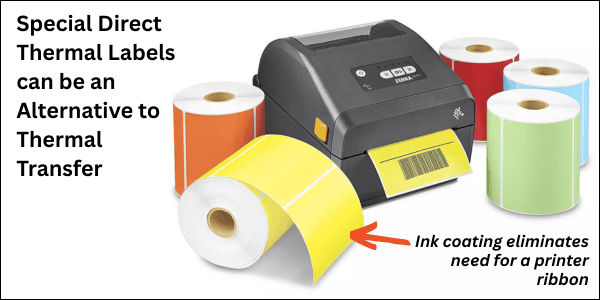
A direct thermal label printer uses heat-sensitive media that darkens when heated, eliminating the need for ink, toner, or ribbon. Printed direct thermal items are less resistant to heat, direct sunlight, and abrasion, typically lasting 6–12 months before fading.  Direct thermal label printers work exclusively with specialized thermal paper. There is no thermal printhead to replace.

Why Choose One Over the Other?

The choice between these label printer technologies depends on your business’s specific needs:

Choose Thermal Transfer Printing If You Need:Choose Direct Thermal Printing If You Need:
Long-lasting, durable prints.
Simplicity and minimal maintenance (no ribbons to replace).
Labels that can withstand extreme temperatures, moisture, or exposure to chemicals.A cost-effective solution for short-term labeling.
Versatility in printing on different materials.High-speed printing for time-sensitive tasks.

Typical Applications for Thermal Printers

Thermal transfer printers are the go-to for industries requiring longevity and resilience in their printed labels. Examples include:

  • Manufacturing: Barcode labels for inventory, equipment, and raw materials.
  • Healthcare: Patient wristbands, medical equipment labeling, and pharmaceutical packaging.
  • Retail: Product labels, shelf tags, and branding on flexible packaging.

Common Applications for Direct Thermal Printers

Direct thermal printers are designed for short-lived applications that prioritize simplicity and speed. Common use cases include:

  • Logistics & Shipping: Shipping and mailing labels for packages.
  • Retail: Receipts and price tags.
  • Event Management: Temporary event badges or tickets.

Are There Cost Differences in Print Media?

Yes, there are notable differences in media costs for these two label printing technologies:

Thermal Transfer Media:Direct Thermal Media:
Requires both a ribbon and a compatible label or substrate, which adds to the material cost.
Uses only heat-sensitive paper, making it initially less expensive.
However, the durability of prints reduces the need for reprinting, offering better long-term cost efficiency for permanent labeling.Prints are prone to fading or damage, potentially increasing costs if reprinting is necessary.

Pro Tip: When calculating costs, consider not only the media expenses but also maintenance and reprinting frequency.

Ready to Evaluate Thermal Label Printers? CSSI Can Help

Thermal and direct thermal printers each bring unique benefits and limitations. For businesses requiring robust, long-lasting labels, thermal transfer printers are the ideal choice for printing labels. On the other hand, direct thermal printing technology shines in applications needing fast, temporary, and cost-effective solutions for printing receipts.

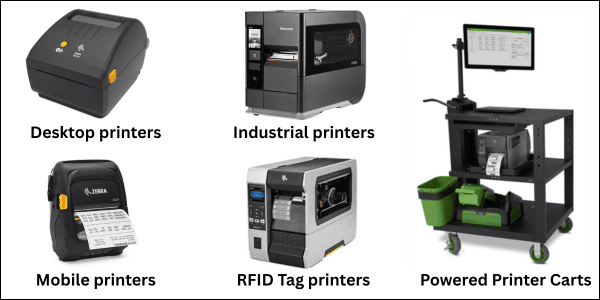
The team at CSSI are experts in direct thermal as well as thermal transfer printers. CSSI is an authorized dealer for all of the industry leading printer manufacturers and can help you evaluate, select, and deploy thermal printers in your operation. Contact CSSI to discuss thermal printers for labels, receipts, and more.