A Better Way To Manage Your Devices: Zebra Intelligent Cabinets
Organize, Store, Secure, Track, and Manage Your Mobile Device Fleet
Companies face real challenges in keeping track of their growing fleets of handheld and mobile devices. Many firms use ad hoc solutions such as tables or shelves for charging stations. Unfortunately, these methods lack an ability to ensure that devices are properly returned to charge at shift-end, and there is limited security and accountability for users.
We were excited to discover Zebra’s Intelligent Cabinets product line, which directly tackles these challenges… and does so in a way which is seamless and integrated with the popular Zebra mobile computers used by so many firms.
A Configurable Device Management Solution
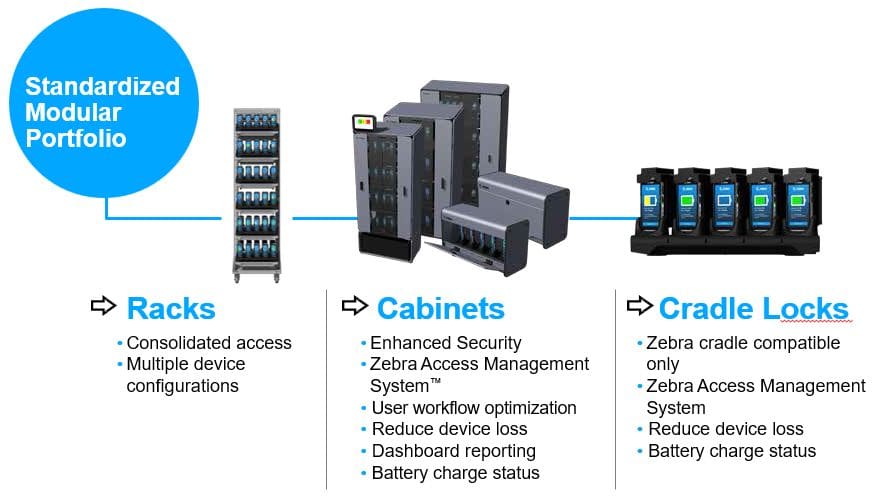
The Intelligent Cabinets solution is highly configurable and adaptable to your preferred method of use. At core, the solution provides an organized method of storing and charging mobile devices when not in use. It also provides a check-in / check-out capability which enables you to track which employees have which devices. As further value add, you have the option of adding device security and keeping an eye on device battery health so that you can proactively replace failing items.
Your CSSI rep will work with you to spec out the features and configurations you need and will plan your deployment. We can create solutions for varying device quantities and types, as well as adding features like locking cradles or cabinets.
The Benefits of Zebra Intelligent Cabinets
What is the cost of device loss and/or lost device usage in your facility? These are significant for most companies. Not only do expensive handhelds occasionally go missing, but workers are unable to perform their job due to not being able to find the right device, or losing battery strength during the course of the workday. Intelligent Cabinets addresses those problems with immediate benefits:
Ensure devices are charged daily
Monitor battery life and battery health
Limit device access, and provide accountability for device return
Manage device software updates
Device Accountability and Oversight
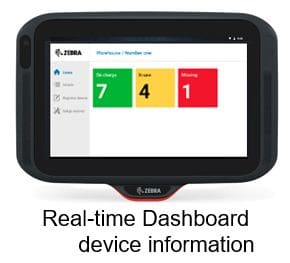
The cornerstone of all intelligent cabinet installations is the device dashboard. This kiosk informs you at a glance how many devices are in use. Dive deeper, and you can gain visibility into which users have devices, and which devices are missing or not available for use. Reduce productivity lost due to the inability to find devices, or to devices with dead batteries mid-shift!
Learn More About Zebra Intelligent Cabinets
Contact CSSI to discuss this device storage solution. Our consultants will review your needs and specify a solution perfect for your business.
FAQ – Frequently Asked Questions About the Zebra Guardian Cabinets (Formerly Known as Intelligent Cabinets)
Q: What are Zebra Guardian Cabinets, and what problem do they solve?
A. Guardian Cabinets are a portfolio of device storage solutions that combine storage hardware with software automation, security applications, and ongoing support. They consolidate your Zebra mobile devices in one place and connect them for reporting, battery charging, and access management. The goal is to have every device ready for use at the start of every shift without interrupting operations.
Q: How many devices can a cabinet hold, and what are my options if a cabinet doesn’t fit my space?
A. The standardized modular cabinets come in six sizes, from Compact to Extreme, holding from 5 to 100 devices depending on the device type and cradles used. If an enclosed cabinet isn’t the right fit, single-sided or double-sided open racks store 30 to 60 devices, with several mounting and built-in options to suit your floor space and workflows. Cradle locks are also available for Zebra’s TC2x, TC5x, and TC7x cradles, and they can be mounted on walls or desks, inside cabinets, or on carts.
Q: How do the cabinets keep devices secure and reduce loss?
A. Security comes from Device Guardian Access Management, which controls how devices are issued to workers. The software tracks which worker is using which device. Zebra describes multiple security layers that support personal ownership and accountability, which can reduce device loss, damage, repairs, and replacements and lower Total Cost of Ownership.
Q: How do I know devices will be charged and ready when a shift starts?
A. The access management software is designed to ensure devices are stored securely and fully charged before they are placed into service on a shift. On cradle lock configurations, the Access Management System automates workflows and battery charge status. In practice, this means workers are issued devices that are ready to go, not ones that will die mid-shift.
Q: How do supervisors monitor device usage, and does this add administrative work?
A. Authorized personnel can access the cloud-based software from the display attached to the cabinet or through a browser. Rather than adding work, individual user tracking and reporting removes the need for additional supervisory resources, speeds up device readiness at shift start, and reduces delays at shift end.