These Handheld Computers Can Run Microsoft Windows
Load Windows 10 / Windows 11 on a Handheld Computer? Yes It’s Possible!
It’s well-known that the Android OS has become the default standard for mobile computers. Ongoing improvements in Android and Microsoft’s elimination of the Windows Mobile and Windows CE operating systems have resulted in market consolidation around excellent rugged devices built to run Android.
But what if your mobile application requires the Windows Operating System?
Until now, if you had a critical mobile app built to run on Windows, your best options were to either a) rewrite the application to run on Android, or b) rewrite it as a web application which can run in the browser on the handheld device. These are common approaches, and CSSI can help with these rewrites through our custom programming services. However, what if a software rewrite is not feasible?
Mobile Device Options Running Microsoft Windows (full-version or IOT)
We are happy to let you know that we now have options for a rugged handheld which can run either full-blown Microsoft Windows operating system, or Windows IOT Enterprise. CSSI’s partner DT Research offers models which are tough, enterprise-grade, and ready to handle your Windows applications.
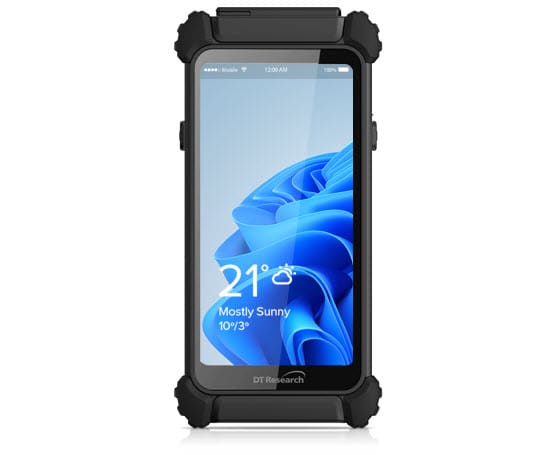
DT Research DT362GL Windows Handheld Computer
This rugged yet slim handheld PC boasts a 6″ capacitive touch screen, and high-performing Pentium processor. Select from a range of accessories such as a back camera, barcode scanner, or RFID reader. It is IP65 rated, so ready for harsh use environments.
Mobile Device Features include:
6″ touch screen
Intel Pentium
IP65
Optional camera, RFID reader, and barcode scanner!
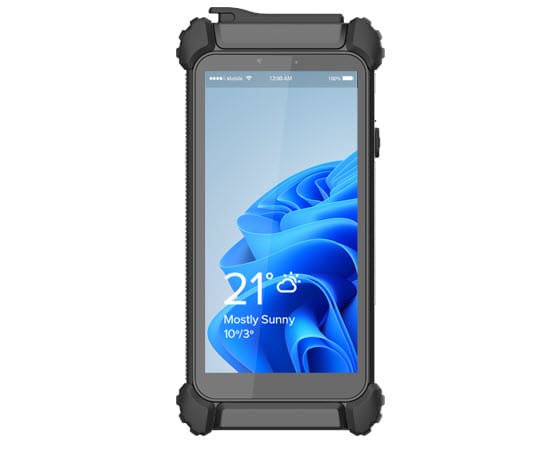
DT Research DT362DN Windows Handheld Computer
The DT362DN boasts an Intel Core processor, with a touchscreen capable of digital pen support. A hot-swappable battery pack makes it a great choice for always-on environments. Choose your accessories – back camera, barcode scanner (close or long range), and a GPS module.
Handheld Device Features:
6″ touch screen
Intel Core
IP65
Hot-swappable battery
Optional camera, RFID reader, and mid- or long-range barcode scanner!
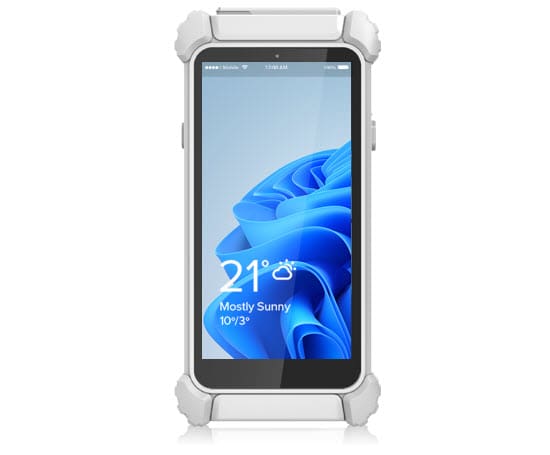
DT Research 362MD Windows Medical Computer
This handheld PC is certified and ready for medical applications. Critical ES60601-1 certification is in place, and the antimicrobial enclosure assist in keeping the device sanitary. A bright capacitive touch screen makes this a tool which healthcare professionals will love for monitoring and recording patient information in a Windows application or environment.
Mobile Device Features include:
ES60601-1 healthcare use certified!
Antimicrobial enclosure
6″ touch screen
Intel Pentium
IP65
Optional: RFID reader, barcode scanner!
Contact CSSI for Handheld Devices Running Microsoft Windows OS
The CSSI team are experts in rugged mobile computers. Does your application or workflow require a handheld computer running Microsoft Windows? Contact CSSI to speak with one of our consultants about your project. We can arrange a demo of handheld computers or tablets running either Windows or Android. We’ll help you determine the best fit for your business. Please contact CSSI to discuss Windows rugged handhelds.
FAQ – Frequently Asked Questions About Mobile Computers Running Microsoft Windows
Q: Our current handhelds run Windows CE or Windows Mobile — are we forced onto Android when we replace them? A. No. While Microsoft retired Windows CE and Windows Mobile, it didn’t retire Windows on handheld hardware. Devices like the DT362GL and DT362DN run full Windows 10/11 or Windows 10/11 IoT Enterprise, which means a fleet coming off legacy Windows Embedded devices can move to modern rugged hardware without rewriting existing Win32 or .NET applications. Android is still the right call for many deployments, but it isn’t the only upgrade path — and for teams with a large investment in Windows-based line-of-business software, staying on Windows avoids a costly re-platforming project.
Q: Is Windows 10 even still supported? We don’t want to standardize on hardware that’s already outdated. A. It depends on which edition. Mainstream Windows 10 (Home/Pro/Enterprise) reached end of support in October 2025, but Windows 10 IoT Enterprise LTSC 2021 — the edition built for fixed-function and mobile hardware — is supported by Microsoft through January 2032. Windows 11 IoT Enterprise LTSC extends that runway further. When evaluating a Windows device, ask specifically whether it ships with a standard consumer/Pro build or an IoT Enterprise LTSC image — that distinction determines how many years of security updates you’re actually buying.
Q: What warehouse or logistics scenarios actually require Windows instead of Android? A. It is often (mistakenly) thought that terminal emulation users (many WMS, ERP, and mainframe-connected systems ) require Windows. This is actually incorrect – CSSI has solutions which can very quickly get a TE application running on a modern Android device without having to touch your complex backend software. Beyond that, however, Windows tends to win out when a deployment depends on specialized peripheral drivers (label printers, RFID readers, vehicle-mount scanners, diagnostic tools) that vendors only certified for x86/x64 Windows, or on desktop-class software (CAD viewers, engineering tools, some EMR/patient-monitoring platforms) that has no Android equivalent. If your workflow is app-based and cloud- or browser-delivered, Android is usually the simpler, lower-cost choice.
Q: How do we manage and secure Windows mobile computers across a distributed fleet compared to Android? A. Windows devices join the same Active Directory domain and Group Policy structure your desktops already use, and can be managed through the same SCCM or Intune console your IT team is likely already running — which means less new tooling and less retraining for your help desk. Android fleets are managed differently, typically through an EMM platform using Android Enterprise. Neither approach is more “secure” by default; the deciding factor is usually which management stack and skill set your IT team already has in place.
Q: If we mix Windows and Android devices in the same fleet, does that create more work for IT? A. It adds a second management platform, but it’s a common and manageable setup — some companies run Android for general scanning and mobility tasks while keeping Windows on the subset of roles (data entry stations, workstations tied to legacy ERP, specialized equipment) where a Windows-only application is non-negotiable. The key is scoping Windows to where it’s actually required rather than standardizing the whole fleet on it by default, which keeps both the device cost and the management overhead in check.