The Hands-Free Advantage: How Are Zebra Wearable Scanners Revolutionizing Warehouse Productivity?
In the high-stakes world of modern warehousing and logistics, speed and accuracy are the currencies of success. As order volumes surge and delivery windows shrink, equipping your workforce with the right tools is no longer optional—it is critical. This is where wearable technology is making a transformative impact.
What is The Benefit of Wearable Scanner Technology in the Warehouse?
The primary advantage of wearable computers and scanners is simple yet profound: hands-free mobility. In traditional workflows, workers often juggle handheld devices, clipboards, or paper lists while trying to pick and pack items. This constant “pick up, put down” motion breaks focus and slows down operations.
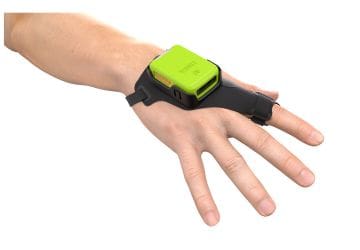
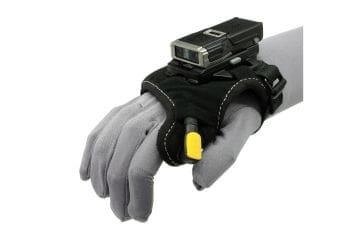
By moving the computer to the wrist and the barcode scanner to the finger or back of the hand, you liberate your workers’ hands to do what they do best—handle materials. The results are immediate and measurable:
Soaring Productivity: Freeing up hands for picking can lead to significant gains. For example, Zebra customer Signet saw a 40% reduction in picking times after deploying wearable solutions.
Financial Impact: Time savings translate directly to the bottom line. In Signet’s case, the efficiency gains resulted in an annual operational saving of $67,000.
Improved Accuracy: With data available at a glance and scanning integrated into natural movements, errors are minimized. Some Zebra-ready modular solutions have demonstrated up to 99% picking accuracy.
Enhanced Safety and Ergonomics: Wearables are designed to reduce muscle strain and fatigue, contributing to a safer working environment and reducing the risk of manual handling incidents.
Why Partner with CSSI & Zebra for Wearables?
When it comes to wearable technology, Zebra Technologies Corp isn’t just a participant; they are a pioneer. Choosing Zebra wearable scanners and Zebra mobile computers means investing in a comprehensive ecosystem designed for the realities of the enterprise.
Unmatched Breadth of Portfolio: Zebra offers the industry’s most diverse wearable portfolio. From the WT6000 series of wearable computers to ring scanner options like the RS6100, RS5100, and RS2100, you can mix and match devices to create the perfect solution for your specific environment—whether it’s a standard warehouse floor or a -30°C freezer.
Purpose-Built Ruggedness: Consumer-grade devices cannot survive the warehouse. Zebra’s wearables are built to withstand drops, spills, and dust, ensuring maximum uptime and a lower total cost of ownership.
Seamless Integration: Zebra’s portfolio supports text-only, voice-only, and multi-modal applications (combining voice and screen data). This flexibility allows you to modernize at your own pace, moving from green-screen legacy apps to modern touch interfaces without disrupting backend systems.
Comfort-Driven Design: Zebra marries rugged durability with advanced human factors engineering. The result is lightweight, ergonomic devices that workers actually want to wear, minimizing fatigue even during the longest shifts.
What Are the Highlights of the Zebra Wearable Mobile Computer and Barcode Scanner Product Line?
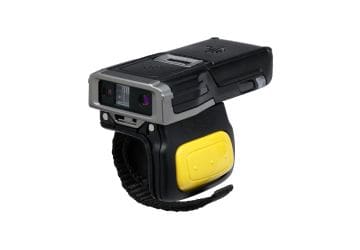
The Zebra RS2100 Wearable Scanner is the world’s smallest and lightest enterprise-grade wearable barcode scanner. The light design creates maximum comfort for users, while maintaining enterprise class wearability and offering a great scan engine.
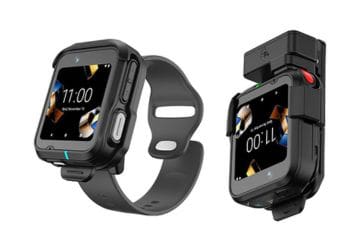
The WS301 Android Wearable Computer is the latest addition to Zebra’s wearables family. It is the smallest and lightest wearable, and empowers workers for hands-free workflows and seamless communication. Use for voice-picking, push-to-talk, and task management.
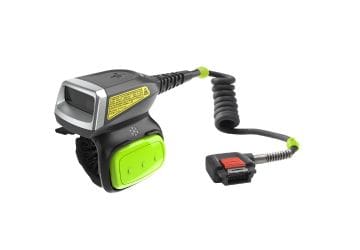
Combine the powerful RS5000x Corded Ring Scanner with a Zebra wearable computer for hands-free productivity. Suitable for use in freezer and refrigerated environments.
The RS5100 Bluetooth Ring Scanner lets your users go cordless… easy device pairing via bluetooth. The ergonomic design features a thumb trigger. Choose from several bluetooth wearable scanner options to best suit your environment.
The feather-light RS6100 Bluetooth Ring Scanner improves on the RS5100… this wearable lets you scan at distances from 2 inches to 40 feet! Choose between cordless and wired versions (for intense all-day usage).
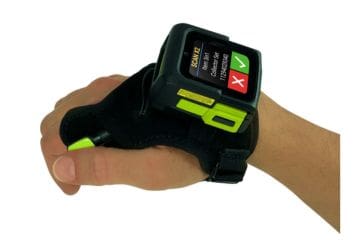
The unique WS50 Android Wearable is a powerful mobile computer and scanner with color touch screen worn on the back of the hand. Combine scanning, computing/WMS direction, and voice communication into a single device!
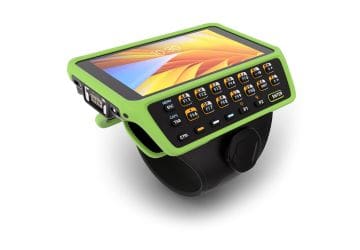
The Zebra WT6400 Wearable Mobile Computer maximizes utility and computing power, with an optional keypad and features to power hands-free picking operations. Android OS. This updates prior products such as the WT6300 wearable computer.
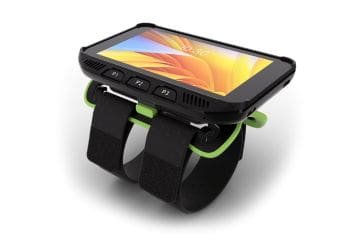
The Zebra WT5400 Wearable Mobile Computer is a new lower-cost yet purpose-built wearable computer packed with innovations to support hands-free picking. Android OS.
How to Get a Quote and Learn More About Zebra Wearable Scanners & Computers?
FAQ – Frequently Asked Questions About Using Zebra Wearable Scanners in Warehouse Operations
1: What are Zebra wearable scanners, and how do they help warehouse operations? Zebra wearable scanners are hands-free barcode scanning devices worn on a worker’s finger, hand, or wrist instead of held in a handheld unit. By eliminating the repetitive “pick up, put down” motion required with traditional scanners, they let workers scan continuously while keeping both hands free for picking, packing, and moving product — improving workflow speed, data accuracy, and overall productivity.
2: What Zebra wearable scanner models are available, and how do they differ? Zebra’s diverse wearable portfolio includes several models suited to different warehouse needs:
RS2100 — the world’s smallest, lightest enterprise-grade ring scanner
WS301 — Zebra’s latest Android wearable, and its smallest, lightest hands-free option
RS5000x — a corded ring scanner built for freezer and refrigerated environments
RS5100 — a Bluetooth ring scanner with an ergonomic thumb trigger
RS6100 — an extended-range scanner that reads from 2 inches to 40 feet, available in cordless or wired configurations
WS50 — a color touchscreen worn on the back of the hand, combining scanning, WMS access, and voice functionality
WT6400 — a high-utility Android wearable with an optional keypad
WT5400 — a lower-cost Android-based option for hands-free picking support
3: How much can wearable scanners actually improve picking productivity and accuracy? Results vary by operation, but real-world deployments have shown significant gains. Zebra customer Signet saw a 40% reduction in picking times after deploying wearable scanners, translating to roughly $67,000 in annual operational savings. Some modular wearable setups have also demonstrated picking accuracy as high as 99%.
4: Are Zebra wearable scanners suitable for cold storage or freezer environments? Yes. The RS5000x is a corded ring scanner specifically built to hold up in freezer and refrigerated warehouse environments, making it a fit for cold-chain and cold-storage operations where standard devices may struggle.
5: How do wearable scanners improve worker safety and reduce fatigue? Because wearable scanners are worn rather than gripped and repeatedly raised and lowered, they reduce the repetitive strain and muscle fatigue associated with traditional handheld scanning. Keeping hands free for the physical task at hand — rather than juggling a scanner — also reduces awkward movements and drop/reach hazards, contributing to a safer warehouse floor.
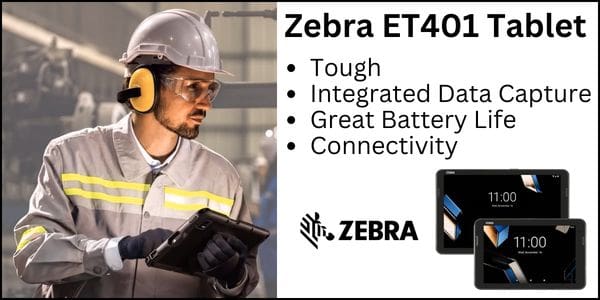
Zebra ET401 Tablet Brings Mobile Computing Power to Transportation & Logistics
In the fast-paced world of Transportation and Logistics (T&L), the gap between consumer-grade devices and enterprise-ready tools is widening. Drivers, dispatchers, and fleet managers are being asked to do more—faster, safer, and with greater accuracy. Relying on fragile consumer tablets that can’t withstand a rainstorm, let alone a drop on concrete, is a liability that modern supply chains can no longer afford.
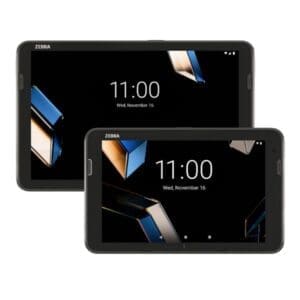
Building on the massive success of the ET40/ET45 series, Zebra Technologies Corp has introduced the Zebra ET401 Tablet for transportation and logistics workflows. It retains the sleek, thin, and light design that your workforce already knows and loves but completely overhauls the internal engine and rugged specifications to meet the specific, grueling demands of T&L operations.
For executives looking to future-proof their fleet technology, the ET401 enterprise tablet represents more than just a hardware refresh; it is a strategic asset designed to solve the most persistent challenges in routing, dispatch, and proof of delivery.
Is the ET401 Tablet PC Rugged Enough for Mobile Use?
In logistics, the ‘office’ is rarely a desk. It is the cab of a truck, a rainy loading dock, or a dusty warehouse floor. The rugged tablet category is a necessity. Consumer tablets often fail in these environments due to cracked screens, water damage, or overheating.
The Zebra ET401 enterprise tablet offers rugged reliability and is engineered to survive where others fail:
Total Protection: With an IP68 sealing rating, this Zebra tablet is completely dust-tight and can handle submersion in water. Whether a driver is capturing a signature in a downpour or the device is accidentally dropped in a puddle, operations continue without interruption.
Thermal Resilience: Logistics doesn’t stop for weather extremes. The ET401 tablet undergoes rigorous thermal shock testing, ensuring it can transition instantly from subzero cold (like a refrigerated truck) to sweltering heat without the electronics failing or the screen fogging up.
Display Durability: The screen is protected by Gorilla Glass 5, offering advanced scratch-and-shatter resistance. Furthermore, the AI-enabled touchscreen is designed to work with gloves and even when the screen is wet—eliminating the frustration of unresponsive devices during inclement weather.
What is Connectivity the Lifeline of Logistics?
Real-time visibility is the currency of modern logistics. Delays in data transmission can lead to missed delivery windows and inefficient routing. The Zebra ET401 enterprise tablet is built to ensure your drivers are never out of touch.
It supports the fastest wireless standards available today, including Wi-Fi 7 and 5G (with support for private 5G networks). This bandwidth capability allows for the rapid upload of high-resolution images for proof of condition, seamless video calls with dispatch, and instant updates to route manifests. Additionally, the inclusion of Bluetooth 6.0 ensures stable, low-energy connections to peripherals like headsets and wearable scanners.
Does the ET401 Offer On-Tablet Data Capture?
One of the most significant differentiators between the ET401 and a standard tablet is its integrated and enhanced data capture options and capabilities. In T&L, speed and accuracy at the point of delivery are critical.
Integrated Barcode Scanner: Unlike consumer tablets that rely on slow, awkward camera-based scanning apps, the ET401 offers enterprise-class scanning options. Drivers can scan barcodes on packages instantly, even if they are damaged or poorly printed.
Short-Range RFID: As RFID mandates grow across the supply chain, the ET401 is ready. The optional integrated short-range UHF RFID capability allows drivers to validate inventory or locate specific packages within the vehicle without line-of-sight, significantly speeding up stops.
Ultra-Wide Angle Camera: Documentation is key to liability protection. The new ultra-wide-angle rear camera makes it easier to capture proof of delivery or document vehicle damage during inspections, providing a comprehensive view that standard cameras miss.
An Enterprise Tablet to Power Through the Long Haul
Shift lengths in T&L can be unpredictable. A dead battery mid-route is not an option. The ET401 tablet offers flexible power solutions designed for the vehicle and the field. When mounted in a forklift or delivery truck, the device supports battery-free operation, drawing power directly from the vehicle to prevent battery wear and tear due to constant heat.
For staff on foot, the device supports hot-swappable batteries via an expansion back, meaning a device never has to be taken out of service to charge—you simply swap the power source and keep moving.
A Tablet Lifecycle You Can Count On
Perhaps the most compelling argument for the ET401 rugged tablet is its longevity. Consumer devices change form factors every year, creating a nightmare for IT departments managing mixed fleets of accessories and software versions.
Zebra designs the ET401 with stability in mind. The device is available for sale for four years and supported for an additional four, offering up to eight years of service and support. This ensures a consistent deployment, maximizes your return on investment, and drastically lowers the Total Cost of Ownership (TCO) compared to replacing consumer tablets every 18 to 24 months.
How to Get a Quote and Demo of the Zebra ET401 Tablet?
Why consider the Zebra ET401 Tablet for transportation and logistics workflows? The ET401 is not just a rugged tablet ; it is a dedicated tool for the transportation and logistics professional. For fleets looking to upgrade their technology stack to meet the demands of 2025 and beyond, this Zebra tablet is the clear choice. CSSI Technologies is an authorized partner of Zebra Technologies Corp. To arrange a demo and discuss the ET401 tablet, please contact CSSI Technologies.
FAQ – Frequently Asked Questions About the Zebra ET401 Tablet for Transportation & Logistics
1. Can the Zebra ET401 survive rough handling in a truck cab or warehouse dock? Yes. The ET401 carries an IP68 sealing rating, meaning it’s fully protected against dust and can withstand water submersion, and it’s built with Gorilla Glass 5 for scratch and shatter resistance. It also undergoes thermal shock testing, so it holds up across extreme temperature swings — useful for drivers moving between a heated cab, a loading dock, and outdoor weather in the same shift.
2. Will the ET401 touchscreen still work if a driver is wearing gloves or the screen is wet? Yes. The ET401’s touchscreen is designed to function reliably with gloves on and in wet conditions, which matters for drivers and warehouse staff who can’t always stop to remove gear before using the device.
3. How does the ET401 handle barcode scanning and proof of delivery? It has an integrated enterprise-class barcode scanner built in, plus an optional short-range UHF RFID reader for facilities using RFID-tagged inventory. For proof of delivery, it includes an ultra-wide-angle rear camera so drivers can document deliveries clearly, even in tight spaces like truck beds or crowded loading areas.
4. Does the ET401 need to be plugged in or charged separately when mounted in a vehicle? No. The ET401 can run battery-free when mounted in a vehicle, drawing power directly from the vehicle’s systems. For use outside the vehicle, it also supports hot-swappable batteries through an expansion back, so field workers can keep working without waiting for a full recharge.
5. How long can a fleet expect to use the ET401 before it needs to be replaced? Zebra plans to sell the ET401 for four years and support it for four years beyond that, giving fleets up to eight years of total service and support. Because it keeps a form factor consistent with the earlier ET40/ET45 series, it also helps reduce the IT overhead of managing device transitions over that lifespan.
Should You Consider Upgrading from Microsoft Access?
For many businesses, Microsoft Access has been a quiet workhorse — handling inventory records, customer data, job tracking, or order management for years, sometimes decades. It was the right tool at the right time. But in 2026, that same database that once solved a problem may now be creating new ones. At CSSI Technologies, we work with companies across warehousing, distribution, and manufacturing who rely on legacy MS Access systems to run key business functions — and we have seen firsthand what happens when those systems start to hold an organization back.
Why Did So Many Companies Chose Access in the First Place?
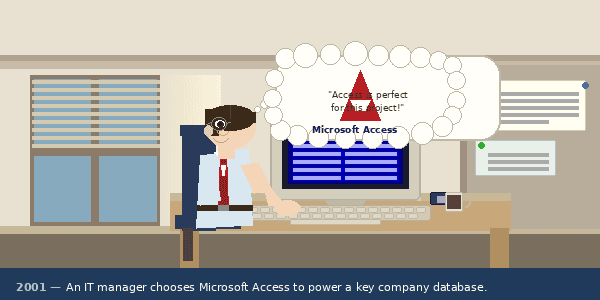
There is nothing wrong with the original decision. When businesses first adopted Microsoft Access database software— often in the late 1990s or early 2000s — it was a genuinely powerful and accessible tool. It required no dedicated database server, no specialized IT infrastructure, and no large capital investment. A capable office administrator or tech-savvy manager could build a functional database application without being a professional developer.
MS Access shipped as part of Microsoft Office, which meant most businesses already owned it. It offered a visual form designer, report builder, and query tools that felt intuitive compared to the alternatives. For small to mid-sized operations with a limited IT budget, it was the practical choice — and for years, it worked well.
The problem is not that those companies made a poor decision. The problem is that business technology has evolved dramatically, and MS Access has not kept pace.
What Are the Shortcomings of MS Access in Today’s Business Environment?
If your company is still running critical processes on Microsoft Access, you have likely encountered one or more of the following challenges:
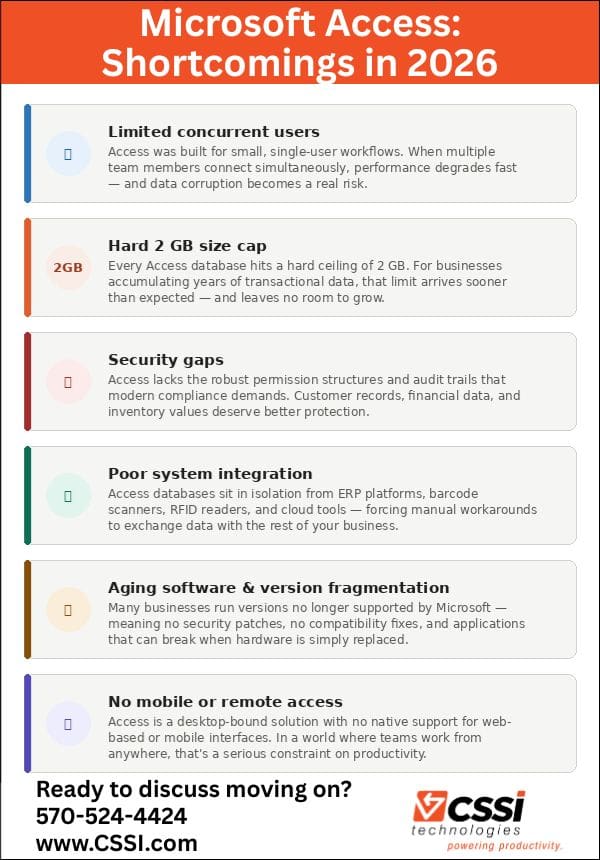
Limited concurrent users. Access was designed for small teams. When multiple users try to access the same database simultaneously, performance degrades quickly — and data corruption becomes a real risk. As your team grows or your data volumes increase, this becomes a serious operational liability.
Scalability constraints. Access databases are capped at 2 GB in size. For businesses with years of transactional data, that ceiling can be reached faster than expected. Once there, the only options are to archive data or accept degraded performance.
Security limitations. Access offers basic user-level security, but it falls well short of the robust permission structures and audit trails that modern compliance requirements demand. Sensitive data — customer records, financial transactions, inventory values — deserves better protection than Access can reliably provide.
Poor integration with modern systems. Today’s business environment runs on connected systems: ERP platforms, warehouse management software, barcode scanners, RFID readers, and cloud-based tools. Access databases often sit in isolation, requiring manual data entry or custom workarounds to exchange information with other platforms.
Aging software and version fragmentation. Many of our customers are running versions of Access that are years or even decades old. Older versions are no longer supported by Microsoft, meaning no security patches and no compatibility with current hardware or operating systems. Even simple IT upgrades — like moving to a new PC — can break an aging Access application.
No mobile or remote access. The modern workforce expects to access data from anywhere. Access is a desktop-bound solution, with no native support for web-based or mobile interfaces without significant custom development.
How Can CSSI Technologies Help With Access? Your Update Options
As custom programming experts, the folks at CSSI understand that migrating away from a system your team has relied on for years is not a decision made lightly. There are real concerns about cost, disruption, and the risk of losing institutional knowledge embedded in your current workflows. That is exactly why CSSI approaches every Access migration process with a practical, consultative lens — not a one-size-fits-all prescription.
We typically recommend one of three paths, depending on your specific situation, budget, and long-term goals:
Option 1: Upgrade to a Newer Version of Access
For organizations running very old versions of Access, a targeted upgrade can deliver meaningful improvements without the complexity of a full migration. Modern versions of Access offer better performance, improved compatibility with current operating systems, and enhanced security features compared to legacy releases. CSSI can help with Access migration services . This is the lowest-disruption option and gets you the latest features while serving as a stabilizing step while your organization plans a longer-term strategy.
Option 2: Database Migration – Move Your Data to a Robust Database Engine, Keep Your Access Front End
This is often the best option for companies that have invested significantly in Access forms and reports that their team knows well. We migrate your stored Access data to a professional database platform such as Microsoft SQL Server, while retaining the familiar Access interface your team already uses. You gain the scalability, data integrity, and reliability of a SQL Server database on the back end, with minimal retraining required on the front end. It is a pragmatic middle path that delivers substantial improvements via the SQL database without forcing a complete workflow change.
Option 3: Rebuild the Software and Database Solution from the Ground Up
For organizations that have outgrown MS Access entirely — or whose business processes have evolved beyond what any version of Access can support — a full rebuild is the right answer. CSSI can design and develop a modern application using current programming languages and a robust database such as Microsoft SQL Server. This approach opens the door to mobile accessibility, deeper integration with your other business systems, custom reporting, and the scalability to grow with your business for years to come. While it represents the most significant investment of the three options, it is also the one that delivers the most transformative long-term value.
Is It Time to Have a Conversation About Your MS Access Use?
If your organization is running important business processes on your Microsoft Access database — and especially if you are doing so on an older version of the software — now is the right time to take an honest look at your options. Waiting until a failure forces your hand is far more costly than making a planned, strategic transition.
CSSI Technologies has the experience to help you evaluate your current Access environment, understand your business requirements, and identify the migration path that makes the most sense for your organization. We are not here to sell you the most complex solution — we are here to help you make the right one.
Reach out to the team at CSSI Technologies today. Tell us how you are currently using Access, what pain points you are experiencing, and what you would like your system to do that it cannot do today. We will work with you to map a practical path forward — one designed around your operations, your budget, and your goals.
FAQ – Frequently Asked Questions About Upgrading from Microsoft Access
Q: Our Access database still works fine most of the time — how do we know if it’s actually becoming a liability? A: The clearest warning signs are performance-related: the database slows down or throws errors as more people try to use it at once, or it’s crept close to (or past) the 2 GB size cap after years of accumulated transactional data. If your team is archiving records just to keep the file usable, or you’re seeing occasional corruption when multiple users save changes simultaneously, those aren’t quirks to work around — they’re signs the platform has outgrown its original design limits.
Q: We only have a handful of concurrent users — does file-level corruption risk really apply to us? A: Risk scales with usage, but it doesn’t disappear at low user counts — it just shows up less predictably. Access was built around a file-sharing model rather than a true multi-user database engine, so every simultaneous write is a small gamble. A five-person team might go months without an incident and then lose a table during month-end close. If that database supports a process you can’t afford to lose, the exposure is worth addressing before it becomes a repair job.
Q: Do we have to abandon Access entirely, or is there a smaller step we can take first? A: Upgrading isn’t all-or-nothing. There are three common paths, in increasing order of disruption: moving to a current, supported version of Access for better performance and security patching; migrating the backend data to Microsoft SQL Server while keeping the familiar Access front end your team already knows; or rebuilding the application entirely on a modern platform. Many organizations start with the SQL Server migration, since it solves the scalability and reliability problems without requiring staff to relearn how they work.
Q: Our compliance requirements have gotten stricter since we built this database — is Access’s security enough? A: Probably not on its own. Access provides basic user-level security, which was adequate when the tool was first adopted but generally falls short of what’s expected for handling sensitive customer or financial data today. If you’re subject to audit requirements, cyber-insurance questionnaires, or customer security reviews, a platform with more robust access controls and encryption — typically achieved through a SQL Server migration or a modern rebuild — is worth prioritizing even if performance isn’t yet a pain point.
Q: Can we connect our Access database to our ERP or warehouse management system instead of replacing it? A: You can, but it usually means building and maintaining custom integrations or accepting manual data entry between systems — Access wasn’t designed to talk to other platforms natively. That works as a stopgap, but it adds ongoing maintenance overhead and a new point of failure every time one of the connected systems changes. If real-time integration with ERP, WMS, or other business systems is a priority, a rebuild on a modern database and application stack is generally the more durable answer.
How To Earn Cash Back for Old Tech When Purchasing New Zebra Equipment
Are you preparing to update your mobile computers, scanners, tablets, or printers in 2026? Did you know that you can trade in your old equipment for cash back when purchasing a new Zebra device?
The 2026 GO Zebra Trade-In Program is designed to help you migrate from outdated legacy devices to the latest market-leading Zebra technology solutions. For purchases made between January 1, 2026, and December 31, 2026, your business can earn significant rebates by trading in eligible mobile computers , label printers , and barcode scanners.
What Are the Key Benefits of the 2026 Go Zebra Trade-In Program?
Financial Incentives: Receive rebates for every eligible device traded in, one-for-one.
Broad Eligibility: Trade in devices from any manufacturer (restrictions apply based on device type).
Simple Process: A streamlined four-step process: Purchase, Register, Trade-in, and Receive Rebate.
How To Take Advantage of the Go Zebra Trade In Program
CSSI is an authorized Zebra Technologies Corp reseller and business partner. Contact CSSI to discuss your new Zebra device needs. We will let you know what your trade-in rebate is for your old gear, and can help you obtain and submit your rebate claim online, and trade in your old devices—including those from competitor brands. It is an opportunity to boost productivity, enhance security, and lower your total cost of ownership while recycling your old hardware responsibly.
Update your mobile computer models to leading-edge devices such as the MC94 or TC501
Update your barcode scanners – trade in old equipment for newer models with better scan engines
Thermal printer upgrades – Zebra is a leader in direct thermal and thermal transfer label printers
FAQ – Frequently Asked Questions About the Go Zebra Trade-In Program
1. What is the Go Zebra Trade-In Program? It’s a 2026 promotion from Zebra Technologies, offered through CSSI Technologies as an authorized Zebra reseller, that helps businesses migrate from outdated legacy devices to Zebra’s latest hardware. Customers who purchase new Zebra equipment and trade in their old devices receive a rebate on the purchase, making it easier and more affordable to upgrade aging equipment.
2. What types of devices are eligible for trade-in? The program covers three device categories: mobile computers, barcode scanners, and label printers. Devices from any manufacturer can be traded in, not just Zebra units, though some restrictions apply depending on the specific device type.
3. What do I actually receive for trading in my old equipment? You receive a rebate for each eligible device traded in, structured on a one-for-one basis — meaning every qualifying old device you trade in earns a rebate toward a corresponding new Zebra device purchase. The program doesn’t publish flat dollar amounts, since rebate value depends on the devices involved, so CSSI evaluates each trade-in to determine the applicable rebate.
4. How does the trade-in process work? The program follows four steps:
Purchase new, eligible Zebra equipment.
Register the purchase in the trade-in program.
Trade in your old devices.
Receive your rebate.
CSSI Technologies assists throughout, handling submission and claims on the customer’s behalf so businesses don’t have to navigate the paperwork alone.
5. When does the program run, and how do I get started? The program is active for the full 2026 calendar year, from January 1 through December 31, 2026. To participate, contact CSSI Technologies — as the authorized Zebra reseller running the promotion, they can assess which of your current devices qualify, walk you through eligible replacement models (such as Zebra’s MC94 and TC501 mobile computers, updated barcode scanners, and thermal label printers), and manage the registration and rebate submission process for you.
What Is Causing Mobile Computer & Tablet Price Increases?
If you have purchased a new laptop, server, or industrial handheld computer recently, you may have noticed something uncomfortable: prices are up, availability is down, and lead times have stretched. You are not imagining the price hike. A global shortage of computer memory chips is reshaping technology procurement across virtually every industry—and the effects are being felt from hyperscale data centers all the way to warehouse floors. Here is what is happening, why it is happening, and what businesses like yours should expect over the next two to three years.
The Current State of Computer Memory Prices in March 2026
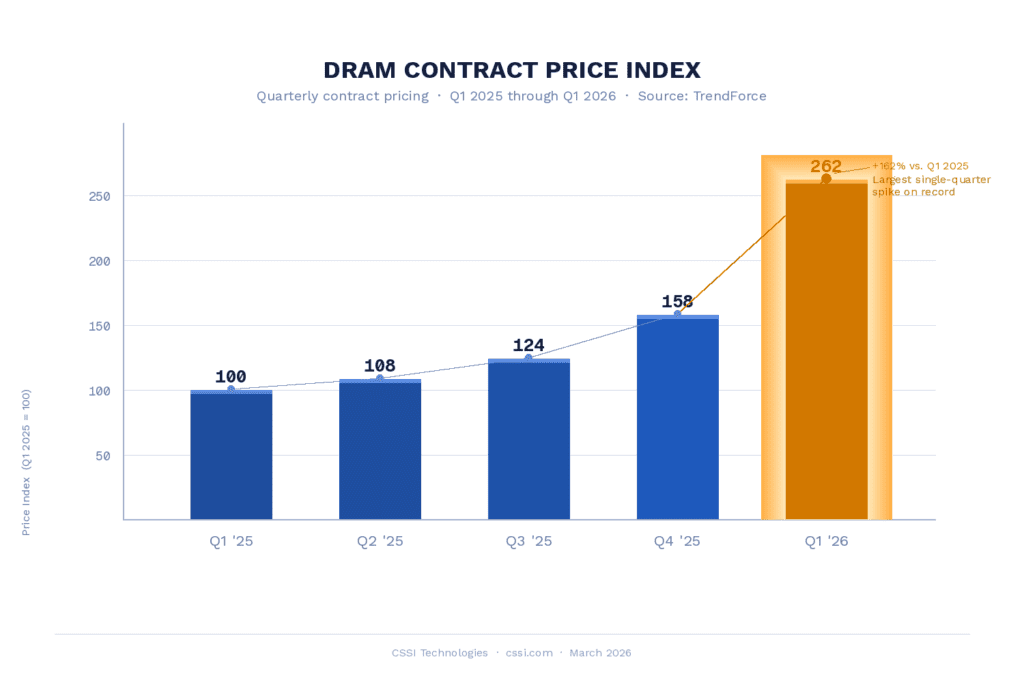
The computer memory market is experiencing one of the most severe supply crunches in its history. According to TrendForce , a leading semiconductor research firm, conventional DRAM contract prices surged by an estimated 90 to 95 percent quarter-over-quarter in Q1 2026 alone—the largest single-quarter increase on record. Enterprise SSD RAM prices are expected to rise by an additional 53 to 58 percent in the same period.
The numbers at the product level are equally striking. Samsung raised prices on 32GB DDR5 modules to $239 from $149 just months prior—a 60 percent increase. According to Network World , research firm Counterpoint projects that DDR5 RAM 64GB RDIMM modules—widely used in enterprise servers—could cost twice as much by year-end 2026 compared to early 2025. SK Hynix has already reported that its HBM, DRAM, and NAND capacity is sold out through the end of 2026. Micron has acknowledged it can meet only about two-thirds of the memory requirements for some customers.
The ripple effects are being felt across the hardware ecosystem. We have already seen price increases imposed by manufacturers for rugged handhelds and tablet PCs. For businesses running technology refresh cycles or deploying rugged mobile computing solutions in industrial environments, this is a cost reality that demands attention.
The RAM Shortage – What Is Driving Computer Memory Prices Higher?
The root cause of the shortage is straightforward: explosive growth in artificial intelligence infrastructure has fundamentally redirected the world’s memory supply chain.
Training and running large AI models requires enormous quantities of a specialized component called High Bandwidth Memory (HBM). HBM is the memory that surrounds the GPU chips in AI servers built by Nvidia, AMD, Google, and others. The catch is that producing one bit of HBM requires approximately three times the wafer capacity of producing one bit of standard DDR5 memory. As CNBC reported, Micron’s own leadership described this dynamic clearly: “As we increase HBM supply, it leaves less memory left over for the non-HBM portion of the market, because of this three-to-one basis.”
The three companies that produce nearly all of the world’s DRAM—Samsung, SK Hynix, and Micron, which together control approximately 90 to 95 percent of global supply—have all prioritized HBM production because the profit margins are significantly higher. TrendForce data showed that as of mid-2025, HBM3e commanded a price premium more than four times that of DDR5, making the business decision easy for manufacturers even as it created downstream pain for everyone else.
According to IDC, this is not a typical cyclical supply-and-demand imbalance. The research firm describes it as “a potentially permanent, strategic reallocation of the world’s silicon wafer capacity.” The hyperscalers—Microsoft, Google, Meta, Amazon, and others—are spending at unprecedented levels to build AI infrastructure, with hyperscaler capital expenditure approaching $600 billion in 2026 alone, a 36 percent year-over-year increase. These buyers are first in line for memory allocations, leaving industrial, commercial, and consumer markets to compete for what remains.
The root cause of the shortage is straightforward: explosive growth in artificial intelligence infrastructure has fundamentally redirected the world’s memory supply chain. AI demand for high bandwidth memory is consuming vast amounts of capacity.
Training and running large AI models requires enormous quantities of a specialized component called High Bandwidth Memory (HBM). HBM is the memory that surrounds the GPU chips in AI servers built by Nvidia, AMD, Google, and others. These are used in rapidly multiplying data centers, which require vast memory capacity. The catch is that producing one bit of HBM requires approximately three times the wafer capacity of producing one bit of standard DDR5 memory. As CNBC reported , Micron’s own leadership described this dynamic clearly: “As we increase HBM supply, it leaves less memory left over for the non-HBM portion of the market, because of this three-to-one basis.”
The three memory makers that produce nearly all of the world’s DRAM—Samsung, SK Hynix, and Micron, which together control approximately 90 to 95 percent of global supply—have all prioritized HBM production because the profit margins are significantly higher. TrendForce data showed that as of mid-2025, HBM3e commanded a price premium more than four times that of DDR5, making the business decision easy for manufacturers even as it created downstream pain for everyone else.
According to IDC , this is not a typical cyclical supply-and-demand imbalance. The research firm describes it as “a potentially permanent, strategic reallocation of the world’s silicon wafer capacity.” The hyperscalers—Microsoft, Google, Meta, Amazon, and others—are spending at unprecedented levels to build AI infrastructure, with hyperscaler capital expenditure approaching $600 billion in 2026 alone, a 36 percent year-over-year increase. These buyers are first in line for memory allocations, leaving industrial, commercial, and consumer markets to compete for what remains.
Compounding the supply squeeze is behavior in the procurement market itself. Panic buying and double ordering have become widespread, distorting demand signals and accelerating price increases beyond what fundamental supply constraints alone would produce, according to Sourceability . Buyers who would ordinarily place measured orders are front-loading purchases out of fear that prices will be even higher in a few months—which creates a self-fulfilling cycle.
What Is the Outlook for RAM Prices Through 2027 and 2028?
The difficult reality is that there is no quick fix on the horizon. Building a new semiconductor fabrication facility—a “fab”—takes three to five years from planning to volume production, and requires billions of dollars in capital investment. Micron is constructing new fabs in Boise, Idaho (expected online in 2027-2028) and has announced a facility in Clay, New York that is not expected to produce chips until 2030. SK Hynix’s planned capacity additions are similarly years away. The Register quotes a TechInsights analyst noting that even with the current revenue surge giving memory makers capital to invest, “it’ll be at least three more years before they enter production.”
The consensus across analysts at TrendForce, IDC, Counterpoint Research, and TechInsights points to the following trajectory:
• 2026: Prices continue to rise in the first half, with some potential plateau in the second half as incremental fab expansions (not new greenfield facilities) add modest capacity. TechRadar notes that TrendForce projections show no downward reversal—only continued increases at a potentially slower pace after the dramatic Q1 spike.
• 2027: The most likely window for initial price stabilization, according to the base-case scenarios from SoftwareSeni and Bacloud’s market analysis. New capacity from Micron’s Idaho facility and SK Hynix’s Yongin cluster may begin to reach commercial volumes. However, The Register cautions that Nvidia plans to deploy its next-generation Rubin-Ultra GPUs with a terabyte of HBM4e memory each in 2027, which could absorb new supply as fast as it comes online.
• 2028 and beyond: Meaningful price declines may begin as multiple new fabs reach volume production. Even then, analysts at BISI caution that prices are likely to remain 30 to 50 percent above pre-crisis levels permanently. The era of extremely cheap computer memory chips appears to be structurally over, regardless of when the acute shortage eases.
The worst-case scenario, which some analysts assign a meaningful probability, is that sustained AI infrastructure investment keeps computer memory prices elevated through 2028 or later, with each wave of new AI hardware demand absorbing incoming supply before prices can normalize for commercial buyers.
What RAM Prices Mean for Technology Buyers in Industrial and Commercial Sectors
For operations managers and IT leaders in warehousing, distribution, manufacturing, and logistics, the memory crunch has practical implications that go beyond sticker shock on a hardware quote.
Technology refresh cycles that assumed stable or declining hardware costs will need to be revisited. Rugged handheld computers, tablets, barcode scanners, and thermal label printers all depend on memory components affected by this shortage. Lead times on some products have extended, and pricing agreements that were valid even a few months ago may no longer reflect current market conditions.
The prudent strategy for most organizations is to plan hardware procurement further in advance than has historically been necessary, work with a great VAR partner such as CSSI Technologies to stay informed on impending price changes, and resist the temptation to delay planned purchases in hopes of lower prices—current analyst consensus suggests that strategy is likely to cost more, not less, over the near term.
CSSI Technologies Is Here To Help With Your AIDC Technology Needs
CSSI Technologies monitors these market dynamics on behalf of our customers and helps you prepared for the price increase. If you are planning a technology refresh, deploying new scanning or mobile computing infrastructure, or evaluating your hardware roadmap in light of current market conditions, we encourage you to contact us for help . Our team can help you develop a procurement strategy that accounts for today’s supply environment and positions your operations for the technology cycles ahead.
FAQ – Frequently Asked Questions About the Rising Computer Memory Prices
Q: What is causing computer memory prices to rise so sharply in 2026? A: The primary driver is the explosive growth of artificial intelligence infrastructure. Training and running large AI models requires enormous quantities of High Bandwidth Memory (HBM) — a specialized component used in AI server GPU chips. Producing HBM requires approximately three times the wafer capacity of standard DRAM memory. Since Samsung, SK Hynix, and Micron — who together control roughly 90–95% of global DRAM supply — have shifted production priority to HBM due to its significantly higher profit margins, far less standard memory is available for everyone else. Add to that a surge in panic buying and double ordering by procurement teams, and prices have accelerated well beyond what the underlying supply constraints alone would produce.
Q: How much have memory prices actually increased, and how does that affect the cost of rugged mobile computers and devices? A: DRAM contract prices surged an estimated 90–95% in Q1 2026 alone — the largest single-quarter increase on record. Enterprise SSD prices are expected to rise an additional 53–58% in the same period. At the product level, major manufacturers including Dell, Lenovo, HP, and Asus have signaled PC price increases of 15–20%. Memory now accounts for roughly 18% of a new device’s total bill of materials — approximately double its 2024 share. For businesses deploying rugged handheld computers, tablets, and mobile printers in warehouse or field environments, this translates directly to higher per-unit costs and, in some cases, extended lead times as manufacturers manage constrained component supplies.
Q: Should we delay our planned hardware refresh and wait for prices to come down? A: Most analysts advise against waiting. The consensus from TrendForce, IDC, and Counterpoint Research is that meaningful price relief is unlikely before 2027 at the earliest — and that even a partial recovery may leave prices 30–50% above pre-crisis levels on a permanent basis. New semiconductor fabrication facilities take three to five years from planning to volume production, and incoming supply capacity may be absorbed by the next generation of AI hardware before it can benefit the broader market. Businesses that delay planned refreshes are likely to pay more, not less, over the near term — while also absorbing the operational cost of running aging devices past their optimal service life.
Q: How should we adjust our hardware procurement strategy in response to this situation? A: The most effective response is to extend your planning horizon and act with more lead time than has historically been necessary. Specifically: lock in pricing agreements where possible before further increases take effect, accelerate any refresh cycles already under consideration, and work closely with your technology partner to understand current availability on the specific devices and configurations you need. Pricing that was quoted even a few months ago may no longer be valid, so it is worth confirming current pricing before finalizing budgets or deployment plans.
Q: Will this shortage affect all types of mobile computing devices equally, or are some categories more impacted than others? A: The impact varies by device category and memory specification. Devices requiring higher-capacity or newer-generation memory — such as enterprise-grade rugged tablets and high-performance handheld computers with advanced processing capabilities — are generally more exposed to price increases than simpler, lower-memory scanning or data collection devices. That said, virtually no segment of the market is entirely insulated. Lead times have extended across the board, and even entry-level devices are seeing cost pressure as memory represents a growing share of overall bill of materials. Your technology partner can help you assess which specific models in your planned deployment are most affected and whether comparable alternatives exist at more favorable price points.
How Does the Zebra ET401 Meet Warehouse & Manufacturing Tablet Needs?
In the demanding environments of warehousing and manufacturing, consumer grade tablets often fall short. The Zebra ET401 Enterprise Tablet is a new rugged tablet PC engineered to bridge the gap, offering the sleek, user-friendly design workers expect with the rugged durability and advanced barcode scanning capabilities your operations require. The ET401 tablet runs the Android operating system.
Why ET401 Rugged Tablets Excel in Industrial Environments
Rugged Reliability: Built to withstand the toughest conditions, the ET401 rugged tablets feature IP68 sealing , protecting completely against dust and water submersion. It is drop-tested directly to concrete and designed to handle extreme temperature swings, from subzero cold storage to sweltering loading docks.
Advanced Data Capture: Unlike consumer tablets that rely on slow camera scanning, the ET401 is a rugged tablet PC offering integrated barcode scanner options (SE4100 or SR500 engines) and an ultra-wide angle rear camera for capturing proof of condition. It also features an optional integrated short-range UHF RFID reader, allowing workers to read up to 90 tags per second.
Power for Every Shift: Ensure zero downtime with a hot-swappable battery option that keeps devices running through multiple shifts. For fixed stations, the ET401 supports battery-free operation when connected to a power source, eliminating battery maintenance for vehicle-mounted or kiosk setups.
Next-Gen Connectivity: Future-proof your operations with support for Wi-Fi 7, 5G, and Bluetooth 6.0, ensuring fast, reliable connections for real-time data access anywhere in the facility.
What Are Key Workflows & Applications for the ET401 Tablet?
The ET401 enterprise tablet is designed to streamline critical tasks across your facility:
Workflow
Application Description
Inventory Management
Leverage the integrated scanner or RFID reader for rapid cycle counts, real-time inventory visibility, and accurate stock replenishment. Workers can easily identify contents on high shelves or in pallets without needing separate devices.
Forklift Operations
Mount the ET401 on forklifts for picking and put-away operations. The device can serve as a vehicle-mounted terminal to display pick lists and routing instructions, then easily detach for scanning and verification tasks.
Quality Assurance (QA)
Use the high-resolution rear camera to document product condition, capture images of defects, and perform digital inspections. The AI-enabled touchscreen works with gloves, making it easy for QA staff to input data on the floor.
Staff Management & Communication
Keep managers and floor staff connected with push-to-talk (PTT) and secure messaging. The device serves as a central hub for task management, dispatch, and workforce communication.
Maintenance & Repair
Technicians can access digital manuals, schematics, and work orders directly at the point of repair. The rugged design ensures the tablet survives drops and exposure to grease or fluids common in maintenance areas.
How To Get a Quote or Demo for the Zebra ET401 Tablet
FAQ – Frequently Asked Questions About the Zebra ET401 Tablet for Manufacturing and Warehouse Use
Q: How rugged is the ET401 compared to a consumer tablet? A: The ET401 is built for conditions that would damage a standard consumer tablet. It carries an IP68 rating, meaning it’s fully sealed against dust and can withstand submersion in water, and it’s drop-tested against concrete surfaces. It’s also rated to operate across extreme temperature swings — from subzero cold storage to hot loading docks — so the same device holds up whether it’s dropped on a warehouse floor, splashed during cleaning, or moved between a freezer and an outdoor dock.
Q: Can the ET401 be used in cold storage environments? A: Yes. The tablet is rated to function across a wide temperature range, from subzero cold-storage conditions to the heat of a loading dock, making it suitable for facilities where workers move between climate-controlled and ambient areas throughout a shift.
Q: What barcode scanning and RFID capabilities does it offer? A: The ET401 supports integrated barcode scanner options — either the SE4100 or SR500 engine — for standard scanning tasks like receiving, picking, and cycle counts. For facilities using RFID, an optional integrated short-range UHF RFID reader is available, capable of reading up to 90 tags per second, which speeds up bulk inventory counts and pallet-level tracking. The device also includes an ultra-wide angle rear camera, useful for documenting product condition or defects during quality checks.
Q: How does the battery hold up across multiple shifts? A: The ET401 offers a hot-swappable battery option, so workers can replace a depleted battery without powering down the device — a common requirement in facilities running multiple shifts back-to-back. For fixed or vehicle-mounted deployments, such as forklift mounts or wall-mounted kiosks, the tablet also supports battery-free operation when connected directly to a power source.
Q: What connectivity does it support, and can it be used while wearing gloves? A: The ET401 supports Wi-Fi 7, 5G, and Bluetooth 6.0, giving it fast, reliable connectivity for real-time inventory updates, staff messaging, and push-to-talk communication across a large facility. Its touchscreen is also designed to work reliably with gloves on, which matters in cold storage, manufacturing, and other environments where workers can’t remove gloves to use their device.
How Hands-Free Barcode Scanning Can Transform Your Pack Bench Efficiency
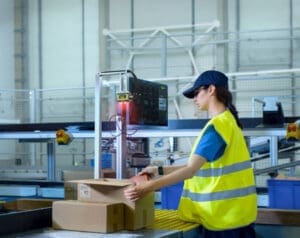
In the high-pressure world of modern logistics and manufacturing, every second counts at the packing bench. Manual barcode scanning processes—picking up a handheld device, aiming, scanning, and setting it down—add unnecessary friction to your workflow. The Zebra FS42 Fixed Industrial Scanner (part of Zebra’s line of fixed scanners ) eliminates these bottlenecks, delivering a seamless, hands-free experience that drives throughput and accuracy.
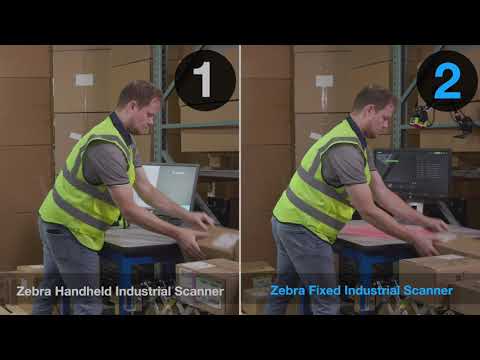
Check out the speed advantage of hands-free overhead scanners in the video below:
Why Upgrade Your Pack Bench to Use Fixed Overhead Scanners?
1. Boost Throughput by up to 33%: Moving from manual handheld barcode scanning to a fixed, hands-free solution such as the Zebra FS42 significantly speeds up operations. By removing the need to handle a device, operators can focus entirely on the package. The overhead scanner automatically captures data as the box enters the field of view, allowing your team to process more packages in less time.
2. Immediate Operator Feedback: Overhead Scanners like the FS42 provide clear, instant confirmation of every scan.
Visual Cues: 360° LED lights flash green for a successful decode.
Audible Alerts: An adjustable beeper ensures operators know the scan is complete without taking their eyes off the task. This immediate feedback loop reduces errors and ensures that only verified packages move to the next stage.
3. Superior Performance on Challenging Barcodes Shipping labels aren’t always perfect. They can be damaged, poorly printed, or placed on curved surfaces. The FS42 features ImagePerfect+ and a powerful quad-core processor designed to capture even the most challenging 1D, 2D, and DPM barcodes instantly. This reduces “no-reads” and manual data entry, keeping your lines moving.
4. Simple, Plug-and-Play Deployment Getting started is effortless. The FS42 offers:
USB-C Connectivity: Plug directly into a workstation, laptop, or tablet without complex cabling.
Auto-Tune Setup: A single button press automatically dials in the perfect image focus and lighting.
Integrated Lighting: Built-in illumination eliminates the need for expensive external lighting setups.
5. Future-Proof Your Investment The FS42 grows with your business. Start with high-speed barcode scanning today, and simply purchase a software license to unlock advanced capabilities later, such as:
Deep Learning-based OCR: Read text on labels without font training.
Machine Vision Tools: Automate quality inspections or anomaly detection.
Key FS42 Overhead Scanner Specifications for Logistics
Feature
Benefit
Processor
Quad-core processor for accelerated throughput
Connectivity
Dual Ethernet, USB-C, Serial, and Industrial Protocols
Feedback
360° LED Status Indicators and Adjustable Beeper
Sealing
IP65/IP67 (Dust tight and water-resistant)
Software
Zebra Aurora Focus™ for unified management
Contact Us to Discuss Faster Pack Bench Operations with Fixed Barcode Scanners
By integrating hands-free overhead scanning into your packing benches, you are investing in an intelligent automation solution that reduces labor costs, minimizes shipping errors, and accelerates delivery timelines. Empower your workforce with the tools they need to meet the escalating demands of the global supply chain.
To discuss the Zebra FS42 overhead scanner for your shipping operations, please contact CSSI.
FAQ – Frequently Asked Questions About Implementing Overhead Scanners on Pack Benches
Q: What exactly is an overhead scanner, and how is it different from the handheld scanners we use now? A. An overhead scanner, such as the Zebra FS42 Fixed Industrial Scanner, mounts above the pack bench and reads barcodes automatically as a package passes underneath, rather than requiring an operator to pick up a device, aim it, scan, and set it back down. Removing that manual pick-up-aim-scan-put-down cycle from every package is the main source of the efficiency gain, and CSSI cites throughput improvements of up to 33% from switching to this hands-free approach.
Q: Will it still work with damaged, poorly printed, or curved labels — that’s a big source of scanning failures for us today? A. Yes, that’s one of the scanner’s core strengths. The FS42 uses Zebra’s ImagePerfect+ technology paired with a quad-core processor to decode 1D and 2D barcodes as well as DPM (direct part mark) codes, even when labels are damaged, poorly printed, or on curved surfaces. So the barcode types and label conditions that typically slow down or defeat handheld scanning are exactly what this technology is built to handle.
Q: How do operators know a scan succeeded without having to check a screen? A. The system gives immediate visual and audible feedback at the point of scan. A 360° LED light ring flashes green when a barcode decodes successfully, and audio alerts (which are adjustable) reinforce the confirmation. That real-time feedback loop is what allows only verified packages to move forward, which helps reduce shipping errors without adding an extra manual verification step.
Q: What’s involved in installing and setting this up on our existing pack benches? A. Setup is designed to be straightforward. The FS42 connects directly to a workstation over USB-C, and an “Auto-Tune Setup” feature calibrates focus and lighting with a single button press — no manual tuning required. It also has built-in illumination, so you don’t need to budget for or install separate external lighting at each station. For broader deployments, the unit supports dual Ethernet, serial, and industrial protocol connectivity, and can be centrally managed with Zebra’s Aurora Focus software. It also carries an IP65/IP67 rating, so it can hold up in dusty or wash-down environments typical of shipping and warehouse floors.
Q: Do we have to buy full machine-vision capability up front, or can we start smaller and scale later? A. You can start smaller. CSSI positions this as a scalable investment: businesses can deploy the FS42 initially for basic barcode scanning, then add software licenses later to unlock deep learning OCR, text recognition, and machine vision capabilities as needs grow. That lets you phase the investment — starting with the throughput and error-reduction gains at the pack bench, then layering on more advanced automation once the initial rollout proves out.
What Is the Zebra TC501 Handheld Computer?
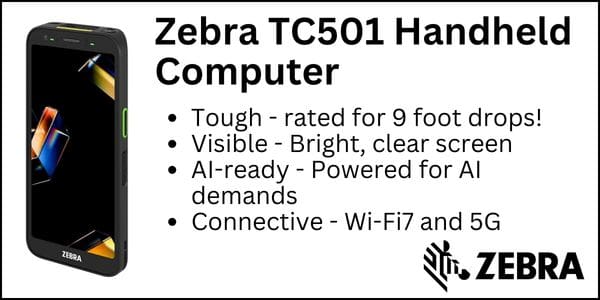
Zebra Technologies Corp has just announced the TC501 mobile computer, the next generation product following in its popular TC5x line. The TC501 is built to handle the intense demands of the logistics supply chain. From the warehouse floor to the last mile, this device combines the rugged durability your drivers need with the next-generation connectivity and AI capabilities your operations demand.
What’s New & Different About the Zebra TC501?:
Unmatched Durability for the Road: The TC501 is the most rugged TC5 Series mobile computer ever built. With a 9 ft. drop rating (with boot) and advanced thermal shock resistance, it survives the inevitable drops, tumbles, and temperature shifts drivers face daily—reducing downtime and repair costs.
Crystal Clear Visibility, Anywhere: Featuring the industry’s first 6.0-inch FHD+ Hybrid OLED display with 1500-nit peak brightness, your drivers can easily view route navigation, proof of delivery forms, and manifests in bright sunlight or dimly lit truck cabs.
Future-Proof Connectivity: Keep your fleet connected in real-time with Wi-Fi 7 and 5G. Whether inside a distribution center or out on a delivery route, the TC501 ensures seamless communication, faster data transfer for large manifests, and reliable GPS tracking.
Optimized for Workflow Efficiency: Running the Android operating system and equipped with a Qualcomm Dragonwing™ processor and up to 12GB RAM, the TC501 is ready for AI-driven applications like route optimization, intelligent load planning, and advanced voice communications.
Excellent battery capacity and barcode scanner capability
What Are Great Workflows for the Zebra TC501 Mobile Computer?
Proof of Delivery/Pickup: Capture high-resolution images of delivered goods and signatures instantly.
Fleet Management: Real-time driver communication and telemetry tracking.
Route Optimization: High-speed data processing for dynamic routing adjustments.
Asset Management: Accurate tracking of pallets and packages across the supply chain.
Zebra TC501 Features
See the complete spec sheet below for all of the details on the TC501.
How To Get a Quote or Demo of the Zebra TC501 Handheld Computer
FAQ – Frequently Asked Questions About the Zebra TC501 Mobile Computer
Q: What is the Zebra TC501 designed for, and who is it built for? A. The TC501 is a rugged Android mobile computer built for frontline workers who need a smartphone-style device that can also scan barcodes, capture images, and (on RFID-equipped models) read UHF RFID tags. Zebra positions it for retail associates and store managers, field service technicians, and postal/delivery carriers — essentially anyone who needs to do price checking, product recognition, inventory management, and AI-assisted workflows without carrying separate consumer and scanning devices.
Q: What are the TC501’s core hardware specs? A. The TC501 runs Android on a Qualcomm Dragonwing Q-6690 octa-core processor (up to 2.9 GHz) with a dedicated AI engine, which Zebra says delivers up to 300% more processing power than previous TC5-series models. It’s available with 8GB RAM/128GB flash storage or 12GB RAM/256GB flash storage, plus a microSD slot supporting up to 2TB of additional storage. The 6-inch AMOLED display reaches 1,500 nits of brightness (readable in bright daylight) and is protected by Corning Gorilla Glass Victus. The device measures roughly 163 x 78 x 16mm (6.4 x 3.1 x 0.6 in) and weighs about 273g (9.6 oz) with the standard battery.
Q: How rugged is the TC501, and what environments can it handle? A. The TC501 is built to survive typical warehouse, retail, and field conditions. It’s rated to withstand drops of 2.4m (8 ft) to concrete, or 2.7m (9 ft) with the optional rugged boot, and it’s rated for 2,000 tumbles. It carries IP68 and IP65 sealing against dust and water, and it operates across a wide temperature range of -20°C to 50°C (-4°F to 122°F) — making it suitable for cold storage through hot outdoor use.
Q: What scanning, camera, and RFID capabilities does it offer? A. Data capture is one of the TC501’s strengths. It offers a choice of scan engines (SR500, SR560, or AC670), with the longest-range option able to read barcodes up to about 30m away. It has a 50MP rear camera (with an optional 13MP ultrawide) and an 8MP front-facing camera, and an optional Time-of-Flight sensor is available for 3D depth capture and mobile parcel dimensioning. RFID-equipped configurations add built-in UHF RFID reading, capable of reading over 200 tags per second at distances up to about 2m (6.5 ft) — useful for fast inventory counts and item-level tracking.
Q: What connectivity, battery life, and security features does the TC501 include? A. The TC501 supports the latest wireless standards: Wi-Fi 7, 5G (Release 17) cellular, Bluetooth 6, NFC, and triple-band GNSS for accurate positioning. Power comes from a PowerPrecision+ battery (up to 5,000 mAh) that’s hot-swappable and supports fast charging — 0 to 70% in about 45 minutes — so devices can stay in continuous use across shifts. On the security and software side, the TC501 supports facial recognition login, contactless payment, and comes preloaded with Zebra’s DNA software suite and Frontline AI Suite tools to simplify deployment and management across a fleet of devices.
Q: Can CSSI Technologies Help Me Purchase a TC501? A. Yes. CSSI Technologies is an authorized reseller partner for Zebra Technologies. The CSSI team can help you to test, purchase, deploy, and support the TC501.
How CSSI Can Help Manage Your Android Computers
We encounter many companies which struggle to support their growing fleets of Android mobile devices. Consider some of the headaches we have helped our clients navigate related to Android 11, Android 13, and Android 14. We encounter many companies which have yet to upgrade from Android 10 or 11 because of software issues… CSSI can help you navigate these problems.
Handhelds and tablets have proliferated, but IT resources often have not kept pace. When you combine this with the challenge of annual Android firmware updates, the need to test those updates against your enterprise software, and day-to-day user support demands, it becomes overwhelming.
For these reasons, CSSI created a program where our Android experts can manage your device profiles, plan and execute your firmware upgrades, and manage device provisioning, to ensure a turnkey experience for you. If you have either a quantity of mobile computers, or devices which are spread across multiple locations, this solution will be particularly valuable for your IT team.
Do Any of These Android OS Challenges Apply to You?
You have not upgraded your Android OS on mobile devices for several years (running Android 10/11/13 in 2026).
You struggle to support your company’s mobile devices and user technical issues
You are not an expert in using mobile device management software
You would like to get new handhelds deployed to users more rapidly
You need guidance for strategies in simplifying your ongoing support of mobile devices
What Is CSSI Device Lifecycle Management?
Device Lifecycle Management is CSSI’s program for managing your devices as your configurations change and the Android OS evolves. Our goal is to take away your mobile device management burden.
We believe that there is great value in standardizing, so we work with you first to define your standard configuration (perhaps several if you have different device types or user types). We utilize mobile device management software to enable hands-off software updates and technical support. We ensure that new devices arrive at your facility pre-provisioned and ready to deploy, saving you time and frustration. On an annual basis, we review the impact of the latest Android firmware, help you test, and if acceptable, create a plan and push updates to your users.
You benefit from: better control and support for your mobile computer fleet; time savings for your IT team; improved security by staying current with firmware; improved user support; access to our Android and mobile device management experts.
How To Get a Quote or Demo for CSSI Device Lifecycle Management
Interested in learning more? Contact CSSI and set up a demo and discussion of how we can help you manage your handhelds and tablets.
FAQ – Frequently Asked Questions About Managing Android Mobile Devices
Q: Why is managing a growing fleet of Android devices so difficult for IT teams? A. As companies add more Android handhelds and tablets to support scanning, warehouse, or field operations, the workload for IT doesn’t scale in a straight line — it grows faster than the fleet does. Staffing rarely increases at the same pace, so the same IT team ends up responsible for provisioning, updating, troubleshooting, and securing far more devices than before. CSSI’s Device Lifecycle Management program is built to absorb that extra load, giving IT teams expert support and standardized processes instead of asking them to stretch further on their own.
Q: Why do so many companies get stuck on older versions of Android? A. Upgrading from one Android version to the next (for example, from Android 10 or 11 to 13 or 14) isn’t as simple as clicking “update.” Every new OS version has to be tested against the enterprise software and workflows already running on those devices, and a failed or rushed upgrade can break mission-critical apps. Many organizations understandably delay upgrades to avoid that risk — but staying on an outdated OS for years also means missing security patches and new features. CSSI’s team plans, tests, and deploys firmware and OS updates on a defined schedule so devices stay current without the guesswork.
Q: What is Device Lifecycle Management, and what does it include? A. Device Lifecycle Management is CSSI’s managed program for handling Android devices from deployment through retirement. It covers device provisioning (devices arrive pre-configured and ready to deploy, rather than IT setting up each one by hand), firmware management (CSSI’s specialists test, plan, and deploy annual OS updates), mobile device management or MDM (software updates are pushed out hands-off through MDM tools), configuration standardization (optimal settings are defined for each device type and user role, so every device behaves consistently), and expert support (direct access to Android and MDM specialists when issues come up).
Q: How does MDM software reduce the day-to-day burden on IT? A. Mobile device management software lets IT push configurations, updates, and policies to many devices at once instead of touching each one individually. Within CSSI’s program, this means routine software updates happen automatically in the background, and device settings stay standardized across the fleet — cutting down on one-off support tickets and freeing IT staff to focus on higher-value work instead of repetitive device maintenance.
Q: How can CSSI help a company that’s currently struggling with its Android fleet? A. CSSI works directly with organizations to take the ongoing burden of Android fleet management off their internal IT teams. Through Device Lifecycle Management, CSSI handles provisioning, firmware and OS update testing and deployment, MDM-based software updates, and configuration standardization — backed by specialists who know Android and MDM platforms in depth. The result is better control over the device fleet, stronger security through up-to-date firmware, and less day-to-day strain on internal IT resources. Companies that want this kind of hands-on support can reach out to CSSI to discuss their current device environment and get started.
Zebra TC701 Mobile Computer: Ready for AI and Data-Intensive Applications
You may already be familiar with Zebra’s TC7 series mobile computer family. This is a top-of-line rugged touchscreen-only product family. Zebra Technologies Corp has now announced a new addition, the TC701. This is an ultra-rugged handheld computer optimized for AI and data-intensive tasks, featuring a powerful processor, AMOLED display, and ample memory.
Compared to the TC73/TC78, the TC701 offers:
More powerful processor (sufficient to support on-device AI)
Brighter display (1500 nits)
More memory (12 GB Ram, 256 GB Flash)
Comparing the TC701 versus TC73/TC78
Key Features
TC701
TC73/TC78
Processor
Qualcomm Dragonwing™ Q-6690 Octa-core, up to 2.9 GHz
Built for AI applications and data-intensive tasks
General rugged use with advanced scanning capabilities
What Are Great Applications for the Zebra TC701 Handheld?
The TC701 is ideal for frontline workers who need a durable touch computer. Consider it for T&L (proof of delivery and scanning, Warehouse (shipping and receiving, inventory management), and for Field Service & Maintenance (remote communication, mobile payments, data capture). The TC701 excels in diverse workflows by utilizing its AI features, advanced data capture options, and robust connectivity. It’s particularly valuable in environments requiring real-time data, quick transactions, and efficient inventory management.
How To Get a Quote or Demo of the Zebra TC701 Mobile Computer
Contact CSSI Technologies to set up a demo of the TC701 Zebra mobile computer. We are authorized partners and experts in Zebra mobile computers and will pair you up with the optimal device for your workflows and requirements.
FAQ – Frequently Asked Questions About the Zebra TC701 Mobile Computer
Q: What is the Zebra TC701 designed for? A. The TC701 is a phone-sized, ultra-rugged Android mobile computer built for frontline workers — think warehouse, retail, field service, transportation, and manufacturing teams that need a handheld device tough enough for daily drops and rough handling but powerful enough to run modern, AI-driven apps. Zebra markets it as part of the TC7 series, positioned as “ultra-rugged mobile computing reimagined for the AI-powered frontline.”
Q: What’s under the hood — how powerful is it? A. The TC701 runs on a Qualcomm Dragonwing (Snapdragon 6690) processor, clocked at 2.0GHz or 2.9GHz depending on configuration, paired with 8GB or 12GB of RAM and 128GB or 256GB of UFS 3.1 storage (expandable via microSD up to 2TB). Zebra says this delivers roughly 3x the performance of earlier TC7-series devices, and the chip includes a dedicated on-device AI engine so tasks like image recognition can run locally without needing a cloud connection.
Q: How rugged is it, really? A. Quite rugged for its phone-like form factor: it’s rated to survive drops from 12 feet onto concrete and withstand roughly 3,500 tumbles, and it carries an IP65/IP68 rating, meaning it’s fully dust-tight and can be submerged in water. The 6-inch AMOLED display (1500-nit peak brightness) is also protected by Corning Gorilla Glass Victus.
Q: What scanning and data-capture capabilities does it offer? A. The TC701 comes with a choice of two imaging engines: the SR560 for standard-range 2D barcode scanning, or the AC670 advanced-range imager, which can read barcodes from close range out to over 30 meters (100 feet). It also includes integrated UHF RFID support, plus a 50MP rear camera and 8MP front camera (with an ultrawide camera and Time-of-Flight sensor available on higher-end configurations).
Q: What connectivity options and battery life can I expect? A. Every model includes Wi-Fi 7 and Bluetooth 6.0 (with BLE beacon support), and optional 5G cellular is available on WAN-enabled models, along with GPS and NFC. The battery is hot-swappable, so a device never has to go offline for a full recharge, and it supports fast charging — Zebra cites 0 to 70% in about 45 minutes.