
Tag Archive for "gp tips" | page 9
Assigning a password to GP SmartList Favorite

Assigning a GP SmartList Favorite Password

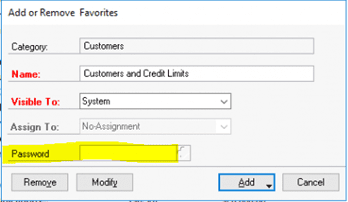
One of the new features added in Dynamics GP 2018 is the ability to assign a password to a SmartList Favorite. Maybe you’ve created a new list and you want another Dynamics GP user to be able to view the list but not make changes. If he or she doesn’t know the password, they won’t be able to save changes. Use the Add or Remove Favorites window to make password adjustments.

assigning GP smartlist favorite password

Need more help with Smartlists in GP?

  • SmartList builder
  • SmartList designer
  • Setting default SmartList
  • SmartList Options window

CSSI is here to help! Contact us for GP technical support.

Creating GP Fiscal Periods

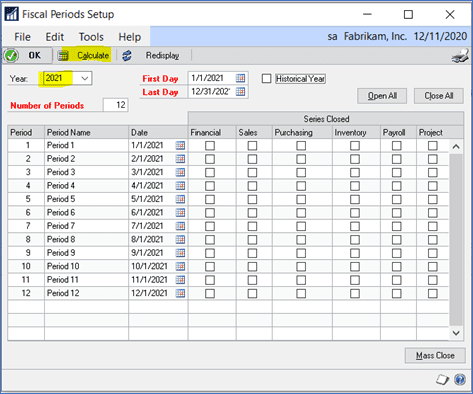
Because the year end is fast approaching, here’s a reminder on how to create a new fiscal year in GP.  Go to Microsoft Dynamics GP > Tools > Setup > Company > Fiscal Periods.  Type in the new year.  Verify that the First Day, Last Day and Number of Periods are all correct then click on Calculate.  Click on OK when finished.

gp fiscal periods

It’s also recommended that you go into this window to close individual periods once you’ve printed financial statements for that period.  You don’t want users posting back to prior periods! 

Contact CSSI for further GP training or technical support.